


Invoice OCR software is transforming how finance teams handle accounts payable, but many businesses still struggle with slow, manual workflows.
A stack of paper invoices is deposited on a desk, initiating a manual data entry cycle that is time-consuming and inefficient.
That manual bottleneck costs finance organizations significant time and resources. Staff members spend hours typing vendor names and line-item totals into accounting systems.
Generic optical character recognition (OCR) fails to solve this problem entirely. Legacy OCR simply turns pixels into plain text, leaving the accounting team to sort out formatting issues.
Meanwhile, modern invoice OCR software flips the process. AI-driven platforms read complex layouts, pull structured data automatically, and route the output to your database.
What is Invoice OCR Software?
Invoice OCR software transforms static document images into structured database records. The system reads visual pixels, identifies financial data points, and outputs machine-readable text.
That machine-readable output flows straight into an accounting system. You eliminate the keyboard entirely, moving data from a static PDF to a live ledger in seconds.
How OCR Invoice Processing Works
Document Capture and Preprocessing
The process begins the moment a vendor submits a billing file. The OCR platform ingests the document regardless of its original format.
That ingestion phase handles smartphone photos just as easily as digital PDFs. The system normalizes the image resolution and straightens skewed pages before attempting any text extraction.
Page Layout Analysis
After capturing the image, the software analyzes the spatial structure of the page. It looks for header blocks, vendor logos, and nested tables.
This layout analysis separates a smart tool from a generic text reader. The system understands that a number sitting beneath a “Total Due” header carries specific financial weight.
Data extraction
Once the software maps the layout, it targets specific fields for capture. It pulls the invoice date, payment terms, and individual line items.
Those line items require complex spatial reasoning. Tools like Doc.AI use Table Extraction to preserve entire row and column alignments across multi-page PDFs.
Data validation
Extracted text requires immediate verification to prevent downstream accounting errors. The software applies logical rules to check the data integrity.
For example, the system adds up the line items to ensure they match the stated grand total. It flags any mathematical mismatch for immediate human review.
Structured Data Output and Integration
Verified text needs a permanent destination to be useful. The software packages the final data into a clean, structured payload.
That structured payload drops directly into your ERP through an API connection. Engineering teams use JSON format exports to pipe the data seamlessly.
Key Takeaway: Invoice OCR processing connects an unstructured visual image to a structured database through a series of automated layout checks.
Key Benefits of Invoice OCR Software
Eliminate manual invoice data entry
Human typists introduce errors during repetitive data entry tasks. A single misplaced decimal point on a vendor bill creates massive reconciliation issues.
Invoice OCR software eliminates that manual typing phase completely. Machine learning models maintain precise character matching across thousands of dense pages.
Improve invoice processing accuracy
Generic OCR systems break down when a vendor changes their document layout. If the tax line drops down two inches, a legacy template fails to read it.
AI invoice scanning software adapts to those layout shifts dynamically. The system reads the surrounding context to find the right number, boosting overall accuracy.
Reduce accounts payable costs
Processing invoices by hand requires significant labor hours. Finance departments must hire temporary staff during end-of-month reporting spikes to clear the backlog.
Automated extraction software handles volume spikes without requiring additional headcount. You keep operational costs flat even as your vendor network grows.
Speed up invoice approvals
Delayed data entry leads directly to delayed vendor payments. Slow payments damage supplier relationships and cost your company early-payment discounts.
OCR invoice capture accelerates the entire intake pipeline. An invoice arrives in the inbox and lands in the approval queue mere seconds later.
Enable end-to-end AP automation
Data extraction acts as the crucial first step for broader accounts payable automation. You cannot automate payment routing until the invoice data becomes machine-readable.
Once the OCR layer digitizes the document, routing logic takes over. The software matches the invoice against a purchase order and flags discrepancies automatically.
Key Takeaway: Automated invoice capture turns a slow, error-prone manual chore into a fast, scalable digital workflow.
9 Best OCR Invoice Processing Software
Evaluating extraction tools requires examining the underlying technical architecture. Different platforms serve entirely different accounting environments and user personas.
| Software | Pricing Model | Free Tier | Technology | Line Items | API Access | Output Formats |
| ValiTract | Usage-based | Yes | Template-free AI | Full | REST API | JSON, CSV |
| Lido | Subscription | Yes | Spreadsheet AI | Basic | None | Excel, Google Sheets |
| Nanonets | Usage-based | Yes | Deep learning | Full | Full REST | JSON, XML, CSV |
| Mindee | Pay-as-you-go | Yes | Pre-trained ML | Full | Full REST | JSON |
| ABBYY | Custom | No | Cognitive OCR | Full | Full REST | XML, JSON, Custom |
| Docsumo | Usage-based | Yes | Pre-trained ML | Full | Full REST | JSON, CSV |
| Tipalti | Subscription | No | AP Workflow AI | Basic | Standard | ERP Native |
| Klippa | Tiered monthly | No | Layout-aware AI | Full | Full REST | JSON, CSV |
| Datamolino | Tiered monthly | Yes | Rule-based ML | Full | Standard | Xero/QB Native |
Note: Software pricing and feature availability change frequently. Verify API specifications with vendors directly before implementation.
Top OCR Invoice Processing Software
ValiTract
ValiTract stands out as a next-generation invoice OCR software built for finance teams that need both accuracy and scalability without complex setup. Instead of relying on rigid templates, the platform uses advanced visual AI to understand invoice structures contextually.
This layout-aware approach enables highly accurate invoice capture across diverse vendor formats, eliminating the need for manual rule configuration or constant template maintenance. Beyond extraction, ValiTract is designed for real-world finance operations, with a streamlined validation interface and API-ready architecture that supports end-to-end OCR invoice processing software workflows.
- Key Features: Template-free extraction, side-by-side validation screen.
- Pricing: Usage-based billing with volume discounts.
- Pros: High accuracy on complex layouts, minimal setup time, strong automation capabilities, intuitive user interface.
- Cons: Struggles with blurry handwriting, lacks deep currency conversion tools.
- Best For: Mid-size finance departments avoiding heavy IT deployment.
Lido
Lido targets spreadsheet-heavy workflows by embedding extraction directly into a familiar grid interface. Users connect their email inbox and extract data straight into rows.
This approach keeps financial data highly visible during the extraction process. Teams build custom approval formulas right next to the extracted text.
- Key Features: Spreadsheet-native extraction, automated email fetching.
- Pricing: Flat monthly subscription.
- Pros: Extremely gentle learning curve, flexible formula-based routing.
- Cons: Not designed for massive enterprise volume, lacks API and deeper automation capabilities.
- Best For: Small business operations running heavily on spreadsheet logic.
Nanonets
Nanonets provides a powerful platform for teams that want to train their own specific data models. The system learns custom fields rapidly from a small set of historical invoices.
That custom training capability solves edge cases that trip up pre-trained software. Developers appreciate the robust webhook documentation.
- Key Features: Custom model training, intelligent table extraction.
- Pricing: Pay-as-you-go per document.
- Pros: High accuracy on unusual layouts, excellent developer resources.
- Cons: Training custom models requires upfront time investment.
- Best For: Technical teams dealing with highly non-standard billing documents.
Mindee
Mindee delivers a developer-first experience for invoice OCR processing. The platform offers a highly refined API endpoint for off-the-shelf financial document extraction.
That API-first approach lets engineering teams build extraction features directly into internal software. The model returns a clean JSON payload almost instantly.
- Key Features: Developer-first architecture, sub-second response times.
- Pricing: Pay-as-you-go per API call.
- Pros: Incredible processing speed, clean technical documentation.
- Cons: Requires software engineers to build the user interface.
- Best For: Product teams embedding OCR features into proprietary applications.
ABBYY FlexiCapture
ABBYY FlexiCapture serves massive enterprise environments dealing with established legacy systems. The platform offers deep cognitive OCR capabilities refined over decades.
That deep capability handles almost any document type, from structured tax forms to unstructured legal agreements. The tool scales reliably to millions of pages.
- Key Features: Massive scalability, advanced cognitive text capture.
- Pricing: Custom enterprise licensing.
- Pros: Unmatched volume handling, massive global partner network.
- Cons: Very expensive, requires certified integration partners for setup.
- Best For: Global corporations migrating immense volumes of physical paper.
Docsumo
Docsumo relies on pre-trained machine learning models built specifically for financial documents. The system works immediately for standard invoice layouts out of the box.
Those pre-trained models require zero historical data to begin processing right away. The platform flags mathematical anomalies automatically for human review.
- Key Features: Pre-trained financial models, smart anomaly detection.
- Pricing: Usage-based pricing tiers.
- Pros: Fast setup process, transparent usage pricing.
- Cons: Limited native reporting dashboards.
- Best For: Financial services processing standard document types consistently.
Tipalti
Tipalti functions as a complete end-to-end accounts payable automation platform rather than a standalone OCR. The software reads the incoming invoice and stages the actual bank payment.
That integrated workflow eliminates the gap between data capture and cash disbursement. Users manage the entire payable lifecycle inside one unified platform.
- Key Features: Integrated global payments, automated tax compliance routing.
- Pricing: Flat monthly subscription plus payment fees.
- Pros: True end-to-end payable automation, strong global compliance checks.
- Cons: Overkill if you only need data extraction.
- Best For: Global companies needing comprehensive accounts payable management.
Klippa DocHorizon
Klippa DocHorizon specializes in high-volume receipt and invoice processing for mobile-first workflows. The system excels at reading crumpled receipts photographed in bad lighting.
That mobile optimization makes it perfect for field service teams tracking expenses. The layout-aware AI parses complex European VAT tables accurately.
- Key Features: Mobile-optimized capture engine, strong European tax handling.
- Pricing: Tiered monthly subscription.
- Pros: Great smartphone image handling, strong GDPR compliance framework.
- Cons: Interface feels geared more toward developers than finance clerks.
- Best For: Field-heavy operations requiring mobile document capture.
Datamolino
Datamolino integrates tightly with popular cloud accounting software to streamline bookkeeping. The tool extracts invoice data and pushes it directly into Xero or QuickBooks.
That tight integration reduces the monthly bank reconciliation process significantly. The software handles line-item details well for accurate ledger coding.
- Key Features: Deep cloud accounting integrations, detailed line-item parsing.
- Pricing: Tiered monthly subscription based on volume.
- Pros: Seamless accounting sync, highly user-friendly interface.
- Cons: Lacks a robust standalone API for custom internal software.
- Best For: Small accounting practices using modern cloud-ledgers.
Key Takeaway: Choose an API-first tool for custom engineering projects, or an end-to-end platform if you want strict accounts payable automation out of the box.
6 Questions to Ask Before Choosing Invoice OCR Software
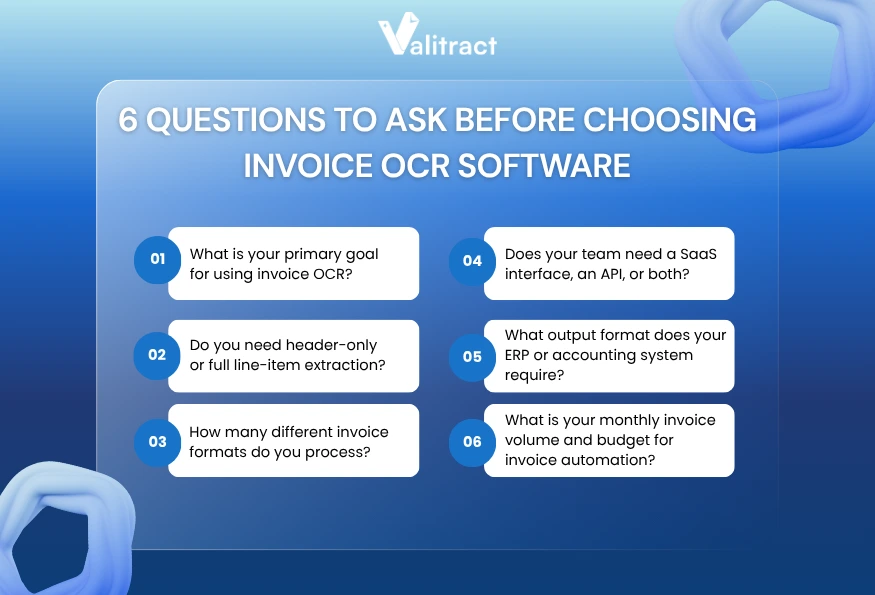
What is your primary goal for using invoice OCR?
Your core objective will directly determine which invoice OCR software fits your business.
If your goal is simply to reduce manual typing, basic OCR invoice scanning software with template-based extraction may work in the short term. However, these tools often break when invoice formats change.
For businesses aiming at full automation and straight-through processing, modern OCR invoice processing AI is essential. AI-driven systems understand layout variations and continuously improve accuracy, reducing the need for human intervention over time.
Do you need header-only extraction or full line-item extraction?
Header extraction simply grabs the total amount, the vendor name, and the due date. Many basic AP automation tools stop there because they only care about payment routing.
Line-item extraction pulls every individual product row on the invoice. This detailed capture is mandatory if your procurement team matches invoices against specific purchase orders.
How many different invoice formats do you process?
A local business dealing with three steady suppliers can survive using rigid coordinate templates. You set the template once and forget about it.
An enterprise receiving documents from five hundred different global vendors needs zero-config extraction. AI software handles varying layouts without demanding a new template setup for each supplier.
Does your team need a SaaS interface, an API, or both?
Finance clerks need a clean SaaS interface to review highlighted text against the original document image. They cannot work with raw code endpoints.
Engineering teams prefer a headless API architecture. They want to send an invoice file to an endpoint and receive structured data to populate custom internal software.
What output format does your ERP or accounting system require?
Legacy ERP systems often demand flat CSV files for basic ingestion. You must ensure your OCR tool exports tabular data neatly without corrupting the columns.
Modern API endpoints expect structured JSON payloads. Apps like Doc.AI export to Excel, JSON, Markdown, and HTML, covering whatever downstream workflow your technical team runs into.
What is your monthly invoice volume and budget for invoice automation?
Software pricing scales dynamically based on document volume. A tool charging per-page fees looks cheap at low volumes but becomes prohibitively expensive at enterprise scale.
Calculate your historical peak monthly volume before signing a vendor contract. Read the specific tier limits to avoid massive overage charges during busy reporting seasons.
Key Takeaway: Define your required output format and line-item needs before evaluating tools, as these two features disqualify many basic platforms immediately.
Key Criteria to Evaluate the Performance of Invoice OCR Software
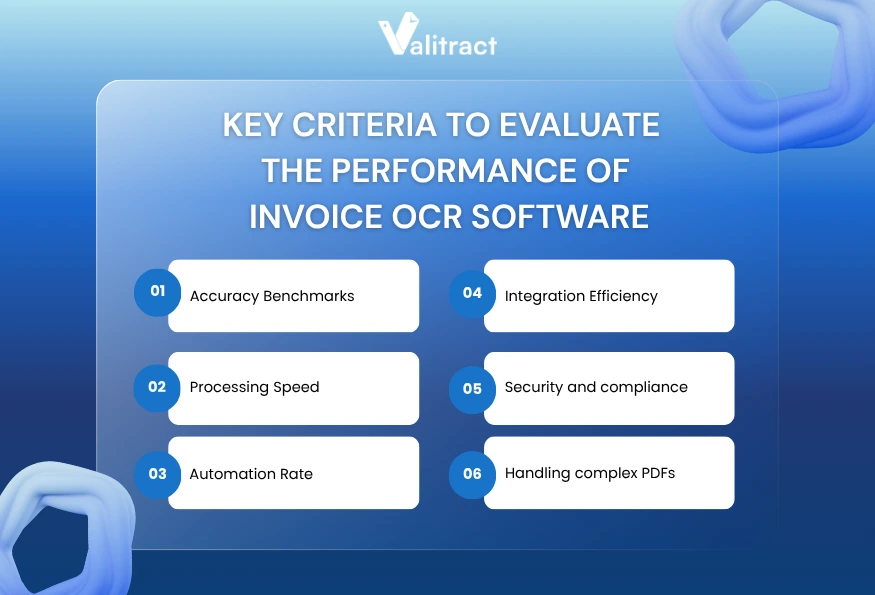
Accuracy Benchmarks
Vendors routinely claim near-perfect extraction accuracy in their marketing materials. You must test those claims against your own messy documents during a pilot phase.
Look closely at how the software handles low-contrast text and strange fonts. The best platforms generate a confidence score for every extracted field to guide human review.
Processing Speed
Processing speed matters when a massive batch of invoices arrives on the final day of the month. Slow extraction engines create a digital bottleneck instead of a manual one.
API-driven platforms usually return data payloads in under two seconds per page. Test the speed capabilities using large multi-page PDF files.
Automation Rate
The automation rate measures the percentage of invoices processed completely without human involvement. A high accuracy score means nothing if users still have to click approve on every document.
Track this metric relentlessly during your trial period. If your team still manually reviews eighty percent of incoming files, the software has failed its primary mission.
Integration Efficiency
Extracted text serves no purpose if it remains trapped inside the OCR platform. The system must connect seamlessly to your existing financial architecture.
Review the developer documentation carefully. A well-documented REST API ensures your engineering team can build stable connections without burning weeks of development time.
Security and compliance
Financial documents contain highly sensitive corporate pricing data and vendor banking details. Your chosen software must protect that data at rest and in transit.
Verify the vendor holds standard compliance certifications for your operating region. Ensure the platform offers robust audit trails to track which user accessed specific invoices.
Handling complex PDFs
Modern billing happens digitally, but formats vary wildly. A reliable tool must process native digital files, scanned images, and mobile photos equally well.
Doc.AI reads JPEG, PNG, GIF, WebP, and HEIC files natively. If a contract accompanies the invoice, Doc.AI’s Full Document mode extracts the entire text flow to Markdown or JSON cleanly.
Key Takeaway: Never trust vendor accuracy benchmarks blindly. Run your worst-quality scanned invoices through the software to evaluate true performance.
FAQs about Invoice OCR Software
What is the best invoice OCR software for businesses that don’t want template setup?
Platforms utilizing pre-trained machine learning models eliminate template setup entirely. Tools like Docsumo and ValiTract read the spatial context of a document to find fields dynamically. This zero-setup approach works best for teams dealing with hundreds of unique vendor layouts.
How accurate is AI invoice OCR compared to traditional OCR? What’s the difference for line items?
Traditional OCR converts raw pixels to text but loses all row formatting. AI invoice OCR understands the structural relationship between columns and headers. This allows the AI to extract complex, nested line items while preserving the precise table grid.
What output formats do invoice OCR tools support?
Output formats depend heavily on the software architecture. Accounting-focused tools often push data directly into an ERP without generating a standalone file. Developer-focused extraction tools output structured JSON, XML, or Markdown payloads for custom database ingestion.
How does invoice OCR software integrate with ERP systems via API?
Software engineers use REST or GraphQL endpoints to connect the OCR platform to the ERP. The OCR software sends a JSON format payload containing all the extracted invoice fields. The ERP consumes that structured payload and updates the ledger automatically.
What compliance certifications should invoice OCR software have for EU and US businesses?
Software handling financial data must maintain strict security standards. US businesses should look for SOC 2 Type II compliance to ensure data handling security. European operations require strict GDPR compliance regarding data residency and retention policies.
What’s the difference between invoice OCR software and full AP automation platforms?
Invoice OCR software focuses strictly on data extraction, turning images into text payloads. Full AP automation platforms include that OCR layer but also handle subsequent workflows. Those platforms manage purchase order matching, approval routing, and the final bank payment execution.
Final Thoughts: Choosing the Right Invoice OCR Software for Scalable Automation
Upgrading to modern invoice OCR software stops manual data entry bottlenecks completely. You move finance teams away from repetitive typing tasks and focus their effort on strategic data review.
Legacy templates fail when vendors update their billing layouts. AI-driven platforms solve this by using layout-aware models to locate line items and totals dynamically.
A reliable tool supports hundreds of languages, reads varied file types, and exports clean data structures. Doc.AI supports 200+ languages natively and handles everything from HEIC photos to multi-page PDFs.
Transitioning to automated extraction requires defining your goals clearly. Test complex documents during a pilot phase, confirm your required API output formats, and watch your accounts payable efficiency scale.
Ready to streamline your invoice processing?
If you’re looking for a solution that combines high-accuracy OCR invoice capture, template-free setup, and seamless API integration, it’s worth exploring how modern platforms like ValiTract can support your automation journey.
Test your real invoice data with ValiTract and see how quickly you can move from manual processing to fully automated workflows.
Valitract – Next-gen AI-Powered Data Extraction Platform
- Email: contact@valitract.com
- LinkedIn: https://www.linkedin.com/company/valitract-api-platform
- X: https://x.com/valitract