
#1 AI-Powered OCR API & Platform for Automated Data Extraction
Efficient, Accurate, and Secure
AI Data Extraction
Automate document data extraction easily with our AI-powered OCR solution, offered as a no-code platform or API integration.
Save time, reduce errors, and optimize workflows with 99.8% accuracy.
See how Document OCR works on all types of business documents
Intelligent OCR Text Recognition with Accuracy Beyond Human Capabilities
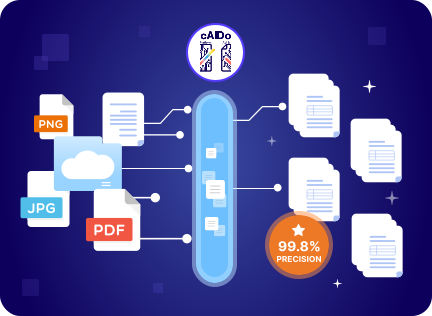
Achieve 99.8% data extraction accuracy
Extract data with near-perfect precision with only 1 error in 10,000 documents while eliminating manual verification.
Reduce document processing time by 80%
Extract precise data from each document in just 0.5 to 4 seconds, saving valuable minutes.
Slash Operational Costs by 75%
Cut labor and processing costs while efficiently managing 4x more documents with the same resources.
Powerful OCR with AI-Based Data Extraction for Documents and Images
Smart data extraction
Leverage AI-powered smart data extraction to effortlessly handle unformatted documents. Our fully automated system handles everything—from parsing and validating to extracting data accurately with up to 99.8% precision.
“Process 1000 of our PDF files within seconds and without any errors. Simply amazing solution all around.”
Jamie Lynn | Account Executive
Customizable data fields & labels
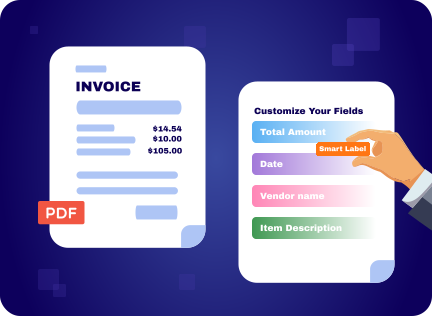
Simplify document extraction with customizable data fields and labels tailored to your needs. Whether you want us to handle the entire extraction process or select specific fields, we’ve got you covered.
“The ready-to-use template is great! Appreciate the flexibility for labels and data fields.”
Steve Bricks | Email Marketer
Any Doc, Any Language
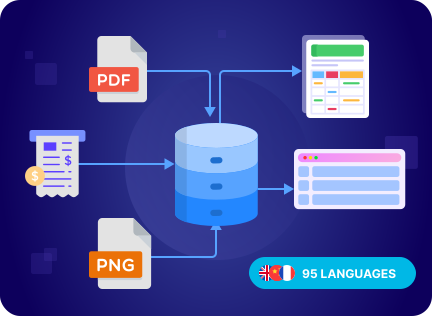
Effortlessly extract data from images and documents in any language. Our OCR system supports over 95 languages and processes various input types, including PDFs, images, screenshots, scans, and more, making it ideal for global businesses
“It’s amazing. They actually can read our data from all type of forms.”
Jacob Petterson | HR Executive
Ready-to-use data output
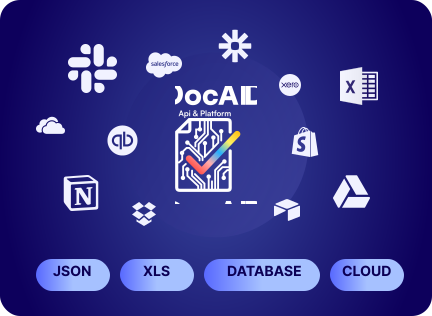
Receive extracted data in structured formats such as JSON, XLS, or CSV, ready for seamless integration with databases, analytics tools, or other applications.
“Super happy with the output options. Save us tons of time since we can send the pulled data to our CRM, ERP, as well as our database directly. This is true automation. ”
Rose | Account Executive
No-code Platform
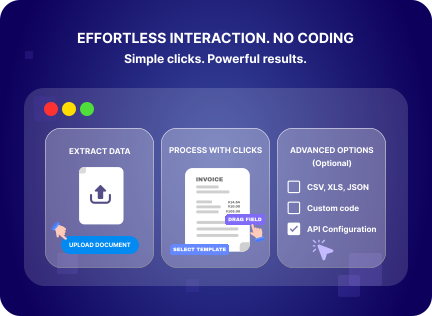
Interact with our solution effortlessly through simple clicks. No coding or complex configurations required unless you want to.
“I’ve been an accountant for 30 years and this app has help me out immensely. I don’t understand fully how they do it but it only takes a few set up to have the results I want.”
Amber Taylor| Account Executive
Intelligent Document Processing with AI-Powered OCR: Accurate, Flexible, and Secure
Document Processing That Actually Works
Industry-leading accuracy on complex documents, or we’ll credit your next batch. Built to handle your most challenging formats.
Benny Wilson
Mid-Market
(51-1000 emp.)
Great tools, even better service. Take me 5 minutes to set up and we’re more than happy with the results.
Simple, Flexible Plans
Flexible monthly plans with clear volume tiers. Choose what fits your needs, from Start to Enterprise scale.
Lucas I
Small-Business
(50 or fewer emp.)
Best of class OCR with great price. We could’ve spent a fortune on extracting the holiday sales invoice.
Your Data Stays Confidential, Always
Enterprise-level security protocols. Automatic data purge. Your data is never used to train our models.
Selena
Enterprise (>1000 emp.)
The app is super upfront about their data confidentiality policy. We don’t need to worry that our private information of customers floating around the Internet since the app deletes them immediately!
How Our AI-powered OCR Works in 4 Easy Steps
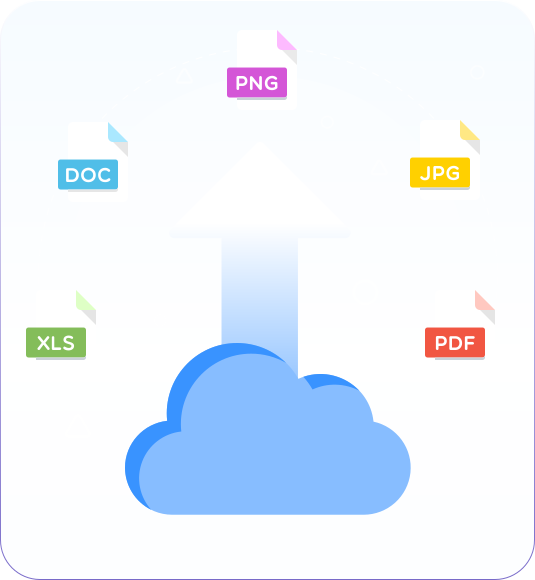
Supported formats include: jpg, png, gif, jpeg, tiff, webp, and more.
The easiest AI-powered OCR API to use
Once you sign up with a bussiness email, click on My Account > API Keys to get your key.
This key will allow you to authenticate API requests.
import java.io.*;
import java.net.*;
import org.json.*;
public class DocAIOCR {
private static final String API_KEY = "your_api_key_here";
private static final String API_URL = "https://api.docai.com/v1/ocr";
public static void main(String[] args) {
try {
File file = new File("invoice.pdf");
String result = processOCR(file);
System.out.println("Extracted Data: " + result);
} catch (Exception e) {
e.printStackTrace();
}
}
public static String processOCR(File file) throws Exception {
HttpURLConnection conn = (HttpURLConnection) new URL(API_URL).openConnection();
conn.setRequestMethod("POST");
conn.setRequestProperty("Authorization", "Bearer " + API_KEY);
conn.setDoOutput(true);
// Upload file and get response
return "JSON Response";
}
}package main
import (
"bytes"
"encoding/json"
"fmt"
"io"
"mime/multipart"
"net/http"
"os"
)
const (
apiKey = "your_api_key_here"
apiURL = "https://api.docai.com/v1/ocr"
)
type OCRResponse struct {
FileName string `json:"file_name"`
ExtractedData map[string]interface{} `json:"extracted_data"`
}
func processOCR(filePath string) (*OCRResponse, error) {
file, err := os.Open(filePath)
if err != nil {
return nil, err
}
defer file.Close()
body := &bytes.Buffer{}
writer := multipart.NewWriter(body)
part, _ := writer.CreateFormFile("file", filePath)
io.Copy(part, file)
writer.Close()
req, _ := http.NewRequest("POST", apiURL, body)
req.Header.Set("Authorization", "Bearer "+apiKey)
req.Header.Set("Content-Type", writer.FormDataContentType())
client := &http.Client{}
resp, err := client.Do(req)
if err != nil {
return nil, err
}
defer resp.Body.Close()
var result OCRResponse
json.NewDecoder(resp.Body).Decode(&result)
return &result, nil
}
func main() {
result, err := processOCR("invoice.pdf")
if err != nil {
fmt.Println("Error:", err)
return
}
fmt.Printf("Extracted Data: %+v\n", result)
}const axios = require('axios');
const FormData = require('form-data');
const fs = require('fs');
const API_KEY = 'your_api_key_here';
const API_URL = 'https://api.docai.com/v1/ocr';
async function processOCR(filePath) {
try {
const form = new FormData();
form.append('file', fs.createReadStream(filePath));
const response = await axios.post(API_URL, form, {
headers: {
'Authorization': `Bearer ${API_KEY}`,
...form.getHeaders()
}
});
console.log('Extracted Data:', response.data);
return response.data;
} catch (error) {
console.error('Error processing OCR:', error.message);
throw error;
}
}
// Usage
processOCR('invoice.pdf')
.then(data => console.log('Success:', data))
.catch(err => console.error('Failed:', err));<?php
define('API_KEY', 'your_api_key_here');
define('API_URL', 'https://api.docai.com/v1/ocr');
function processOCR($filePath) {
if (!file_exists($filePath)) {
throw new Exception("File not found: $filePath");
}
$ch = curl_init();
$cfile = new CURLFile($filePath, mime_content_type($filePath), basename($filePath));
$data = [
'file' => $cfile
];
curl_setopt_array($ch, [
CURLOPT_URL => API_URL,
CURLOPT_POST => true,
CURLOPT_POSTFIELDS => $data,
CURLOPT_RETURNTRANSFER => true,
CURLOPT_HTTPHEADER => [
'Authorization: Bearer ' . API_KEY
]
]);
$response = curl_exec($ch);
$httpCode = curl_getinfo($ch, CURLINFO_HTTP_CODE);
curl_close($ch);
if ($httpCode === 200) {
return json_decode($response, true);
} else {
throw new Exception("API Error: $response");
}
}
// Usage
try {
$result = processOCR('invoice.pdf');
echo "Extracted Data:\n";
print_r($result);
} catch (Exception $e) {
echo "Error: " . $e->getMessage();
}
?>import requests
import json
API_KEY = 'your_api_key_here'
API_URL = 'https://api.docai.com/v1/ocr'
def process_ocr(file_path):
"""
Process OCR on a document using DocAI API
Args:
file_path (str): Path to the document file
Returns:
dict: Extracted data from the document
"""
headers = {
'Authorization': f'Bearer {API_KEY}'
}
with open(file_path, 'rb') as file:
files = {
'file': (file_path, file, 'application/pdf')
}
try:
response = requests.post(API_URL, headers=headers, files=files)
response.raise_for_status()
result = response.json()
return result
except requests.exceptions.RequestException as e:
print(f'Error processing OCR: {e}')
raise
# Usage
if __name__ == '__main__':
try:
data = process_ocr('invoice.pdf')
print('Extracted Data:')
print(json.dumps(data, indent=2))
except Exception as e:
print(f'Failed to process document: {e}')require 'net/http'
require 'uri'
require 'json'
API_KEY = 'your_api_key_here'
API_URL = 'https://api.docai.com/v1/ocr'
def process_ocr(file_path)
uri = URI.parse(API_URL)
File.open(file_path, 'rb') do |file|
request = Net::HTTP::Post.new(uri)
request['Authorization'] = "Bearer #{API_KEY}"
boundary = "-----------RubyMultipartBoundary"
request['Content-Type'] = "multipart/form-data; boundary=#{boundary}"
post_body = []
post_body << "--#{boundary}\r\n"
post_body << "Content-Disposition: form-data; name=\"file\"; filename=\"#{File.basename(file_path)}\"\r\n"
post_body << "Content-Type: application/pdf\r\n\r\n"
post_body << file.read
post_body << "\r\n--#{boundary}--\r\n"
request.body = post_body.join
response = Net::HTTP.start(uri.hostname, uri.port, use_ssl: true) do |http|
http.request(request)
end
if response.code == '200'
JSON.parse(response.body)
else
raise "API Error: #{response.body}"
end
end
end
# Usage
begin
result = process_ocr('invoice.pdf')
puts "Extracted Data:"
puts JSON.pretty_generate(result)
rescue StandardError => e
puts "Error: #{e.message}"
endusing System;
using System.IO;
using System.Net.Http;
using System.Net.Http.Headers;
using System.Threading.Tasks;
using Newtonsoft.Json;
namespace DocAIOCR
{
public class OCRClient
{
private const string API_KEY = "your_api_key_here";
private const string API_URL = "https://api.docai.com/v1/ocr";
public static async Task<string> ProcessOCR(string filePath)
{
using (var client = new HttpClient())
{
client.DefaultRequestHeaders.Authorization =
new AuthenticationHeaderValue("Bearer", API_KEY);
using (var form = new MultipartFormDataContent())
{
var fileContent = new ByteArrayContent(
File.ReadAllBytes(filePath)
);
fileContent.Headers.ContentType =
MediaTypeHeaderValue.Parse("application/pdf");
form.Add(fileContent, "file", Path.GetFileName(filePath));
var response = await client.PostAsync(API_URL, form);
response.EnsureSuccessStatusCode();
var result = await response.Content.ReadAsStringAsync();
return result;
}
}
}
public static async Task Main(string[] args)
{
try
{
var result = await ProcessOCR("invoice.pdf");
Console.WriteLine("Extracted Data:");
var formatted = JsonConvert.DeserializeObject(result);
Console.WriteLine(
JsonConvert.SerializeObject(formatted, Formatting.Indented)
);
}
catch (Exception ex)
{
Console.WriteLine($"Error: {ex.Message}");
}
}
}
}Get your free API Key
Once you sign up with a bussiness email, click on My Account > API Keys to get your key.
This key will allow you to authenticate API requests.
Intelligent OCR for All Document Types
Say goodbye to manual entry! Our AI-powered OCR transforms any business documents into valuable and actionable data.
Logistic documents
Transform data from delivery notes, shipping labels, and more into searchable text for seamless management.
Financial documents
Convert balance sheets, income statements, cash flow statements, and more into structured, actionable data.
Identity document
Automate the extraction of identity information from various ID formats, saving time and effort.
Legal document
Streamline the discovery process by extracting all necessary data from diverse legal sources.
HR documents
Effortlessly build your HR database with employee data extracted and organized intelligently.
Medical documents
Looking for something else? Explore our pre-trained models for a wider variety of document types.
Logistic documents
Transform data from delivery notes, shipping labels, and more into searchable text for seamless management.
Other documents
Looking for something else? Explore our pre-trained models for a wider variety of document types.
Practical Use Cases for Intelligent OCR Data Extraction
Say goodbye to manual entry! Our AI-powered OCR transforms any business documents into valuable and actionable data.
Receipt data extraction
Extract key accounts payable fields from invoices and billing documents, regardless of format or quality. Automate your workflows and eliminate manual processing!
Invoice data extraction
Extract data from receipts of any format and quality, including phone-captured images, scanned documents, and digital PDFs. We can process them all seamlessly!
Purchase order data extraction
Extract items, types, pricing, and more from purchase orders effortlessly. Gain valuable insights into your customers’ purchasing behavior with ease!
Driving License data extraction
Extract crucial information for identity verification from large volumes of driving licenses in real-time, ensuring high accuracy and significant cost savings.
ID Card data extraction
Streamline customer onboarding, prevent fraud, and cut manual verification costs with our ID card processing solution.
Passport data extraction
Extract identity information from passports worldwide, regardless of language or layout, in just seconds.
Practical Use Cases for Intelligent OCR Data Extraction
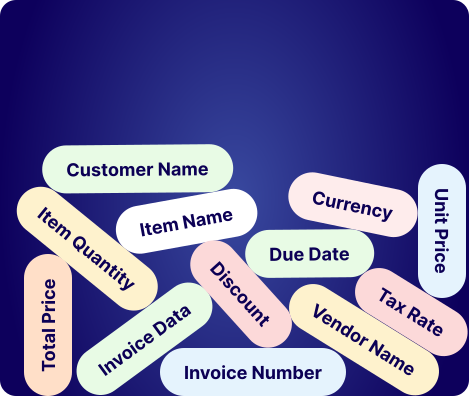
Our AI-Powered OCR supports JPG, PNG, and PDF inputs, recognizing 100+ document types, 50+ pre-trained data fields and support custom data fields. Output is provided in JSON format for easy integration, including fields like:
Merchant name
Address
Phone number
Chamber of Commerce ID
Logo
VAT Number
Product name
Transaction number
Invoice date
Discounts
Language
Tax amount
Total amount
Place of birth
Location of issue
Social security number

44,000 ORDERS
from affiliates & influencers
We manage influencer sales via screenshots and images, and it used to take days to tally orders. With this converter, I processed 44,000 orders from affiliates & influencers in no time. It has completely transformed our reporting workflow.
Shaun Moore, Business Analyst

44,000 ORDERS
from affiliates & influencers
We manage influencer sales via screenshots and images, and it used to take days to tally orders. With this converter, I processed 44,000 orders from affiliates & influencers in no time. It has completely transformed our reporting workflow.
Shaun Moore, Business Analyst
Frequently asked question
Find quick solutions to common queries and get the most out of your learning experience
There are various software tools for data extraction including Python libraries, specialized ETL tools, and custom solutions depending on your specific needs and data sources.
Data extraction allows you to consolidate that information into a centralized system in order to unify multiple data sets.
Yes, Excel can be used for basic data extraction tasks, though it has limitations compared to specialized tools.
There are many free tools available including Python libraries, open-source ETL tools, and free tiers of commercial products.
OCR technology can process various document types including scanned images, PDFs, and photos.
Most systems support CSV, Excel, PDF, JSON, XML, and common image formats.
Modern AI-powered OCR can read clear handwriting, though accuracy varies based on quality.