


Document volumes continue to grow across all industries today. At the same time, strict compliance rules require flawless record keeping and faster processing speeds. Traditional manual entry simply cannot keep up with this growing demand.
This guide compares the 12 best intelligent document processing software options available in 2026. You will learn how to evaluate their core features, pricing models, and system integrations. We will give you the exact criteria needed to choose the right automation tool for your business.
TL;DR
- Intelligent document processing software eliminates manual data entry by extracting structured data from unstructured files automatically.
- Top platforms use artificial intelligence to achieve over 99 percent extraction accuracy on standard printed documents.
- This guide compares 12 leading tools based on features, pricing, and integration capabilities to help you automate your workflows.
What is Intelligent Document Processing Software?
Intelligent document processing software automatically extracts specific data from unstructured files and moves it into your business systems. It replaces manual human typing with automated text recognition and data structuring.
Traditional text extraction only reads raw pixels on a page. Modern intelligent document processing tools understand context to identify vendor names, total amounts, and line items without needing strict templates. These systems read documents much like a human does.
The overall benefit is an immediate reduction in operational costs. A 50-person logistics team processing 2,000 delivery notes per week saves approximately 40 hours by switching from manual entry to AI extraction. This time savings allows staff to focus on analysis and customer service instead of typing.
The extraction process relies on three distinct steps to turn raw files into usable database entries. Review these core steps to understand how the software operates.
- Define the input. The software receives files via API, email, or manual upload. It accepts common formats like PDF, JPEG, and PNG.
- Extract the data. Artificial intelligence models read the document and identify key fields automatically. The system maps these fields into a structured format like JSON or CSV.
- Export the results. The platform pushes the structured data directly into an enterprise resource planning or accounting system. This completely removes the need for human data entry.
Best Intelligent Document Processing Software
The best intelligent document processing solution for your company depends entirely on your technical resources and document volume. Some platforms offer simple no-code interfaces, while others require dedicated developers to configure complex pipelines.
The table below compares 12 leading tools based on their core strengths, setup requirements, and pricing models. Use this data to shortlist two or three tools that match your technical capacity and budget.
| Software | Core Strength | Setup Required | Pricing Model |
| ValiTract | Template-free AI extraction | Low (No-code + API) | Free tier + Volume-based |
| ABBYY | Legacy enterprise processing | High | Custom enterprise |
| UiPath | Robotic process automation | High | Subscription + Usage |
| Rossum | Transactional document AI | Medium | Custom volume-based |
| Amazon Textract | AWS ecosystem native | High (Developer) | Pay-as-you-go |
| Microsoft Azure AI | Azure cloud native | High (Developer) | Pay-as-you-go |
| Google Document AI | Google Cloud native | High (Developer) | Pay-as-you-go |
| Tungsten Automation | Total workflow orchestration | High | Custom enterprise |
| Appian | Process orchestration | High | Custom enterprise |
| Nanonets | Customizable AI models | Medium | Tiered subscription |
| Hyperscience | Handwriting accuracy | High | Custom enterprise |
| Blue Prism Decipher | Integrated RPA data | High | Custom enterprise |
ValiTract
ValiTract is an AI-powered extraction platform that converts unstructured files into structured data. It handles invoices, receipts, human resources forms, and logistics paperwork automatically. The software requires no strict templates to identify fields correctly.
Review the specific features and pricing details for ValiTract below.
- Key Features: Template-free AI extraction, no-code dashboard, and RESTful API access.
- Pricing: A free tier includes 100 pages per month. Paid tiers scale based on volume and add advanced features.
- Pros: Reaches 99.8 percent extraction accuracy on standard printed documents. The platform is fully GDPR and HIPAA compliant.
- Cons: Heavily damaged scans or complex handwritten notes may require manual review.
- API access & system integration: Offers a full API and native integrations with QuickBooks, SAP, Xero, and Zapier.
- Best For: Mid-size finance and operations teams needing accurate AI extraction and simple setup.
ABBYY Vantage
ABBYY Vantage provides enterprise-grade document processing for large global organizations. The platform uses pre-trained cognitive skills to read and process specific document types. It is built to handle massive daily volumes across multiple departments.
Review the core capabilities and integration options for ABBYY below.
- Key Features: Cognitive skills catalog, advanced optical character recognition, and deep classification tools.
- Pricing: Custom enterprise pricing based on document volume and specific module usage.
- Pros: Extremely capable of handling highly complex, multi-page legacy documents.
- Cons: Implementation can take weeks or months and usually requires professional services.
- API access & system integration: Connects deeply into major enterprise resource planning systems like SAP and Oracle.
- Best For: Large legacy enterprises with complex on-premise integration requirements.
UiPath Document Understanding
UiPath Document Understanding combines data extraction with robotic process automation workflows. It allows software robots to read documents and take actions based on the extracted data. This tool works best when combined with the broader UiPath ecosystem.
Review the specific features and target users for UiPath below.
- Key Features: Drag-and-drop workflow builder, pre-trained models, and validation stations for human review.
- Pricing: Subscription-based pricing tied to RPA licenses and processing volume.
- Pros: Excellent for companies already using UiPath bots for other business processes.
- Cons: The pricing structure can become complicated when mixing bot licenses and extraction volume.
- API access & system integration: Built specifically to integrate with UiPath Studio and enterprise software.
- Best For: Companies fully invested in robotic process automation, looking to add document reading capabilities.
Rossum
Rossum focuses heavily on transactional documents like invoices and purchase orders. The platform uses an advanced AI engine to predict field locations without rules or templates. It includes a user-friendly validation screen for human operators.
Read the details regarding Rossum’s features and limitations below.
- Key Features: Predictive AI extraction, unified inbox for document ingestion, and usage analytics.
- Pricing: Custom pricing based entirely on annual document volume.
- Pros: The user interface for manual exception handling is very intuitive and fast.
- Cons: Custom pricing can be prohibitive for smaller companies with lower document volumes.
- API access & system integration: Offers API access and connects with common accounting systems.
- Best For: Accounts payable teams processing high volumes of varied vendor invoices.
Amazon Textract
Amazon Textract is a machine learning service that automatically extracts text, handwriting, and data from scanned files. It goes beyond simple character recognition to identify table structures and form fields. The service lives entirely within the Amazon Web Services environment.
Evaluate the technical requirements and pricing for Amazon Textract below.
- Key Features: Table extraction, handwriting recognition, and query-based data retrieval.
- Pricing: Pay-as-you-go model charging fractions of a cent per page processed.
- Pros: Extremely cost-efficient for developers building their own custom applications.
- Cons: Requires a development team to build the interface and workflow around the API.
- API access & system integration: Integrates perfectly with AWS services like S3, Lambda, and SageMaker.
- Best For: Engineering teams building custom document processing pipelines within AWS.
Microsoft Azure AI Document Intelligence
Microsoft Azure AI Document Intelligence extracts text, key-value pairs, and structures from documents. It offers pre-built models for standard files like W-2s and invoices alongside custom training options. It is the default choice for organizations committed to the Azure cloud.
Review the developer requirements and system features for Azure below.
- Key Features: Pre-built receipt models, custom classification, and signature detection.
- Pricing: Pay-as-you-go pricing based strictly on API calls.
- Pros: Highly secure and compliant infrastructure backed by Microsoft.
- Cons: Lacks a ready-to-use business interface for non-technical finance or operations staff.
- API access & system integration: Connects flawlessly with Microsoft Power Automate and Azure Logic Apps.
- Best For: Azure-based enterprise IT teams wanting to add extraction to existing applications.
Google Cloud Document AI
Google Cloud Document AI uses Google’s machine learning expertise to parse documents into structured data. The platform features specialized parsers for lending, procurement, and identity documents. It offers both pre-trained options and custom model training tools.
Examine the specific features and ideal users for Google Cloud Document AI below.
- Key Features: Specialized industry parsers, human-in-the-loop review tools, and knowledge graph integration.
- Pricing: Pay-as-you-go pricing per page, with different rates for basic versus specialized parsers.
- Pros: Excellent at understanding unstructured text and complex table layouts.
- Cons: Setup requires cloud architecture knowledge and active developer support.
- API access & system integration: Native integration with Google Cloud Storage and BigQuery.
- Best For: Data science and engineering teams hosting applications on Google Cloud Platform.
Tungsten Automation TotalAgility
Tungsten Automation provides a comprehensive suite for total digital workflow orchestration. It handles everything from capturing paper mail to routing digital data into backend databases. The platform is designed for global scale and complex compliance environments.
Read the details on Tungsten Automation’s capabilities and costs below.
- Key Features: Multi-channel document capture, advanced workflow routing, and analytics dashboards.
- Pricing: High-tier custom enterprise pricing based on modules and scale.
- Pros: Can handle virtually any document type across dozens of different global departments.
- Cons: The interface and setup process are complex, requiring significant internal training.
- API access & system integration: Integrates with legacy mainframes and modern enterprise systems.
- Best For: Fortune 500 companies needing a single platform to control all incoming company data.
Appian AI Process Platform
Appian combines low-code application development with native artificial intelligence processing. It treats document extraction as just one step in a larger automated business process. Users can design complete applications that route extracted data for human approval.
Check the technical features and target audience for Appian below.
- Key Features: Low-code app builder, integrated process mining, and native document extraction.
- Pricing: Enterprise subscription pricing based on users and application scope.
- Pros: Great for building visual workflow applications without writing extensive code.
- Cons: Might be too expensive and complex if you only need standard invoice extraction.
- API access & system integration: Provides pre-built connectors to Salesforce, SAP, and various databases.
- Best For: Operations leaders wanting to build custom automated applications quickly.
Nanonets
Nanonets provides a highly customizable platform for training specialized artificial intelligence models. Users can upload a small batch of specific documents to train the system on unique layouts. It offers a clean interface for both technical and non-technical users.
Review the pros, cons, and pricing details for Nanonets below.
- Key Features: Custom model training, automated approval workflows, and post-processing rules.
- Pricing: Tiered subscription pricing with additional costs per document processed.
- Pros: Very easy to train models for non-standard documents that other tools struggle to read.
- Cons: Costs can escalate quickly if your monthly document volume fluctuates significantly.
- API access & system integration: Includes a full API and native integrations with accounting software.
- Best For: Mid-size businesses processing unique or highly specific industry forms.
Hyperscience Hypercell
Hyperscience focuses on achieving the highest possible accuracy rates, especially for difficult documents. The platform excels at reading messy handwriting, low-resolution scans, and crumpled paper. It uses a proprietary machine learning engine designed for extreme accuracy.
Evaluate the core strengths and limitations of Hyperscience below.
- Key Features: Advanced handwriting recognition, proprietary AI models, and structured quality assurance workflows.
- Pricing: Custom enterprise pricing based on processing volume.
- Pros: Consistently outperforms competitors when processing handwritten forms or degraded images.
- Cons: The platform is expensive and generally reserved for massive enterprise or government use cases.
- API access & system integration: Offers a robust API for connecting to enterprise databases and mainframes.
- Best For: Government agencies and insurance firms processing millions of handwritten forms.
Blue Prism Decipher IDP
Blue Prism Decipher is an intelligent document processing tool built natively for the Blue Prism RPA ecosystem. It identifies data in documents and feeds it directly into digital worker queues. The tool is designed to work efficiently within strict corporate compliance environments.
Read the specific capabilities and target market for Blue Prism below.
- Key Features: Native RPA integration, compliance audit trails, and machine learning extraction.
- Pricing: Custom pricing tied to the broader Blue Prism software licensing model.
- Pros: Streamlines the deployment of software bots by handling the document ingestion phase automatically.
- Cons: Not ideal as a standalone extraction tool if you do not use Blue Prism for automation.
- API access & system integration: Built specifically to feed data into Blue Prism digital workers.
- Best For: Enterprise RPA teams looking for an integrated tool to read incoming files.
The Strategic Guide to Assessing and Choosing IDP Software
Choosing the right intelligent document processing software requires matching your exact workflow needs against the platform’s actual capabilities. Many tools look identical on marketing pages but perform very differently on real data. You must test the system against your actual daily challenges.
Use the following six criteria to evaluate potential vendors and avoid costly implementation mistakes.
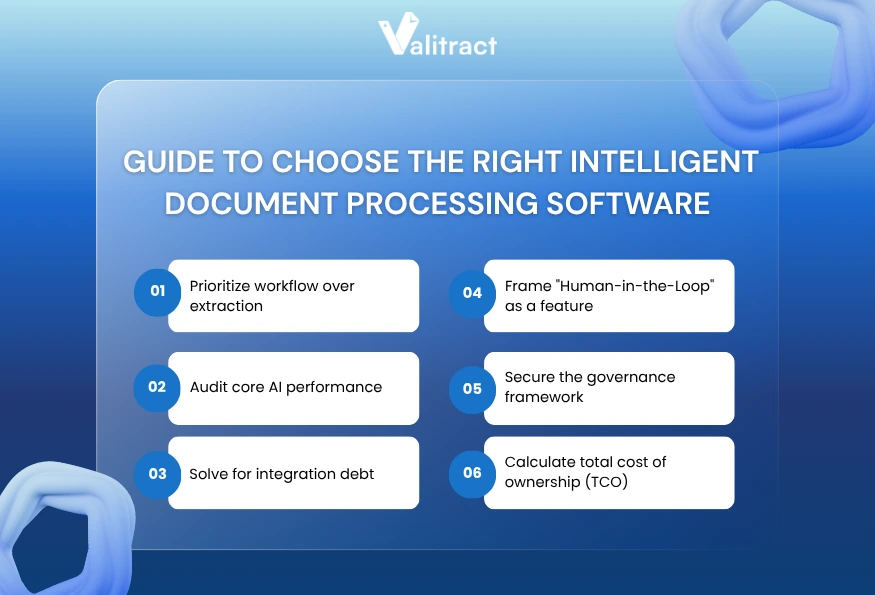
1. Prioritize workflow over extraction
- Why it matters: You do not just need a tool that reads text on a page. You need a system that actively triggers business actions like ERP posting or supplier emails based on that text.
- How to evaluate: Determine if you need a versatile generalist tool or a specialist tool. A generalist handles many document types fairly well, while a specialist offers extreme accuracy for one exact document type.
2. Audit core AI performance
- Why it matters: Vendor demos always use perfect, clean documents that extract flawlessly. Real-world documents arrive crumpled, faded, or photographed from strange angles.
- How to evaluate: Demand to test the software using your own messy data. Ensure the system includes confidence scoring so it flags uncertain text rather than pushing incorrect data into your database. Verify that the AI actually learns from human corrections over time.
3. Solve for integration debt
- Why it matters: The best extraction in the world is useless if the data cannot reach your final system automatically. Building custom API connectors can drain your IT budget quickly.
- How to evaluate: Focus heavily on how data moves into your specific enterprise resource planning software. Audit how the tool handles hidden tasks like ingesting emails and cleaning data formats before it reaches your main system.
4. Frame “Human-in-the-Loop” as a feature
- Why it matters: No artificial intelligence achieves 100 percent accuracy on unstructured data all the time. You need a plan for the small percentage of documents that the system cannot read confidently.
- How to evaluate: Build a clear workflow for exception handling during your trial period. Use manual reviews as a feedback loop to retrain the AI and close accuracy gaps permanently.
5. Secure the governance framework
- Why it matters: Financial and personal data extraction carries significant security risks. You must be able to prove to auditors exactly how data was handled and who touched it.
- How to evaluate: Set up clear audit trails from day one to track who changed what data and when. Verify compliance standards like SOC 2, ISO 27001, and regional mandates such as GDPR or HIPAA.
6. Calculate total cost of ownership (TCO)
- Why it matters: The advertised price per page is only one part of the total software cost. Hidden fees for setup, API calls, and developer time can double your actual spend.
- How to evaluate: Factor in the costs of model training, human review time, and ongoing system maintenance. Stress-test the platform to verify it can handle peak volume loads at month-end without slowing down your operations.
Features of Intelligent Document Processing Software
Modern intelligent document processing platforms rely on five core features to turn raw files into structured data safely. These features work together to automate the entire lifecycle of a document. Missing any of these capabilities will force your team to intervene manually.
Look for these five standard capabilities when comparing different software vendors.
- Document classification: The system automatically identifies whether an uploaded file is an invoice, a receipt, or a contract. It sorts the files before attempting to extract any data.
- Data extraction: The software identifies the specific fields you need, such as vendor name or total amount. It maps these fields into a clean structure using artificial intelligence.
- Data processing: The platform applies rules to clean the data, such as standardizing date formats or checking mathematical totals. This ensures the output matches your database requirements perfectly.
- Continuous learning: The artificial intelligence models improve over time by observing how human users correct mistakes. This reduces the error rate steadily as you process more volume.
- Reporting and analytics: The software provides dashboards showing extraction accuracy, processing times, and user productivity. This helps managers identify bottlenecks in the daily workflow.
What Are the Benefits of Intelligent Document Processing?
Intelligent document processing cuts manual data entry time by 70 to 80 percent for most operations teams. This massive reduction in typing allows companies to process higher volumes without hiring additional staff. The return on investment is usually visible within the first month of implementation.
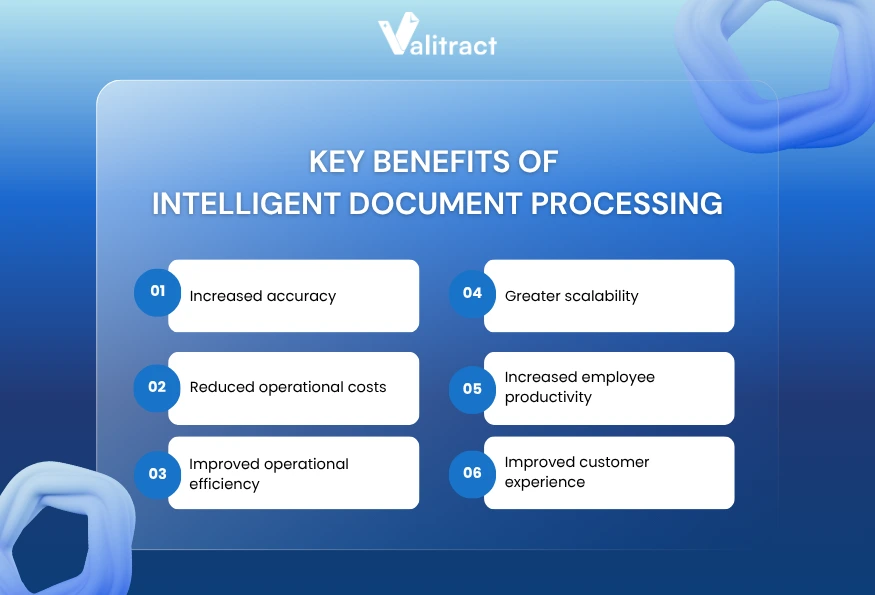
Implementing an automated data extraction system provides six measurable advantages for your business.
- Increased accuracy: Artificial intelligence removes the risk of human typing fatigue. Top platforms like ValiTract achieve 99.8 percent extraction accuracy on standard printed documents.
- Reduced operational costs: Every document your team types manually costs between $3 and $10 in labor time. Software automation extracts the same data for a fraction of a cent.
- Improved operational efficiency: Documents are processed in seconds rather than sitting in an inbox for days. This speed helps companies capture early payment discounts from vendors.
- Greater scalability: Software can process 10,000 invoices just as easily as it processes 100. Your business can handle seasonal volume spikes without hiring temporary workers.
- Increased employee productivity: Staff members spend their time analyzing data and solving supplier issues instead of doing repetitive data entry. This improves morale and lowers employee turnover.
- Improved customer experience: Faster processing means faster onboarding for new clients and quicker claims resolution. Customers receive accurate responses rapidly because the data is instantly available.
What Are the Use Cases of Intelligent Document Processing Software?
Teams use intelligent document processing to automate data entry for invoices, medical records, and legal contracts. Almost any department that receives high volumes of paperwork can benefit from automation. The software adapts to the specific language and layout of different business units.
Read how six different industries apply data extraction to their daily workflows to save time.
- Human resources: Teams extract data automatically from passports, identity cards, and onboarding forms. This ensures new employee data enters the payroll system without typos.
- Finance: Accounts payable departments automatically capture line items and totals from vendor invoices. ValiTract maps this structured data directly into systems like QuickBooks without pre-configuring templates.
- Legal: Law firms process hundreds of pages of contracts to identify specific clauses, dates, and party names. This reduces the time paralegals spend reading standard agreements.
- Logistics: Coordinators extract data from bills of lading, delivery notes, and customs declarations. This keeps supply chains moving by removing paperwork bottlenecks at shipping ports.
- Healthcare: Administrators digitize patient intake forms and medical history records instantly. The software ensures critical health data moves securely into electronic health record systems.
- Insurance: Adjusters automate the extraction of data from claims forms and repair estimates. This speeds up the approval process and gets payments to customers faster.
What Are the Technologies Used in Intelligent Document Processing Software?
Intelligent document processing relies on artificial intelligence to understand document structure and context. It does not just read letters; it understands what those letters mean in relation to the whole page. This intelligence is what separates modern platforms from legacy software.
Three core technologies work together to convert image pixels into usable business data.
- Natural Language Processing (NLP): This technology helps the system understand the meaning and context of the text. It allows the software to recognize that “Total Due” and “Amount to Pay” mean the same thing.
- Optical Character Recognition (OCR): This is the foundational technology that converts image pixels into machine-readable text characters. It is the first step in turning a scanned JPEG into editable words.
- Robotic process automation (RPA): Software bots take the extracted data and move it into the final destination system. They mimic human clicks and keystrokes to update databases automatically.
FAQs about Intelligent Document Processing Software
What Is Intelligent Document Processing Software (IDP)?
Intelligent document processing is software that automatically extracts specific data from unstructured files and turns it into structured data. It reads documents like invoices or contracts using artificial intelligence to understand context without strict templates. Companies use it to eliminate manual data entry and connect paperwork directly to their databases.
What Is the Difference Between IDP vs OCR?
Optical Character Recognition simply converts image pixels into raw text characters without understanding what the words mean. Intelligent document processing uses AI to understand context, identify specific fields, and structure the data for business use. OCR is just one foundational step inside a complete IDP platform.
What Types of Documents Can IDP Handle?
These platforms handle almost any structured or semi-structured business file. Common examples include financial invoices, employee tax forms, shipping delivery notes, and legal contracts. Top tools can process PDFs, standard image files, and even raw emails.
What Industries Benefit Most From IDP?
Finance and logistics sectors see the fastest return on investment due to their massive daily document volumes. Healthcare and insurance industries also benefit heavily because they process millions of complex patient and claim forms securely. Any industry relying on manual data entry will see immediate labor savings.
What Are the Best Intelligent Document Processing Software?
The best tools include ValiTract for template-free AI extraction and UiPath for heavy robotic process automation users. ABBYY is a top choice for legacy enterprise processing. The right tool depends on whether you need a developer-focused API or a simple no-code dashboard.
What Is the Intelligent Document Processing Software Pricing?
Pricing models vary heavily based on your document volume and the vendor’s structure. Some tools charge a flat subscription fee, while others charge fractions of a cent per page processed. Many platforms offer a free tier for low-volume users to test the extraction accuracy before purchasing.
Every invoice or receipt your team types by hand costs between $3 and $10 in labor time. ValiTract extracts the exact same data for a fraction of a cent while scaling effortlessly with your business volume. You can connect the API to your existing software or use the no-code dashboard to start automating your data entry immediately.
Conclusion
Intelligent document processing software has become an essential technology for businesses looking to reduce manual workloads, improve data accuracy, and scale operations efficiently. By automating document extraction and validation, modern IDP platforms help organizations process invoices, contracts, forms, and other business documents faster while minimizing costly human errors.
Choosing the right solution depends on your document complexity, integration requirements, compliance needs, and long-term automation goals. The best approach is to evaluate platforms using real-world documents and prioritize factors such as AI accuracy, template flexibility, workflow automation, and total cost of ownership.
If you are looking for a scalable, AI-powered solution built for complex and unstructured documents, explore how Valitract helps businesses automate document processing with higher accuracy, faster deployment, and flexible integration capabilities.
Valitract – Next-gen AI-Powered Data Extraction Platform
- Email: contact@valitract.com
- LinkedIn: https://www.linkedin.com/company/valitract-api-platform
- X: https://x.com/valitract


