


The moment a finance team receives a stack of supplier invoices, the clock starts on manual data entry. Staff members open attachments, read line items, and type those numbers into an accounting system.
That manual workflow creates severe bottlenecks before the payment cycle even begins. An accounting department managing high invoice volumes loses substantial productivity to repetitive typing tasks.
Automated invoice data extraction software tools shift this dynamic entirely. They ingest multi-page documents, locate specific financial data points, and output clean structures for immediate downstream use.
In this guide, we explore how the invoice data extraction software works in practice. We will cover the core technologies, compare the top platforms on the market, and outline a step-by-step implementation framework for your engineering and finance teams.
Invoice Data Extraction Software Explained: From Raw Documents to Structured Data
What is invoice data extraction software?
Invoice data extraction software identifies and pulls unstructured information from financial documents. The system links visual elements, such as vendor names, tax totals, and item descriptions, to specific database fields.
That mapped output flows directly into an ERP or accounting system via an API webhook. You bypass the keyboard entirely, moving data from a static file to a live database in seconds.
A comparison of manual and automated invoice data extraction
Manual extraction requires human eyes on every single page. A data entry clerk reads a scanned PDF, identifies the correct subtotal, and types that number into a separate software window.
This human-dependent approach scales poorly. When invoice volumes spike during end-of-month reporting, finance teams must work overtime to clear the backlog.
Automated invoice data extraction relies on layout-aware AI models. These systems scan the document visually, understand the spatial relationship between headers and values, and generate an immediate output file.
Those layout models process thousands of pages per hour. They do not require breaks, and their accuracy remains consistent regardless of the total workload.
Key Takeaway: Invoice data extraction converts flat visual images into structured text payloads without requiring human keystrokes.
Why do Businesses need Automated Invoice Data Extraction Software?
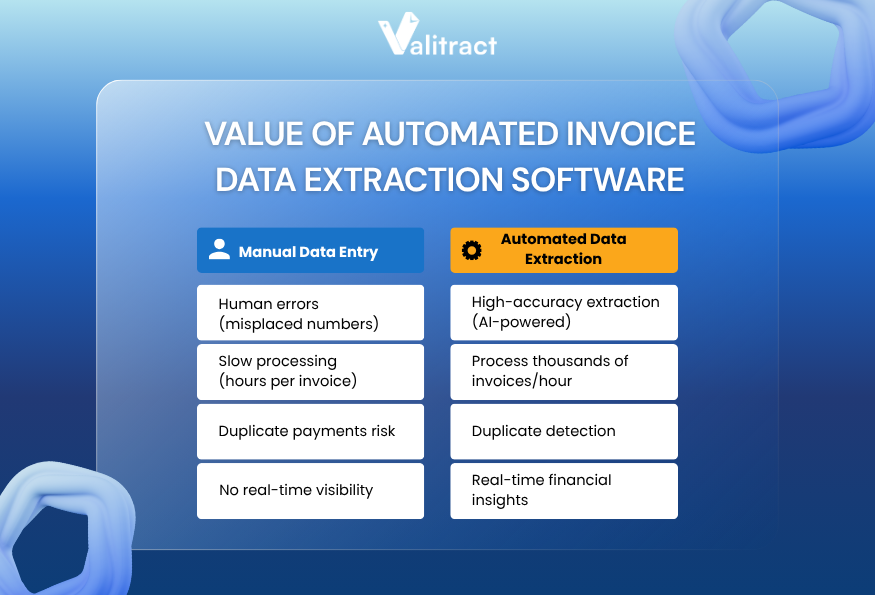
High-precision accuracy
Human fatigue introduces typographical errors during manual data entry. A misplaced decimal point on a high-value invoice creates major reconciliation headaches for the entire accounting department.
In contrast, invoice data extraction software using AI never loses focus. They are able to read complex table structures and return exact character matches across hundreds of dense pages.
When a model encounters smeared ink or ambiguous text, it generates a confidence score. The system routes low-confidence fields to a human operator, ensuring bad data never reaches your ledger.
Handling complexity and varying formats at scale
Vendors send invoices in wildly varying formats. Your accounts payable inbox likely contains standard digital PDFs, skewed scans, and smartphone photos.
Template-based OCR systems rely on fixed coordinates, expecting fields like “Total Amount” to appear in the same position every time. This approach breaks down immediately when formats vary.
AI invoice data extraction software adapts to layout shifts dynamically. The system identifies totals and line items by reading the surrounding context, regardless of where those fields sit on the page.
Optimizing resources and faster processing time
Typing line items consumes hours that finance professionals should spend on forecasting and variance analysis.
With automatic invoice data extraction, processing time drops from minutes to seconds per document.
As a result, staff members reclaim their daily schedules immediately. They transition into exception handlers, only intervening when the extraction model specifically flags an irregular document for review.
Preventing duplicate payments
Manual tracking often misses duplicate invoice submissions across different billing cycles. A vendor might email an invoice on Monday and mail a physical copy on Friday.
Extraction tools efficiently log invoice numbers, vendor IDs, and dates as soon as a document is received. That immediate data capture flags exact matches early in the pipeline.
Therefore, duplicate payments can be stopped before the payment file reaches the bank. This single capability often justifies the entire software cost.
Transparency enhancement & real-time reporting
Finance leaders need clear visibility into outstanding liabilities to manage cash flow. Manual processing can cause delays, resulting in reporting dashboards lagging behind actual operations.
Invoice data extraction software updates those dashboards faster than manual processing ever could. As soon as an invoice hits the inbox, the extracted liability data flows into the ERP.
That speed provides a real-time view of cash requirements. Treasury teams see precise payable totals without waiting for end-of-month reconciliation.
Key Takeaway: Automated extraction trades slow, error-prone manual workflows for speed, high accuracy, and real-time visibility into company payables.
Best Invoice Data Extraction Software
Evaluating extraction tools requires looking past marketing claims and examining the core architecture. Different tools serve completely different technical environments and user personas.
| Software | Pricing Model | Core Technology | API Access | Best For |
| ValiTract | Usage-based | Template-free AI | Full REST API | Mid-size finance teams |
| Tofu | Tiered monthly | Deep learning OCR | GraphQL API | High-volume enterprises |
| Dext | Subscription | Rule-based & ML | Pre-built | Small accounting firms |
| BILL | Subscription | AI-driven workflow | Standard API | Accounts payable automation |
| Lightyear | Flat fee | Line-item extraction | Standard API | Procurement teams |
| Astera | Custom enterprise | Template & AI hybrid | Full REST API | Complex data pipelines |
| Docsumo | Usage-based | Pre-trained ML | Full REST API | Financial services |
| ABBYY | Custom enterprise | Advanced cognitive | Full REST API | Large legacy systems |
Note: Software capabilities change rapidly. Verify API endpoints and language support directly with vendors before committing to a deployment.
Top Invoice Data Extraction Software
ValiTract
ValiTract focuses on flexible data capture without requiring rigid coordinate templates. The platform learns specific vendor layouts over time through continuous feedback loops.
That continuous learning capability reduces manual corrections on recurring supplier invoices. The software highlights low-confidence text fields in a side-by-side interface for fast human validation.
From a cost perspective, the platform offers a free tier of 100 pages per month with no credit card required, which is rare in AI invoice data extraction software. Paid plans start at a competitive cost per page (around $0.11–$0.12), with credits valid for up to one year. This gives businesses far more flexibility than monthly pricing models.
- Pros: Fast setup process, strong user interface, minimal technical training required, cost-effective pricing with free tiers
- Cons: Struggles heavily with handwritten notes, limited multi-currency handling features.
- Best For: Mid-size finance teams moving away from restrictive legacy OCR tools.
Tofu
Tofu targets high-volume operations requiring deep integration with custom internal software. The tool uses advanced deep learning models to parse complex, multi-page tables.
Those deep learning models handle invoices with varying column widths and nested rows natively. Engineering teams appreciate the robust GraphQL API for precise data querying.
- Pros: Excellent developer documentation, high accuracy on dense tables, and fast processing times.
- Cons: Steep learning curve for non-technical users, expensive enterprise pricing tiers.
- Best For: Enterprise operations teams with dedicated software developer resources.
Dext
Dext caters heavily to accounting firms managing multiple client portfolios. The platform standardizes receipt and invoice capture across dozens of different business entities.
That standardization speeds up the monthly bank reconciliation process significantly. The mobile application allows clients to submit physical receipts on the go directly to their accountant.
- Pros: Great mobile application, seamless integrations with major accounting software, and highly user-friendly.
- Cons: Limited custom metadata fields, basic table extraction capabilities compared to enterprise tools.
- Best For: Small accounting firms and independent bookkeeping practices.
BILL
BILL combines invoice extraction with actual payment execution inside a single closed platform. The system reads the incoming invoice and immediately routes it through a predefined approval chain.
That integrated workflow eliminates the gap between data capture and ACH payment processing. Users manage the entire accounts payable lifecycle inside one unified interface.
- Pros: End-to-end payment workflow, strong compliance routing, broad external integration network.
- Cons: Functions as a closed ecosystem rather than standalone extraction software, complex pricing structure.
- Best For: Companies needing complete, out-of-the-box accounts payable automation.
Lightyear
Lightyear specializes in detailed line-item data capture specifically for procurement departments. The software maps individual line items directly to specific internal budget codes.
Mapping items at the row level provides granular spend visibility across the organization. Purchasing teams use this detailed data to track historical unit costs across different suppliers.
- Pros: Deep line-item detail capture, strong purchase order three-way matching, robust inventory integration.
- Cons: Initial setup requires heavy ledger mapping, user interface feels dated and clunky.
- Best For: Procurement teams handling complex physical inventory invoices.
Astera
Astera provides a heavy data pipeline approach, combining template rules with AI models. The platform targets complex enterprise architectures requiring heavy data transformation before storage.
Data engineers use Astera to clean, format, and filter extracted data before it hits the central warehouse. The visual mapping interface handles complex logical transformation rules natively.
- Pros: Powerful data transformation logic, handles messy legacy formats well, strong validation guardrails.
- Cons: Resource-heavy deployment phase, requires solid data engineering knowledge to operate.
- Best For: Organizations maintaining complex corporate data warehouse architectures.
Docsumo
Docsumo relies on pre-trained machine learning models built specifically for financial documents. The system works immediately out of the box for standard invoice layouts.
Those pre-trained models solve the cold-start problem, requiring zero historical data to begin processing. The platform flags anomalies like mismatched subtotals automatically for human review.
- Pros: Fast implementation timeline, smart anomaly detection engines, transparent usage-based pricing.
- Cons: Custom model training takes considerable time, limited native reporting dashboards.
- Best For: Financial services companies processing high volumes of standard document types.
ABBYY FlexiCapture
ABBYY FlexiCapture serves massive enterprise environments dealing with established legacy systems. The platform offers deep cognitive OCR capabilities refined over decades of development.
That deep capability handles almost any document type, from structured tax forms to highly unstructured legal contracts. The tool scales reliably to process millions of pages per month.
- Pros: Unmatched enterprise scalability, handles extreme document complexity, massive global partner network.
- Cons: Very expensive licensing, often requires certified integration partners for initial setup.
- Best For: Large global corporations migrating millions of physical paper documents.
Key Takeaway: The ideal tool depends entirely on your architecture. Choose API-first platforms for custom data pipelines, or end-to-end platforms for strict AP automation.
Key Features to Check in Invoice Data Extraction Software
AI-powered data extraction
Basic OCR requires strict coordinate templates to find data fields. If a vendor adds a new logo and shifts the text down two inches, the template breaks entirely.
Invoice data extraction machine learning models understand the surrounding context instead. They know the difference between a shipping date and a due date based on layout patterns, preventing failed reads when formats shift.
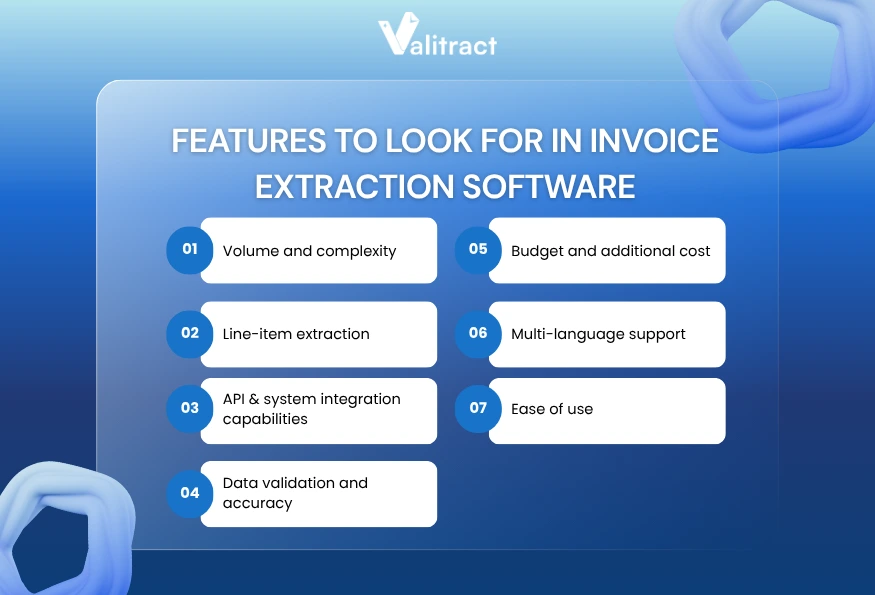
Volume and complexity
Your extraction tool must handle the actual file types your vendors send daily. Contractors often submit photos from their trucks, while large enterprise suppliers send multi-layered digital PDFs.
Data extraction tools handle JPEG, PNG, WebP, and HEIC files natively alongside multi-page PDFs. That broad native support stops workflow blockages when a vendor uploads an uncompressed iPhone photo.
Line-item extraction
Capturing header data like grand totals and invoice dates is a simple target. The real technical challenge lies in the detailed invoice tables.
Table extraction mode inside Valitract lets you pull rows, columns, and merged cells intact. The tool exports that precise grid data to Excel with its original structure preserved, removing the need for manual realignment.
API & system integration capabilities
Extracted text needs a permanent destination to be useful. Invoice data extraction API access lets developers pipe the output directly into your core ERP systems.
Exporting to a JSON format makes that system integration seamless for engineering teams. The data payload drops directly into your database or custom application without intermediate CSV cleanup steps.
Data validation and accuracy
The software must grade its own accuracy levels on every document. Good extraction methods generate confidence scores and highlight uncertain text fields for immediate human review.
That built-in validation step catches smeared ink or complex merged cells early. Your team fixes the specific error before the bad data propagates into your general ledger.
Budget and additional cost
Vendor pricing models vary wildly, from simple per-page fees to flat monthly subscriptions with usage caps. Calculate your expected annual document volume accurately before signing a contract.
Hidden costs often hide in multi-language support tiers or complex line-item add-ons. Read the specific tier limits closely to avoid unexpected billing overages at the end of the quarter.
Multi-language support
Global vendors send invoices containing their native character sets and currency symbols. Look for tools that handle varying international formats right out of the box.
Apps like Valitract automatically detect over 200 languages in a single pass without manual configuration. That auto-detection speeds up the intake process significantly for international finance teams.
Ease of use
Even the most powerful extraction model is useless if your accounting team cannot operate the user interface. The best tools offer a clean, intuitive review screen for daily operators.
Those review screens place the original document image right next to the extracted data fields. Users verify the highlighted text and correct mistakes in a single, focused view.
Key Takeaway: Prioritize software that handles nested table structures natively. Extracting the grand total holds little value if your team still has to type out fifty individual line items.
The Best Practices for Choosing and Implementing Invoice Data Extraction Software
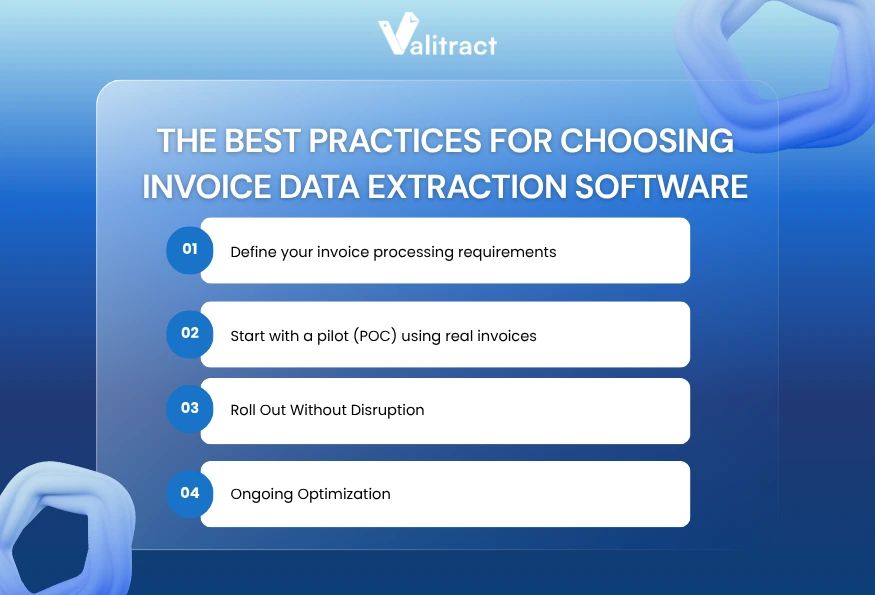
Phase 1: Before you buy: Define your invoice processing requirements
Audit your invoice mix thoroughly before evaluating any software vendor. You need to know the exact percentage of scanned PDFs versus native digital files your team receives monthly.
Set a minimum accuracy threshold based on your current manual entry error rate. Define your integration endpoints clearly so you know exactly where the resulting JSON data needs to land.
Phase 2: Start with a pilot (POC) using real invoices
Run your own internal invoice sample through the software during the trial phase. Never rely on vendor demonstrations using pristine, computer-generated documents.
Test the invoice data extraction using AI against your worst-quality scans. That realistic pilot phase reveals exactly how the system handles rotated pages, coffee stains, and blurry handwritten notes.
Phase 3: Roll out without disruption
Build a clear exception-handling workflow before the official go-live date. Your team needs strict, documented rules for handling fields the machine learning model flags as uncertain.
Audit trails protect your internal compliance and security. Set up that access audit trail from day one to track precisely which user approved or modified every document.
Phase 4: Ongoing optimization
Track a small set of core operational metrics post-launch. Measure the percentage of documents processed straight through the system without any human involvement.
Review your vendor mix and invoice format changes quarterly. Consistent quarterly reviews ensure your deep learning models keep pace with supplier layout updates and new compliance requirements.
Key Takeaway: Successful software implementation requires testing messy, real-world documents during the initial pilot phase to expose platform limitations early.
FAQs about Invoice Data Extraction Software
What is the best invoice data extraction software for small businesses?
Small businesses benefit most from platforms featuring pre-built accounting software integrations like Xero or QuickBooks. Tools that require minimal developer resources offer the fastest return on investment. Look for simple flat-rate subscription pricing and strong mobile upload capabilities for field receipts.
How accurate is AI invoice data extraction vs. manual entry?
AI extraction models handle massive document volumes with extreme consistency. Human typists suffer from eye fatigue, which steadily increases error rates during long shifts. Machine learning models maintain precise character matching across thousands of pages without degrading performance.
Can invoice data extraction software handle PDF invoices?
Modern extraction tools handle both native digital PDFs and flat-scanned image PDFs effortlessly. Advanced layout models read multi-page documents without losing the contextual relationship between different pages. They identify tables perfectly, even when a row breaks across a hard page boundary.
What output formats do invoice extraction tools support (JSON, CSV, Excel)?
Output formats depend entirely on the specific software and the chosen extraction mode. Table extraction workflows export well to Excel for immediate manual review by finance analysts. Developer-heavy workflows require structured JSON or Markdown exports to pipe the data directly into internal SQL databases.
Does invoice data extraction use machine learning or deep learning?
Modern extraction software relies heavily on deep learning models and computer vision. These modern models replace brittle, old-school template OCR methods. Deep learning allows the system to understand document context dynamically and adapt to new vendor layouts without any manual rule creation.
How does invoice data extraction integrate with ERP systems via API?
Software developers use REST or GraphQL APIs to connect the extraction tool directly to the ERP. The extraction platform sends a structured JSON payload containing all the parsed invoice data. The ERP consumes that secure payload and populates the appropriate ledger fields automatically.
What is the difference between OCR and AI extraction?
Generic OCR simply converts dark pixels on a page into plain text strings, reading blindly from left to right. AI extraction understands the actual semantic meaning of that text. The AI knows a specific number is a tax total based on its spatial position near the bottom of a specific column.
Conclusion
Invoice data extraction software is no longer a nice-to-have. It is an essential component for modern finance operations. By replacing manual data entry with automated tools, businesses eliminate processing bottlenecks and significantly accelerate the entire payment lifecycle.
Today’s AI invoice data extraction software leverages advanced models to understand complex table structures and diverse vendor formats. These systems support PDF invoice data extraction, handle multilingual documents, and push structured outputs directly into ERP systems.
For teams looking to implement these capabilities quickly, platforms like ValiTract offer a practical starting point. With a free tier, flexible per-page pricing, and built-in automation integrations (API, Zapier, Make), ValiTract enables finance teams to adopt automatic invoice data extraction without heavy upfront investment or complex setup.
However, choosing the best invoice data extraction software still requires careful planning. Audit your invoice formats, test real documents during a pilot phase, and define clear validation workflows to maintain data accuracy.
When implemented effectively, automated invoice data extraction software tools transform finance operations—shifting teams away from manual typing toward higher-value analysis and decision-making.
Start with a free plan or explore how ValiTract fits your workflow to streamline invoice processing from day one.
Valitract – Next-gen AI-Powered Data Extraction Platform
- Email: contact@valitract.com
- LinkedIn: https://www.linkedin.com/company/valitract-api-platform
- X: https://x.com/valitract