


TL;DR
- An invoice OCR API reads an invoice image or PDF and returns structured data like vendor, date, totals, and line items over a simple web request.
- It replaces manual keying, which industry benchmarks put at roughly $12.88 per invoice and 17.4 days from receipt to payment.
- The best APIs win on accuracy, speed, cost per page, ease of integration, and multi-document support.
- A genuine free tier lets you test on your own invoices before you commit.
An invoice OCR API is a service that reads an invoice, whether a scan, a photo, or a PDF, and returns its data as structured fields your software can use. It turns a picture of an invoice into vendor name, invoice number, date, totals, and line items, delivered over a single web request.
The key word is structured. You do not get a wall of text back, you get labeled fields your code can act on.
That is what separates an OCR API from plain OCR. One gives you characters, the other gives you answers.
The pain it removes is expensive. According to Ardent Partners, companies without best-in-class automation spend an average of $12.88 to process one invoice, with a cycle time of 17.4 days from receipt to payment.
Automation changes that math. Best-in-class AP teams using automated capture process invoices for around $2.78 each and close in about 3.1 days, roughly an 80% cost reduction and a 70% time reduction.
Errors add to the bill. IOFM reports that around 39% of invoices contain errors, and each one costs about $53 to find and fix.
This guide explains how an invoice OCR API works, the service models, how to choose one, what a real free tier looks like, and how to integrate it in minutes. The focus throughout is practical. By the end, you should be able to evaluate a tool and integrate it the same week.
How Does an Invoice OCR API Actually Work?
At a high level, you send an invoice and get back structured data. What happens in between is where the quality is won or lost.
The steps are similar across providers. What separates them is how well each handles a messy, real-world invoice.
From Traditional OCR to AI-Powered Extraction
Traditional OCR converts an image into raw text. It reads the characters on the page, but it does not know that one number is the total and another is a line-item price.
Older tools then bolt on templates. You draw zones for each vendor’s layout, and the tool reads values from fixed coordinates, which breaks the moment a layout changes.
That is why template-based tools disappoint at scale. Every new vendor becomes a maintenance ticket.
AI-powered extraction works differently. Machine-learning models recognize an invoice’s fields by meaning, so they find the total and the line items regardless of where they sit on the page.
The practical result is coverage without templates. A new vendor’s invoice works on the first request, with no zone to draw and no model to retrain.
That is the difference buyers feel most. Template upkeep is a hidden job that never quite ends, and AI extraction removes it.
OCR vs Intelligent Document Processing: The Real Difference
OCR and IDP are often used interchangeably, but they are not the same thing. OCR reads text, while intelligent document processing reads, structures, validates, and routes the data.
An invoice OCR API worth using sits closer to the IDP end. It does not just return text; it returns labeled fields, parses the line-item table, and can validate that the numbers add up.
For invoices, the line items are the hard part. A tool that flattens a table into loose text has not really done the job.
That distinction matters for what you build on top. For a fuller breakdown, see our guide to IDP vs OCR.
For invoices specifically, the IDP capabilities are the ones that pay off. Parsing the line-item table and checking the totals are what turn extraction into usable accounting data.
Invoice OCR API Service: Managed API or Self-Hosted Model?
Once you decide to automate, the next question is how to run it. There are two broad models, and the right one depends on your team.
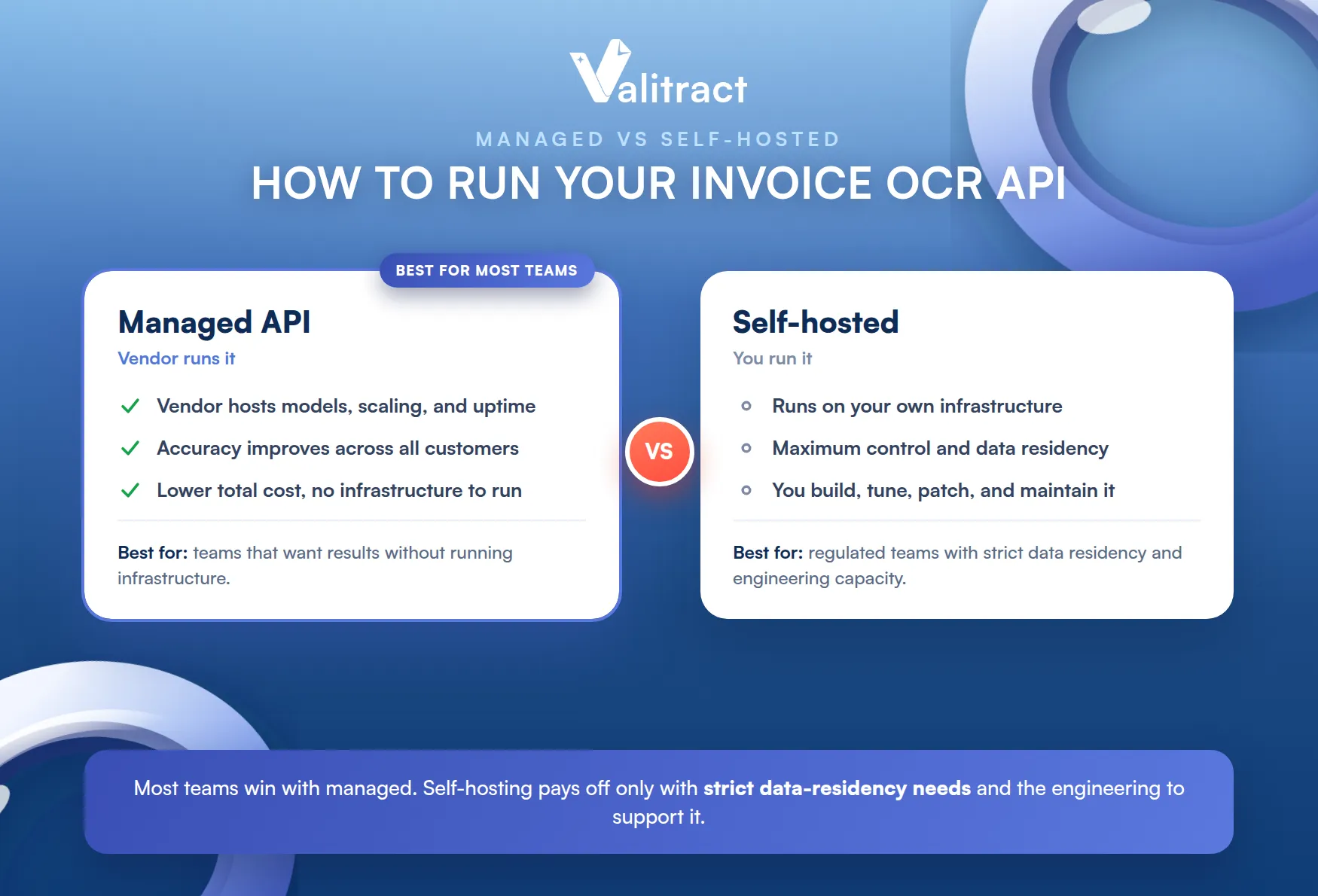
The choice is really about where you want to spend effort. Buy the managed service, or build and maintain the pipeline yourself.
Most teams underestimate the build. Reading an invoice reliably is harder than a proof of concept suggests.
Managed Service vs Self-Hosted OCR
A managed invoice OCR API service is hosted and maintained by the vendor. You send requests to an endpoint, and the provider handles the models, scaling, uptime, and accuracy improvements.
Self-hosting means running an open-source or licensed engine on your own infrastructure. It offers maximum control and data residency, at the cost of the engineering to build, tune, and maintain it.
For most teams, the managed model wins on total cost. The self-hosted route only pays off when you have strict data-residency rules and the engineering capacity to support it.
Accuracy is another factor. A managed provider improves its models across many customers, which a single self-hosted deployment rarely keeps pace with.
The hidden cost of self-hosting is upkeep. Someone has to patch models, handle new invoice formats, and keep the pipeline running, which is rarely in the original budget.
Data residency can still tip the balance. Some regulated teams must keep documents on their own infrastructure, and that requirement outranks convenience.
What a Good Invoice OCR API Service Should Include
Not all managed services are equal. A strong one covers five things without you having to ask.
- Accuracy on real invoices, not just clean demo files, including noisy scans and varied layouts.
- Speed that fits your workload, with fast per-document response and batch processing for volume.
- Scalability that absorbs spikes without you provisioning anything.
- Support and documentation good enough that your developers can integrate without a sales call.
- Security and compliance appropriate for financial data, including encryption and clear data retention.
Weigh these together. A fast API that is inaccurate, or an accurate one that cannot scale, will not survive contact with production.
Test each on your own invoices during evaluation. A demo file will make every service look capable.
What Makes the Best Invoice OCR API? Key Evaluation Criteria
Every vendor claims to be the best. These five criteria let you judge for yourself, on your own documents.
The order matters less than the honesty. Score each option on real inputs, not marketing pages.
Five Criteria to Evaluate
Score each option against the same short list. It keeps a slick demo from setting your requirements for you.
- Accuracy percentage: how many fields are correct on your real, messy invoices, not a clean sample.
- Speed: per-document processing time and whether batch and asynchronous modes exist.
- Cost per page: the all-in price at your real volume, modeled at ten times today’s usage.
- Ease of integration: clear docs, a simple REST endpoint, SDKs, and a no-code option for non-developers.
- Multi-document support: whether it also handles receipts, purchase orders, and statements, not just one invoice format.
No tool wins on every line. Rank the criteria that matter most for your use case, then test the shortlist.
Bring your ugliest invoices to that test. The crumpled scan and the foreign-language PDF are where tools separate.
Quick Benchmark: Valitract vs Industry Averages
To make the criteria concrete, here is how Valitract compares to typical manual and legacy-OCR baselines.
Table 1. Valitract against common baselines.
| Criterion | Manual or legacy OCR | Valitract |
| Field accuracy | Manual entry 1 to 4% error per field | Up to 99.8% extraction accuracy |
| Speed | Minutes per invoice by hand | Around 3 seconds per document |
| Cost | About $12.88 per invoice manually | Up to 40 to 80% lower processing cost |
| Languages | Often single-language | 95+ languages |
| Templates | Per-vendor templates to maintain | Template-free, works on first upload |
Sources: Ardent Partners (manual cost and cycle time); Barchard and Pace (manual entry error rate); Valitract product data. Confirm current figures before publishing.
For a wider view of the category, see our roundup of the best OCR API options.
Treat any benchmark as a starting point. Your own invoices are the only benchmark that truly counts.
The table above is a directional guide. Treat the numbers as a hypothesis to test, not a promise.
Free Invoice OCR API: Try Before You Commit
The best way to judge an API is to run your own invoices through it. A real free tier makes that possible without a sales call.
Beware trials disguised as free tiers. A 14-day window is not the same as a standing free plan you can test against for weeks.
The difference shows in how confidently you buy. A real free tier lets the product earn the purchase.
What Is Included in Valitract’s Free Tier
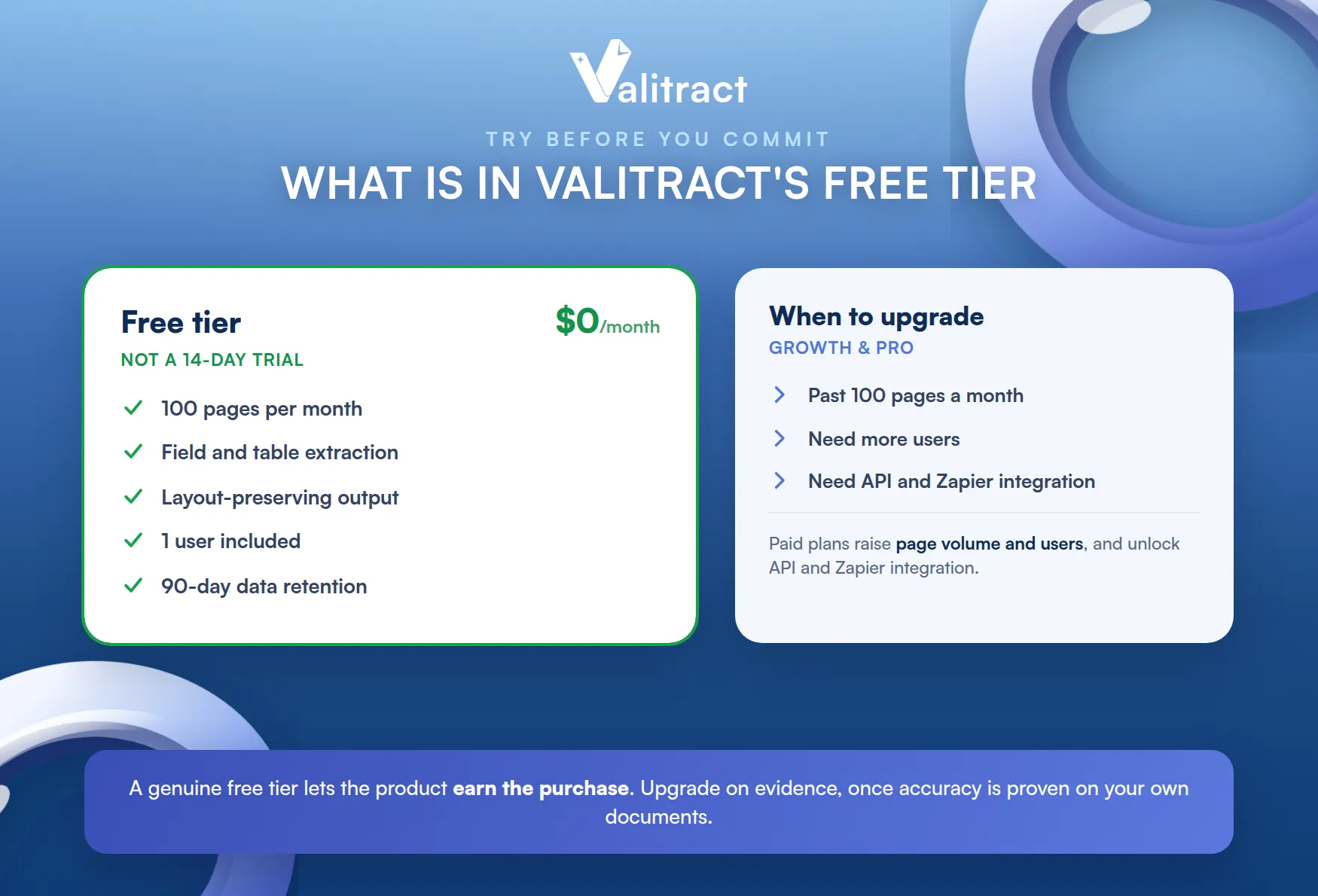
Valitract offers a genuine free tier, not a time-limited trial. It costs $0 per month and includes 100 pages per month, which is enough to test the API on real documents.
The free tier is not crippled. It includes field and table extraction, layout-preserving output, one user, and 90-day data retention.
That means you can evaluate the real product. You extract structured fields and line-item tables from your own invoices, exactly as you would in production.
That honesty is the point of a free tier. You should be able to prove the value before you spend anything.
Free Tier Limits and When to Upgrade
The free tier is built for testing, not high volume. Once you move past 100 pages a month, or need more users and deeper integration, the paid plans take over.
The Growth and Pro plans raise the page volume, add users, and unlock API and Zapier integration for production workflows. The right moment to upgrade is when a successful test turns into a real pipeline.
Upgrade on evidence, not hope. Once the free tier has proven accuracy on your documents, scaling up is a simple decision.
Watch two signals: page volume and integration needs. When you hit either ceiling, the paid plan is the next step.
To see the full extraction feature set, explore the Valitract invoice OCR API free tier, and check the Valitract OCR API pricing page for plan details.
Invoice OCR API Solutions for Every Business Type
Invoices are the common entry point, but most teams soon need more. The strongest solutions read a whole family of documents through one API.
Starting with invoices is sensible. It is usually the highest-volume, highest-pain document, so it delivers the fastest return.
From there, expanding is low-friction. The same integration already handles the next document type.
Beyond Invoices: A Complete Document Suite
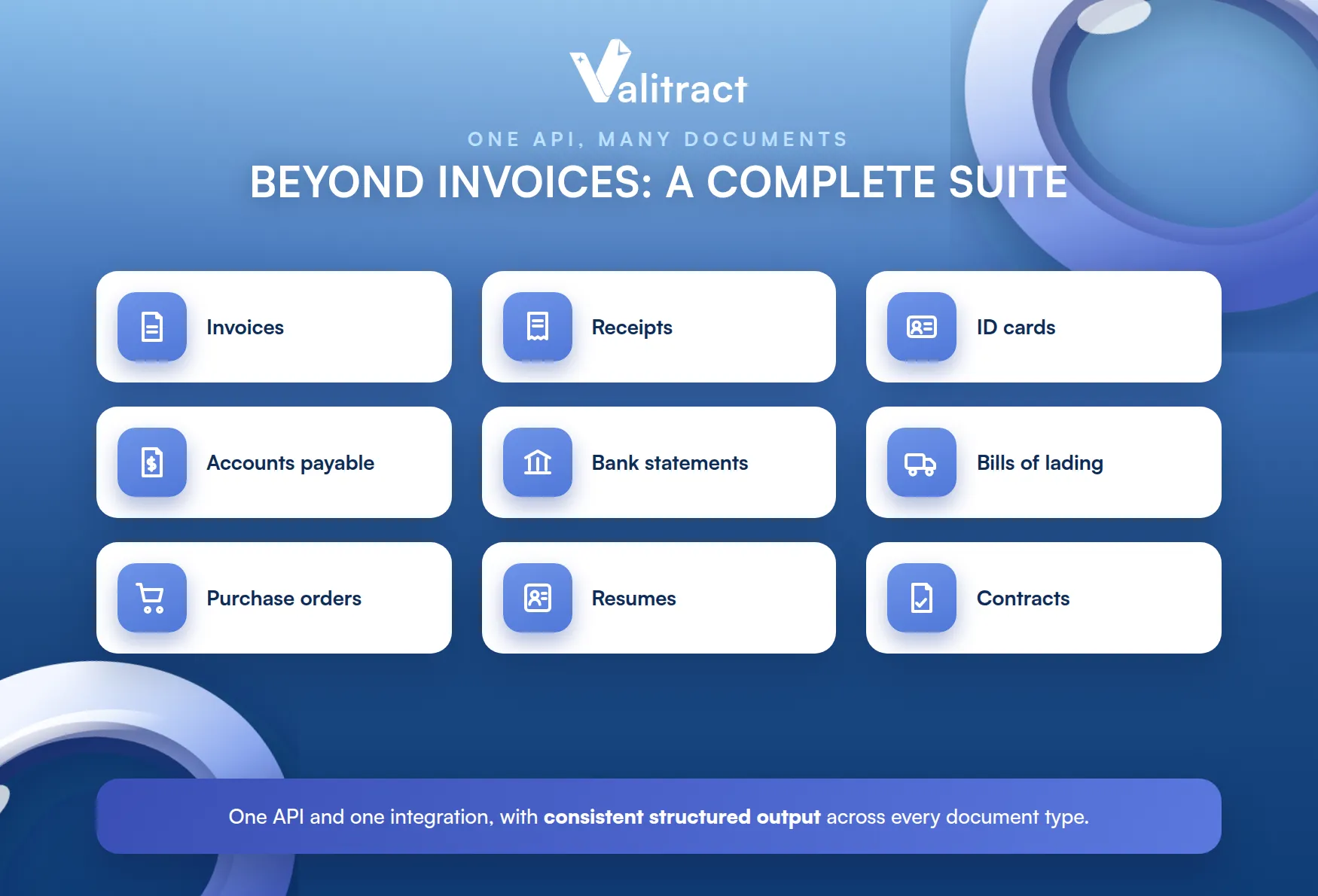
A single vendor and one integration should cover more than invoices. Valitract also extracts from receipts, ID cards, accounts payable documents, bank statements, bills of lading, purchase orders, resumes, and contracts.
That breadth matters for consolidation. One API and one contract covering several document types is simpler and cheaper than stitching together a tool for each.
It also future-proofs the choice. When a new document type appears, you already have the tool for it.
The shared engine also means consistent output. Every document type returns structured, validated data in the same format, ready for the same downstream systems.
That consistency simplifies your code. You integrate once and reuse the same handling across document types.
Industry Use Cases
The same API solves different problems across industries. Here are the most common.
- Accounts payable automation: finance teams extract invoice data straight into the ERP, cutting the manual keying that drives the $12.88 per-invoice cost.
- Business process outsourcing: BPO providers process high volumes of client documents faster and with fewer errors, improving margin per contract.
- Logistics: operators read bills of lading and delivery notes at scale, keeping shipments moving without manual data entry.
- Financial services: lenders and fintechs extract data from statements and IDs for faster onboarding and underwriting.
The thread across all four is the same. Structured data out of documents removes a manual step that scales badly.
Customer quote placeholder: insert a verified quote from GDS BPO, HRI, or DocAI here if available. Do not publish an unverified testimonial.
Integrating an Invoice OCR API in Minutes
A good API is one your developers can adopt in an afternoon. The pattern is the same everywhere: send the document, read the structured response.
There is no pipeline to build first. A single authenticated request is enough to get structured data back.
Code Sample Walkthrough
Below are minimal examples that post an invoice to a generic extraction endpoint and print the structured result. The endpoint path, parameters, and response shape are illustrative, so confirm them against the current Valitract API documentation.
The shape rarely changes much between providers. You authenticate, upload a file, and read a JSON response.
Python:
import requests
API_KEY = “your_api_key”
url = “https://api.valitract.com/v1/extract-generic”
with open(“invoice.pdf”, “rb”) as f:
response = requests.post(
url,
headers={“Authorization”: f”Bearer {API_KEY}”},
files={“file”: f},
)
data = response.json()
print(data[“fields”]) # vendor, invoice_number, date, total
print(data[“line_items”]) # parsed table rows
Node.js:
import fs from “fs”;
import FormData from “form-data”;
import fetch from “node-fetch”;
const form = new FormData();
form.append(“file”, fs.createReadStream(“invoice.pdf”));
const response = await fetch(“https://api.valitract.com/v1/extract-generic”, {
method: “POST”,
headers: { Authorization: `Bearer ${process.env.API_KEY}` },
body: form,
});
const data = await response.json();
console.log(data.fields); // vendor, invoice_number, date, total
console.log(data.line_items); // parsed table rows
Both calls do the same thing. They upload the file, and the API returns labeled fields and the parsed line-item table as JSON.
Error handling aside, that is the whole integration. Most of the remaining work is mapping fields to your own schema.
From there, you map the fields into your own system. The response is clean structured data, so there is no text parsing left to do on your side.
Confidence scores travel with the data. You can route low-confidence fields to a reviewer and auto-post the rest.
That keeps humans in the loop only where they add value. Everything the model is sure about flows straight through.
No Technical Skills? Use the No-Code Platform
Not every team has developers to spare. Valitract also offers a no-code platform, so non-developers can upload invoices and export structured data without writing a line of code.
That widens who can use it. A finance analyst can automate a workflow without waiting on engineering.
That makes the same extraction available to finance and operations teams directly. To see both the API and the no-code interface, explore the Valitract AI-powered OCR API Platform.
The two share one backend. Developers use the API, business users use the dashboard, and both get the same structured output.
Frequently Asked Questions About Invoice OCR API
Can an invoice OCR API read handwritten invoices?
It can read some handwriting, but accuracy is lower than for printed text and varies with legibility. Modern AI models handle handwriting far better than legacy OCR, and a confidence-scoring step should flag uncertain handwritten fields for human review.
How accurate is invoice OCR API extraction?
Accuracy depends on the tool and the input quality. A strong AI-based API reaches up to 99.8% on clean, printed invoices, with accuracy dipping on poor scans, which is why validation and confidence scoring matter as much as the headline number.
Is an invoice OCR API secure for financial data?
It can be, provided the service uses encryption in transit and at rest, controlled access, and clear data retention. Because invoices are sensitive, treat security and compliance posture as a top selection criterion, not an afterthought.
Do I need coding skills to use an invoice OCR API?
For the API itself, yes, a developer sends requests and handles the response. Many providers, including Valitract, also offer a no-code platform so non-developers can extract data through a web interface instead.
What are the limits of a free invoice OCR API?
Free tiers cap page volume, users, and sometimes integrations. Valitract’s free tier includes 100 pages per month, one user, and 90-day retention, which is built for testing rather than running a full production pipeline.
Conclusion: Get Started With Valitract’s Invoice OCR API
An invoice OCR API turns slow, costly manual keying into fast, structured data your systems can trust. It reads invoices and related documents, returns labeled fields and line items, and drops that data straight into your workflow.
The technology is mature and the barrier to trying it is low. A free tier and a few lines of code are enough to see it work.
The payoff is concrete: up to 40% lower processing cost, up to 99.8% accuracy, and integration in minutes, backed by a genuine free tier. Whichever tool you choose, test it on your own invoices before you commit.
The manual alternative is not getting cheaper. At around $12.88 an invoice, the case for automating is only growing stronger.
Start small and let the results decide. Run a batch of real invoices through a free tier, then scale what works.
To discuss your use case, reach the team through the Valitract AI-powered OCR API Platform. Or start for free and run your own invoices through it today.
Valitract – Next-gen AI-Powered Data Extraction Platform
- Email: contact@valitract.com
- LinkedIn: https://www.linkedin.com/company/valitract-api-platform
- X: https://x.com/valitract


