


TL;DR
- Purchase order automation replaces manual PO creation, approval, matching, and payment triggers with a connected digital workflow.
- APQC benchmarks put the cost of processing a single PO at anywhere from about $14 to more than $54, driven mostly by manual work.
- The make-or-break step is three-way matching, which fails when the data extracted from POs, invoices, and receipts is wrong.
- Successful automation is a good workflow plus accurate data from the start, which is the layer Valitract provides.
Purchase order automation is how procurement teams stop pushing paper and email around to buy things. And the manual version is expensive.
APQC benchmarking data shows organizations spend anywhere from about $14 to more than $54 to process a single purchase order, a gap that translates into millions of dollars a year for companies issuing tens or hundreds of thousands of POs.
Most of that cost is manual effort, and much of it is avoidable. But automation is not only about routing approvals faster. It starts with the data on every PO, invoice, and receipt being accurate from the moment it enters your systems.
That distinction shapes this whole guide. Workflow speed and data accuracy are two different problems, and you need both.
This guide covers what purchase order automation is, its components, the cost of getting it wrong, the challenges it solves, three-way matching, the features and steps that matter, where AI is heading, and how the data layer fits.
One theme runs through all of it. Automation is only as good as the data feeding it.
What Is Purchase Order Automation?
The term is broad, so it helps to define it and set its boundaries.
Purchase order automation is the use of software to create, approve, dispatch, match, and reconcile purchase orders with little or no manual effort. It replaces spreadsheets, email, and paper with a connected digital workflow.
It is narrower than procurement automation. E-procurement and procurement automation cover the whole source-to-pay journey, while PO automation focuses on the ordering and matching steps within it.
The distinction matters when choosing tools. You may want a focused PO tool, a full suite, or a data layer that feeds either.
A full PO cycle has a clear shape. It runs from PO creation to approval routing, dispatch to the supplier, goods or service receipt, matching, and finally a payment trigger.
Automation connects those steps into one flow. Instead of handoffs between inboxes, the order moves through a single system.
Manual PO Process vs Automated PO Process
The contrast is stark. Manual purchase order processing relies on paper forms, spreadsheets, and email to manage orders from start to finish, and many companies still work this way despite knowing it is inefficient.
Table 1. Manual versus automated purchase orders.
| Dimension | Manual PO | Automated PO |
| Time to create and approve | Hours to days | Minutes |
| Error rate | High, from re-keying | Low, with validation |
| Visibility | Scattered across inboxes | Real-time status |
| Audit trail | Manual, easy to lose | Logged and timestamped |
For a deeper contrast, see our guide to manual vs. automated purchase order processing.
Key Components of an Automated Purchase Order Workflow
A working automated PO process is a chain of connected steps. Each one used to be manual.
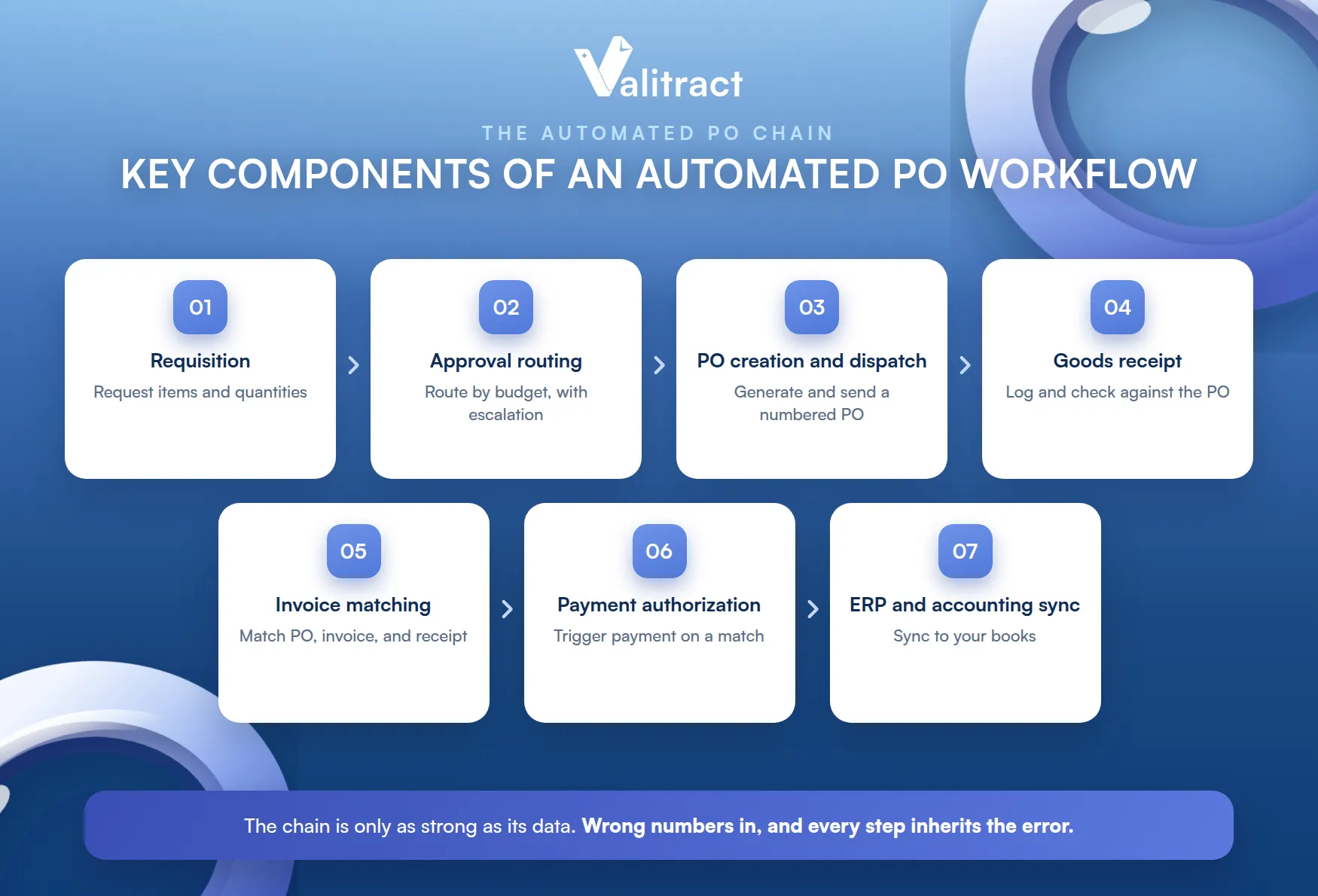
- Requisition or purchase request: an employee raises a request with items, quantities, and a reason.
- Approval routing: the request routes by budget and department, with escalation if it stalls.
- PO creation and dispatch: the system generates a numbered PO and sends it to the supplier, with acknowledgment tracking.
- Goods or service receipt: received items are logged and checked against the PO.
- Invoice matching: the PO, invoice, and receipt are compared before payment is allowed.
- Payment authorization: payment is triggered once matching succeeds.
- ERP or accounting sync: the data syncs to your books to avoid double entry.
The strength of the chain depends on its data. If the numbers entering it are wrong, every downstream step inherits the error.
This is the point most buyers miss. They automate the routing but leave the data entry manual, and the errors flow straight through.
How Does an Ineffective Purchase Order Process Affect Your Bottom Line?
A broken PO process is not just an annoyance. It leaks money, time, and goodwill.
The losses rarely show up as one line item. They hide across departments, which is what makes them so persistent.
Financial Impact: Errors, Overspending, and Maverick Buying
Manual processes invite financial leakage. A mistyped quantity or price leads to overpayment, and purchases made outside the process, known as maverick buying, escape budget controls.
Those leaks are hard to see. Because they are scattered across departments, no single number captures the total loss.
Maverick buying is the costliest of these. Spend that skips the process skips the negotiated price too.
Operational Drag: Wasted Time and Project Delays
Slow POs slow the business. A team waiting on an approval or a corrected order cannot start the work the order was for.
The delay compounds. Each manual handoff adds hours, and a stalled PO can push a whole project past its deadline.
The cost is more than time. A delayed order can idle a team that is paid to be working.
Relationship and Compliance Risk: Suppliers, Legal, and Trust
Suppliers feel a bad process too. Late or disputed orders strain the relationship and can cost you priority or better terms.
Compliance is at stake as well. Missing records and weak audit trails turn a routine audit into a scramble, and industry procurement benchmarks consistently tie poor process control to higher cost and risk.
Trust is the quiet casualty. A supplier burned by a messy process remembers it at renewal.
Common Challenges of the Manual PO Process, and How Automation Fixes Them
Each manual pain has a root cause and a fix. The pattern is the same across teams.
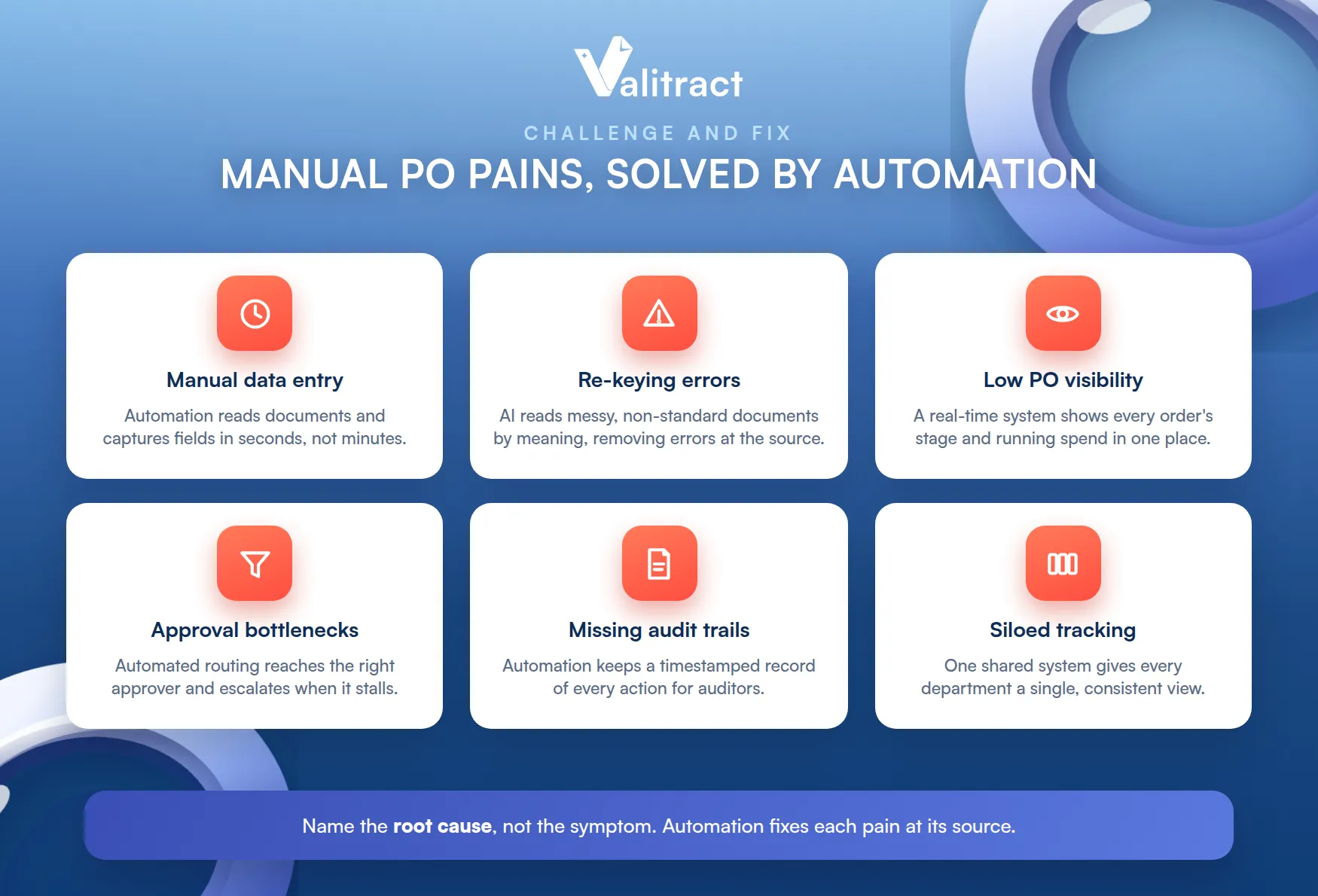
Naming the root cause matters. Fixing the symptom without the cause just moves the problem downstream.
Time-Consuming Manual Data Entry
The challenge is obvious: someone keys every PO, invoice, and receipt by hand. Automation reads the documents and captures the fields, turning minutes of typing into seconds.
High Error Rates From Manual Re-Keying
Re-keying breeds mistakes, and the root cause is often overlooked. Errors come not only from people but from non-standard documents: handwritten POs, blurry scans, and multi-language invoices that manual entry cannot handle reliably.
This is where accurate data extraction matters most. AI that reads messy, varied documents by meaning removes the errors at their source, before they reach your workflow.
Most tools skip this layer. They automate the steps after data entry and assume the input is already clean.
Low Visibility Into PO Status and Spend
Without automation, PO status lives in inboxes. A real-time system shows every order’s stage and running spend in one place.
Approval Bottlenecks
Manual approvals stall in someone’s inbox. Automated routing sends each request to the right approver and escalates when it sits too long.
Inadequate Recordkeeping and Missing Audit Trails
Paper and spreadsheets lose the trail. Automation keeps a timestamped record of every action, which is exactly what an auditor wants to see.
Decentralized, Siloed Tracking Across Departments
When each team tracks POs its own way, the data fragments. A single automated system gives every department one shared, consistent view.
Benefits of Purchase Order Automation
The gains land on both sides of the transaction, and beyond it.
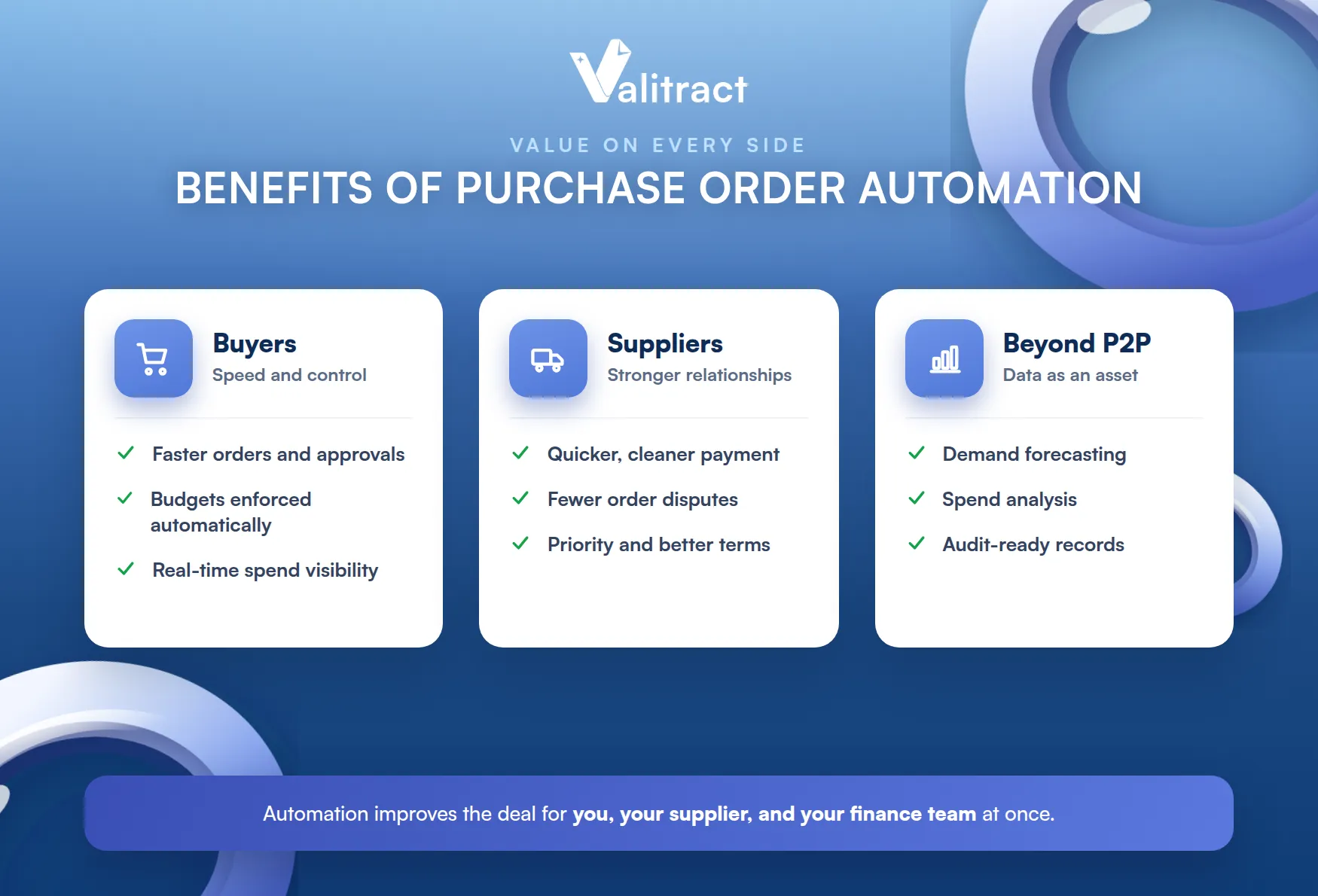
That breadth is why automation pays back quickly. It improves the deal for you, your supplier, and your finance team at once.
How PO Automation Benefits Buyers
Buyers gain speed and control. Orders move faster, budgets are enforced automatically, maverick spend drops, and cash flow becomes visible in real time.
That control is the real prize. Spend that once escaped the process now runs through it.
Visibility follows control. When every order flows through one system, you can see spend as it happens, not months later.
How PO Automation Benefits Suppliers
Suppliers benefit too, which strengthens the relationship. Faster, cleaner matching means quicker payment and fewer disputes over what was ordered and received.
A supplier paid on time is a better partner. Reliability earns priority and, often, better terms.
Benefits Beyond the P2P Cycle: Data for Forecasting and Audit Readiness
The value does not stop at faster processing. Accurately digitized PO and invoice data becomes an asset for demand forecasting, spend analysis, and financial reporting.
It also makes audits routine. Clean, structured, traceable records turn audit readiness from a project into a default state.
Three-Way Matching: The Make-or-Break Step in PO Automation
If one step decides whether PO automation succeeds, this is it. It is also where most systems quietly break.
What Is Three-Way Matching?
Three-way matching compares three documents before a payment is released: the purchase order, the supplier invoice, and the goods receipt. When all three agree on items, quantities, and prices, the invoice is cleared to pay.
When they disagree, the invoice becomes an exception. Someone then investigates why the three do not line up.
It is the core financial control in procurement. It stops overpayments, duplicate payments, and payment for goods never received.
Done well, it runs silently. Most invoices clear on their own, and only genuine mismatches reach a person.
Why Three-Way Matching Fails in Most Automated Systems
Here is the gap competitors rarely mention. A workflow can be fully automated, yet if the data extracted from an invoice or receipt is wrong, the match fails and drops to a human to resolve.
The culprit is weak extraction. Template-based OCR stumbles on a new supplier’s invoice layout or a scanned receipt, so exceptions pile up and the promised automation never materializes.
The team then does the work by hand anyway. The automation exists on paper, but not in the daily routine.
How AI-Powered Data Extraction Makes Three-Way Matching Work
The fix is accurate data at the source. AI-powered OCR data extraction reads POs, invoices, and receipts in any format and returns clean, structured, validated fields, so the three documents can actually be matched automatically.
This is the foundation the rest depends on. Our Valitract AI data extraction software and OCR API provide exactly this layer, turning messy documents into match-ready data.
Must-Have Features in Purchase Order Automation Tools
When comparing tools, a short checklist separates the serious from the superficial.
- Automated PO creation and templating, so orders generate consistently.
- Approval workflow and routing by budget threshold, with escalation.
- ERP integration with NetSuite, SAP, QuickBooks, and Xero, so data flows without double entry.
- Cloud-based access, for real-time collaboration from anywhere.
- AI-powered document extraction and three-way matching, the accuracy layer under it all.
- Real-time reporting and an audit trail, for visibility and compliance.
If you are comparing specific tools, see our detailed roundup of the best purchase order automation software. It answers which options fit which needs without repeating a listicle here.
Whatever you shortlist, test the extraction on your real documents. That is the feature that decides whether matching actually runs unattended.
How to Adopt Purchase Order Automation: Step by Step
Adoption is a short project when you take it in order. Five steps get you from manual to automated.
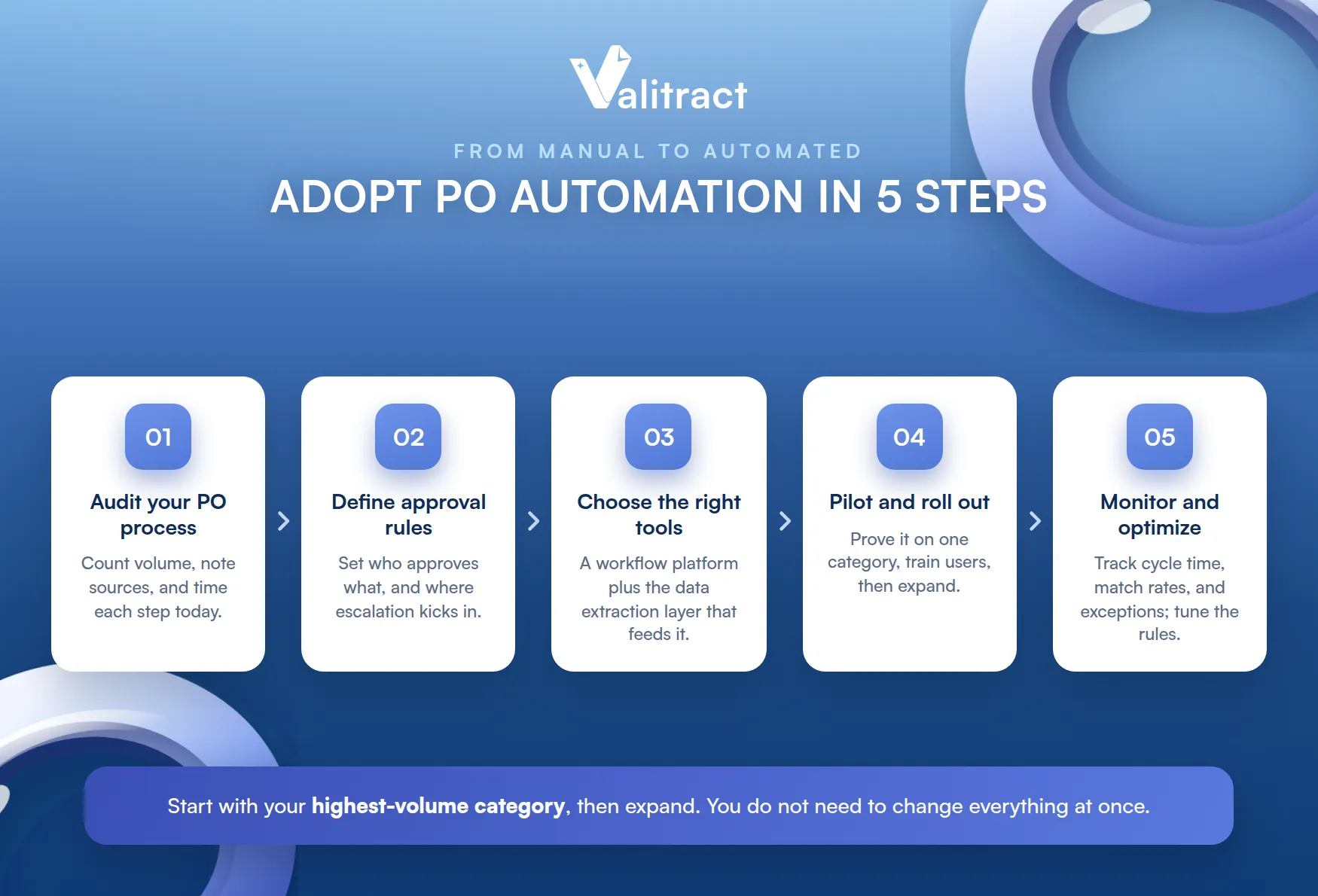
You do not need to change everything at once. Start with the highest-volume category and expand from there.
Step 1: Audit Your Current PO Process
Start by mapping what you have. Count PO volume, note where orders originate, and time how long each step takes today.
Step 2: Define Approval Rules and Budget Thresholds
Next, set the rules the system will enforce. Decide who approves what at which spend level, and where escalation kicks in.
Step 3: Choose and Integrate the Right Tools
This step trips many teams up. They pick a workflow platform and forget the data extraction layer that feeds it, then wonder why matching still needs manual work.
Fit the choice to your size. A small business may need a lean, cloud-based tool, while an enterprise needs deep ERP integration, but both need accurate extraction underneath.
Think in two layers, not one. The workflow tool routes and approves, and the data layer makes sure what it routes is correct.
Step 4: Pilot, Train Teams, and Roll Out
Start small and prove it. Run a pilot on one category or department, train the users, then expand once it works.
Step 5: Monitor, Measure, and Optimize
Finally, watch the numbers. Track cycle time, match rates, and exceptions, and tune the rules as real orders flow through.
Best Practices to Maximize PO Automation Efficiency
A few habits keep an automated process healthy over time.
Automation is not set-and-forget. It rewards a little regular attention to stay accurate as suppliers and documents change.
Standardize Vendor Onboarding
Consistent vendor data prevents downstream mess. Standardize how suppliers are added, so their invoices match cleanly from day one.
Enforce Budget Controls and Approval Thresholds
Let the system hold the line. Automated thresholds enforce budgets more consistently than any manual reviewer can.
Use Real-Time Analytics and Dashboards
Watch spend as it happens. Live dashboards catch overspending and bottlenecks while you can still act on them.
Regularly Audit for Exceptions and Data Accuracy
Audit the data, not just the process. Reviewing extraction accuracy and match exceptions regularly is what keeps the automation from silently drifting.
The Next Frontier: AI Agents in Purchase Order Automation
Automation is moving from following rules to making judgments. This is where procurement is heading next.
From Rule-Based Automation to Autonomous AI Agents
Traditional automation follows fixed rules. Agentic AI goes further, reasoning about a document or an exception and deciding how to handle it, rather than routing it to a person.
The promise is fewer human touches. The work that rules cannot cover is exactly what an agent aims to take on.
That shift changes the ceiling. Tasks that once needed a human because they were ambiguous become candidates for automation.
The direction is clear even if the timeline is not. Procurement is moving from automated steps to automated judgment.
How Agentic AI Will Handle End-to-End PO Exceptions
The clearest use is exceptions. An AI agent could read a mismatched invoice, work out why it does not match, and propose or apply a resolution, closing the loop that manual review slows today.
Every agent still needs clean data to reason over. Accurate extraction is the foundation any AI agent depends on, which is why the data layer matters more, not less, as automation grows more autonomous.
Choosing Valitract as Your Purchase Order Automation Data Layer
Valitract is not an e-procurement suite, and it does not replace tools like Tipalti or Ivalua. It is the AI-OCR data extraction layer that makes any PO automation system or ERP work accurately.
It reads the documents that drive a PO. Valitract extracts data from purchase orders, invoices, and receipts in any format, across 95+ languages, at up to 99.8% accuracy.
It fits into your stack cleanly. Valitract offers a no-code platform and an API, outputs JSON, XLS, or CSV, and is built with enterprise-grade security for sensitive financial data.
It works with what you already run. Rather than replacing your PO system, it feeds it the clean data it needs.
That is the role it plays: the accurate-data foundation your workflow and matching depend on. See our flexible pricing to find the plan that fits your volume.
Frequently Asked Questions About Purchase Order Automation
What is purchase order automation?
It is the use of software to create, approve, dispatch, match, and reconcile purchase orders with little or no manual effort, replacing spreadsheets, email, and paper. It speeds up ordering, enforces budgets, and keeps a clean audit trail.
Which purchase order automation software is the best?
There is no single best tool; the right choice depends on your size, stack, and volume. For a detailed side-by-side, see our roundup of the best purchase order automation software.
Is purchase order automation suitable for small businesses?
Yes. Cloud-based tools make automation accessible to small teams without heavy IT, and accurate data extraction underneath keeps matching reliable at any size.
Does purchase order automation support three-way matching?
Good systems do, comparing the PO, invoice, and receipt before payment. The catch is that matching only works if the data extracted from those documents is accurate, which is where AI extraction earns its place.
How does AI improve purchase order accuracy?
AI reads POs, invoices, and receipts by meaning rather than fixed position, so it handles varied layouts, handwriting, and multiple languages. That removes the re-keying errors that cause failed matches and manual exceptions.
What is the difference between purchase order automation and procurement automation?
Purchase order automation focuses on the ordering and matching steps, while procurement automation covers the whole source-to-pay process, including sourcing and supplier management. PO automation is one part of the larger procurement picture.
Conclusion
Purchase order automation succeeds when a good workflow meets accurate data from the very first input. The workflow speeds approvals and matching, while clean extraction keeps three-way matching from collapsing into manual exceptions.
Get both right, and the cost of a PO falls, visibility rises, and audits become routine. Get the data wrong, and even the best workflow stalls.
Valitract provides the accurate-data layer that makes your PO automation and ERP actually work. To see it on your own documents, book a demo with the Valitract team.
Valitract – Next-gen AI-Powered Data Extraction Platform
- Email: contact@valitract.com
- LinkedIn: https://www.linkedin.com/company/valitract-api-platform
- X: https://x.com/valitract


