


API integration automation is connecting two or more applications through their APIs so data moves between them on a trigger, with no one copying it by hand. The request, the response, the error handling, and the retry all run unattended. Note that this is different from API test automation, which checks that an API behaves correctly rather than moving data between live systems.
API integration automation is what turns a stack of disconnected apps into something that runs itself. Instead of a person exporting a CSV from one tool and pasting it into another, an automated integration moves the data the moment it changes, handles the errors, and retries when something hiccups.
The build is usually the easy part. The maintenance, the edge cases, and the sources that have no API at all are where the real work lives, and that is what this guide is about: how an automated call actually works, where these automations break in production, and how to decide what to automate first.
The distinction worth holding onto from the start is that an integration is only as reliable as its least-handled failure. A workflow that runs perfectly until the first unexpected input is not automated so much as demonstrated.
How API Integration Automation Actually Works
Every automated integration, however simple it looks in a no-code builder, is a single automated API call repeated reliably. Seven components make up the anatomy of that call, and knowing them is what lets you debug one when it stops.
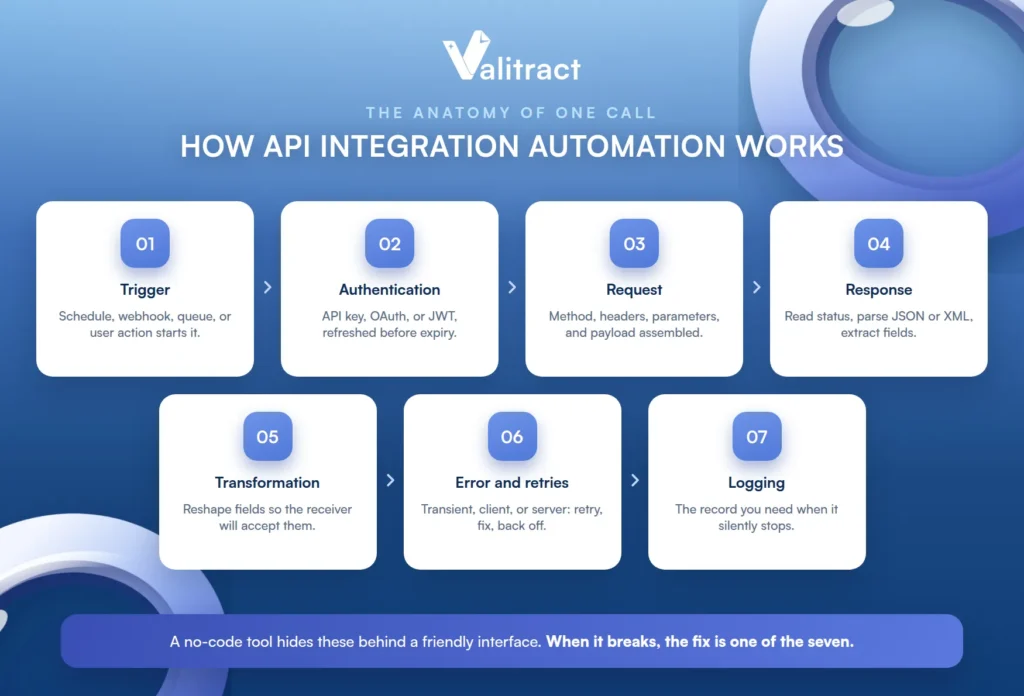
A no-code tool hides most of these behind a friendly interface, which is a strength until something breaks. When it does, the fix is always in one of the seven, so it pays to know they are there.
Trigger. Something has to start the call: a schedule, a webhook from another system, a queue message, or a user action. The trigger decides whether your automation runs in real time or on a batch, which shapes everything downstream.
Authentication. The call has to prove it is allowed, using an API key, an OAuth token, or a JWT, and it has to refresh that token before it expires. Auth is quiet when it works and a silent killer when a token lapses.
Request construction. The call is assembled from a method, headers, parameters, and a payload. Getting the shape of this right is most of what a connector does for you invisibly.
Response handling. The call reads the status code, parses the JSON or XML that came back, and extracts the fields it needs. A 200 means the call succeeded, not that the data inside it is correct, a distinction that matters later.
Data transformation. Fields almost never line up between two systems, so values get reshaped, renamed, and reformatted until the receiving system will accept them. This is where most of the fiddly logic in an integration lives.
Error handling and retries. A robust call distinguishes a transient failure (retry it) from a client error (fix the request) from a server error (wait and back off). The absence of this is what separates a demo from a production system.
Logging and observability. Every call leaves a record, and that record is the only thing you have when an automation silently stops working. Without it, you find out from an angry colleague, not a dashboard. This is the component teams skip first and regret most.
API Integration Automation vs. API Test Automation vs. RPA
The phrase “API automation” means three different things to three different audiences, and landing on the wrong one wastes everyone’s time. This table separates them so you can confirm you are in the right place.
The confusion is understandable, because all three genuinely involve APIs and automation. What differs is whether the goal is moving data, testing behavior, or managing an API’s life, and those are entirely separate jobs.
| Approach | What it does | Who uses it |
|---|---|---|
| API integration automation | Moves data between live systems on a trigger | Ops, RevOps, finance, and developers |
| API test automation | Verifies an API behaves correctly before release | QA and DevOps teams |
| API lifecycle automation | Manages an API from design through retirement | Platform and API teams |
| RPA | Mimics clicks in a UI when no API exists | Ops teams with legacy software |
If you came looking for Postman collections and CI/CD pipelines, you wanted the second row; this article is the first.
The practical rule that ties these together is simple. If a system exposes an API, integrate it directly; if it does not, robotic process automation (RPA) or document extraction is the fallback, a point the section on missing APIs picks up in detail.
Where API Automations Actually Break in Production
Every tutorial documents the happy path, and every practitioner thread documents the opposite: the build is easy, and the maintenance is not. Here are the failure modes that actually cause the 2 a.m. pages, each with its symptom and its fix.
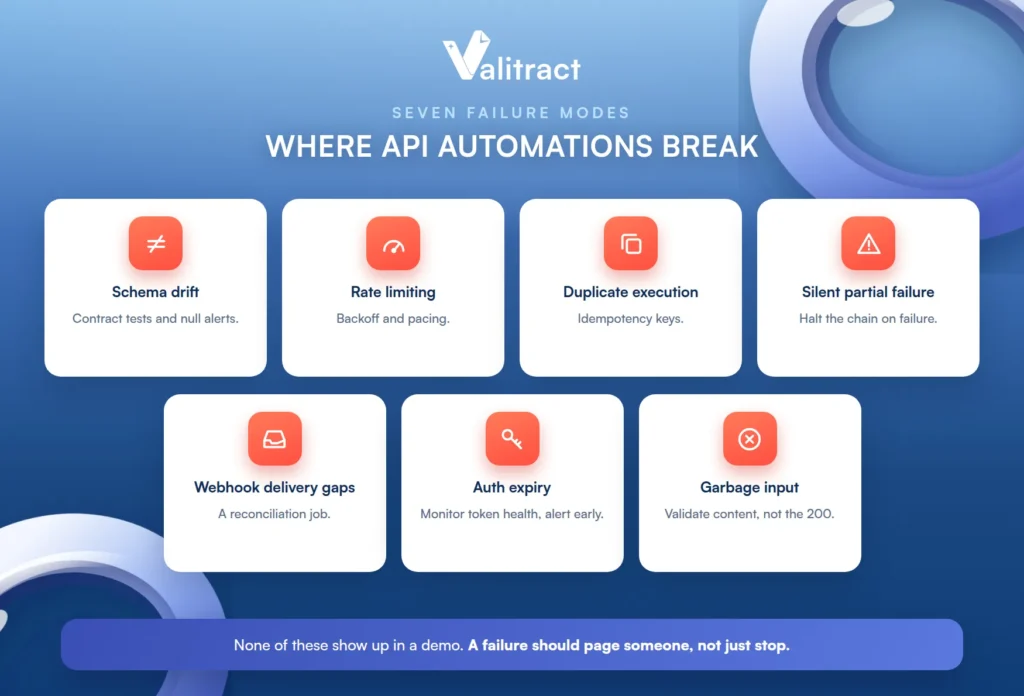
What these share is that none of them show up in a first demo. They surface at volume, over time, or on the input nobody tested, which is exactly why they are so often designed around too late.
Schema drift. Someone renames a field in the CRM, and every downstream step silently maps it to null. The fix is contract tests and alerting on unexpected nulls, so a rename surfaces immediately instead of corrupting records quietly.
Rate limiting. The automation works flawlessly at 50 records and falls over at 5,000, because the target API throttles it. The fix is backoff and pacing, spacing the calls so you stay under the limit rather than hammering it.
Duplicate execution. A retry fires a second time and creates two records instead of updating one. The fix is idempotency keys, so a repeated call is recognized as the same call and does not double-write.
Silent partial failure. Step three of seven fails, steps four through seven run against incomplete data, and nothing alerts. The fix is to halt the chain on a failed step rather than letting it run on garbage.
Webhook delivery gaps. The sending system retries three times and gives up while your endpoint happens to be down, and the event is simply lost. The fix is a reconciliation job that periodically checks for anything the webhooks missed.
Auth expiry. A refresh token quietly expires and the automation dies on a Friday night, discovered on Monday. The fix is monitoring token health and alerting before expiry, not after.
Garbage input. The API call succeeds with a clean 200, and the data inside it is wrong, which no status code will ever catch. The fix is validating the content, not just the response code, before it reaches a system of record.
The thread running through all seven is observability. The difference between a hobby automation and a production one is whether a failure pages someone or just stops.
What to Do When the Data Source Has No API
The most common reason an automation stalls is not a broken endpoint. It is that the data arrives as a PDF, a scan, or an email attachment, and there is no API to call at all. Workflow tools are powerful, but they cannot hit a system that does not expose an API, and a surprising share of business-critical data still shows up as a document.
There are three practical routes when the source has no API, and it is worth being honest about each.
The right one depends on the source. A stable internal web app suits browser automation, a one-off migration might tolerate manual entry, and a steady stream of documents calls for extraction.
RPA or browser automation works by mimicking a human clicking through a UI. It is a genuine option, but it is brittle against interface changes, so a redesigned page can break it overnight.
Manual entry into a staging table is the honest fallback: a person keys the data into a structured place the automation can read. It is not a solution so much as an admission that the other two routes were not set up, and it does not scale.
A document extraction API turns the unstructured file itself into a JSON payload the automation can act on. This is the route that keeps the automation unattended, because the document becomes structured data before the workflow ever sees it.
Valitract is one working example of that third route. It provides template-free extraction from invoices, receipts, bank statements, purchase orders, and IDs, returning JSON, CSV, or XLS through a REST API, with connectors into Zapier, Make, and n8n so the output drops into an existing workflow rather than replacing it. This is the layer our guides to intelligent document processing and the invoice OCR API describe in depth.

The value of the extraction route is that it keeps the rest of your automation unchanged. The workflow still runs in whatever tool you already use; it simply receives structured data where it used to receive nothing it could act on.
The honest boundary belongs in the same breath. This converts a document into structured data; it does not orchestrate the workflow, execute payments, or replace a procure-to-pay platform. The automation tool still owns the routing and the logic, and the extraction layer simply hands it a clean payload it could not get any other way.
How to Choose Between iPaaS, No-Code, and Custom Code
There is no universally correct tool, only the right one for your volume, your team, and your data. Rather than another vendor listicle, here are the six questions that actually decide it.
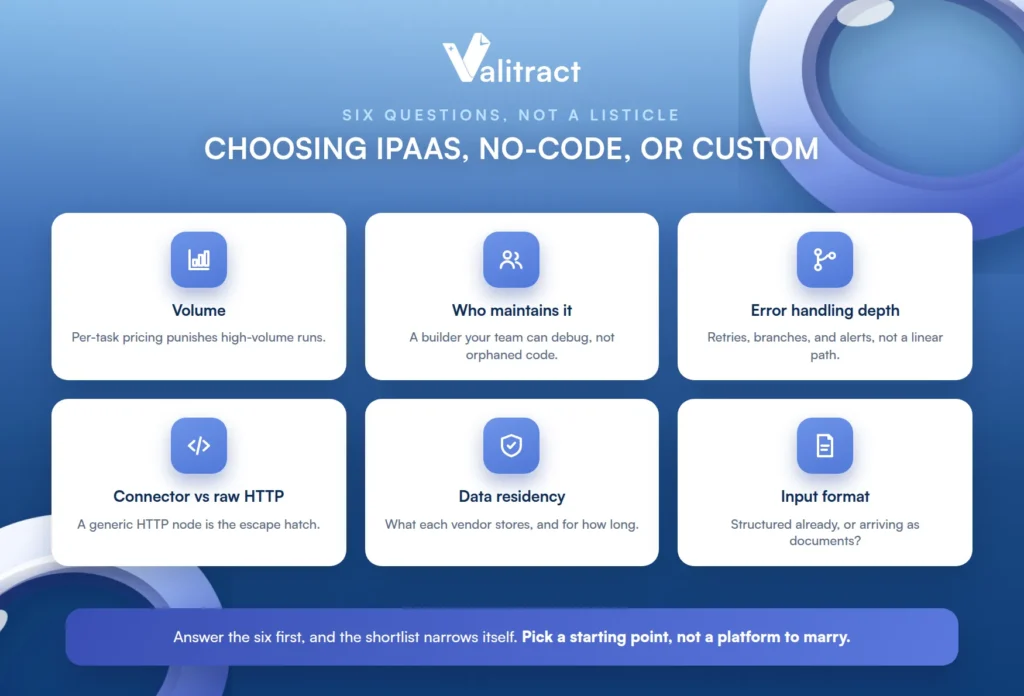
Answer these first and the shortlist narrows itself, because most tools are clearly strong on some of the six and clearly weak on others. The wrong way round is to pick a tool and then discover which questions it answers badly.
Volume. Per-task pricing punishes high-volume runs, while execution-based or self-hosted pricing does not. Estimate your monthly run count honestly before you fall in love with a tool that gets expensive at scale.
Who maintains it. A no-code builder your ops lead can debug beats elegant code that only one departed engineer could read. The best tool is the one your actual team can keep running.
Error handling depth. Ask whether you can set retries, branches, and alerts, or only a linear happy path. The tools that look simplest often hide the least room for the error handling production demands.
Connector coverage versus raw HTTP. A missing connector is not a dealbreaker if the tool exposes a generic HTTP request node, which lets you call any API by hand. Coverage matters less than whether the escape hatch exists.
Data residency and retention. Check what each vendor in the chain stores and for how long, because an automation often touches more services than you think. This matters most in regulated and finance workflows.
Input format. Ask whether your source data is already structured or arrives as documents, because that decides whether you need an extraction step at all. If half your inputs are PDFs, no connector list solves that.
Named by shape rather than ranked: Zapier is strongest for breadth and speed, Make and n8n for branching logic and cost control, and Workato and MuleSoft for governed enterprise integration. For document sources specifically, the cheapest way to learn whether extraction removes the manual step is to run your own files through a free tier before committing to anything; Valitract’s is 100 pages a month with no credit card. Our overview of document workflow software covers the surrounding tooling.
None of these choices are permanent. The point of answering the six questions is to pick a defensible starting point, not to marry a platform, and a tool that fits today can be revisited as volume and complexity grow.
Common Mistakes in API Integration Automation
A handful of mistakes account for most of the automations that quietly fail. Each is avoidable once named.
They tend to share a root cause: optimism at build time about how clean the inputs and how stable the systems will be. Designing for the messy, changing reality instead is what makes an automation last.
The first is building for the happy path and treating error handling as a later phase that never arrives. The second is testing on clean sample data instead of the messy records production actually sends, which hides every edge case until launch.
The third is automating a broken manual process instead of fixing the process first, which just makes a bad workflow run faster. The fourth is treating “the API returned 200” as proof the data is correct, when a successful call can carry wrong data.
The fifth is skipping validation on extracted or transformed fields before they hit a system of record; automated data validation is what stops a bad value from spreading. The sixth is chaining so many steps that no one can tell which one failed when the whole thing stops.
Frequently Asked Questions About API Integration Automation
What is API integration automation?
It is connecting two or more applications through their APIs so data moves between them automatically on a trigger, without anyone copying it by hand. The request, response, error handling, and retries all run unattended. The goal is data that flows between systems on its own and stays in sync.
What is the difference between API automation and API test automation?
API integration automation moves real data between live systems as part of a workflow. API test automation verifies that an API behaves correctly before a release, and it is a QA and DevOps activity rather than a data-movement one. They share the word “API” and almost nothing else.
Is API integration automation the same as RPA?
No. API integration automation talks to a system directly through its API, which is faster and more reliable. RPA (robotic process automation) mimics a human clicking through a user interface, and it is the fallback for legacy systems that expose no API. If an API exists, integrating it directly is almost always the better choice.
Can you automate API integrations without writing code?
Yes. No-code and low-code platforms like Zapier, Make, and n8n let you build integrations visually, and they cover a large share of common needs. Custom code becomes worthwhile when you need logic, performance, or control the platforms cannot provide, or when per-task pricing gets expensive at high volume.
How do you automate a workflow when the source system has no API?
You have three options: RPA that mimics UI clicks, manual entry into a staging table, or a document extraction API that turns the file into structured data. For documents like invoices and statements, extraction keeps the workflow unattended by converting the PDF or scan into a JSON payload the automation can act on. Manual entry is the honest last resort.
What causes API automations to break after they go live?
The usual culprits are schema drift when a field is renamed, rate limiting at higher volume, expired auth tokens, duplicate execution from retries, and garbage data that passes a status check but is wrong. Most are invisible without observability, which is why logging and alerting separate a production automation from a hobby one. The build is rarely the hard part; the maintenance is.
How much does an API integration cost to build?
It ranges widely, from near-zero for a simple no-code Zap to significant engineering time for a custom, high-volume, governed integration. The larger and more often overlooked cost is maintenance: monitoring, handling API changes, and fixing the failures above. Budget for the upkeep, not just the build.
Conclusion
API integration automation is straightforward to start and unforgiving to maintain, so the teams that succeed are the ones that plan for the failure modes, not just the happy path. Build in error handling and observability from the first version, validate the data rather than trusting a 200, and be honest about which sources have no API at all.
For those document-shaped sources, extraction turns a PDF or scan into the structured payload your automation needs, so the file becomes just another input the workflow can act on. Get the anatomy right, respect where each layer’s job ends, and the integration runs itself instead of running your week.


