


- Automated data processing replaces manual, repetitive data tasks with systems that extract, validate, and structure information, freeing teams to analyze instead of type.
- The gains show up in five areas: speed, accuracy, cost, scalability, and decision-making.
- Most content on this topic stops at structured, database-style data and overlooks a major source of manual work: unstructured documents like invoices, receipts, and bank statements.
- Turning unstructured documents into usable data is often the hardest part to get right, and where accuracy matters most, since one misread number can throw off a downstream decision.
The benefits of automated data processing are usually explained in terms of structured data: databases, pipelines, and ETL jobs moving clean rows from one system to another. That picture is real, but it is incomplete.
In many organizations, the largest pile of manual work is not in the database at all. It sits in unstructured documents, the invoices, receipts, and bank statements that someone still reads and keys by hand.
That work is easy to underestimate. It rarely appears on a system diagram, yet it consumes real hours in finance, operations, and legal every day.
This guide covers ten concrete benefits of automated data processing, who gains most from it, how to start, and where document extraction fits, the part most articles leave out.
The theme throughout is simple. The biggest wins are hiding in the documents, not the database.
What Automated Data Processing Actually Involves
Automated data processing is the use of software to collect, extract, validate, and structure data with little manual effort. It turns raw inputs into clean, usable information a system can act on.
It splits across two kinds of data, and the difference matters. Structured data already lives in rows and columns, so tools like ETL pipelines move and transform it. Unstructured data, by contrast, is trapped in documents (PDFs, scans, and photos) and has to be read and structured before any pipeline can touch it.
Most coverage of this topic focuses on the first kind. The benefits below apply to both, but the document side is where the hidden hours are.
Keeping the two straight is practical, not academic. It tells you which kind of tool a given process actually needs.
The Benefits of Automated Data Processing
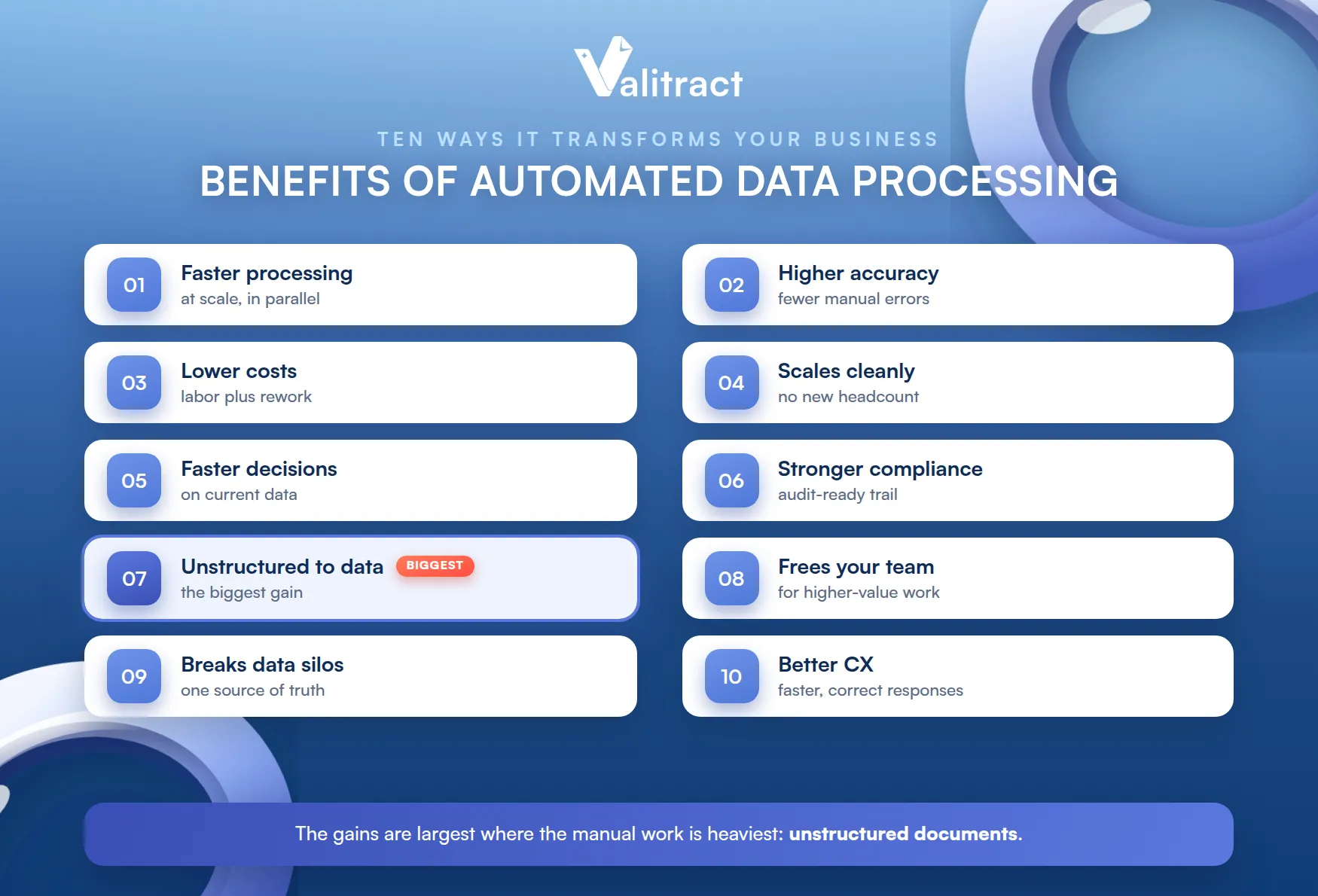
Here are ten ways automated data processing changes how a business runs. Each targets a specific, familiar pain.
They reinforce one another. Speed enables scale, accuracy enables trust, and freed time enables better decisions.
1. Faster Processing at Scale
Manual processing is linear: more documents means more hours. A person keying transactions from a stack of statements works at a fixed, slow pace no matter how urgent the task.
Automation breaks that link. A system batch-processes hundreds of documents or transactions in minutes, reading and structuring them in parallel rather than one at a time.
Throughput no longer depends on how fast someone can type. It depends on the pipeline, which does not tire or slow down.
The effect compounds with volume. What took an afternoon of typing becomes a job that finishes before the coffee cools.
Speed also removes a bottleneck for everyone downstream. When processing keeps pace with intake, work stops piling up in a queue.
2. Higher Accuracy, Fewer Manual Errors
Manual entry has a built-in error rate. Studies put it at roughly 1% to 4% per field, and a single wrong digit in a total or a missed line can corrupt a report.
That floor does not move with effort. It is a property of manual keying, so training reduces it but never removes it.
Automation with validation attacks this directly. It reads the data and then checks it, confirming formats and totals so an error is caught rather than passed downstream, which matters most for financial and numeric data where the numbers must reconcile. This is why accurate bank statement data extraction is so valuable.
Validation is what makes the accuracy trustworthy. A number that reads correctly and passes its checks is one you can safely act on.
The gain is measurable. Automation is widely reported to cut data errors substantially, often by around 80% versus manual entry.
Accuracy matters most where numbers must reconcile. In finance, a small extraction error does not stay small once it reaches the books.
3. Lower Operating Costs
Manual data work is expensive labor. Hours spent keying and re-checking documents are hours paid for a task that adds no insight on its own.
The true cost is higher than the wage. It also includes the delay and the errors that manual work introduces.
Automation lowers that cost twice over. It removes the repetitive labor, and it cuts the expensive rework that follows an error found late, since poor data quality costs organizations an average of $12.9 million a year by Gartner’s estimate.
Those two savings usually cover the tool’s cost quickly. At any real volume, the labor and rework avoided outweigh the subscription.
The savings scale with volume. The more documents you process, the larger the gap between the manual and automated cost.
The cost of errors is the hidden half. Prevented rework rarely shows on a report, but it is real money saved every month.
4. Scalability Without Proportional Headcount
Growth usually means hiring, but data work does not have to. When volume doubles, a manual process needs roughly double the hours, which means more people or more overtime.
Automation decouples volume from headcount. The same pipeline that handles today’s load handles a multiple of it, so you scale throughput without scaling the team that keys it.
That elasticity is hard to match by hand. Hiring for a spike is slow, and unwinding it afterward is painful.
Seasonal peaks stop being a crisis. A month-end or quarter-end surge is absorbed by the same pipeline that runs the rest of the year.
5. Faster, More Reliable Decision-Making
Decisions are only as good as the data behind them. When information sits in a backlog of unprocessed documents, leaders decide on stale or incomplete numbers.
Automation shortens that gap. Data is extracted, validated, and available in near real time, so decisions rest on current, reliable figures rather than a week-old snapshot.
Reliability is half the value. A fast decision on wrong data is worse than a slow one, which is why the validation step matters as much as the speed.
Current data changes what is possible. Teams can act on this week’s numbers instead of reacting to last month’s.
6. Stronger Compliance and Audit Trails
Manual processes leave a patchy trail. When data is handled across spreadsheets and inboxes, reconstructing who did what, and when, becomes a scramble at audit time.
Automation records every step. It logs each extraction and change consistently, producing a timestamped, traceable trail that is exactly what auditors and regulators expect to see.
That record is a control, not just a convenience. A clean audit trail turns compliance from a project into a default.
It also shortens audits. When every step is logged, proving what happened takes minutes rather than days of reconstruction.
7. Turning Unstructured Documents Into Usable Data
This is the benefit most articles skip, and it is the biggest. In accounting, operations, and legal teams, the heaviest manual workload is not database entry; it is reading data out of documents.
The reason is structural. A bank statement, invoice, or receipt arrives as a PDF, scan, or photo, with no columns for a traditional ETL tool to grab, so a person has to transcribe it first. That transcription is where the hours and the errors both live.
Traditional pipelines assume clean rows. They were never built to read a scanned document, which is why this work stayed manual for so long.
AI-powered extraction removes that step entirely. Tools like our Valitract AI data extraction software and OCR API read the document directly and return structured, validated data, and specialized bank statement extraction software handles the messiest financial formats.
This is the gap between a demo and reality. Structured-data automation looks tidy in a diagram, while the real backlog is a folder full of PDFs.
Close that gap and the other benefits scale. Every hour saved reading documents is an hour returned to analysis and decisions.
8. Freeing Teams for Higher-Value Work
Skilled people are wasted on data entry. An accountant transcribing statements or an analyst re-keying figures is doing work that software can do faster and more accurately.
Automation reassigns that time. When the keying and checking are automated, people move to analysis, exception handling, and decisions, the work that actually needs judgment.
The morale gain is real too. Fewer hours on monotonous entry means more on work people were hired to do.
Retention often follows. Skilled staff stay longer when their days are not spent transcribing documents.
9. Breaking Down Data Silos and Improving Cross-Department Efficiency
Manual processes fragment data. Each team stores and formats its own records differently, so the same figure lives in incompatible shapes across departments.
Automation imposes consistency. It extracts and structures data in a uniform way, so finance, operations, and management all work from one shared, reliable version.
That consistency removes friction. Teams stop reconciling each other’s formats and start using the same numbers.
A single source of truth becomes possible. When every department reads from the same structured data, disagreements about the numbers fade.
10. Enhanced Customer Experience
Slow back-office data work is felt by customers. A delayed loan decision, a held reimbursement, or a slow claim all trace back to documents waiting to be processed.
Automation speeds the whole chain. Faster, more accurate processing means quicker approvals, refunds, and responses, which customers experience directly.
Speed builds trust. A process that responds quickly and correctly is one customers come back to.
Accuracy protects it. A fast response that is also correct avoids the follow-up that a mistake would create.
Who Benefits From Automated Data Processing
The gains land across departments, but the shape differs by function. These four feel it most.
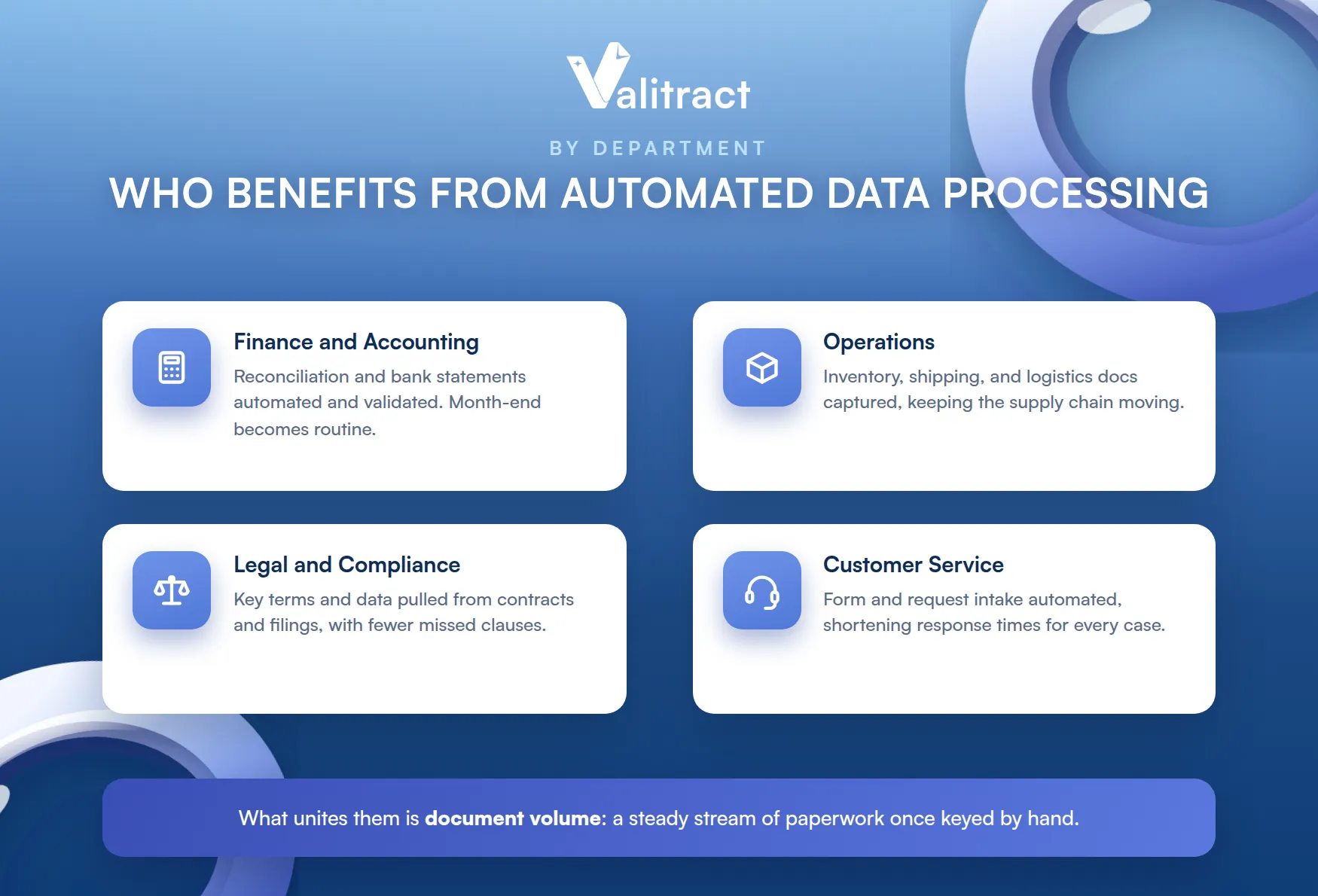
What unites them is document volume. Each handles a steady stream of paperwork that used to be keyed by hand.
Finance and Accounting
Finance carries the heaviest document load. Reconciliation and bank statement processing are slow and error-prone by hand, and automation removes the transcription while validating the numbers. Our Valitract bank statement extraction software and bank statement data extraction are built for exactly this.
The month-end close is the clearest example. Automating extraction and the balance check turns a multi-day scramble into a routine run.
Operations
Operations runs on documents too. Inventory records, shipping paperwork, and logistics documents pile up, and automating their capture keeps the supply chain moving without a data-entry bottleneck.
Errors here ripple outward. A mistyped quantity or ship date can stall an entire order downstream.
Legal and Compliance
Legal teams review mountains of text. Extracting key terms and data from contracts and filings automatically speeds review and reduces the risk of a missed clause.
Consistency is a quiet benefit here. The same fields get captured the same way across every document, not at the mercy of who reviewed it.
Customer Service
Customer service processes forms and requests. Automating the intake of those documents shortens response times and frees agents to handle the cases that need a human.
How to Start Automating Your Data Processing
You do not need a full transformation to begin. A focused start proves the value and guides what comes next.
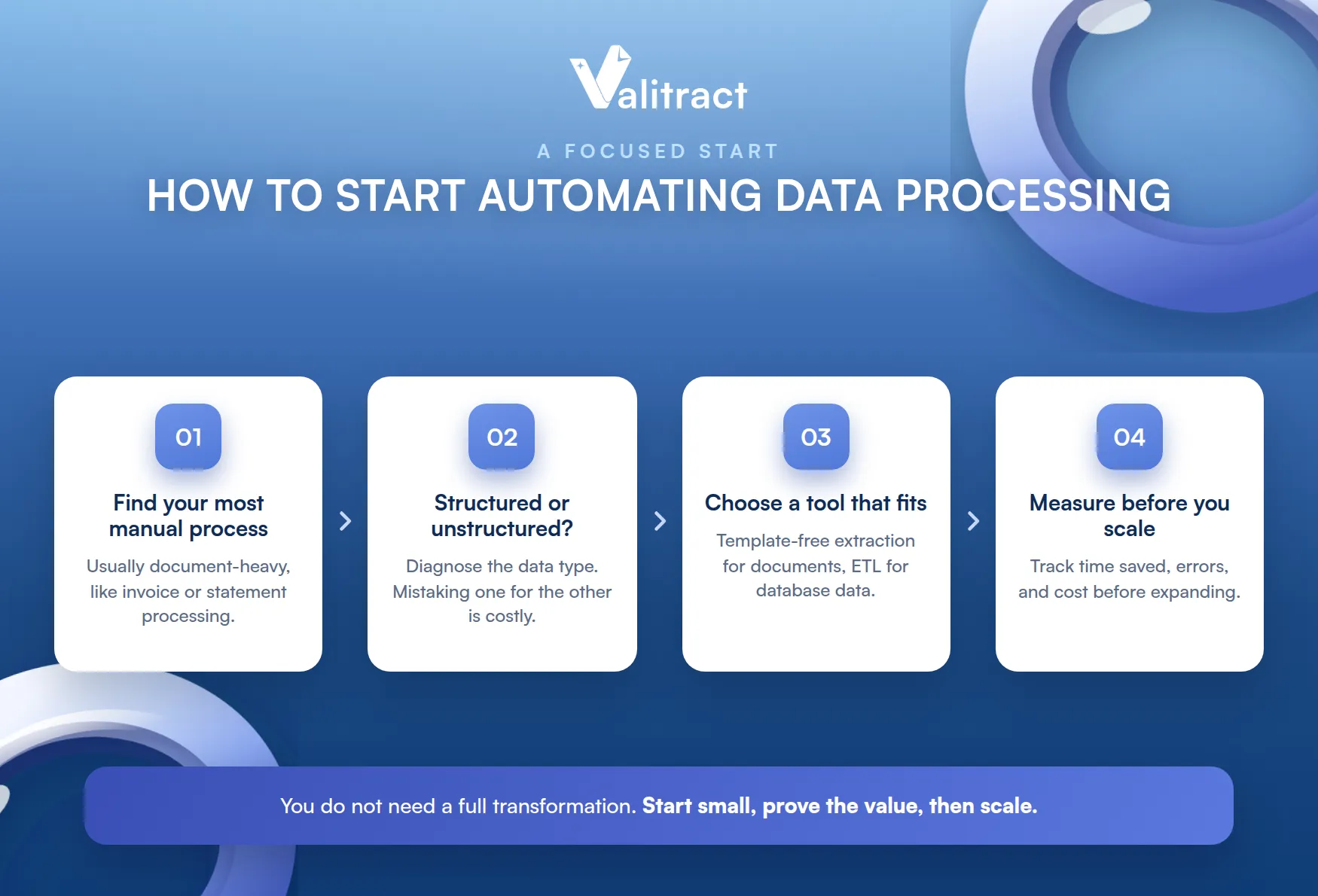
Starting small also lowers the risk. You learn what works on one process before committing across the business.
Step 1: Find Your Most Manual Process
Start with the pain. Identify the workflow that eats the most manual hours, which is usually a document-heavy one like invoice or statement processing.
Step 2: Check Whether the Data Is Structured or Unstructured
Diagnose the data type. Structured data suits a pipeline tool, while unstructured documents need an extraction layer first, and mistaking one for the other is a common, costly error.
This one check saves a lot of pain. It is the difference between buying a tool that fits and one that never quite works.
Step 3: Choose a Tool That Fits the Data
Match the tool to the job. For documents, that means template-free extraction with validation; for database data, it means an integration or ETL tool.
Step 4: Measure Before You Scale
Prove it on one process. Track time saved, error rates, and cost before expanding, so your rollout rests on real numbers rather than a hunch.

How Valitract Helps You Automate Data Processing Faster and More Accurately
Valitract automates the document side of data processing, which is the part most tools leave manual. It offers template-free extraction, so you do not configure a format for each bank or document type, and it validates the numbers with arithmetic and balance checks, flagging low-confidence fields for review.
It fits how you already work. Valitract is API-first, so it drops into an existing pipeline, and it outputs clean, structured data in JSON, XLS, or CSV.
A no-code option covers non-technical teams too. Business users can run extraction without waiting on engineering.
It is clear about its scope. Valitract is the document extraction and validation layer, not a comprehensive data automation platform, so it does not replace an ETL or BI tool for structured data; it feeds those tools accurate document data they could not read on their own. To see it on your documents, book a demo with the Valitract team.
Frequently Asked Questions About Automated Data Processing
What is automated data processing?
It is the use of software to collect, extract, validate, and structure data with little manual effort, turning raw inputs into usable information. It covers both structured database data and unstructured documents like invoices and statements.
What is an example of automated data processing?
A common example is extracting transaction data from a bank statement PDF, validating that it balances, and exporting it into an accounting system, all without manual typing. The same idea applies to invoices, receipts, and forms.
What are the benefits of automated data processing?
Automated data processing enables businesses to process data faster, reduce manual errors, and lower operating costs while scaling efficiently as workloads grow. It also improves decision-making with more reliable data, strengthens compliance through consistent audit trails, and transforms unstructured documents into structured data for downstream systems. By eliminating repetitive data entry, organizations can improve cross-team efficiency and deliver a faster, more accurate customer experience.
Can automated data processing handle unstructured documents like PDFs and scans?
Yes, with the right tool. AI-powered extraction reads PDFs, scans, and photos directly, which traditional ETL pipelines built for structured data cannot do.
How is automated data processing different from data automation?
Data automation is a broad term for automating any data movement or transformation, while automated data processing emphasizes turning raw inputs, including documents, into clean, structured, validated data. The document-extraction part is where the two most often diverge in practice.
Is automated data processing secure for sensitive financial data?
Reputable tools are built with enterprise-grade security and data handling for sensitive documents. Always confirm a vendor’s specific security posture and certifications against your own compliance requirements.
What are the disadvantages of automated data processing?
It requires upfront setup and integration, and it works best when paired with human review of flagged exceptions rather than treated as fully hands-off. Choosing a tool that does not fit your data type, structured versus unstructured, is another common pitfall.
Concluding Thought
The benefits of automated data processing are real across speed, accuracy, cost, scalability, and decision-making, but they are largest where the manual work is heaviest: unstructured documents. Structured-data automation is well understood, while the document side is where most teams still lose hours and introduce errors.
Getting that side right starts with accurate extraction and validation. Read the document correctly, check the numbers, and every downstream benefit follows.
That is the order that matters. The speed, cost, and decision gains all rest on data that was captured accurately in the first place.
Valitract provides that document extraction and validation layer. To start automating your own document processing, book a demo with the Valitract team.
Valitract – Next-gen AI-Powered Data Extraction Platform
- Email: contact@valitract.com
- LinkedIn: https://www.linkedin.com/company/valitract-api-platform
- X: https://x.com/valitract


