


- Multi-page table parsing is detecting that a table continues across a page break and reconstructing it as one logical table, through continuation detection, header propagation, row stitching, and deduplication, rather than returning one broken fragment per page.
- It is different from, and much harder than, extracting several self-contained tables from a multi-page document, where each table lives on its own page.
Multi-page table parsing is the difference between a loan schedule that arrives as one clean table and the same schedule arriving as four unrelated fragments, one per page, with a row silently lost at every break. The rows are all there in the PDF; the parser just failed to see that page 13 continues page 12.
This is one of the most common and least discussed failures in document extraction, and it is dangerous precisely because it often does not error. This guide explains what the parsing actually involves, why page-first tools break on spanning tables, how cross-page reconstruction works, and how to tell which stage failed when your output is wrong.
What Multi-Page Table Parsing Actually Is
Multi-page table parsing reconstructs a single table that was split by page breaks back into one logical table with its rows and columns intact. The distinction the whole article rests on is between two problems that sound identical and are not.
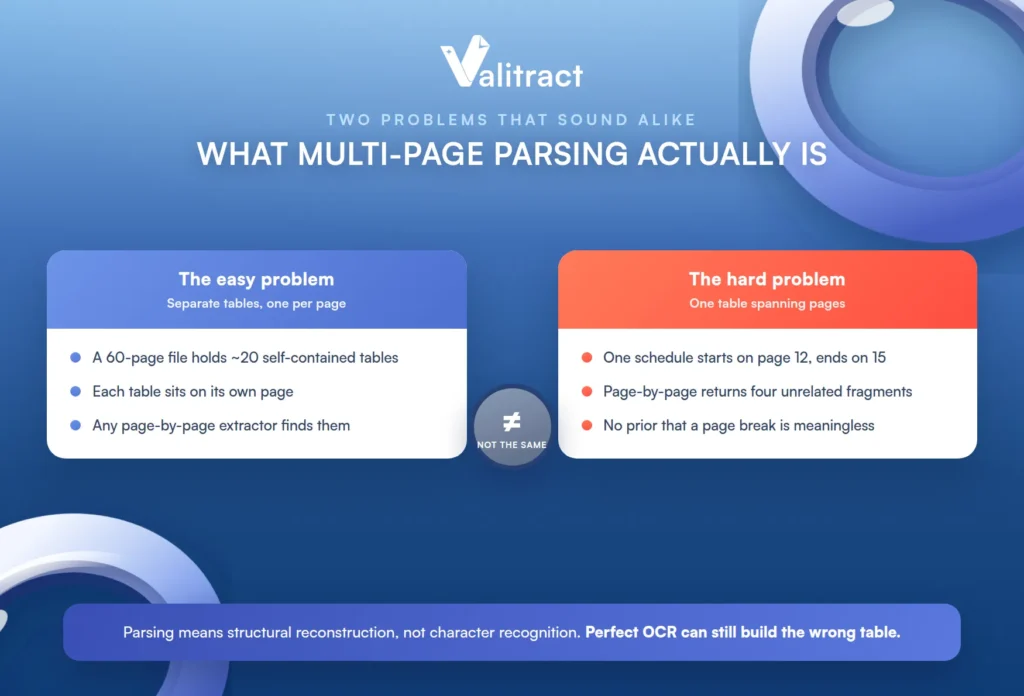
A 60-page document can hold 20 separate, self-contained tables, one or more per page, and any page-by-page extractor finds those without trouble. That is the easy problem, and most tools solve it.
The same document can hold one schedule that starts on page 12 and ends on page 15, and a page-by-page extractor returns four unrelated fragments instead of one table. That is the hard problem, and it is the one this article is about.
A human reader reconciles those fragments automatically, because the page break carries no meaning to a person reading a continuous schedule. The extractor has no such prior unless it was specifically built for it, so it treats the break as the end of one table and the start of another.
One term boundary matters here: “parsing” in this context means structural reconstruction, not character recognition. The characters may be read perfectly and the table still assembled wrong, which is why this depends on, but is separate from, the upstream OCR data extraction step.
Why Page-First Extractors Break on Spanning Tables
Most extractors iterate page by page because it is fast, cheap, and parallelizable, and in doing so they treat every page break as a table boundary. That single assumption produces four recognizable failure modes, and naming yours is the first step to fixing it.
Orphaned rows. Page 2 has data rows but no header, because the header only appeared on page 1. The parser either drops them as noise or emits them as a second malformed table with no column names.
Duplicated headers. The header repeats on every page for print readability, and the parser lands each repeat in the output as a data row. Now a row of column labels sits in the middle of your data.
Split rows. One logical row breaks across the page boundary, with some cells at the bottom of one page and the rest at the top of the next, and the parser never rejoins them. The result is two half-rows where there should be one.
Silent truncation. The extractor returns the first fragment, reports success, and gives no signal that the remaining rows exist. This is the dangerous one, because nothing errors: the output looks clean, and the missing rows are discovered only when a total comes out wrong weeks later.
The common thread is architectural, not a bug in any one tool. Page-by-page iteration is the default because it is efficient, and efficiency is exactly what makes it blind to a table that does not respect page boundaries.
How Cross-Page Table Reconstruction Works
Reconstructing a spanning table is a five-step pipeline, and each step is a discrete operation that can succeed or fail on its own. Understanding them as separate stages is what lets you diagnose a broken output later.
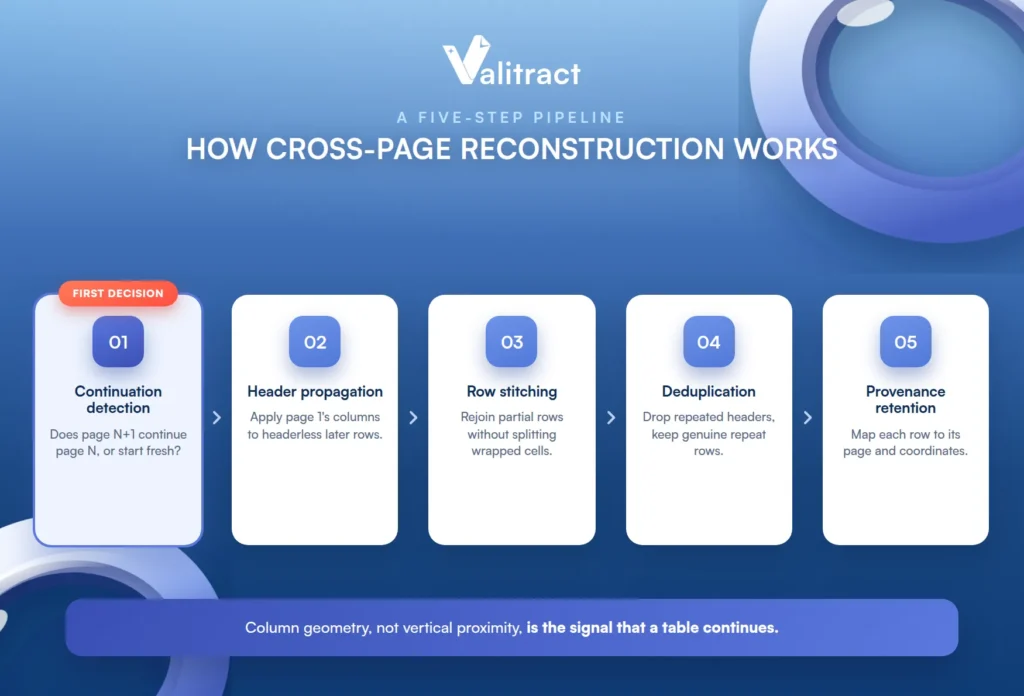
Continuation detection decides whether the table at the top of page N+1 continues the one at the bottom of page N, or whether it is a genuinely new table that happens to sit there. This is the first decision, and getting it wrong cascades into everything after.
Header propagation applies page 1’s column definitions to the headerless rows on later pages, and it has to handle headers that are abbreviated on later pages or absent entirely. Without it, later rows arrive with null or shifted columns.
Row stitching rejoins the partial rows that broke across the boundary, while being careful not to confuse multi-line cell content for separate rows. This is the step where a wrapped description can be mistaken for a new record.
Deduplication removes the repeated headers that appear on each page while preserving data rows that are legitimately identical. Over-aggressive deduplication is how genuine repeat rows get deleted along with the header noise.
Provenance retention keeps each row mapped to its source page and coordinates, so a reviewer can verify a stitch rather than trust it. This is the step that turns an unverifiable output into an auditable one.
The Signals That Say “This Table Continues”
The community threads that debate this converge on a handful of signals, and no single one is definitive. The combination is what produces a confident join.
- Column geometry match is the primary signal: the normalized column x-positions and relative widths carry across pages far more reliably than vertical proximity does. Trust geometry over closeness.
- Column count match between the two candidate fragments, as a fast first filter before the more expensive geometry check.
- No intervening body text between the end of one fragment and the start of the next, excluding the header and footer zones that always sit there.
- A page-position heuristic, where fragment A ends near the bottom margin and fragment B starts near the top margin, consistent with a break rather than two separate tables.
- Explicit cues where present, such as a repeated header row or a “continued” label, which confirm a join but cannot be relied on to always exist.
The honest caveat is that none of these is definitive alone, and a confident join comes from several agreeing at once. A useful property of the geometry-first approach is that it also handles borderless tables, where border-detection methods have nothing to match on in the first place.
How to Tell Which Failure You Actually Have
When the output is wrong, most people can see that it is wrong but cannot name the stage that broke. This table maps the symptom you can see to the stage that failed and the first thing to check.
| What you see in the output | Stage that failed | What to check first |
|---|---|---|
| Row count lower than the source document | Continuation detection | Whether later fragments were emitted at all, or dropped |
| Row count higher than the source | Deduplication | Whether repeated header rows entered the data set |
| Rows present but columns null or shifted | Header propagation | Whether later pages inherited page 1’s column definitions |
| Two half-rows at each page boundary | Row stitching | Whether the boundary row was flagged incomplete |
| Several small tables instead of one | Continuation detection | Column count and column x-positions across fragments |
| Correct on samples, wrong in production | Upstream OCR or input quality | Skew, resolution, and scan quality on the failing documents |
The row-count check is the fastest diagnostic available and costs nothing: compare the extracted row count against the source before you look at a single cell value.
That row-count comparison is the single most useful habit in this whole workflow. A mismatch in either direction tells you which half of the pipeline to investigate before you have inspected any data at all.
Which Documents Actually Have Spanning Tables
This problem is abstract until you see it in documents you recognize. The table below grounds it, and lets each kind of team find itself quickly.
| Document type | Typical span | Difficulty | What makes it hard |
|---|---|---|---|
| Bank and credit card statements | 1 to 4 pages | Medium | Section headers and running balances repeat on every page |
| Multi-line-item invoices and POs | 2 to 5 pages | Medium | Subtotals mid-table; descriptions wrap across rows |
| Loan agreements and covenant schedules | 2 to 6 pages | High | Merged cells and inconsistent headers between pages |
| Financial statements and filings | 3 to 10 pages | High | Nested subtables; footnotes on separate pages |
| Insurance schedules and claims listings | 2 to 8 pages | High | Hundreds of rows; headers repeat irregularly |
| Logistics manifests and bills of lading | 1 to 5 pages | Medium | Borderless layouts; variable column widths |
Difficulty rises with merged cells, irregular headers, and borderless layouts, not with page count alone.
Valitract handles these document types with template-free table extraction that preserves row and column relationships and outputs JSON, CSV, or XLS. For the statement case specifically, see our guide to bank statement data extraction, and for filings and reports, our overview of financial data extraction software.
Build It Yourself or Use a Parser That Handles It?
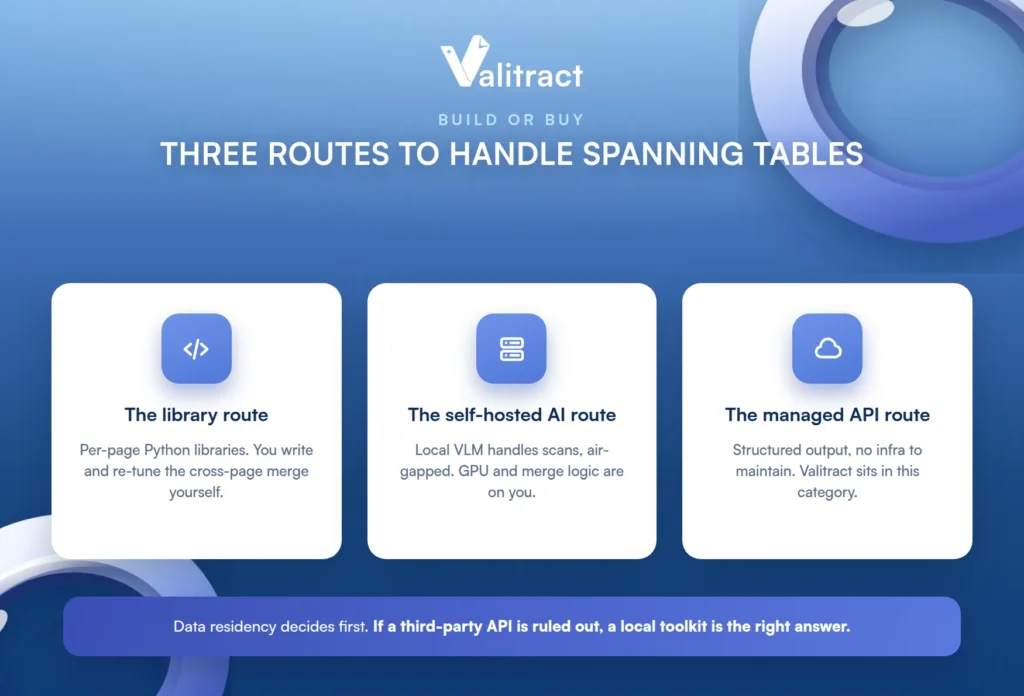
The choice is set by your data-residency constraint first and your document variance second, not by cost. Decide where your documents are allowed to go before you compare features, because that single answer removes whole categories of tool.
The Library Route
Coordinate-based Python libraries extract per page and treat each page as an independent table, so cross-page merging is post-processing you write and maintain yourself. The honest cost is that the merge logic has to be re-tuned per document family, and there is no generic version of it that works across all your layouts.
The Self-Hosted AI Route
Local vision-language and layout models handle scans and borderless tables without sending documents anywhere, which is the deciding factor for air-gapped and data-sensitive workloads. Credit them honestly: the tradeoff is GPU provisioning, managing model weights, and per-page merge logic that still is not automatic just because the model is local.
The Managed API Route
A managed API removes the OCR, layout, and structure layers as things you maintain, and returns structured output directly. Valitract sits in this category, with template-free extraction, a REST API plus a no-code UI, and low-confidence flagging that routes uncertain rows to review rather than passing them through silently.
The honest boundary belongs here, not in a footnote: Valitract has no self-hosted or open-source deployment option. If a third-party API is ruled out by policy, a local toolkit is the correct answer, and this article says so plainly. For readers still choosing between approach families, our guide to template-based OCR versus AI extraction lays out the tradeoffs.
How to Test Whether a Tool Actually Handles Multi-Page Tables
Every vendor claims table extraction, and almost all of them mean single-page table extraction. Here is a five-minute test you can run today to find out which one you are dealing with, before you commit to anything.
Use a real document from your own workload with a table spanning at least three pages, not the vendor’s sample, because the sample was chosen to pass. Then count the rows in the source, count the rows in the output, and compare, since a mismatch in either direction identifies the failure before you inspect a single value.
Count the header rows in the output next, because more than one means deduplication failed. Then check the row at each page boundary specifically, as that is exactly where stitching breaks and where it is cheapest to spot.
Ask for the tool’s accuracy figure on multi-page tables specifically, and ask whether it is cell-level or structure-level, because these are different numbers that are routinely reported interchangeably. Finally, include a degraded document, a scan, a photo, or a skewed page, because upstream recognition errors propagate straight into structure errors.
A free tier is enough to run exactly this test. Valitract’s covers 100 pages a month with no credit card, which is plenty to run the row-count and boundary checks on your own real multi-page documents rather than a curated sample. For the developer path, see our OCR API overview.

Common Mistakes in Multi-Page Table Parsing
A few recurring mistakes cause most of the pain, and each is avoidable once named.
The first is testing on clean vendor samples instead of the documents that are actually failing, which guarantees the test passes and production does not.
The second is treating a field-level accuracy figure as a structure-level claim. A tool can read individual cells accurately on standard printed documents and still assemble them into the wrong table. Valitract’s reported up to 99.8% field-level accuracy is a recognition claim about standard printed documents, not a statement about cross-page reconstruction, and the two should never be blurred together.
The third is merging fragments on vertical proximity alone, when two tables that happen to sit at a page boundary are not necessarily one table. Column geometry, not closeness, is the reliable signal.
The fourth is deduplicating too aggressively and removing genuine repeat rows along with the repeated headers. A statement can legitimately contain two identical transaction rows.
The fifth is discarding page and coordinate provenance during the merge, which makes every downstream error unverifiable because no one can trace a bad row back to its source.
The sixth is flattening a stitched table into plain text before it reaches an LLM, which destroys the header-to-cell relationships the stitching just worked to recover.
Frequently Asked Questions About Multi-Page Table Parsing
What is multi-page table parsing?
It is detecting that a table continues across a page break and reconstructing it as one logical table, using continuation detection, header propagation, row stitching, and deduplication. The goal is a single clean table rather than one broken fragment per page. It matters most for schedules, statements, and line-item tables that routinely span pages.
How is it different from extracting tables from a multi-page PDF?
Extracting tables from a multi-page PDF means finding the several self-contained tables in a long document, which any page-by-page tool does well. Multi-page table parsing means reconstructing one table that was split by page breaks, which most page-by-page tools fail at. The first is easy; the second is the hard problem.
Why do Python PDF libraries split tables at page breaks?
Because they iterate page by page for speed and treat each page as an independent unit, so a page break is read as a table boundary. Cross-page merging is post-processing you have to write on top, and it has to be tuned per document family. There is no generic merge that works across all layouts.
How does a parser know a table continues when the header doesn’t repeat?
It relies on signals other than the header, chiefly column geometry: the normalized column positions and widths carrying across the break. Column count, the absence of intervening body text, and page-position heuristics add confidence. No single signal is definitive, so a confident join comes from several agreeing at once.
Can multi-page tables be extracted from scanned documents?
Yes, but only with a method that runs OCR first and then reconstructs structure, because a scan has no text layer to read directly. AI-native and vision-language approaches handle scans and borderless spanning tables in one pass. Recognition errors on a poor scan will propagate into structure errors, so scan quality matters.
How do you handle merged cells that cross a page boundary?
This is one of the hardest cases, and it needs row stitching that understands a cell can span rows and that a wrapped value is not a new row. Provenance retention helps, because it lets a reviewer verify the boundary reconstruction against the source. Merged cells crossing a break are a case worth testing explicitly rather than assuming.
What accuracy should you expect on tables that span pages?
Ask specifically for a structure-level accuracy figure on multi-page tables, not a cell-level recognition figure, because they are different numbers. A tool can score very high on reading individual cells and still assemble spanning tables incorrectly. Test on your own multi-page documents to get a number that reflects your real mix.
How should multi-page tables be handled in a RAG pipeline?
Reconstruct the full table first, then preserve its structure in a format that keeps header-to-cell relationships, such as HTML or structured JSON, rather than flattening to plain text. Flattening before the model sees it destroys the very relationships the parsing recovered. Keeping structure intact is what lets the model answer questions about the table correctly.
Conclusion
Multi-page table parsing fails quietly, which is what makes it worth understanding: a page-first tool returns fragments, reports success, and loses rows that nobody notices until a total is wrong. The fix is to treat cross-page reconstruction as its own pipeline, with continuation detection, header propagation, stitching, deduplication, and provenance as separate stages you can test and diagnose.
Start with the row-count check, decide your build-or-buy question by data residency first, and test any tool on your own three-page-plus documents rather than a vendor sample. Get that right, and a schedule that spans four pages comes back as one clean table instead of four fragments with a missing row.


