


TL;DR
- OCR vs AI data extraction is not a fight between old and new. They solve different problems: OCR transcribes characters, AI reads meaning.
- Traditional OCR is fast and precise on fixed, unchanging layouts, but a template breaks the moment a vendor shifts a field.
- AI data extraction is template-free. It handles new layouts, handwriting, and poor scans on the first upload and returns structured JSON.
- The strongest setups are hybrid: OCR speed plus AI comprehension plus validation. Valitract is built that way.
Teams in document-heavy industries often treat OCR vs AI data extraction as the same capability under two names. They are not. Optical Character Recognition and Artificial Intelligence data extraction handle data in fundamentally different ways, and confusing them is expensive. A company that buys a template-based OCR tool for a high-variability invoice stream ends up assigning people to fix every broken run. A company that buys a heavy AI platform to digitize one fixed government form overpays for capability it never uses. The simplest way to frame the shift is this: OCR transcribes the words on a page, while AI understands what those words mean.
This guide explains how each one works, compares them across eight dimensions, shows when to use each, and walks through the hybrid workflow that combines both.
The confusion is understandable. Both technologies start by looking at a page, both promise to cut manual data entry, and many vendors market AI-enhanced tools as “OCR” because the word is familiar. A common search question, “is OCR considered AI,” captures the uncertainty exactly. The honest answer is that they overlap at the input stage and diverge completely after it. One stops at recognizing characters. The other continues on to understand what those characters represent. Getting that distinction right is the difference between a pipeline that scales and one that quietly buries a team in correction work.
What Is Traditional OCR?
Traditional OCR is a technology that converts the visual shapes of characters in an image or scanned PDF into machine-readable text by matching those shapes against an internal pattern database. It turns a picture of a page into a flat string of letters and numbers.
Mechanics of Traditional Optical Character Recognition
Legacy OCR maps the visual contours of each character against a stored pattern library, then outputs the recognized text. That is the whole job: pixels in, characters out. The technology has existed for decades, and on clean, printed pages, it is fast and reliable.
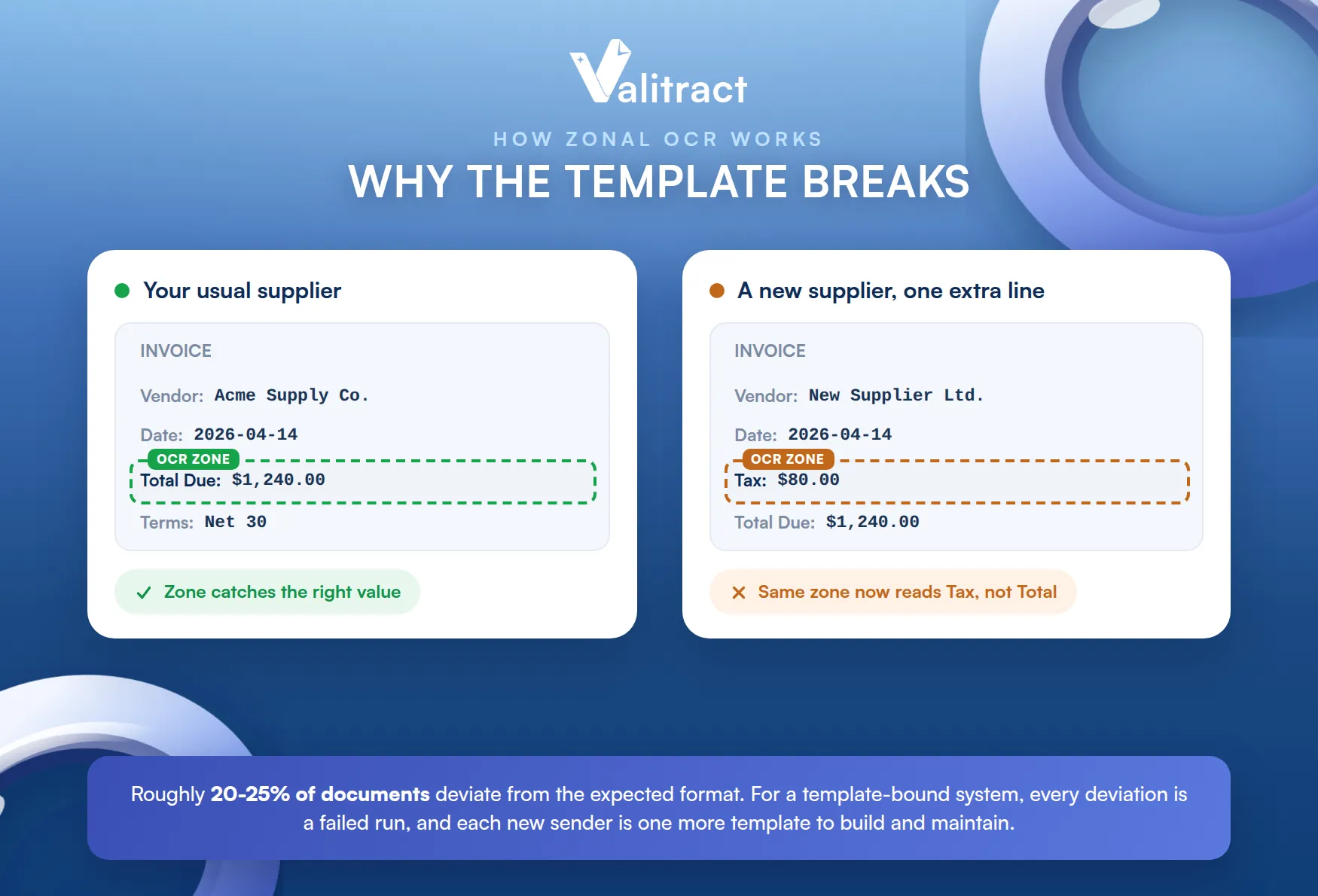
What it does not have is any conceptual understanding of fields. Traditional OCR does not know that one number is the total, another is the tax, and a third is an account reference. It sees only characters in sequence. To pull a specific value like “Total Due,” it relies on humans drawing fixed coordinate bounding boxes, known as zonal templates, around the spot where that value sits. You tell the system, in effect, “the total is always in this rectangle,” and it reads whatever sits there.
That works until the layout moves. Picture an invoice from a new supplier whose total sits forty pixels lower than your template expects. The system dutifully reads the rectangle you defined and returns the wrong cell, or nothing at all. Now someone has to open the configuration and redraw the coordinates by hand. Multiply that by every supplier who tweaks a margin, renames a label from “Order Date” to “Purchase Date,” or adds a line. Industry analyses put the share of documents that deviate from an expected format at roughly 20% to 25%, and for a template-bound system, every deviation is a failed run. The maintenance burden does not shrink as you grow. It grows with you, because each new sender is a potential new template to build and babysit.
What Is AI Data Extraction?
AI data extraction is a method that uses machine learning, deep learning, and natural language processing to read a document by meaning, classify it, and return structured key-value data without a predefined template. It interprets the document rather than just transcribing it.
Mechanics of AI-Native Extraction
AI-native extraction inverts the OCR principle. Instead of asking “what characters sit at these coordinates,” it asks “what does this document mean.”
The work happens across several layers. Computer vision detects the layout structure, including headers, tables, and field-value pairs. Natural language processing interprets labels and the context around them. A language model resolves ambiguity, for example, deciding whether a given number is a quantity, a unit price, or a reference code.
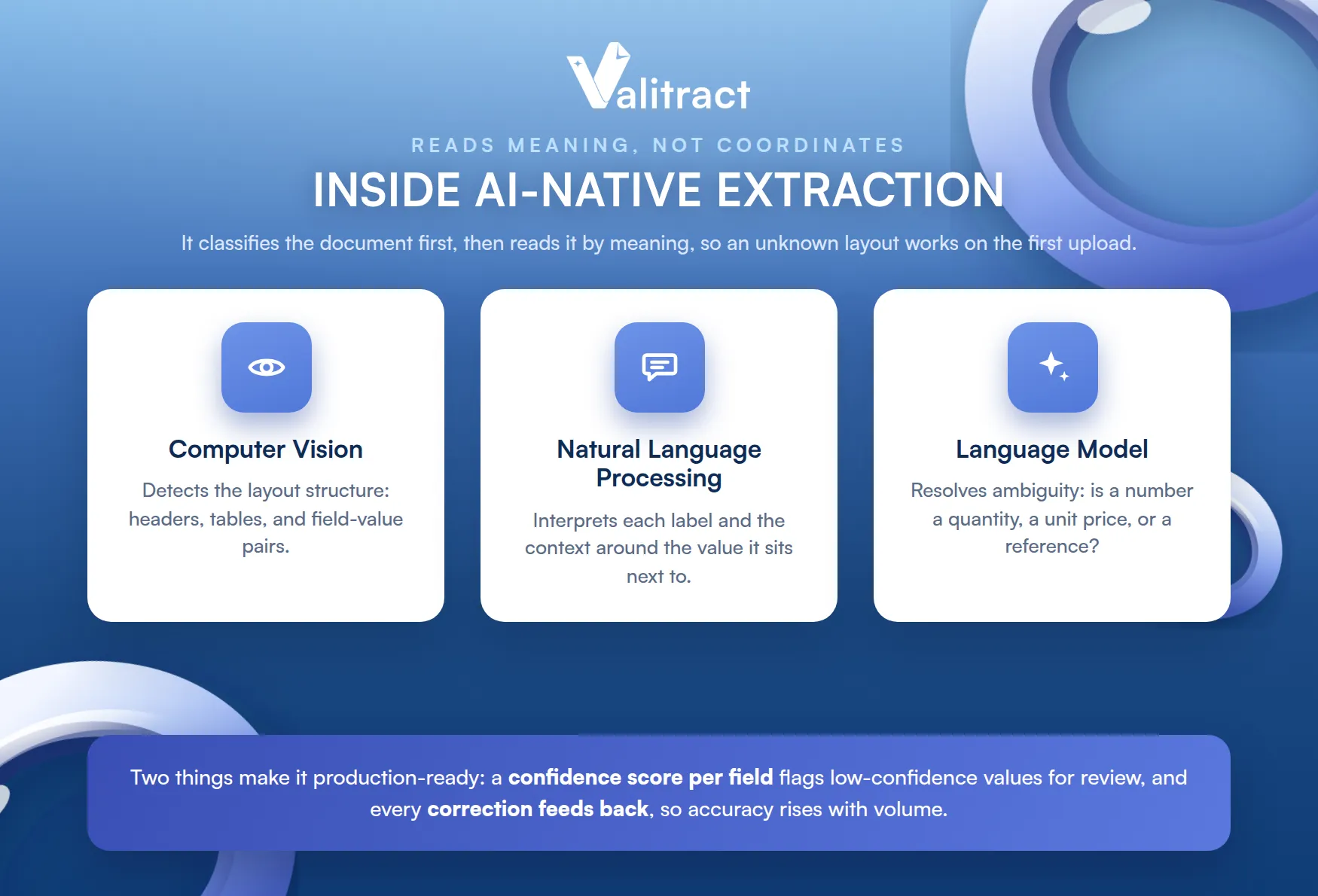
The first step is usually classification. The model identifies what the document is, an invoice, a receipt, a bank statement, or a passport, then routes it to the right extraction logic. Because it reads context rather than coordinates, AI data extraction does not care where a field sits. It understands that a string matching an address pattern next to a company name represents a vendor billing profile, so it handles an unknown format on the first upload with no template setup.
Two more properties matter in production. First, the engine returns a confidence score for each field, so low-confidence values can be flagged for a human instead of trusted blindly. Second, it improves over time. Each manual correction flows back into the model, so accuracy rises with volume rather than degrading as formats multiply. This is the engine behind modern automated data extraction that runs without a person keying every field.
OCR vs AI Data Extraction: 8 Critical Comparative Dimensions
The clearest way to see the difference is a side-by-side comparison across the dimensions that actually affect cost and reliability. The table below synthesizes findings from 2026 OCR-versus-AI analyses, then the discussion that follows unpacks the dimensions that drive real spend.
Table 1. OCR vs AI data extraction across eight dimensions.
| Dimension | Traditional OCR | AI Data Extraction |
| Output type | Flat, unstructured text string | Structured key-value JSON, ready for systems |
| Setup overhead | A zonal template per layout, maintained by hand | No template; works on first upload |
| Layout inconsistencies | Breaks when a field shifts or a margin changes | Reads by meaning, so layout shifts are absorbed |
| Handwriting and checkboxes | Weak; handwriting accuracy can fall below 70% | Handles handwriting, checkboxes, and tables far better |
| Accuracy | Up to 99% on fixed, clean layouts; drops sharply off-template | 95%+ out of the box on varied layouts, improving with corrections |
| Human time cost | High on variable docs, since people fix every off-template failure | Low; exceptions are flagged for review, not re-keyed |
| Advantages | Fast, cheap, and precise on standardized forms; tight zonal control | Template-free, scalable, and resilient to messy real-world media |
| Disadvantages | Fragile to layout change; no semantic understanding | Less granular pixel-level control; needs confidence checks |
Source: synthesis of 2026 OCR-versus-AI analyses, including Vellum, Winder.ai, Docxster, and Lido. See sources in the appendix.
Output and setup are where the paths split first: OCR hands you a flat text string, so a developer still has to write parsing logic to find the fields inside it. AI hands you structured JSON that drops straight into a database. On setup, OCR needs a template per layout, and that library is the part that teams underestimate. AI needs none, which is why it scales across many senders without a configuration backlog.
Resilience is the dimension that decides most real cases: Traditional OCR struggles when a document is not a clean, printed page. Handwriting accuracy can fall below 70%. Tables collapse into an interleaved stream of characters that loses the row and column structure. Faded text, skewed scans, and low-resolution phone photos all degrade the output. AI was trained on exactly this variety, so it absorbs the noise that breaks templates.
Accuracy is easy to misread, so look at the right number: A traditional engine can report 99% character accuracy and still corrupt several fields on a single invoice, because one wrong digit in a total or an invoice number makes that whole field unusable downstream. Field-level accuracy, not character accuracy, determines whether your ERP can trust the data. A system that is correct on 98% of characters but wrong on the total field has not saved you anything.
Human time cost is the hidden line item: The trap is buying an OCR tool, then quietly assigning one or two people to clean up and correct its output. On paper, the work is automated. In practice, it moved downstream to a person who now does the expensive part by hand. AI keeps people out of the routine path and brings them in only for the small share of low-confidence exceptions, which is where their judgment actually adds value. The numbers behind this are large. Manual data entry can run several thousand dollars a month for a mid-size finance team, and on a per-document basis, a manually processed invoice costs far more than an automated one. Zero-shot AI extraction can remove most of that cost, because the machine handles the routine volume, and people touch only the exceptions. The per-page sticker price rarely tells you the real total. The labor sitting behind a fragile template usually does.
OCR vs AI: Which Should You Choose?
The right choice depends on three questions about your own operation: how structured your documents are, how much their layouts vary, and what your downstream systems need.
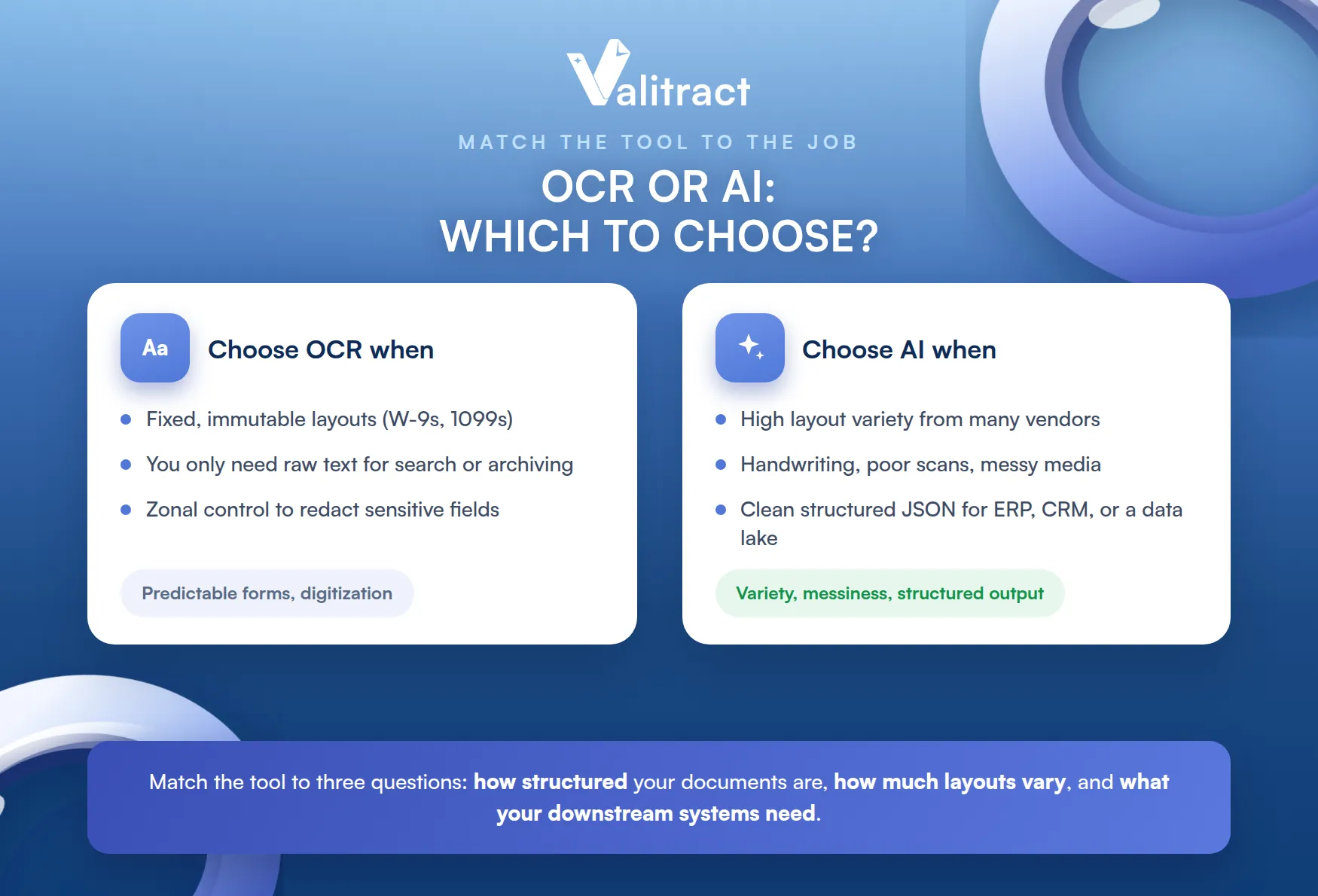
There is no universal winner, so match the technology to the scenario rather than to the marketing. The clearer your answers point toward fixed formats and raw text, the more OCR fits. The more they involve variety, messiness, and structured output, the more you need AI.
Traditional OCR: Best Use Cases
OCR is the right call when your inputs are predictable and your goal is digitization, not interpretation. Three scenarios fit.
- Your documents follow fixed, immutable layouts. If you exclusively process standardized forms such as W-9s, 1099s, or locked internal templates where fields never shift by a pixel, OCR’s structured approach is reliable and cheap. The very rigidity that hurts OCR on varied documents becomes a strength when the layout is guaranteed to stay still.
- You only need raw character digitization. If the goal is to turn paper into searchable, editable, or archival text rather than to extract nested relationships like itemized invoice tables, OCR does exactly that. Digitizing a back catalog of contracts for full-text search is a textbook fit, since you want the words, not a structured schema.
- You need absolute zonal control over data fields. Zonal OCR lets you hard-code coordinate boundaries, so you can explicitly tell the system to ignore a sensitive field such as a Social Security Number inside a specific pixel box. That guardrail is harder to guarantee with fluid AI models, which makes deterministic OCR appealing in tightly regulated, redaction-heavy pipelines.
AI-Native Data Extraction: Best Use Cases
AI earns its place the moment variety, volume, or messiness enters the pipeline. Three scenarios fit.
- You manage high layout variability and many vendors: If you process thousands of invoices, receipts, or shipping manifests from hundreds of suppliers, each with a unique design, a template library cannot keep up, but an AI data extraction tool reads each one on sight. The cost of template maintenance climbs with every new sender, while an AI model simply absorbs them.
- You deal with unstructured or degraded media: If your pipeline regularly ingests handwriting, multi-page tables, low-resolution phone photos, wrinkled receipts, or skewed faxes, AI handles the noise where templates fail. These are precisely the inputs that push traditional OCR accuracy below a useful threshold.
- You require downstream system-ready data: If your ERP, CRM, or data lake needs clean, validated, structured JSON out of the box rather than flat text blocks, AI delivers it natively. That removes the parsing layer a developer would otherwise have to build and maintain on top of raw OCR output.

How a Hybrid OCR-plus-AI Workflow Runs
The strongest production setups do not pick a side, and the workflow runs in five stages from capture to export. Knowing the stages helps you see where OCR ends and AI begins.
- Capture and read: A document arrives by upload, email, or API, and an OCR layer reads the characters, including printed fields and the machine-readable zone on identity documents. Pre-processing such as deskew and contrast enhancement cleans the image first.
- Classify: The AI layer identifies the document type and routes it to the right extraction logic, so an invoice and a passport are handled differently from the start.
- Extract by meaning: The model maps the content into structured key-value fields by semantic role, not coordinate, so a new vendor layout works on the first upload with no template.
- Validate: Rules check the output, for example confirming totals are numeric, matching values against lookup tables, or running checksum tests on identity documents. Low-confidence fields are flagged.
- Route and export: Clean documents flow straight through to your ERP, CRM, or data lake, and only the flagged exceptions reach a human reviewer.
This is the pattern that delivers OCR speed with AI flexibility. Routine documents run touchless, people focus on the few that genuinely need judgment, and validation keeps bad data out of downstream systems.
Valitract: The Intelligent Hybrid Solution
The strongest setups combine an OCR layer for fast, accurate character reading with an AI layer for semantic understanding, and Valitract is built exactly that way.
Valitract pairs OCR with template-free AI extraction and a validation step. The OCR layer reads the characters, including printed fields and the machine-readable zone on identity documents.
The AI layer classifies the document and maps its content into structured key-value fields by meaning, so a brand-new vendor layout works on the first upload with no template. A validation step then checks the output, for example confirming totals are numeric or running ICAO 9303 checksums on passports, and flags anomalies for review rather than letting them reach your ledger.
It handles invoices, receipts, bank statements, passports, and IDs, and it gives both developers and non-technical reviewers a path in. Engineers call a REST API and receive clean JSON. Operations teams use a no-code dashboard to review flagged fields without touching code.
For the full picture of how this fits an end-to-end workflow, the Valitract AI Data Extraction Platform covers capture, extraction, and validation across all of those document types, with support for 95+ languages and accuracy of up to 99.8% on standard documents.
Concluding Thought
OCR vs AI data extraction is the wrong way to frame the decision for most teams. OCR is a precise tool for fixed, uniform documents and pure digitization. AI data extraction is the resilient choice for variable layouts, messy media, and structured output your systems can use. As soon as your document mix grows past a stable handful of formats, the practical answer is a hybrid that reads characters with OCR, interprets them with AI, and validates the result before it moves downstream. That combination gives you the reliability of OCR on clean pages and the flexibility of AI on everything else.
If you want it without building it yourself, explore the Valitract extraction platform.
Frequently Asked Questions About Document Data Extraction
Is traditional OCR considered a form of artificial intelligence?
Not in the modern sense. Traditional OCR is a pattern-matching technology that maps character shapes to a stored library and outputs text. It does not learn, understand context, or interpret meaning. AI data extraction adds machine learning and natural language processing on top of recognition, so it classifies documents and extracts fields by meaning. Some vendors blur the line by calling AI-enhanced systems “intelligent OCR,” but plain legacy OCR on its own is not AI.
When should an enterprise prioritize legacy OCR over AI data extraction?
Prioritize legacy OCR when your documents follow fixed, unchanging layouts, when you only need raw text for search or archiving, or when you need strict zonal control to exclude specific fields by coordinate. For standardized forms that never change, OCR is fast, cheap, and highly accurate. The moment layouts vary across senders or you need structured output, AI becomes the better fit.
Can you use both OCR and AI together for automated document processing?
Yes, and the best platforms do. A hybrid pipeline uses OCR to read characters quickly and accurately, then applies AI to classify the document and extract structured fields by meaning, followed by validation and human-in-the-loop review for low-confidence values. This combination delivers OCR speed with AI flexibility and is the standard approach for reliable, large-scale document automation.
What is “intelligent OCR” or “AI OCR,” and how is it different from both?
Intelligent OCR, sometimes called AI OCR, is the hybrid layer that sits between the two. It runs character recognition like traditional OCR, then adds AI to classify the document and structure the output, so it returns finished key-value data instead of raw text. In practice it is the same idea as the hybrid workflow described above, marketed under a single label. The important thing for buyers is to look past the name and confirm what the tool actually returns: a flat string, or validated structured fields ready for your systems.
Valitract – Next-gen AI-Powered Data Extraction Platform
- Email: contact@valitract.com
- LinkedIn: https://www.linkedin.com/company/valitract-api-platform
- X: https://x.com/valitract


