


- Bank statement data extraction turns transactions, balances, and account details from PDFs or scans into structured, machine-readable data.
- It runs a pipeline: ingestion and classification, OCR, layout and table parsing, field structuring, then validation and export.
- Automation speeds reconciliation, cuts manual errors, and accelerates lending, while feeding cleaner data to fraud and compliance checks.
- Template-free AI extraction handles the format variety that breaks traditional, per-bank OCR templates.
Somewhere on every finance and lending team, someone is still copying transactions line by line from a PDF bank statement into a spreadsheet. It is slow, it is dull, and every retyped row is a chance to introduce an error.
Bank statement data extraction is the technology that removes that manual step. It reads a statement and turns it into clean, structured data your systems can use.
The pain is not one bad row. It is the hours lost and the errors that surface later, in a reconciliation or a rejected loan file.
The market reflects the demand. According to Stripe, citing Verified Market Research, the data extraction software market was valued at nearly $1.4 billion in 2024 and is projected to reach close to $4 billion by 2031.
This guide explains what bank statement data extraction is, how it works, why teams automate it, where it is used, and how to choose the right tool.
Bank Statement Data Extraction Explained
Before the how, it helps to pin down the what. This section defines the term, lists the fields involved, and contrasts manual with automated work.
What Is Bank Statement Data Extraction?
Bank statement data extraction is the process of identifying and pulling structured financial data from bank statements, whether they arrive as PDFs or scanned images, and converting it into a machine-readable format. The output is clean fields and tables rather than a flat document.
In plain terms, it turns a statement you can only read into data a system can act on. A transaction becomes a dated, categorized, machine-usable record.
That shift is what unlocks everything downstream. Reconciliation, lending, and audit all need fields, not paragraphs.
Data Fields Typically Extracted
A bank statement carries more structured data than it first appears. Good extraction captures each field as its own labeled value.
Table 1. Common fields extracted from a bank statement.
| Field | What it captures |
| Transaction date | The date each transaction posted |
| Description or payee | The merchant, counterparty, or memo line |
| Debit amount | Money leaving the account |
| Credit amount | Money entering the account |
| Running or closing balance | The balance after each transaction and at period end |
| Transaction type | Category such as transfer, fee, or deposit |
| Account holder name | The name on the account |
| Account number | The account identifier, often partly masked |
| Statement period | The date range the statement covers |
| Bank or institution name | The issuing bank |
Getting these as discrete fields is the whole point. A labeled amount can be reconciled and posted, while a line of raw text cannot.
The hardest fields are the ones tied to structure. A running balance only makes sense in the order of its rows, so the table has to stay intact.
Manual vs Automated Extraction
The gap between manual and automated extraction is not subtle. It shows up on every dimension that matters at scale.
At low volume the gap feels small. At a thousand statements a month it becomes the difference between a team that keeps up and one that falls behind.
Table 2. Manual versus automated bank statement extraction.
| Parameter | Manual extraction | Automated extraction |
| Processing speed | Minutes per page | Seconds per statement |
| Error rate | Rises with fatigue and volume | Low and consistent |
| Scalability | Caps out, needs more staff | Scales with volume |
| Cost over time | Grows with headcount | Predictable software fee |
| Auditability | Hard to trace | Built-in audit trail |
Extracting transaction data is only the first step, though. Financial institutions also have to confirm that statements are authentic and unaltered before making a lending or underwriting decision.
That is where verification comes in. Pairing extraction with bank statement verification catches tampered or inconsistent statements before they reach underwriting.
How Bank Statement Data Extraction Works
Under the hood, extraction runs a clear, ordered pipeline. Each stage prepares the data for the next, and a weak early stage limits everything after it.
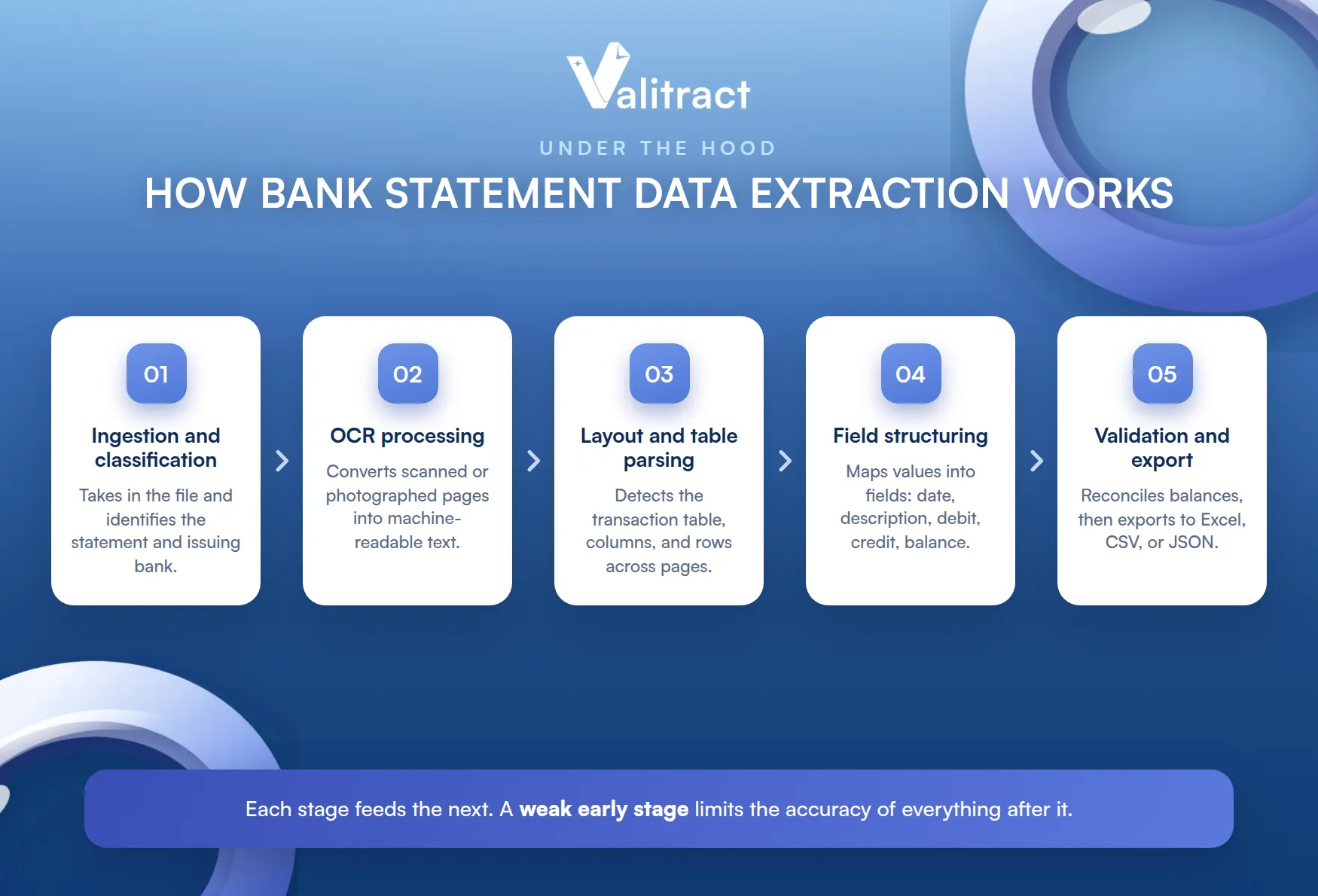
Knowing the five stages helps you judge where a tool is strong. Here is how a statement moves from file to structured data.
The stages are similar across tools. What separates them is how well each handles a messy, real-world statement.
Document Ingestion and Classification
First, the system takes in the file and works out what it is. It recognizes that the document is a bank statement and often identifies the issuing bank.
This step sorts the input before any reading happens. Classifying up front lets the engine apply the right handling to each document.
It also catches non-statements early. A misfiled document gets flagged instead of silently producing garbage fields.
OCR Processing for Scanned Statements
Next, for scanned or image-based statements, the software converts the picture into machine-readable text. This is the OCR data extraction layer that turns pixels into characters.
Native digital PDFs may skip this step, since their text is already selectable. Scans and phone photos rely on it entirely, so OCR quality sets the accuracy ceiling for them.
This is why a clean scan matters. A crooked or shadowed photo limits every step that follows.
Layout Analysis and Table Structure Parsing
Now the engine reads the structure, not just the words. It detects the transaction table, its columns, and its rows, following them across multiple pages.
Statements are mostly tables, so this is where many tools struggle. Keeping columns aligned and rows intact across page breaks is harder than reading isolated text.
A single misaligned column can shift every figure one cell over. That is why table accuracy, not raw OCR, is the real test for statements.
Field Extraction and Data Structuring
With the layout mapped, the system assigns meaning to each value. It maps the raw content into standardized fields like date, description, debit, credit, and balance.
This is where reading becomes usable data. A number stops being text on a page and becomes a labeled credit or debit in a record.
Validation and Export
Finally, the structured data is checked and delivered. The system reconciles transactions against the opening and closing balances, then exports to Excel, CSV, or JSON.
This validation step is also the foundation of bank statement verification. A statement whose figures do not reconcile is exactly the kind a verification workflow should flag before it moves downstream.
Export format matters as much as accuracy. Clean JSON or a tidy Excel file drops into the next system with no cleanup.
Why Businesses Automate Bank Statement Data Extraction
The reasons to automate cluster around speed, cost, and risk. Four benefits stand out.
Faster Reconciliation and Month-End Close
Month-end close is a scramble to reconcile data across many statements. Automated extraction pulls and structures that data in seconds, compressing a close that once took days.
The time saved is not just convenience. It frees the finance team to review and analyze instead of retype.
The close stops being a fire drill. It becomes a routine step the software mostly handles.
Reduced Manual Entry Costs and Errors
Manual keying is expensive and quietly error-prone at volume. Automating it removes both the labor cost and the transposed digits that manual entry produces.
Staff move from typing to handling exceptions. The same team then processes far higher volume without new hires.
The saving compounds beyond wages. It also removes the rework and late corrections that manual errors create.
Faster Lending and Credit Decisions
In lending, speed is conversion. Automated extraction turns a stack of statements into structured income and cash-flow data in minutes, so decisions do not stall.
Applicants get answers faster, and fewer drop out while waiting. The lender clears more applications with the same staff.
Speed also improves the customer experience. A same-day decision beats a two-day wait every time.
Stronger Fraud Detection and Compliance
Clean, structured data is the raw material for fraud and compliance checks. Consistent fields make it far easier to spot duplicates, gaps, and anomalies than a wall of PDF text.
Automation also leaves an audit trail of what was extracted and checked. That record makes regulatory reporting far less painful.
Extraction is the input, not the whole answer. It gives fraud and compliance teams clean data to work from, which is where their own tools take over.
Common Use Cases by Industry
The same technology serves very different teams. Here are the most common places bank statement extraction earns its keep.
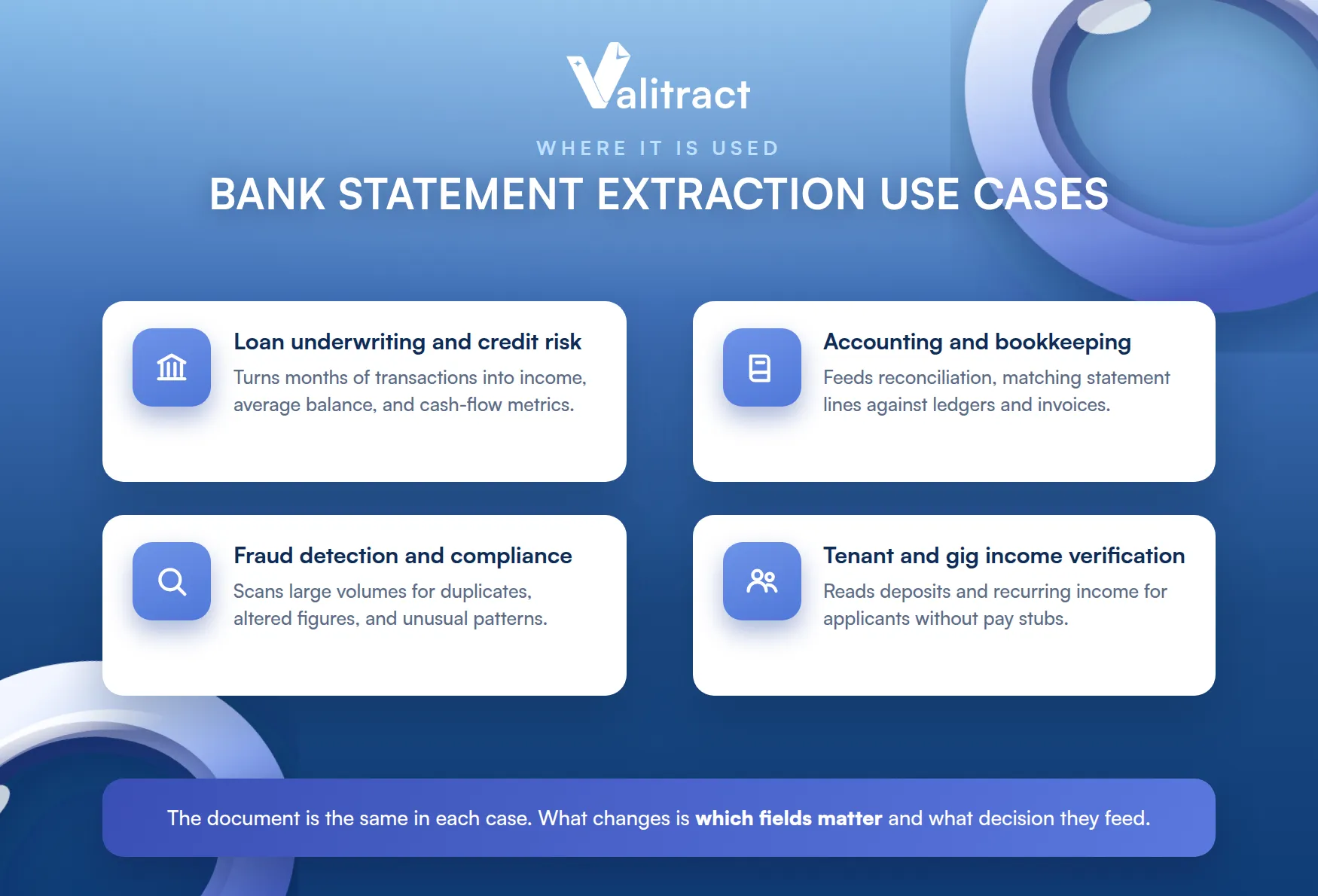
The document is the same in each case. What changes is which fields matter and what decision they feed.
Loan Underwriting and Credit Risk Assessment
Lenders read statements to judge income, expenses, and affordability. Extraction turns months of transactions into the metrics underwriters need, like average balance and net cash flow.
Reading months of history by hand is slow and inconsistent. Automation makes the same analysis fast and repeatable.
Accounting and Bookkeeping Reconciliation
Accountants match statement lines against ledgers and invoices. Structured extraction feeds that reconciliation directly, which is why teams lean on a Valitract AI bank statement data extraction workflow to skip the manual keying.
Matching hundreds of lines by hand is where errors creep in. Structured data makes the match fast and consistent.
Fraud Detection and Compliance Auditing
Risk and audit teams look for anomalies across large volumes of statements. Consistent, structured data lets them scan for duplicates, altered figures, and unusual patterns at scale.
The value is in the volume. Patterns invisible in a single statement become obvious across thousands.
Tenant and Gig Economy Income Verification
Landlords and platforms verify income for applicants without traditional pay stubs. Extraction reads deposits and recurring income straight from a statement, replacing slow manual review.
Challenges in Bank Statement Data Extraction
Extraction is not trivial, and a few problems recur. Knowing them helps you pick a tool that handles them well.
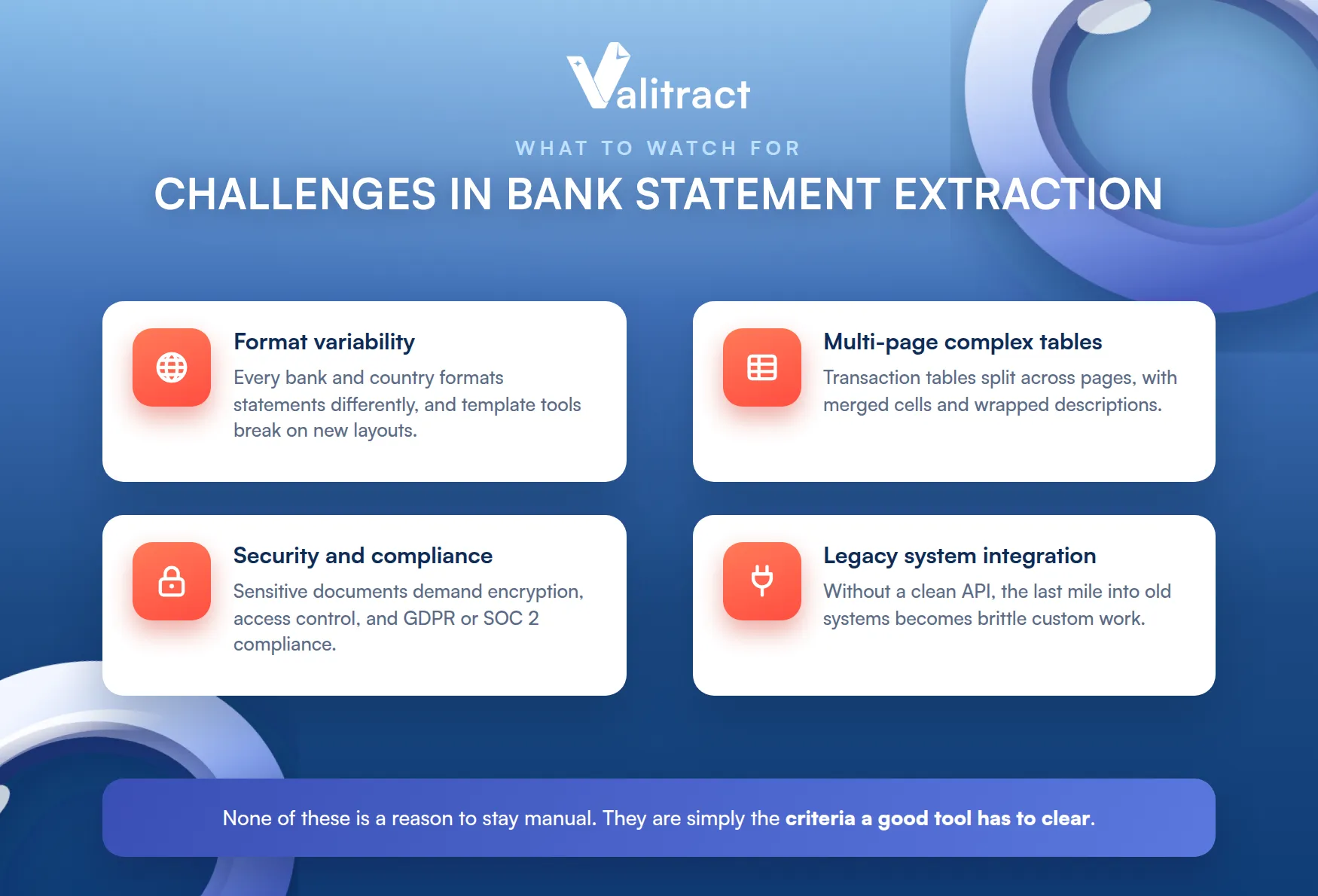
None of these is a reason to stay manual. They are simply the criteria a good tool has to clear.
Format Variability Across Banks and Countries
Every bank formats statements differently, and the variety multiplies across countries. A tool built for one layout breaks the moment a new bank appears.
This is the single biggest reason template-based tools disappoint. Real portfolios span dozens of banks and formats.
Multi-Page and Complex Table Layouts
Statements run for pages, with transaction tables that split across them. Merged cells, wrapped descriptions, and running balances make faithful parsing hard.
Data Security and Compliance Risks
Bank statements are highly sensitive documents. Handling them demands encryption, controlled access, and compliance with frameworks like GDPR and SOC 2.
Cutting corners here is expensive. A single mishandled statement can turn into a breach and a fine.
Integrating with Legacy Financial Systems
Extracted data still has to land in older accounting or lending systems. Without a clean API or connectors, that last mile becomes a custom, brittle integration.
Traditional OCR vs AI-Powered, Template-Free Extraction
Not all extraction is built the same way. The biggest divide is between rigid templates and flexible AI.
Template-Based OCR: Where It Breaks
Traditional OCR relies on a fixed template for each bank layout. It reads values from set coordinates, which works only as long as nothing moves.
The problem is that everything moves. A new bank, a redesigned statement, or a shifted column breaks the template and sends the document to manual review.
Maintaining a template library becomes its own job. Every new format is a ticket, and coverage never quite catches up to reality.
The maintenance cost is easy to miss at first. It grows quietly with every new bank you onboard.
AI and ML-Based, Template-Free Extraction: The Modern Approach
Template-free extraction reads by meaning rather than position. Machine-learning models recognize a date, a balance, or a transaction row regardless of where it sits on the page.
This is the approach Valitract takes, reaching up to 99.8% accuracy without per-bank configuration. A new bank format works on the first upload, with no template to build.
For teams evaluating this shift, our guide to AI data extraction tools breaks down the leading platforms.
The practical win is coverage without upkeep. New formats work on arrival, so the tool keeps pace with your portfolio.
What to Look for in a Bank Statement Extraction Tool
A few criteria matter most for statements specifically. Keep the checklist short and statement-focused.
- Table accuracy: faithful parsing of multi-page transaction tables, including running balances.
- Format coverage: handles many banks and countries without a template for each.
- Validation: reconciles balances and flags low-confidence fields for review.
- Integration: exports clean data to your accounting or lending stack via API.
- Security: encryption, access control, and clear data retention.
Tools split into raw OCR APIs, general IDP platforms, and statement-specialized tools. For a full side-by-side comparison, see our guide to the best bank statement extraction software.

How Valitract Simplifies Bank Statement Data Extraction
Manual bank statement extraction slows down underwriting, reconciliation, and financial review. Different bank layouts, scanned PDFs, and inconsistent formats make traditional OCR unreliable and expensive to maintain.
Valitract removes these bottlenecks with AI-powered extraction that captures structured data from virtually any bank statement, with no template configuration.
Template-Free AI Extraction Across Any Bank Format
Valitract reads any bank format without template setup. That includes scanned PDFs, image-based statements, and long multi-page documents.
The engine maps fields automatically and reaches up to 99.8% extraction accuracy. A new bank works on the first upload, so there is nothing to configure per institution.
Export Structured Data Directly Into Your Finance Workflow
Clean data is only useful where your team already works. Valitract exports to CSV, Excel, or JSON, and feeds tools like QuickBooks, SAP, NetSuite, and Xero through its API.
The output is standardized, so one extraction can serve several systems. Reconciliation and accounting workflows receive data ready to use, not raw text to clean.
That last mile is where many projects stall. A clean API turns integration from a project into a setting.
Built for High-Volume Financial Document Processing
Valitract is built to handle thousands of statements a day. Batch and asynchronous processing through the API keep throughput high without manual bottlenecks.
Security is enterprise-grade, and human review kicks in only when a field is low-confidence. Valitract is GDPR-aligned, with SOC 2 Type II and ISO 27001 certification in progress.
The result is throughput without a bigger team. Routine statements clear on their own, and people step in only where judgment is needed.
To try it on your own statements, use the Valitract bank statement converter to turn a PDF into clean data in minutes.
Frequently Asked Questions about Bank Statement Data Extraction
What data can be extracted from a bank statement?
Extraction captures transaction dates, descriptions or payees, debit and credit amounts, running and closing balances, transaction types, the account holder name, a masked account number, the statement period, and the bank name. Each is returned as a labeled field ready for a spreadsheet, database, or API.
Is bank statement data extraction secure and compliant?
It can be, provided the tool uses encryption, controlled access, and clear data retention, and aligns with frameworks like GDPR and SOC 2. Because statements are highly sensitive, security posture should be a top selection criterion, not an afterthought.
Can it detect fraud or tampered statements?
Extraction with validation can flag inconsistencies, such as balances that do not reconcile or duplicate transactions. Detecting deliberate tampering is a separate job handled by bank statement verification, which is best paired with extraction rather than assumed to be part of it.
What is the difference between bank statement extraction and bank statement verification?
Extraction reads the data off the statement and structures it. Verification confirms that the statement is authentic and unaltered, so extraction answers “what does it say” while verification answers “can I trust it,” and mature workflows use both.
Do I need OCR or AI-based extraction for bank statements?
OCR alone reads text but struggles with varied layouts and validation. AI-based, template-free extraction handles the format variety of real statements and adds field mapping and validation, which is why it is the better fit for most bank statement work.
Conclusion
Bank statement data extraction has become core infrastructure for finance, lending, and compliance teams. It turns slow, error-prone manual keying into fast, structured, auditable data your systems can trust.
The right tool handles format variety, parses multi-page tables, validates its output, and fits your stack. To see template-free extraction on your own statements, try the Valitract bank statement converter or compare options in our software guide.
The manual alternative has not gotten cheaper, and the tools have matured. The question now is which one fits, not whether to automate.
Valitract – Next-gen AI-Powered Data Extraction Platform
- Email: contact@valitract.com
- LinkedIn: https://www.linkedin.com/company/valitract-api-platform
- X: https://x.com/valitract


