


- AI document understanding is the ability of an AI system to read, interpret, and extract meaningful information from documents.
- It goes beyond recognizing characters to comprehend what the data represents, how fields relate to each other, and what the document means in context.
- Note that it describes a category of capability, not a single product, even though vendors like Oracle, Google, Microsoft, and UiPath all ship tools with this phrase or a close variant in the name.
AI document understanding is the point where document processing stops reading and starts comprehending. It is the difference between a system that can see the characters “$2,527.74” and one that knows those characters are the invoice total, due in 30 days, awaiting the approval signed at the bottom of the page.
That leap from recognition to meaning is what the term describes, and it is also why the term is so easy to misuse. This guide defines AI document understanding clearly, separates it from OCR and IDP, breaks down the capabilities and technologies inside it, and shows where the extraction step fits and why it makes or breaks the whole pipeline.
What “AI Document Understanding” Actually Means, and Why the Term Is Confusing
AI document understanding is the layer where document processing goes beyond character recognition and begins reasoning about meaning. It identifies what type of document it is, extracts specific fields, interprets relationships between data points, and delivers structured output a downstream system can use.
The confusion is not about the concept. It is about the words, because the same phrase is used in several different ways across the market.
The capability, not the product
“AI document understanding” describes a layer of intelligence, not a specific vendor tool. The same phrase shows up as a general capability category that analysts and practitioners use, and as a product name, such as Oracle OCI Document Understanding.
It also appears as a near-synonym for Google’s Document AI and Microsoft Azure’s Document Intelligence (itself a rebrand of an earlier product). And it gets used as a marketing label on tools that range from basic OCR with an AI prefix to genuine multi-modal reasoning systems. The phrase alone tells you very little about what a given tool actually does.
How it relates to OCR, IDP, and Document AI
The clearest way to understand the term is as the outermost of three concentric layers, not as a competitor to OCR or IDP. OCR is the foundation, IDP wraps OCR in classification and extraction, and AI document understanding wraps both in interpretation and reasoning.
| Dimension | OCR | IDP | AI document understanding |
|---|---|---|---|
| Core function | Reads characters | Classifies and extracts structured fields | Reads, interprets, and extracts meaning |
| What it understands | Nothing; characters only | One document at a time | Structured and unstructured documents, in context |
| Typical output | Raw text | Structured fields, validated | Structured data plus interpreted relationships |
| Handles new formats? | Any format, but nothing structured | Often needs per-type templates or training | Can generalize to unseen layouts |
| Cross-document reasoning? | No | Limited | Adds interpretation of context and relationships |
What it is not
A few adjacent tools get confused with document understanding, so it helps to rule them out. It is not a search engine for documents, which is document retrieval or enterprise search, and it is not a document management system, which handles storage, versioning, and access control with no comprehension layer.
It is also not a chatbot that summarizes PDFs. That is retrieval-augmented question answering over documents, which is adjacent but distinct, because it answers questions about a document rather than extracting its data into a structured, reliable record.
The Three Core Capabilities Inside Document Understanding
AI document understanding is built on three interdependent capabilities, and the third is what makes the category distinct from older document processing approaches.
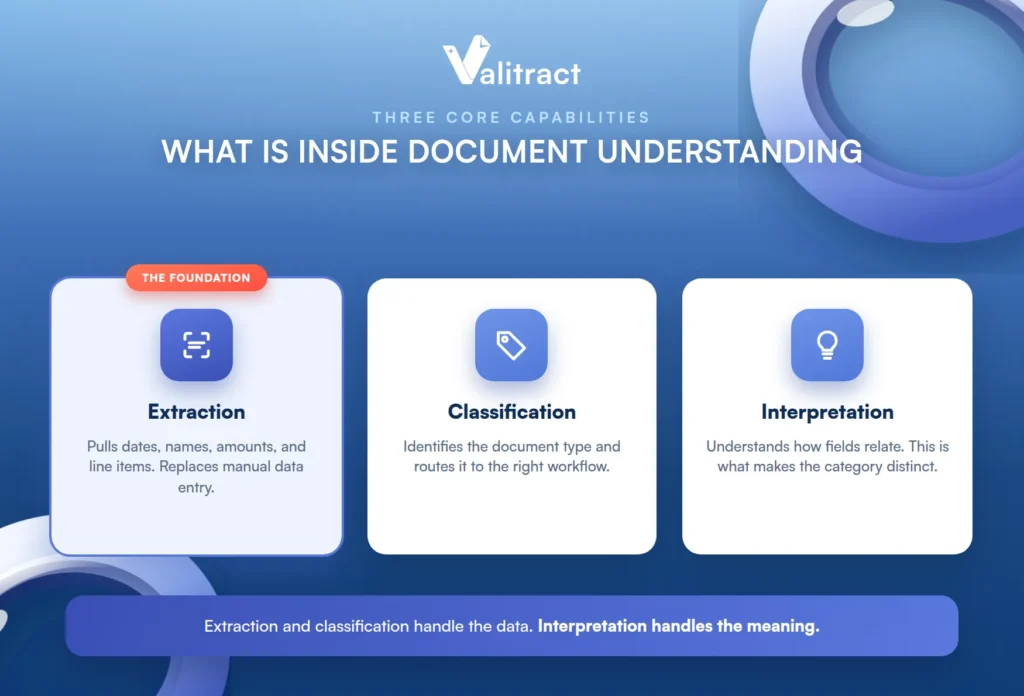
Extraction and classification handle the data; interpretation handles the meaning.
Extraction: pulling specific data points from a document
Extraction identifies and pulls the dates, names, amounts, line items, clauses, or any other field the workflow requires. This is the step that replaces manual data entry, turning a page a human reads into fields a program can use.
Extraction quality determines whether downstream systems receive clean data or garbage. It is the foundation everything else rests on, which is why so much of this guide comes back to it.
Classification: determining what the document is
Classification identifies the document type, such as an invoice, bank statement, contract, or ID card, and routes it to the correct processing workflow. It matters because extraction logic differs by document type.
The fields you need from an invoice are not the fields you need from a passport. Without classification, a system cannot know which extraction rules to apply.
Interpretation: understanding meaning, context, and relationships
Interpretation goes beyond extracting individual fields to understanding how they relate. It recognizes that “$2,527.74” is the invoice total rather than a line item, that “Net 30” means payment is due in 30 days, and that a signature block at the bottom is an approval rather than another data field.
This is the layer that separates document understanding from document extraction. Pulling the values is one problem; knowing what the values mean to each other is a harder one.
How the Processing Pipeline Works, Stage by Stage
Every AI document understanding system runs through a sequential pipeline, with each stage building on the one before it. Understanding the five stages helps you see where an output went wrong.
Ingestion. The document is received (a PDF, image, scan, or email attachment) and normalized regardless of format, so the rest of the pipeline works from a consistent starting point.
Recognition (the OCR layer). This converts visual or encoded content into machine-readable text, handling scans, photos, handwriting, and multi-column layouts. It is the entry point for everything downstream, which you can read more about in our explainer on the OCR API.
Extraction. The system identifies and pulls specific entities, fields, and data points from the recognized text using natural language processing and computer vision. This is where raw text becomes named values.
Classification. The system determines the document type and categorizes the content, then routes it to the correct downstream workflow so the right rules and destinations apply.
Structured output. The extracted, validated data is delivered as JSON, CSV, or a database record ready for an ERP, CRM, or application to consume.
The quality of the entire pipeline depends disproportionately on the first two stages. If the OCR layer destroys the layout or the extraction step misses fields, no amount of downstream intelligence can recover data that was never captured correctly.
Where Extraction Fits, and Why It’s the Step That Makes or Breaks the Pipeline
Extraction is the foundation of every document understanding workflow, and it is also the step where manual processes most often break down. Inconsistent categorization, missed rows on multi-page tables, and hours of manual cleanup all start here.
What extraction actually means in practice
Extraction is not just “reading the page.” It means pulling specific fields, such as the invoice number, vendor name, line-item totals, and due date, into a structured format that a downstream system can consume without human interpretation.
That is the difference between a text dump and a structured JSON record. One still needs a human to make sense of it; the other is ready for a machine to use.
Why extraction accuracy determines everything downstream
If the extraction step returns the wrong total, misreads a date, or drops a line item, every system that consumes that data inherits the error. AP posts the wrong amount, reconciliation fails, and reporting is off.
The practitioner reality is that teams often discover these errors weeks later, during month-end close, rather than at the point of extraction. By then the wrong data has already spread through several systems, which is exactly why getting the first read right matters so much.
Where Valitract fits in this layer
Valitract is built for the extraction step. It provides template-free extraction across document types (invoices, receipts, bank statements, purchase orders, contracts, IDs, logistics documents, medical records, and financial statements), with structured JSON, CSV, or XLS output, a no-code interface and a REST API, up to 99.8% field-level accuracy on standard printed documents, 95+ languages, and table extraction that preserves row and column relationships. Our guides to AI data extraction tools and AI data extraction software go deeper on this layer.
The honest handoff comes after extraction. If your next step is cross-document reasoning (comparing income across a bank statement and a tax return), end-to-end workflow orchestration (routing, approvals, and exception handling), or fraud and tamper detection at the level dedicated verification platforms offer, that is a different tool layer. Valitract is the document intelligence layer, not the workflow platform, and a complete system usually pairs a strong extraction layer with the workflow tools around it.
The AI Technologies Behind Document Understanding
Modern document understanding systems combine four technology layers, and they increasingly use vision-language models that process all four in a single pass rather than as separate sequential steps. Understanding the layers helps you read past the marketing.
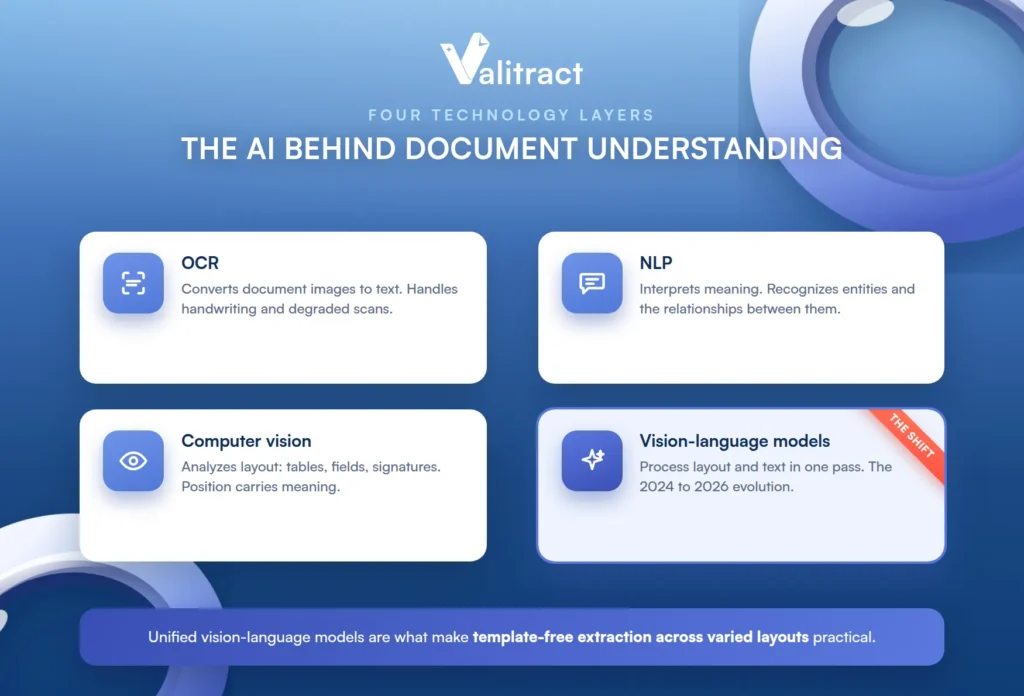
OCR (optical character recognition) is the entry point that converts document images into text. Modern AI-enhanced OCR handles handwriting, multi-column layouts, and degraded scans far better than legacy OCR engines.
NLP (natural language processing) interprets meaning. It recognizes entities such as names, dates, and amounts, and it understands the relationships between text elements.
Computer vision analyzes the visual layout. It recognizes tables, form fields, signatures, stamps, and multi-column structures, and it understands that position carries meaning, because a number in a column header means something different from the same number in a cell.
Vision-language models (VLMs) are the 2024 to 2026 evolution. They process both visual layout and text content simultaneously in a single pass, and they can interpret documents holistically without flattening everything into plain text first.
The shift from sequential OCR-then-NLP pipelines to unified vision-language models is the technical change that makes template-free extraction across varied layouts practical at production scale. It is the reason a modern tool can read an invoice layout it has never seen before.
Structured Versus Unstructured Documents, and Why It Matters for Choosing Tools
Document understanding systems handle both structured and unstructured documents, but the two categories require different levels of intelligence. The tool that handles one well may not handle the other, which makes this distinction central to choosing correctly.
Structured documents
Structured documents have predictable layouts, defined fields, and consistent positions. They are easier to process, and even template-based systems work when the layout is stable.
The real challenge is variability across sources. Fifty vendors can send invoices in fifty different layouts, all containing the same fields in different places, which is where template-based approaches start to struggle.
Unstructured documents
Unstructured documents are free-form and context-dependent, with no fixed fields and no predictable layout. They require deeper language understanding, because the system must infer what matters based on content rather than position.
Contracts, clinical notes, and correspondence all fall here. The ability to process both structured and unstructured categories in a single pipeline, without separate templates or training for each, is one of the defining characteristics that separates genuine document understanding from simpler extraction tools.
Industry Applications: What Changes by Vertical
The same core technology serves very different verticals, and the critical capability shifts with each. What one industry treats as the whole point, another barely uses.
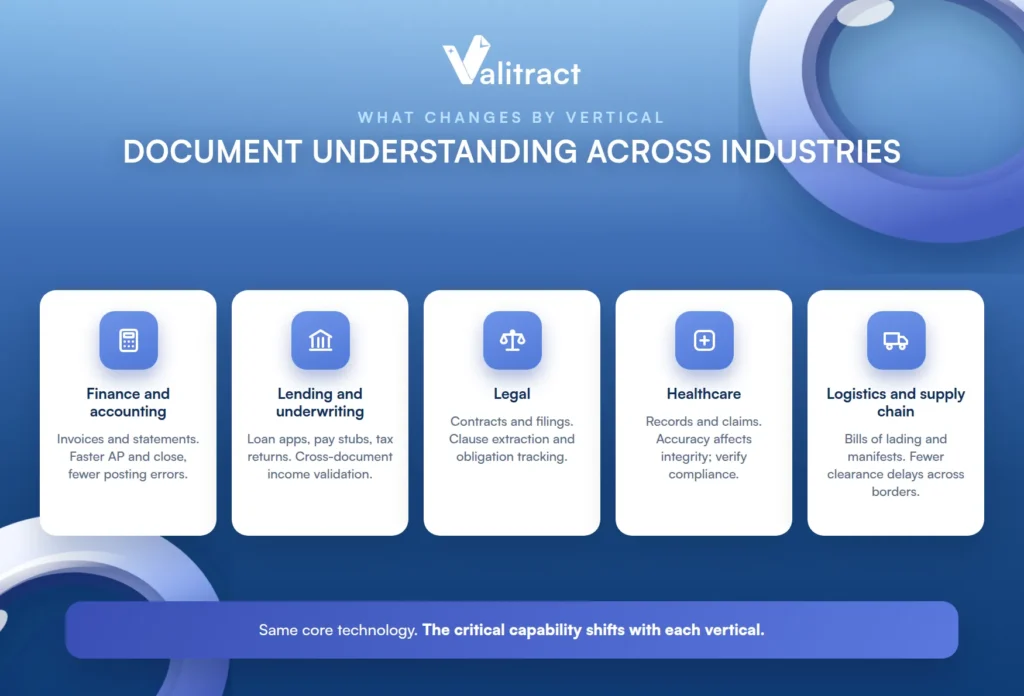
Finance and accounting teams process invoices, bank statements, receipts, and financial statements. Automated extraction reduces AP processing time and month-end close delays, and it cuts errors in posted amounts.
Lending and underwriting teams handle loan applications, pay stubs, tax returns, and bank statements. Here the critical capability is cross-document validation, such as confirming that the income on a tax return matches the deposits on a bank statement.
Legal teams work with contracts, NDAs, and regulatory filings. Clause extraction and obligation tracking speed up due-diligence cycles and reduce the risk of a missed term.
Healthcare teams deal with medical records, insurance claims, lab reports, and prior authorizations. Extraction accuracy directly affects patient data integrity and claims-processing speed, and regulated deployments must be checked against each vendor’s specific compliance posture.
Logistics and supply chain teams process bills of lading, customs forms, shipping manifests, and purchase orders. Automated extraction reduces clearance delays and manual entry across multi-country shipments.
How to Evaluate Whether You Need OCR, IDP, or Full Document Understanding
The right choice depends on three factors: how varied your documents are, whether decisions depend on data from multiple documents, and how often your document formats change. This decision framework maps each situation to the right level of capability.
If your documents have stable, consistent layouts and you just need searchable text, OCR is sufficient. There is no need to pay for interpretation you will not use.
If you need structured data extracted from known document types with moderate layout variation, IDP handles this. Template or training-based extraction works when the document categories are known and stable.
If your documents arrive in dozens of formats that change frequently, or decisions require cross-referencing multiple documents, AI document understanding is the correct architecture. Template-free extraction that generalizes to unseen layouts without per-format configuration is what the situation calls for.
And if you need extraction from varied document types into structured JSON or CSV without per-document-type templates, this is where Valitract fits: template-free extraction with a REST API and a no-code dashboard, for the team that does not want to build or maintain extraction infrastructure. For a broader vendor view, see our guide to the best intelligent document processing software.
Common Misconceptions About AI Document Understanding
A few myths cause real buying mistakes. Each is worth naming and correcting.
“Document understanding is just OCR with a better name.” OCR reads characters; document understanding interprets meaning. The gap between the two is the gap between a text dump and structured, validated data.
“AI document understanding requires massive training datasets.” Template-free and VLM-based systems process documents they have never seen before. The era of needing 200 or more labeled examples per document type is a legacy IDP constraint, not a universal one.
“Higher extraction accuracy means the analysis is also accurate.” Extraction accuracy (did you pull the right number?) and analytical accuracy (did you interpret what the number means?) are separate claims. A system can extract $2,527.74 perfectly and still route it to the wrong field.
“One tool handles the entire pipeline.” Most production workflows combine a document intelligence layer for extraction and classification with separate workflow, decisioning, or integration layers. Expecting one vendor to cover extraction, routing, approval, fraud detection, and payment execution leads to compromises at every layer.
“Testing on clean demo PDFs predicts production accuracy.” Real-world documents are faxed, photographed with phones, skewed, low-contrast, multi-page, and in mixed languages. Evaluate on your actual document mix, not vendor-prepared samples.
Frequently Asked Questions About AI Document Understanding
What is AI document understanding?
It is the ability of an AI system to read, interpret, and extract meaningful information from documents, going beyond character recognition to comprehend what the data represents and how fields relate. It combines extraction, classification, and interpretation to turn a document into structured, usable data. The term describes a category of capability, not a single product.
What is the difference between AI document understanding and OCR?
OCR converts an image into text and stops there, with no understanding of meaning. AI document understanding adds interpretation on top, identifying what the document is, extracting specific fields, and understanding how those fields relate. OCR is one layer inside a document understanding system, not a substitute for it.
Is “Document AI” the same as “AI document understanding”?
They are closely related and often used interchangeably. “Document AI” is Google’s product name, “Document Intelligence” is Microsoft Azure’s, and “AI document understanding” is both a general capability category and, in some cases, a specific product name. The underlying capability is similar; the label depends on who is speaking.
What types of documents can AI document understanding process?
It handles structured documents like invoices, forms, and purchase orders, and unstructured documents like contracts, emails, and clinical notes. The strongest systems process both in a single pipeline without separate templates for each type. The practical limit is set by document quality and how far a given tool generalizes to unseen layouts.
How accurate is AI document understanding on real-world documents?
Accuracy is high on clean, standard documents and lower on faxed, photographed, skewed, or low-contrast ones. Because vendor benchmarks use clean samples, the only reliable measure is testing on your own production document mix. Field-level accuracy is the number that matters, not a single page-level score.
Do I need a developer to implement AI document understanding?
Not necessarily. Some tools offer a no-code dashboard for business teams, while others are API-first for developers, and several offer both. The right choice depends on whether you are building it into a product pipeline or running it as a standalone workflow.
What structured output formats does document understanding produce?
Common outputs are JSON, CSV, and XLS, or a direct database record. JSON is typical for API-driven pipelines feeding an ERP, CRM, or custom application, while CSV and XLS suit spreadsheet and reporting workflows. The right format is the one your downstream system consumes without extra conversion.
Conclusion
AI document understanding is the layer where a system stops reading characters and starts comprehending what a document means. It rests on extraction, classification, and interpretation, and its output is only ever as good as the extraction beneath it.
Valitract is built for that foundational step: template-free extraction across document types, delivered as structured JSON, CSV, or XLS through a no-code dashboard or a REST API. To build accurate extraction into your own document workflow, start with Valitract.


