


- Automated bank statement processing extracts, validates, and reconciles transaction data from any statement, whether a PDF, scan, or photo, without manual re-entry or per-bank templates.
- The process runs in three stages: data extraction, validation and reconciliation, and structured export into your accounting, lending, or KYC workflow.
- The accuracy of the whole process depends on stage two; extraction alone is not enough if the numbers are never reconciled against the opening and closing balances.
Automated bank statement processing solves a problem that scales badly by hand. Many finance and lending teams receive hundreds of bank statements a month, in dozens of different layouts, and keying them manually is both slow and error-prone.
Every bank formats its statement differently. That variety is exactly what makes manual handling so slow and automation so valuable.
The automated version reads the data from each statement, checks that it reconciles, and delivers it structured, so a person is not retyping rows from a PDF. It turns a stack of varied documents into clean, usable financial data.
The difference at scale is stark. What takes hours of careful keying by hand runs in minutes, and with fewer mistakes.
This guide explains what automated bank statement processing means, how extraction and reconciliation differ, the two main approaches, and the step-by-step flow, before showing where an extraction and validation layer fits.
One idea runs through all of it. The reading is the easy part, and the reconciliation is what makes the output safe to use.
What Automated Bank Statement Processing Actually Means
The term has no single standard definition, so it helps to be precise. At its core, it is the automated process of turning raw bank statement data into usable financial information.
That process spans two distinct layers, and confusing them is where a lot of buying decisions go wrong.
Many teams shop for one and end up needing the other. Knowing which layer you are missing saves a costly mismatch.
| Layer | What it does | Examples |
|---|---|---|
| Processing layer | Rule-based work: matching transactions, classifying accounts, creating journal entries | SAP S/4HANA, Oracle JD Edwards |
| Extraction layer | Pulling structured data out of the source statement before any rule can run | AI document extraction tools |
The processing layer is the rule engine. It matches transactions, classifies them to accounts, and posts entries, and it lives inside an ERP.
It is powerful once the data is clean. The catch is that it assumes clean, structured data is already available to work on.
The extraction layer comes first, and it is easy to overlook. Before any rule can run, something has to get clean, structured data out of the source file, whether that is a PDF, a scan, a photo, or a non-standard CSV. This is where intelligent document processing software does its work.
Skip this layer and the rule engine has nothing reliable to act on. Most stalled automation projects trace back to a weak extraction step.
Bank Statement Reconciliation vs. Bank Statement Data Extraction
These two terms get used interchangeably, but they are different steps with different jobs. Understanding the split is the key to understanding accuracy.
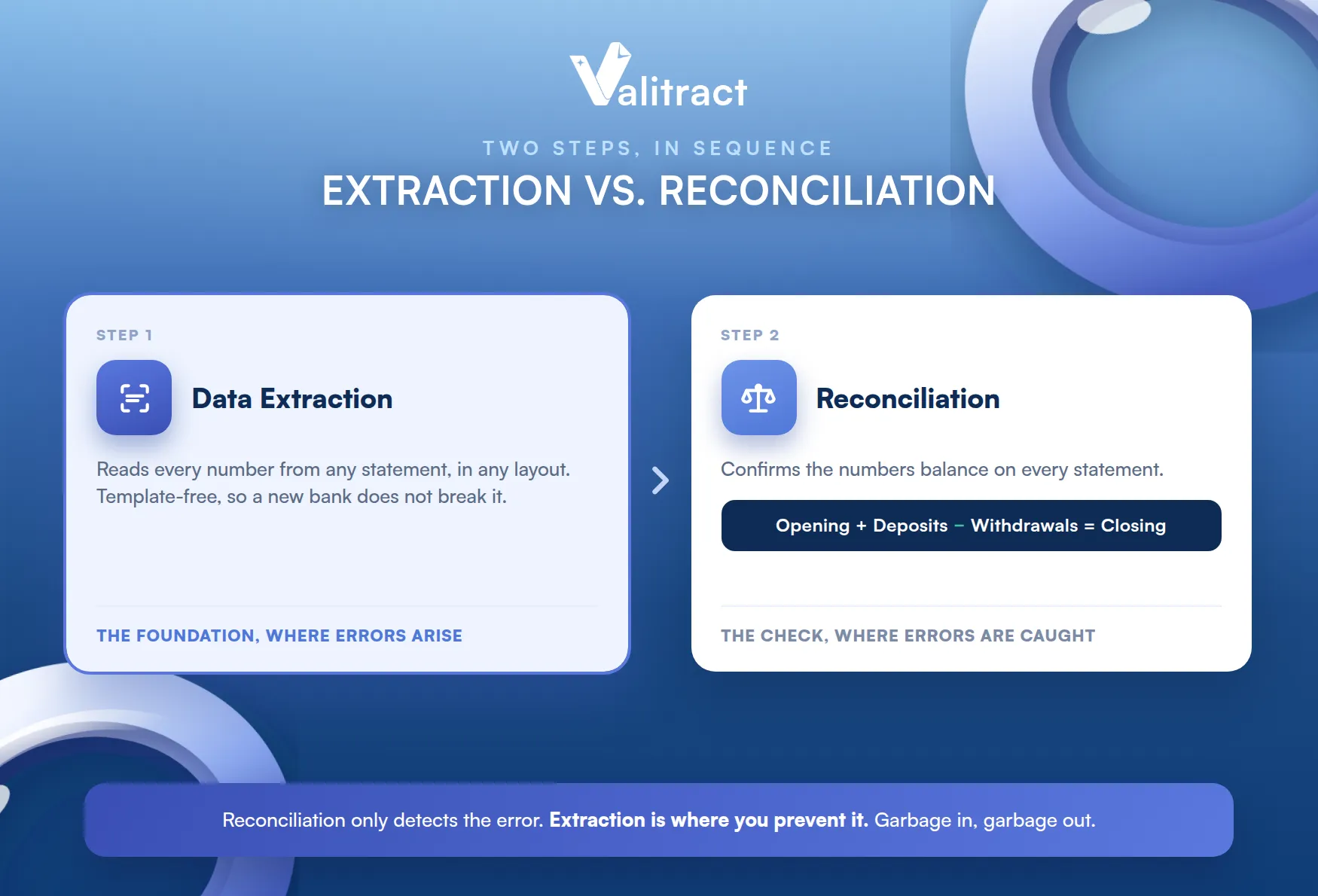
They sit in sequence, not side by side. Extraction happens first, and reconciliation checks its work.
Bank Statement Reconciliation
Reconciliation is the confirmation step. It checks that the extracted numbers match the actual balances, and it is usually where an error is detected, not where the error arises.
That distinction changes where you invest. If reconciliation only detects errors, the way to reduce them is to fix the extraction that creates them.
The core check is simple arithmetic. Opening balance plus deposits minus withdrawals should equal the closing balance, and automatic validation runs that check on every statement.
The simplicity is what makes it powerful. A single equation, applied to every statement, catches a wide range of extraction slips.
Catching the error here is the point. When validation flags a mismatch at reconciliation, the bad number is stopped before it flows into your books or a lending decision.
Reconciliation is a detector, not a fixer. It tells you a number is wrong, but it cannot tell you the right one if extraction failed.
Bank Statement Data Extraction
Extraction is the foundational step, and it decides whether reconciliation can even be accurate. If the numbers are read wrong from the document, the reconciliation inherits the error.
This is why template-free reading matters. A new bank layout should not break the extraction and quietly corrupt the balances.
This is the garbage-in, garbage-out principle in action. No validation can fix a figure that was captured incorrectly in the first place, which is why bank statement data extraction quality determines the accuracy of everything downstream.
This is why extraction deserves the most scrutiny. It is the one step where an error has nowhere upstream to have come from.
Two Approaches to Automating the Process
There are two broad ways to automate, and they suit different situations. Many teams end up using both.
They are not rivals so much as neighbors. One handles the rules, and the other handles the documents that feed them.
Native ERP Rule Engines
ERP rule engines are strong when the inputs are clean. They work well when you have a direct bank feed, standardized formats like BAI2 or MT940, and a single ERP.
In that setting they are hard to beat. The rules run reliably because the data arrives in exactly the shape they expect.
Their limits show with messy inputs. They tend to break when a statement arrives as a scan or PDF, when a bank falls outside the supported list, or when the setup is a complex multi-entity structure.
That is not a flaw so much as a boundary. Rule engines were built for structured feeds, not for reading documents.
Document Extraction and Validation Layer
An extraction layer handles what rule engines cannot. It fits when statements arrive as files (PDFs, photos, scans), when there are many banks, formats, and currencies, and when the data has to feed any downstream system.
Most real-world statement flows look like this. Few teams enjoy perfectly standardized feeds from every bank they touch.
That flexibility is the point. Whether the destination is an ERP, a lending engine, or a forensic review, a financial data extraction software layer with an OCR API turns varied documents into a single clean feed.
It sits in front of the rule engine, not against it. The extraction layer prepares the data that the rule engine then acts on.
How Automated Bank Statement Processing Works, Step by Step
The full process runs in six stages. Each one hands clean data to the next.
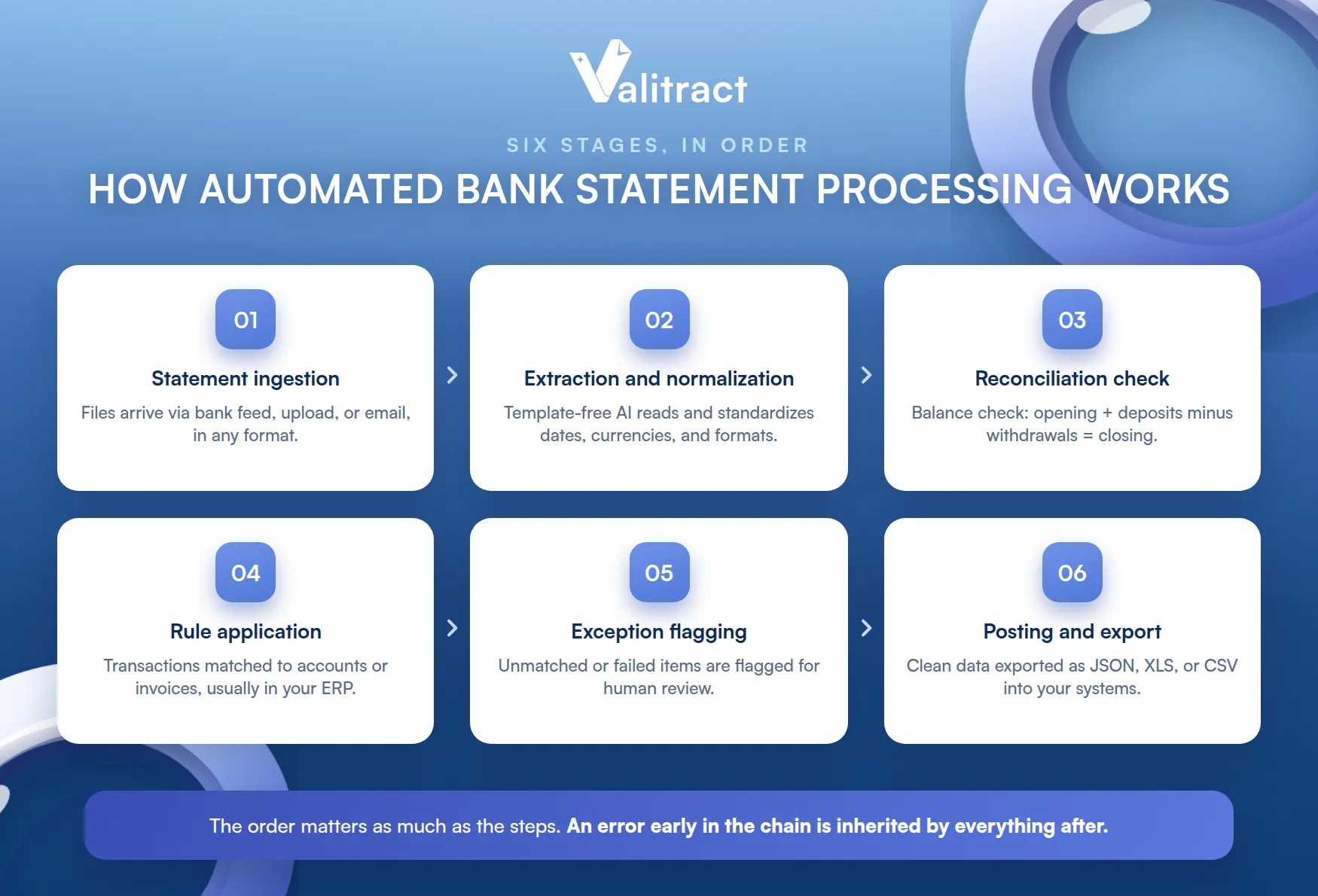
The order matters as much as the steps. An error early in the chain is inherited by everything that follows.
Step 1: Statement Ingestion
The process starts by receiving the file. Statements arrive through a bank feed, a manual upload, or an email inbox, and the system takes them from there.
Ingestion should be effortless to be useful. If getting files in is a chore, the rest of the automation never gets used.
The source does not need to be uniform. Part of the value is accepting whatever format the bank sends.
Removing that constraint removes a lot of manual sorting. Nobody has to convert files by hand before the real work starts.
Step 2: Data Extraction and Normalization
Next, the system reads the data and standardizes it. It normalizes date formats, negative number conventions, and currencies so that statements from different banks become consistent.
This is where template-free AI earns its place. It reads by meaning, so an unfamiliar layout does not stop it.
Normalization is quiet but essential. Two banks that write a date or a debit differently must end up in one uniform structure.
Without it, downstream systems choke. A rule engine cannot match transactions that arrive in inconsistent shapes.
Step 3: Reconciliation Check
Now the numbers are validated. The system runs the balance check, confirming that opening balance plus deposits minus withdrawals equals the closing balance.
A mismatch here triggers a flag. This is the stage that catches an extraction error before it can spread.
Statements that balance pass straight through. Only the ones that do not add up need a closer look, which is where attention should go.
Step 4: Rule Application
With clean, reconciled data, the rules can run. Transactions are matched to the right accounts or invoices, usually inside your ERP or accounting system.
This is the step most people picture as automation. In truth it is only the visible tip of a process that depends on everything before it.
This is the processing layer at work. It depends entirely on the accuracy of the steps before it.
Good rules on bad data still produce bad results. The matching is only as reliable as the figures it matches.
Step 5: Exception Flagging
Not everything matches automatically, and that is expected. Transactions that cannot be matched or that fail a check are flagged for a human to review.
This keeps a person in the loop where judgment is needed. The system handles the volume, and people handle the exceptions.
The review list is short by design. Instead of checking every transaction, a person checks only the flagged few.
Step 6: Posting and Export
Finally, the clean data leaves the pipeline. It is posted or exported into your ERP, accounting system, or other downstream workflow, ready to use.
Structured export formats make this simple. JSON, XLS, or CSV drop into the systems your team already runs.
No one retypes it along the way. The data moves in a format the destination system already accepts.
That closes the loop cleanly. From an unstructured file to a posted entry, the data is touched by hand only at the exceptions.
Automated Bank Statement Processing: Common Use Cases
The same process serves several very different teams. These are the most common.
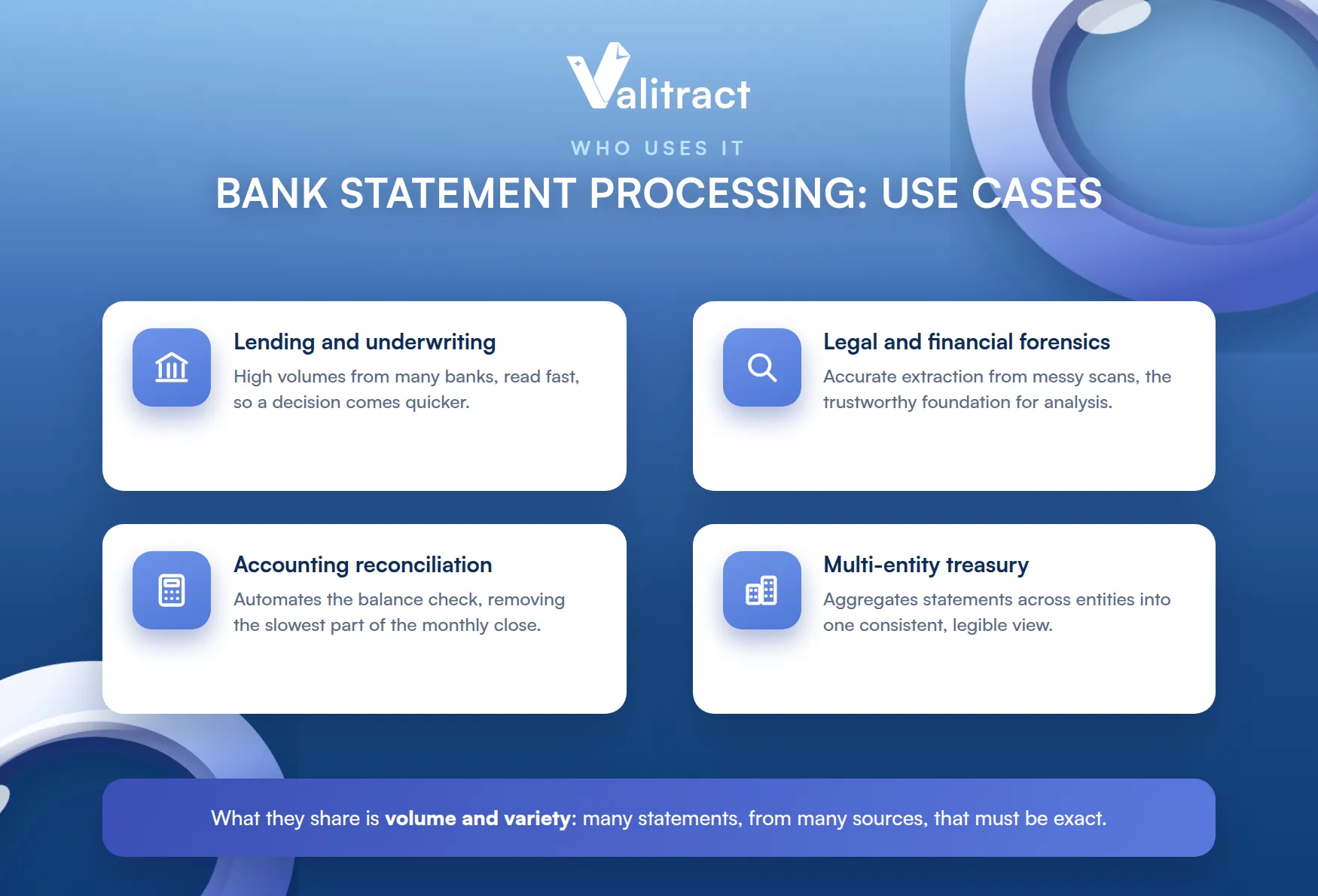
What they share is volume and variety. Each deals with many statements, from many sources, that must be exact.
Lending and Underwriting
Lenders live on statement data. They need to process high volumes from many banks quickly, so automation directly shortens the time from application to decision.
Manual review cannot keep that pace. At application volume, a human bottleneck becomes a lost deal.
Speed and volume are the whole game here. A faster, cleaner read means a faster underwriting decision.
Applicants feel it too. A quicker decision is often the difference between winning and losing a borrower.
Legal and Financial Forensics
Forensic work demands accuracy on messy documents. Investigators often deal with poor-quality scans where a misread digit can change a conclusion.
The documents are rarely clean. Forensic work almost by definition involves the messiest, hardest-to-read statements.
Accurate extraction is the foundation of that work. The analysis is only as trustworthy as the data it starts from.
Extraction and tamper detection are separate jobs, though. Reading the numbers accurately is distinct from proving a document was not altered.
Accounting and Bookkeeping Reconciliation
Accountants reconcile statements constantly. Automating the extraction and the balance check removes the slowest, most error-prone part of the monthly close.
It also frees skilled people for better work. Reconciling rows by hand is not the best use of an accountant’s time.
The payoff is time and accuracy together. Clean data reconciles faster and with fewer disputes.
Month-end stops being a scramble. The reconciliation that once ate days runs mostly on its own.
Multi-Entity Corporate Treasury
Treasury teams juggle many accounts and banks. Automation aggregates statements across entities into one consistent view, which manual handling cannot match at scale.
The complexity grows with every entity added. What is manageable for one company becomes unmanageable across a group by hand.
Consistency is the hard part they solve. One structure across every bank makes the whole picture legible.
Cash visibility improves as a result. A treasurer can see the full position without stitching spreadsheets together.
What Good Automated Bank Statement Processing Software Should Do
When comparing tools, a short checklist separates the capable from the fragile. Look for these traits.
Missing any one weakens the whole. A tool strong on reading but weak on reconciliation still leaves you exposed.
- Layout-agnostic parsing across bank formats, so you do not configure a template per bank.
- Automatic balance reconciliation, not just reading text off the page.
- Exception flagging with a human in the loop for unusual or low-confidence transactions.
- Multi-currency and multi-format support, for statements from anywhere.
- An API-first design, so it drops into your existing pipeline without a rebuild.
A tool that does all five turns bank statements from a bottleneck into a feed. One that misses reconciliation, in particular, is only doing half the job.
Test any tool on your own worst statements. A clean demo file proves little; a faded, multi-currency scan proves a lot.
Where Valitract Fits in Automated Bank Statement Processing
Valitract handles the extraction and validation layer, and it is deliberate about staying in that lane. It provides template-free parsing, arithmetic and balance validation, and flagging of low-confidence fields, across statements in any format.
That pairing is the important part. Reading and reconciling together is what turns raw statements into data you can act on.
It is clear about what it does not do. Valitract does not replace your ERP’s rule engine, and it does not perform forensic tamper detection; if you need that layer, see our guide to bank statement verification software.
That honesty is deliberate. Knowing exactly what a tool does, and does not, is what lets it slot cleanly into a stack.
That focus is a strength, not a gap. By doing extraction and reconciliation accurately, Valitract feeds clean, validated data to whatever handles the rest.
It works with your existing tools, not against them. The goal is to strengthen the input, not to replace the systems you already trust.
It fits into your stack cleanly. Through our bank statement extraction software, the broader AI data extraction software, and the OCR API, the data arrives clean, structured, and reconciled.
Whether you prefer a no-code dashboard or an API, the result is the same. The output is validated data your downstream systems can trust.

Frequently Asked Questions About Automated Bank Statement Processing
What is automated bank statement processing?
It is the automated process of extracting, validating, and reconciling transaction data from bank statements, then exporting it structured into a downstream system. It removes the manual re-entry that makes handling statements slow and error-prone.
How accurate is automated bank statement data extraction?
Modern tools reach up to about 99.8% accuracy and pair extraction with a balance reconciliation check, so a mismatch is caught rather than passed through. The reconciliation step is what makes the accuracy trustworthy, not just the reading.
Can automated processing handle scanned or photographed statements?
Yes. Template-free, AI-powered extraction is designed to read PDFs, scans, and phone photos, which is exactly where native ERP rule engines tend to break.
Does automated bank statement processing replace manual reconciliation entirely?
Not entirely. It automates the routine reconciliation and flags exceptions, but a person still reviews the flagged transactions and owns the final judgment, which is the intended human-in-the-loop design.
What file formats can be processed automatically?
Good tools handle PDFs, scans, images, and non-standard CSVs, and normalize them into one consistent structure. That format-agnostic parsing is a core reason to use an extraction layer at all.
Concluding Thought
Automated bank statement processing works when accurate extraction meets automatic reconciliation. Reading the data is only the start; the balance check is what makes the output trustworthy enough to post, lend, or audit against.
The two stages are not optional extras. Skip either one and the process quietly loses the reliability that made it worth automating.
The safest way to improve the process is to get the foundation right first. Clean, reconciled extraction feeds every downstream system better than any rule engine can compensate for after the fact.
Valitract provides that extraction and validation foundation. To see it on your own statements, book a demo with the Valitract team.
Valitract – Next-gen AI-Powered Data Extraction Platform
- Email: contact@valitract.com
- LinkedIn: https://www.linkedin.com/company/valitract-api-platform
- X: https://x.com/valitract


