


- Bank statement reconciliation compares your accounting records against your bank statement to confirm every transaction matches and to explain any difference.
- The process runs in five steps: gather records, compare balances, find reconciling items, investigate each one, then adjust and finalize.
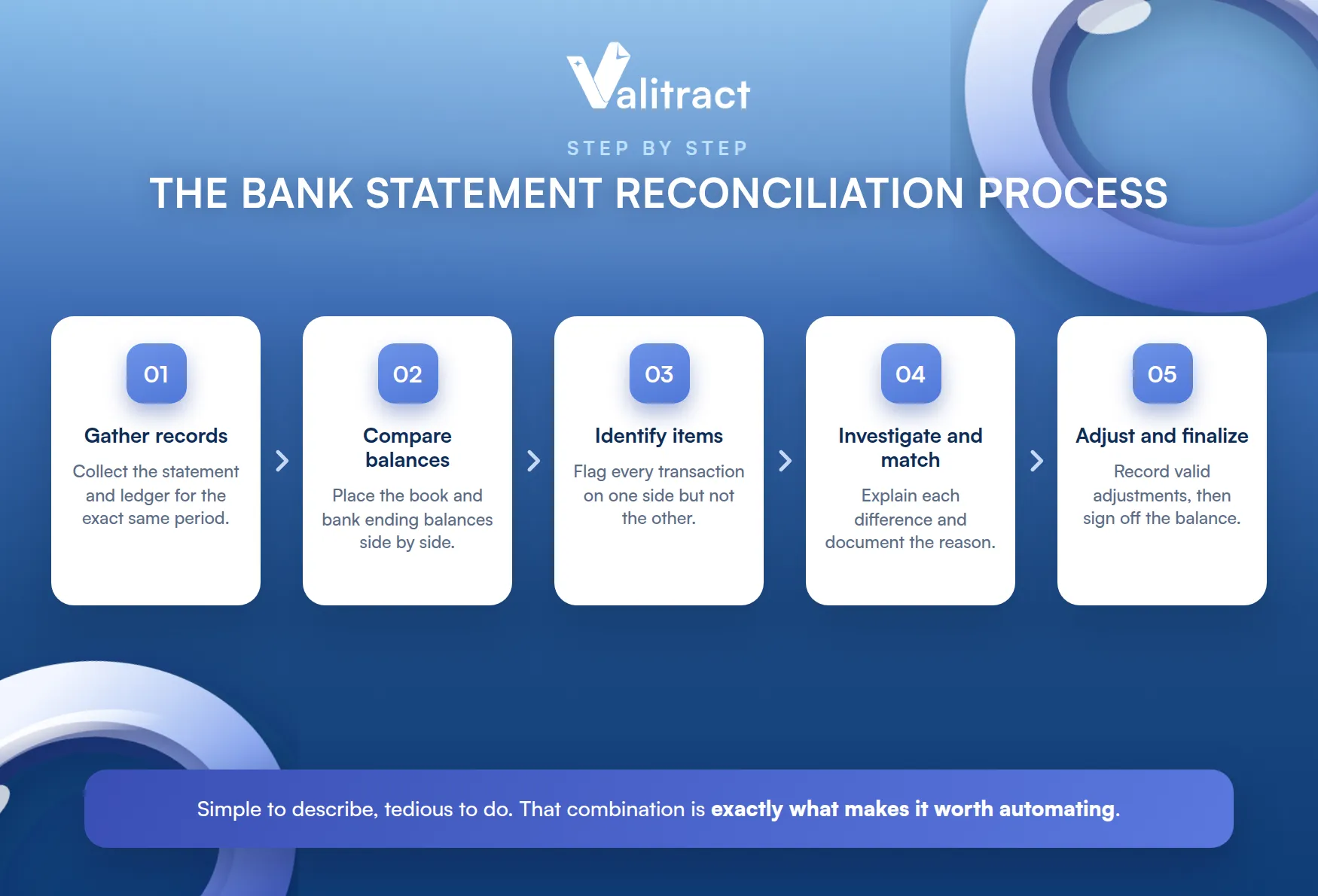
- Reconciliation software automates the matching itself, while the real time sink for many teams is getting clean data out of PDF statements first.
- AI extraction removes the manual re-typing, feeding clean, validated data into your reconciliation tool or spreadsheet.
Bank statement reconciliation is one of the most routine yet time-consuming tasks in accounting. Every month, someone in finance sits down with a bank statement and a ledger and starts checking one line against another. When the two balances do not agree, the hunt for the difference begins, and it can eat an afternoon.
Multiply that across accounts and months, and reconciliation becomes one of finance’s most persistent time sinks.
Bank statement reconciliation is that check, done properly and on a schedule. It is how a business confirms its books reflect reality and catches errors or fraud before they compound.
Done late or sloppily, it hides problems instead of catching them. Done well, it is quiet and routine.
This guide covers what reconciliation is, a worked example, the step-by-step process, where it gets hard, and how to automate the part that actually slows teams down.
The aim is practical, not academic. By the end, you should know exactly which step to automate first. We will also be clear about which tools do which job, since reconciliation software and data extraction tools solve different halves of the problem.
What Is Bank Statement Reconciliation?
Before the process, it helps to define the term and place it against the broader practice of account reconciliation.
Definition and Meaning
Bank statement reconciliation is the process of comparing your internal accounting records against your bank statement to confirm that every transaction matches, then explaining any difference between the two balances. The goal is a reconciled balance both sides agree on.
That agreement is the whole point. Everything in the process works toward getting both balances to the same number.
In plain terms, it answers one question. Does what your books say about cash match what the bank says.
When they match, you have confidence in your cash position. When they do not, you have a lead to follow.
Bank Reconciliation vs Account Reconciliation
The two terms are related but not identical. Account reconciliation is the broad practice of checking any general ledger account against a source of truth.
Bank statement reconciliation is one specific type of it. It focuses on the cash account, using the bank statement as the external source of truth.
The mechanics are the same either way. Bank reconciliation is just the most common and most frequent version.
Why It Matters for Accuracy and Fraud Prevention
Reconciliation is a core financial control, not just bookkeeping hygiene. It keeps reported cash accurate, which every downstream forecast and decision depends on.
It is also a fraud and error tripwire. An unexplained withdrawal, a duplicate charge, or a missing deposit surfaces during reconciliation, often before it does anywhere else.
That early warning is the real value. A reconciled account is one you can trust without a second look.
Auditors and lenders lean on that trust too. Clean reconciliations are a sign of a well-run finance function.
Bank Statement Reconciliation Example
A worked example makes the mechanics concrete. The idea is to adjust both sides for items the other has not yet recorded.
Neither balance is wrong at the start. They simply reflect different timing, which the reconciliation lines up.
A Simple Worked Example
Suppose your book balance is $10,000 and the bank statement ends at $11,000. They differ, so you list the reconciling items.
Table 1. A simple bank reconciliation.
| Item | Side adjusted | Amount |
| Bank statement ending balance | Bank | $11,000 |
| Deposit in transit | Bank, add | +$500 |
| Outstanding checks | Bank, subtract | -$1,800 |
| Adjusted bank balance | $9,700 | |
| Book (ledger) balance | Book | $10,000 |
| Interest earned | Book, add | +$20 |
| Bank service fee | Book, subtract | -$40 |
| NSF (bounced) check | Book, subtract | -$280 |
| Adjusted book balance | $9,700 |
Both sides now land on $9,700. That match is a completed reconciliation.
Notice that neither starting balance was wrong. Each was simply incomplete until the other side’s items were added.
Common Reconciling Items
Most differences come from a short list of usual suspects. Knowing them makes the hunt faster.
- Deposits in transit: recorded in your books but not yet showing on the bank statement.
- Outstanding checks: issued and recorded, but not yet cleared by the bank.
- Bank fees and interest: charged or paid by the bank but not yet in your books.
- NSF checks and bank errors: bounced customer payments or genuine mistakes on either side.
Most of these are timing differences, not errors. They clear on their own once both sides catch up.
Why Small Mismatches Snowball
A tiny unexplained difference is rarely just cosmetic. It usually means a transaction is missing, duplicated, or wrong somewhere.
Left alone, that error rolls into next month’s opening balance. What was a $12 gap becomes a tangle that takes hours to unwind later.
This is why teams reconcile on a schedule. Catching a difference early keeps it small and cheap to fix.
The Bank Statement Reconciliation Process, Step by Step
Reconciliation follows the same five steps whether you do it by hand or with software. A reconciliation template or checklist keeps each step consistent.
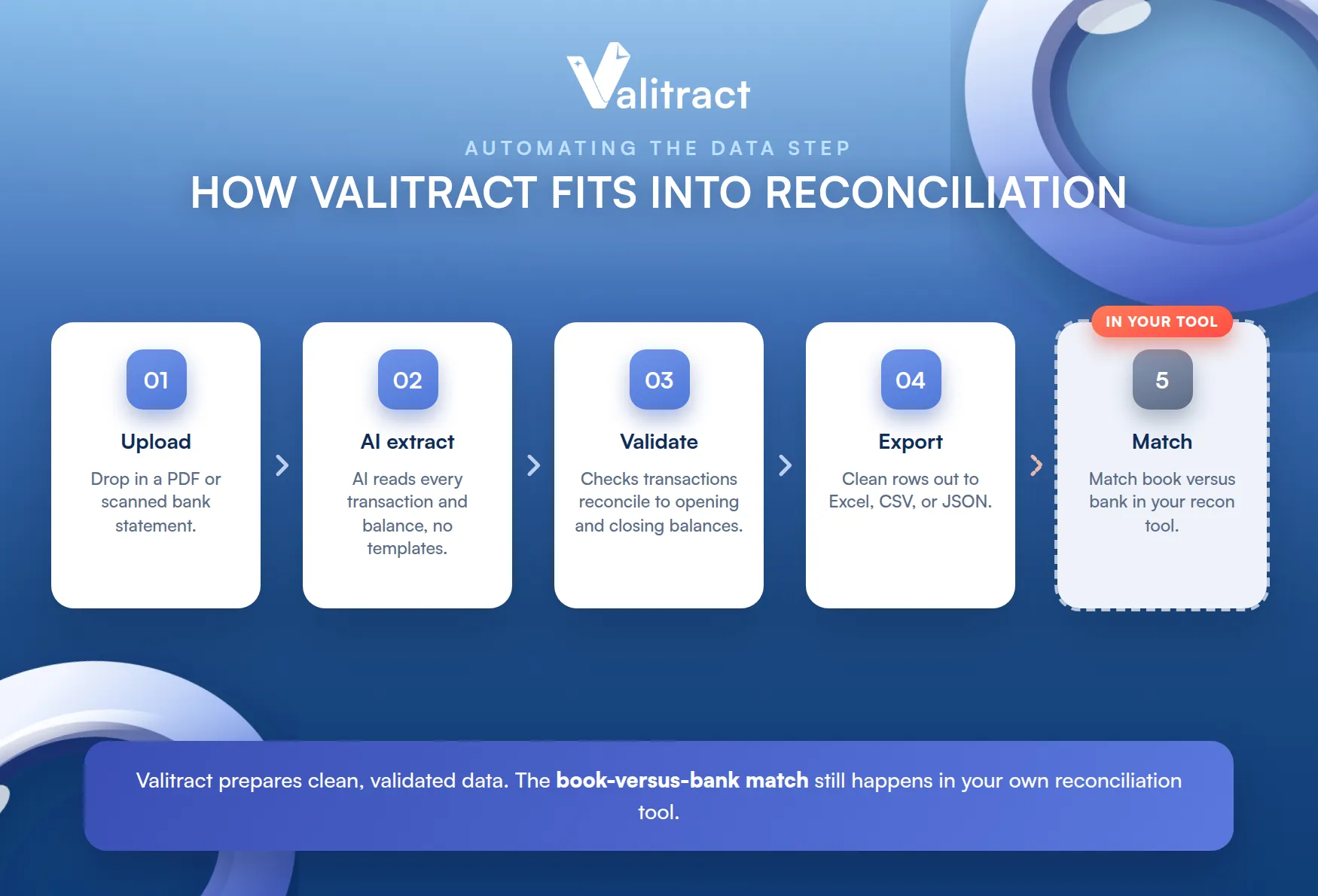
The steps are simple to describe and tedious to do. That combination is exactly what makes them worth automating.
Step 1: Gather the Statement and Your Records
Start by collecting the bank statement for the period and your matching ledger or cash records. Both have to cover the exact same date range.
Consistent inputs prevent false mismatches. A statement and a ledger that end on different days will never tie out cleanly.
It sounds obvious, yet mismatched date ranges are a common cause of phantom differences. Check the periods first.
Step 2: Compare the Book and Bank Balances
Next, place the two ending balances side by side. If they already match, note it and move on.
They usually do not match, and that is normal. The difference is simply the sum of items one side has recorded and the other has not yet.
Your job is to explain that difference, not to force the numbers together. A forced match hides the very error you are looking for.
Step 3: Identify the Reconciling Items
Now go line by line to find every transaction that appears on one side but not the other. Flag deposits in transit, outstanding checks, fees, interest, and any oddities.
This is the slow, manual heart of the job. It is also where transcription errors creep in when data is retyped from a PDF.
The more transactions, the longer this step takes. It scales badly, which is the first place automation pays off.
Step 4: Investigate and Match Each Discrepancy
For each flagged item, work out why it is there. A timing difference is expected, while a duplicate or an unknown charge needs a closer look.
Document the reason as you go. A clear note on each item is what makes the reconciliation defensible in an audit.
Investigation is where judgment matters. A rule can flag a difference, but a person decides what it means.
Step 5: Adjust and Finalize the Reconciled Balance
Finally, record the legitimate adjustments, such as bank fees and interest, in your books. Once both adjusted balances agree, the reconciliation is complete and ready for sign-off.
Anything that still does not tie out stays open and rolls to the next period. It should not be forced to balance.
An open item is information, not failure. It tells you exactly where to look next month.
Company Bank Statement Reconciliation Challenges
At a single account, reconciliation is tedious but manageable. At company scale, it becomes a different problem.
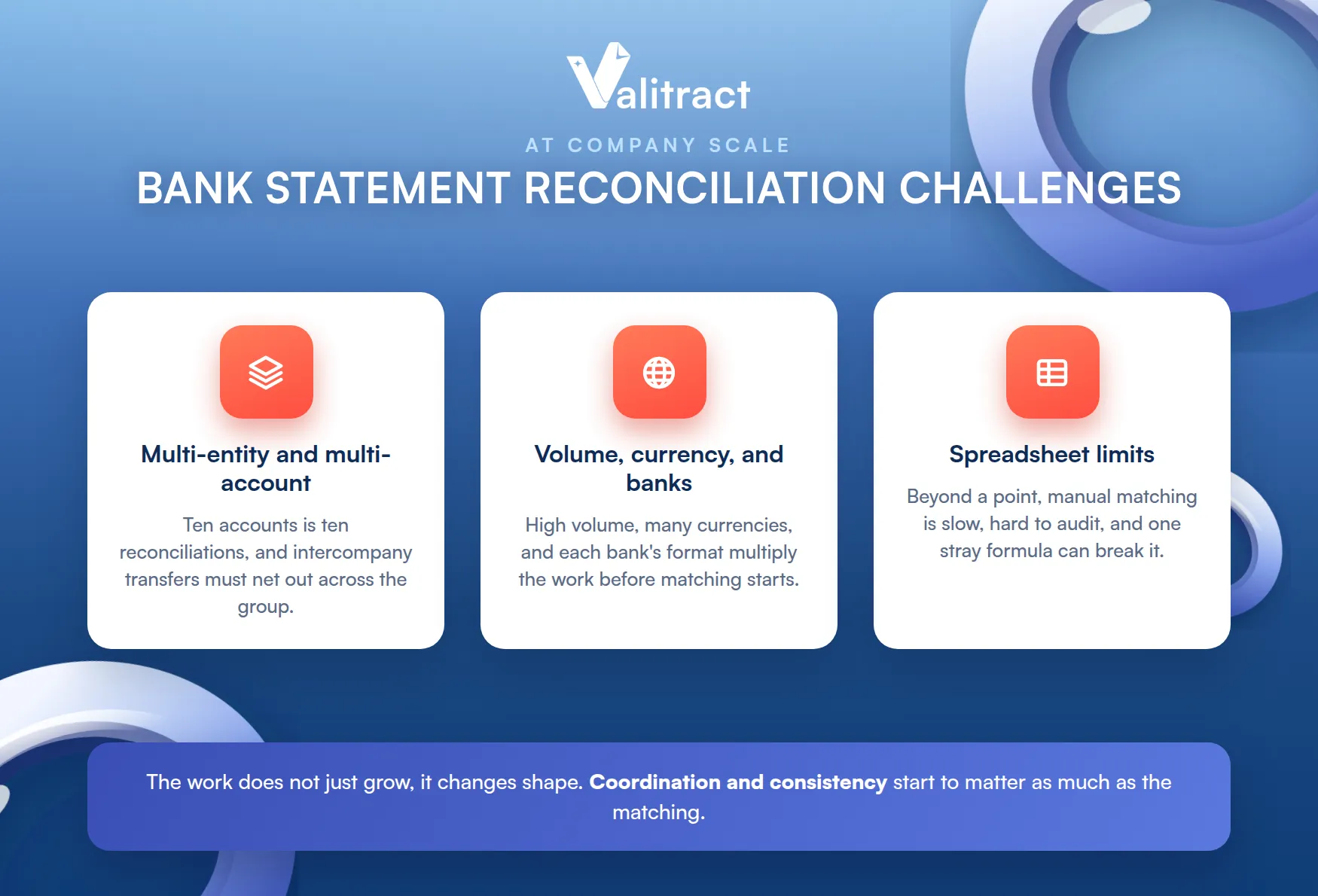
The work does not just grow, it changes shape. Coordination and consistency start to matter as much as the matching itself.
Multi-Entity and Multi-Account Complexity
A growing company reconciles many accounts across several entities. Each has its own statement, its own timing, and its own quirks.
The work multiplies fast. Ten accounts is ten reconciliations, each with its own list of items to chase.
Consolidation adds another layer. Intercompany transfers have to net out cleanly across the group.
Timing differs by entity too. One side may book a transfer a day before the other, creating a temporary gap.
Volume, Multi-Currency, and Multi-Bank Data
High transaction volume alone strains a manual process. Add multiple currencies and banks, and the formats and rules multiply too.
Every bank presents data differently. Normalizing all of it into one consistent view is a job before the reconciliation even starts.
Currency adds timing and rate differences on top. A transfer can look mismatched simply because it settled on a different day.
The Limits of Spreadsheet-Based Reconciliation
Spreadsheets work until they do not. Beyond a certain volume, manual matching is slow, hard to audit, and easy to break with a stray formula.
They also lack a central log of who changed what. That gap becomes a real problem in a SOX or audit-heavy environment.
One broken formula can hide for months. By the time it surfaces, several closes may already rest on it.
Bank Statement Reconciliation Software: When to Move Beyond Excel
At some point, a spreadsheet costs more than it saves. Dedicated software takes over the matching and the record-keeping.
The switch is less about raw speed and more about control. Bank statement reconciliation software makes the process repeatable, reviewable, and easier to scale as transaction volumes increase.
Signs You Have Outgrown Manual Reconciliation
A few signals show up consistently across finance teams. Any one of them is worth taking seriously.
- Reconciliations slip past deadlines and delay the month-end close.
- Volume and account count keep climbing, so manual matching cannot keep up.
- Audit and compliance pressure rises, and spreadsheets cannot show a clean trail.
None of these is fatal on its own. Together they signal that the manual approach has quietly become the bottleneck.
What to Look For in Reconciliation Software
The core of reconciliation software is a matching engine. It pairs transactions by amount, date, and reference, then flags the exceptions for a human.
Beyond matching, look for exception workflows, an immutable audit trail, and integrations with your ERP, accounting system, and banks. These are what turn a faster match into a controlled process.
Integration is the quiet deciding factor. A tool that cannot connect to your bank and ERP just moves the manual work somewhere else.
Automation Platforms in the Market
A wave of platforms now automates the matching and reporting end to end. Tools such as Numeric, HighRadius, and Ripple Treasury use rules and machine learning to auto-match transactions, handle exceptions, and produce audit-ready reports.
These are full reconciliation engines that compare your ledger against bank data. They are a different category from tools that simply read a statement, which is why many teams end up needing both. For the reading half, see our guide to the best bank statement extraction software.
The distinction is worth holding onto. One category matches your data, and the other gets your data ready to be matched.
How to Automate Bank Statement Reconciliation
Automation is not one switch. It helps to separate the matching from the step that quietly consumes the most time.
The Real Bottleneck: Getting Clean Data Out of PDFs
Reconciliation software needs structured data to match. The problem is that banks still deliver statements as PDFs and scans, not tidy spreadsheets.
That format gap is the hidden tax on every close. The data exists, it just is not in a shape a tool can use yet.
So before any matching happens, someone often retypes transactions from a PDF into Excel. That manual step is slow, error-prone, and the real bottleneck for many teams.
It is easy to overlook because it hides inside data prep. But it is often the single longest task in the whole close.
How AI Extraction Removes the Manual Re-Typing
This is where AI-powered extraction fits. It reads a PDF or scanned statement, uses OCR and AI to detect the transaction table, and outputs clean, structured rows.
The result is a spreadsheet or file ready for your reconciliation tool, with no retyping. For a look at the wider category, see our roundup of AI data extraction tools.
The win is not just speed. Removing the retyping also removes a whole class of errors before matching even begins.
To be precise about scope, this layer prepares the data; it does not match your books against the bank. That matching still happens in your accounting system, reconciliation software, or spreadsheet.
Automating the Extraction Step with Valitract
Valitract handles that first, painful step. It is a template-free extraction tool, not a reconciliation engine, and it turns any bank statement into clean, structured data.
The flow is simple. Upload a PDF or scanned statement, let the AI extract every transaction and balance, and export the result to Excel, CSV, or JSON.
There is nothing to configure per bank. A new statement layout works on the first upload.
Valitract also runs arithmetic validation on the statement itself. It confirms the statement’s transactions reconcile to its opening and closing balances, and flags low-confidence fields for review.
That check is about the statement’s own math, not your ledger. It confirms the source is clean before it enters your process.
From there, the clean file drops into your reconciliation workflow for matching. You can start with Valitract’s bank statement to Excel converter to remove the retyping from your close.

Best Practices and Common Mistakes
Good reconciliation is a habit, not a heroic month-end sprint. A few practices prevent most of the pain.
The theme is little and often. Small, regular reconciliations beat one heroic scramble at quarter-end.
Reconciliation Frequency Best Practices
Reconcile at least monthly, aligned to your statement cycle. High-volume accounts benefit from weekly or even daily reconciliation.
More frequent checks mean smaller batches. A daily rec surfaces a problem while it is still one transaction, not a month of them.
Frequency also smooths the workload. A little each day is easier than a wall of transactions at month-end.
The right cadence depends on volume and risk. Match it to how fast your cash actually moves.
Common Errors That Cause Persistent Mismatches
A few mistakes account for most stubborn differences. Watch for each one.
- Ignoring small differences: a tiny gap almost always hides a real error worth finding.
- Manual transcription errors: retyping from a PDF introduces the very mismatches you are hunting.
- Skipping documentation: an unexplained adjustment is a problem waiting for an auditor to find it.
Each of these is avoidable with a little discipline. Consistency, not cleverness, is what keeps reconciliations clean.
Verify Data Before You Finalize
Reconciliation is only as good as the data feeding it. Confirm that extracted or transcribed figures actually match the source statement before you sign off.
This is also where verification and reconciliation meet. Pairing clean extraction with bank statement verification confirms the statement is authentic and internally consistent before its numbers reach your books.
Reconciliation assumes the statement is real. Verification is what confirms that assumption before you rely on it.
Frequently Asked Questions about Bank Statement Reconciliation
What is a bank statement reconciliation?
It is the process of comparing your accounting records against your bank statement to confirm every transaction matches and to explain any difference between the two balances. The result is a reconciled balance that both your books and the bank agree on.
What is the difference between a reconciliation document and a reconciliation report?
A reconciliation document, or template, is the working format you fill in, listing balances and reconciling items on each side. A reconciliation report is the finalized output, showing the matched result, the adjustments made, and a sign-off, often kept as an audit record.
How often should a business reconcile its bank statements?
At a minimum, reconcile monthly to match your statement cycle. Businesses with high transaction volume or tight cash control often reconcile weekly or daily, since smaller, more frequent batches are faster and safer.
Can bank statement reconciliation be fully automated?
Much of it can. Reconciliation software automates the matching and reporting, and AI extraction automates getting clean data out of PDF statements, but a human still reviews exceptions and approves the final result.
Conclusion
Bank statement reconciliation is a core control that keeps your cash figures honest and catches errors and fraud early. The process itself is simple, but at scale the manual parts become the bottleneck.
The fix is rarely to work harder at the manual steps. It is to remove them where a tool can do the job more reliably.
Split the problem to solve it. Use reconciliation software for matching and AI extraction to remove the retyping that slows the whole thing down.
Handled that way, the month-end close stops being a dreaded event. It becomes a routine, the tools mostly run for you.
Start by removing the retyping, since that is the step with the clearest and fastest payoff.
To take the manual data step out of your reconciliation, try Valitract’s bank statement to Excel converter on your own statements.
Valitract – Next-gen AI-Powered Data Extraction Platform
- Email: contact@valitract.com
- LinkedIn: https://www.linkedin.com/company/valitract-api-platform
- X: https://x.com/valitract


