


- Bookkeeping automation is not one feature; it is a four-step chain of capture, categorization, reconciliation, and sync to your ledger.
- Most “top tools” lists compare price and integrations but skip the factor that decides the whole chain’s quality: the accuracy of the first capture step.
- The best full-stack tools in 2026 include Dext, QuickBooks Online, Docyt, Ramp, and Truewind, each suited to a different user.
- If your documents are messy (many banks, many languages, low-quality scans), a dedicated extraction and validation layer in front of your tool is what keeps the rest of the chain accurate.
The best bookkeeping automation tools do not just do one thing; they run a four-step chain. Data is captured from a document, categorized to an account, reconciled against the ledger, and synced to your accounting software.
Each step depends on the one before it. That dependence is why a weak link early on quietly degrades everything after it.
Most “top tools” reviews compare the easy-to-see parts, price and integrations, and skip the one that decides everything downstream: how accurately the tool captures data in the first place. A great categorizer cannot fix a number that was read wrong at the start.
Think of the chain as a relay. If the first runner drops the baton, it does not matter how fast the rest are.
This guide covers why automated bookkeeping matters, what to look for, the top five full-stack tools in 2026, which processes to automate first, and where a dedicated extraction layer fits.
The through-line is accuracy. The tool you pick matters, but the data you feed it matters just as much.
Why Automated Bookkeeping Matters
Manual bookkeeping spends expensive time on low-value work. The hours poured into data entry and reconciliation do not scale with the value they create, especially for firms managing many clients or a business trying to grow.
The cost of staying manual compounds. Errors accumulate across the ledger, the monthly close drags, and skilled people stay trapped in repetitive entry instead of doing the advisory and analysis they were hired for.
For an accounting firm, that ceiling is a growth cap. Every client added means more manual hours, so the practice cannot scale without hiring in step.
The gains are well documented. Industry research reports that AI-assisted bookkeeping can cut manual data-entry errors substantially, often cited around 90% versus manual work, and businesses commonly reduce bookkeeping labor costs in the first year of adoption. Automation turns the bookkeeper into a reviewer rather than a typist.
That shift is the real prize. Freeing skilled staff from data entry lets them do the advisory work clients actually pay a premium for.
What to Look for in a Bookkeeping Automation Tool
Not all automation is equal, so a clear checklist helps. These six criteria separate a genuine automation tool from a lightly automated one.
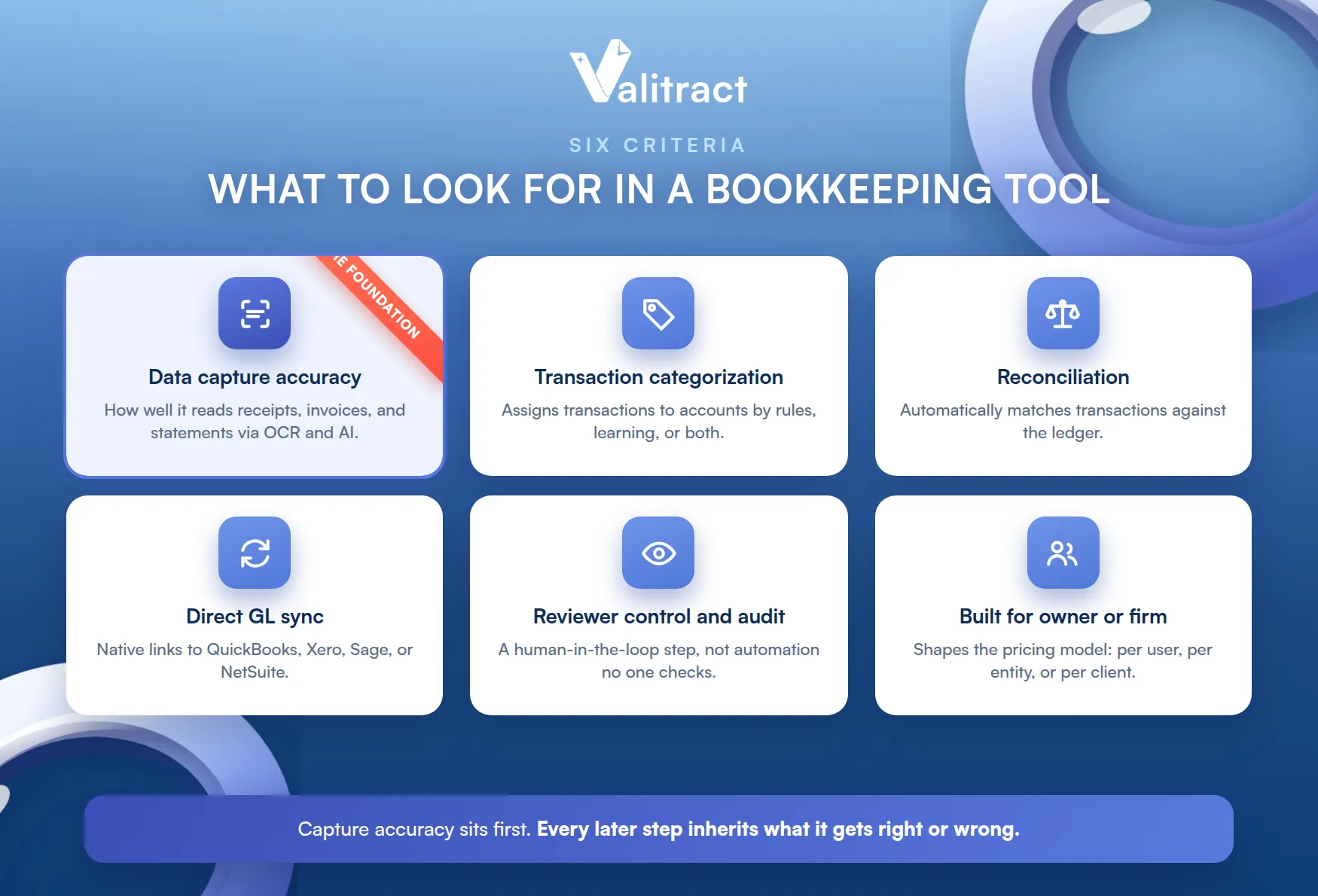
Weigh them by your own situation. A firm cares most about multi-client control, while an owner cares most about a clean native sync.
- Data capture accuracy: how well it reads receipts, invoices, and bank statements through OCR and AI extraction.
- Transaction categorization: whether it assigns transactions to accounts by rules, learning from history, or both.
- Reconciliation: whether it automatically matches transactions against the ledger.
- Direct GL sync: native connections to QuickBooks, Xero, Sage, or NetSuite, so data does not get re-keyed.
- Reviewer control and audit trail: a human-in-the-loop step, not automation that no one checks.
- Built for owner or firm: whether it is designed for a business owner or an accounting firm, which shapes the pricing model (per user, per entity, or per client).
Capture accuracy sits first for a reason. Every later step inherits whatever the capture step gets right or wrong.
Most lists rank on the other five and treat capture as a checkbox. That is the gap this guide is written to close.
Top 5 Bookkeeping Automation Tools in 2026
These five are full-stack tools that handle the bookkeeping chain end to end. Each suits a different kind of user.
There is no single winner. The right pick depends on whether you are a business or a firm, and on how messy your documents are.
Table 1. Top bookkeeping automation tools compared.
| Tool | Best for | Capture | Categorize | Reconcile | GL sync |
| Dext | Firms and SMBs, capture-heavy workflows | Yes, high accuracy | Yes | Yes | Xero, QuickBooks, Sage |
| QuickBooks Online | SMBs managing their own books, all-in-one | Yes | Yes | Yes | Native |
| Docyt | Multi-location and multi-entity businesses | Yes | Yes | Yes | QuickBooks, Sage Intacct |
| Ramp | Businesses wanting spend and books in one | Yes (receipts, cards) | Yes | Partial | QuickBooks, NetSuite |
| Truewind | Firms needing a close workflow and review | Yes | Yes | Yes | QuickBooks, Sage Intacct |
A familiar name is missing: Botkeeper announced its shutdown in early 2026, so it is excluded here. Capability details are drawn from vendor and third-party sources as of mid-2026; confirm current specifics with each vendor.
1. Dext
Dext is a document-capture powerhouse. It uses AI to extract data from receipts, invoices, and bank statements, then syncs it into your accounting software through an Upload, Process, Publish workflow.
It has a large, established user base. That maturity shows in reliable integrations with the major accounting platforms.
Its capture accuracy is a headline strength, widely cited around 99% on clean documents. That makes it a strong fit for both accounting firms and SMBs whose main pain is document intake.
One honest note: Dext is a capture and pre-accounting tool, not a full accounting platform. You still need Xero or QuickBooks alongside it to keep the books.
That focus is also its strength. By doing capture well and syncing cleanly, it slots into almost any accounting stack.
2. QuickBooks Online
QuickBooks Online is the all-in-one default for many small businesses. Its built-in AI features handle capture, categorization, and reconciliation inside the same platform where the books live.
Being the system of record is its edge. Because the books already live there, the automation has nowhere to sync to and from; it is all in one place.
The appeal is simplicity. A business managing its own books can automate a lot without stitching several tools together, since everything sits natively in one system.
It is less a specialist than a generalist. For very high document volumes or complex firm workflows, a dedicated capture or firm tool often complements it.
For most small businesses, that is enough. The convenience of one native system outweighs the extra power of specialist tools.
3. Docyt
Docyt runs full-cycle AI bookkeeping. It combines OCR, machine learning categorization, reconciliation, and financial reporting into one automated flow.
It aims to cover the whole chain in one tool. For operators who want fewer moving parts, that consolidation is the appeal.
Its sweet spot is complexity. Multi-location businesses, franchises, and multi-entity operators benefit most, and it works around QuickBooks and Sage Intacct workflows.
That depth is the trade-off. The breadth that helps a multi-entity operator can be more than a single small business needs.
It rewards structured operations. Businesses with many locations and consistent workflows get the most from its automation.
4. Ramp
Ramp combines spend management with bookkeeping automation. It captures receipts and card transactions, categorizes them, and syncs to QuickBooks or NetSuite.
Its distinct angle is the card. For a business that wants corporate spend and bookkeeping handled together, Ramp folds both into one system.
Its reconciliation is partial rather than full. Teams needing deep, ledger-wide reconciliation may pair it with an accounting platform that handles that end.
The value is in the combination. Card control and automated coding in one place removes a lot of manual expense work.
5. Truewind
Truewind targets accounting firms with an AI-assisted close. It automates bookkeeping tasks and builds review-ready workpapers, positioning itself as a digital accountant for the firm.
It leans into the AI-native framing. The pitch is less about faster data entry and more about an assistant that prepares the close for you.
Its strength is the close workflow. Firms that need tight review control and a clean month-end path get the most value.
It is built for the firm, not the solo owner. The workflow and review features assume a practice managing books at scale.
Review control is the differentiator. Firms that must sign off on quality value a clean, auditable close path over raw automation.
Which Bookkeeping Processes to Automate
Not every task is worth automating first. Some offer far more return than others, so sequence matters.
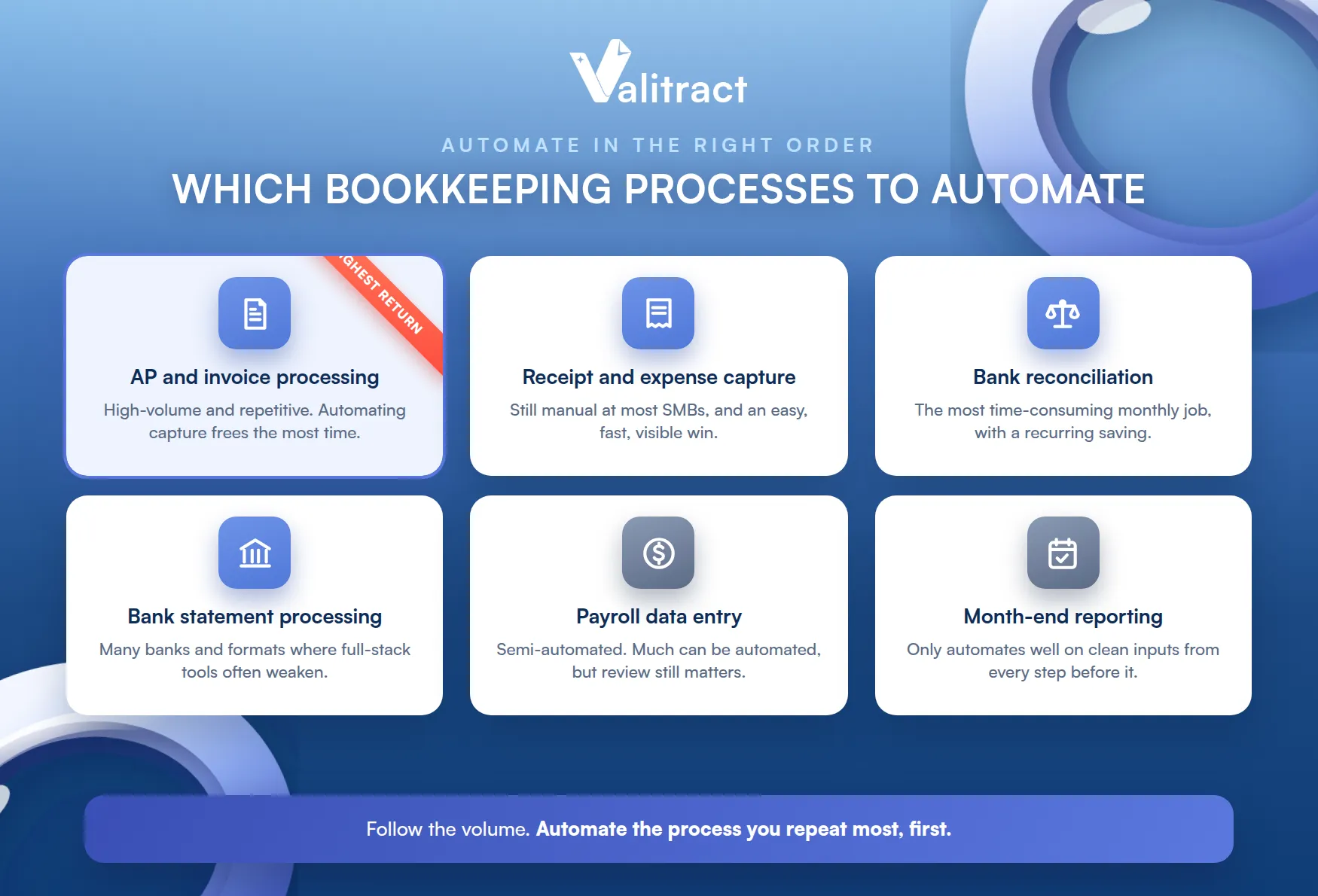
A good rule is to follow the volume. The process you repeat most is usually the one worth automating first.
Accounts Payable and Invoice Processing
AP is the highest-return target. It is high-volume and repetitive, so automating invoice capture and processing frees the most time and prevents the most errors. Our invoice data extraction software is built for this step.
Line-item accuracy is the hard part here. Capturing every line correctly is what lets matching and payment run without a person fixing mismatches.
Receipt and Expense Capture
Receipts are the most commonly still-manual task at SMBs. They are also easy to automate, which makes them a fast, visible win. See our receipt OCR software for how this runs hands-off.
Bank Reconciliation
Reconciliation is the most time-consuming monthly job. Automatic matching of transactions against the ledger delivers an obvious, recurring saving.
It also depends on clean capture. Matching only works when the transaction data was read correctly to begin with.
Bank Statement Processing
Statements are hard when they come from many banks. Multiple formats and layouts make manual handling slow, and accurate bank statement extraction turns them into clean, structured rows.
This is where many full-stack tools weaken. They read a standard feed well but stumble on a scanned statement from an unfamiliar bank.
Payroll Data Entry
Payroll can be semi-automated. Much of the data entry can be automated, though it still warrants review given its sensitivity and compliance weight.
Month-End Reporting and Close
The close only automates well on clean inputs. Reporting depends entirely on the accuracy of every step before it, which is why the capture step matters so much.
Automating reporting on dirty data just produces wrong numbers faster. The foundation has to be right first.
Bookkeeping Automation Tools for Businesses vs. Accounting Firms
The right tool depends on who is using it. Businesses and firms have different needs, and the tools split along that line.
Getting this wrong is a common mistake. A firm tool overwhelms a solo owner, and an owner tool underserves a multi-client practice.
For Businesses Managing Their Own Books
Businesses usually want an all-in-one. QuickBooks Online and Ramp fit well, prioritizing simplicity and minimal setup over deep customization.
The goal is to stay out of the weeds. A business owner wants clean books with the least tool-juggling possible.
For Accounting Firms Managing Multiple Clients
Firms need multi-client control. Dext, Docyt, and Truewind offer the dashboards, workflows, and practice-management features that managing many clients at once requires.
Pricing follows the model. Firm tools tend to price per client or per entity, matching how a practice actually scales.
Best Practices for Bookkeeping Automation
Adopting a tool is not the same as automating well.
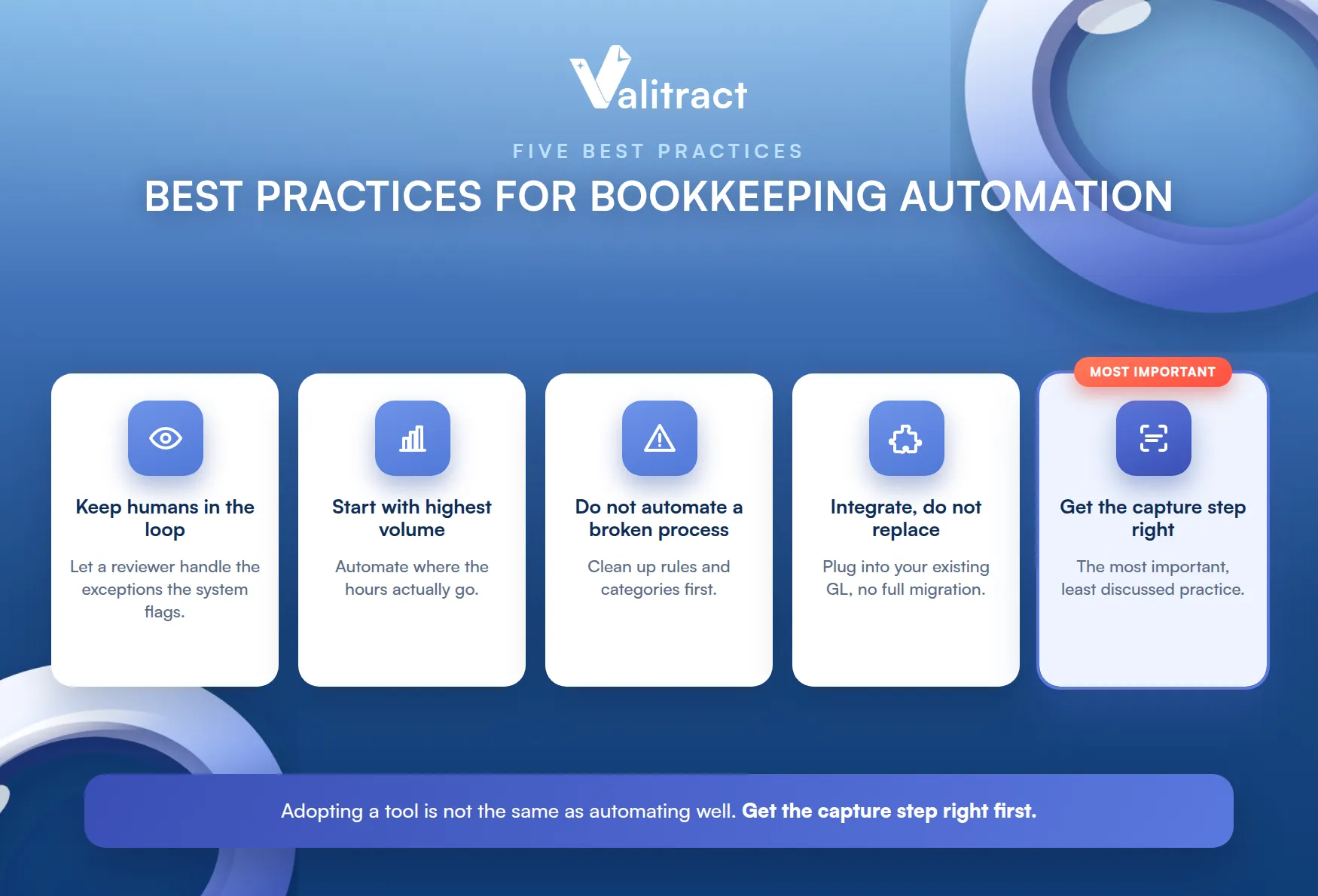
These practices decide whether automation pays off or just moves the problem.
- Keep humans in the loop for exceptions. Do not aim for 100% hands-off; let a reviewer handle the unusual cases the system flags.
- Start with your highest-volume process, not the easiest one. The return is clearest when you automate where the hours actually go.
- Do not automate a broken process. Clean up your rules and categories first, or automation will just multiply the errors faster.
- Integrate, do not replace. Automation should plug into your existing GL, not force a full system migration.
- Get it right at the capture step. This is the most important and least discussed practice.
That last point deserves weight. Every layer behind capture (categorization, reconciliation, reporting) inherits whatever the extraction step gets wrong.
Here is the practical implication. If your full-stack tool handles standard data well but struggles with multi-format, multi-language, or low-quality scanned documents, that is exactly when a dedicated extraction and validation layer in front of it earns its place.
The two are not in competition. A specialist capture layer feeds cleaner data to the full-stack tool, making both work better.
Where Valitract Fits: Extraction, Validation, and Automated Document Processing
Valitract is not a full-stack bookkeeping tool, and that is why it is not in the top five above. It sits one step earlier, as the extract, validate, and automate layer for your documents.
Being honest about that is the point. Naming what a tool does not do is what lets you place it correctly in a stack.
Its capabilities focus on that layer. Valitract offers template-free extraction at up to 99.8% accuracy, confidence scoring that flags low-confidence fields for review before data enters your system, custom schemas per document type, support for 95+ languages and many formats (PDF, scan, photo), and JSON or CSV output ready for downstream systems, built to run at high volume.
It is transparent about its boundaries. Valitract does not categorize transactions by accounting rules, does not reconcile the ledger itself, and does not sync natively into QuickBooks or Xero; those are the jobs of the full-stack tools above.
That makes it a fit for specific cases. It suits teams that want to build their own pipeline rather than depend entirely on one all-in-one vendor, situations with hard documents (many banks, many languages, poor scans) where full-stack tools struggle, and developer teams that need an OCR API to automate the whole document-to-data pipeline. Our AI data extraction software and financial data extraction software cover this layer.
Used this way, it strengthens the tool you already have. The full-stack platform still runs your books; Valitract just makes sure the data reaching it is clean.
Frequently Asked Questions About Bookkeeping Automation Tools
What is bookkeeping automation software?
It is software that automates the bookkeeping chain: capturing data from documents, categorizing transactions, reconciling them against the ledger, and syncing to accounting software. It reduces manual data entry and speeds up the monthly close.
Can bookkeeping automation tools replace a bookkeeper entirely?
No. They automate the repetitive work and flag exceptions, but a bookkeeper still reviews the flagged items, handles judgment calls, and owns the final books. The role shifts from data entry to review and advisory.
What is the difference between bookkeeping automation and accounting software?
Accounting software is the system of record where the books live, such as QuickBooks or Xero, while bookkeeping automation tools speed up the work of getting accurate data into it. Some tools do both; many specialize in one part of the chain.
How accurate is AI-powered bookkeeping automation?
Capture accuracy on clean documents is high, often cited around 99%, and categorization improves as the system learns your history. Accuracy drops on messy or non-standard documents, which is where a dedicated extraction and validation layer helps.
Do bookkeeping automation tools work with QuickBooks and Xero?
Most do, through native integrations or standard exports. If a tool does not sync natively, it can still feed clean, structured data into your accounting software through a file export or an API.
Concluding Thought
Choosing the best bookkeeping automation tools is only half the decision. The other half is making sure the data going into that tool is accurate from the very first capture step, because every layer behind it inherits those errors.
Get the full-stack tool right for your size and workflow, and get the capture right underneath it. Together, that is what turns bookkeeping from a monthly scramble into a reliable, mostly automated process.
Neither half works alone. The best tool on dirty data still produces bad books, and perfect data with no tool still needs a system to run in.
Valitract provides the accurate extraction and validation layer that the rest of the chain depends on. To see it on your own documents, book a demo with the Valitract team.
Valitract – Next-gen AI-Powered Data Extraction Platform
- Email: contact@valitract.com
- LinkedIn: https://www.linkedin.com/company/valitract-api-platform
- X: https://x.com/valitract


