


Quick answer
- A document parsing API converts unstructured documents (PDFs, scans, Office files, images) into machine-readable output, but the term is conflated across three layers: OCR (pixels to characters), layout parsing (spatial and table structure), and structured extraction (mapping to named fields). Most buyer confusion comes from vendors and searchers meaning different layers by the same word.
- The field splits into two genuinely different jobs: general-purpose parsers built for RAG and LLM ingestion that return clean Markdown or chunks (LlamaParse, Reducto, Unstructured.io, Docling, LandingAI ADE), and structured-extraction platforms built for repeatable business documents that return typed JSON or CSV fields (Valitract, Docsumo, and the hyperscaler processors).
- Pricing ranges widely: free for open-source and self-hosted tools, roughly $10 to $30 per 1,000 pages for managed general OCR and parsing, and $30 to $90+ per 1,000 pages for structured extraction with validation and human-review workflows.
- Published accuracy benchmarks (TEDS, JSON F1, DocVQA) use different datasets and methods across vendors, so validate on your own messy production documents, not a vendor’s benchmark page.
Choosing the best document parsing API is harder than it looks, because the phrase describes two different products. One is built to feed varied documents into a RAG pipeline; the other is built to pull typed fields out of repeatable business forms.
Picking the wrong one is the single most common and expensive mistake in this category. A RAG-oriented parser and a structured-extraction platform both call themselves a “document parsing API,” yet they output different things for different downstream systems.
This guide disambiguates the term, compares ten leading tools by segment, and gives you a buyer’s checklist to test them against your own documents. It names the real leaders in each segment honestly, rather than pretending one tool wins every job.
What Is a Document Parsing API?
A document parsing API is an API that converts unstructured documents (PDFs, scans, Office files, and images) into machine-readable output, such as Markdown, JSON, or both, that a downstream system can consume. It turns a file a human reads into data a program can use.
The confusion starts because “parsing” spans three layers, and vendors cover different ones. OCR recognizes characters only; layout parsing adds reading order, columns, and table structure; and structured extraction maps that parsed content to named fields like invoice number or total. Some tools stop at layout parsing and leave the field mapping to you, so check which layer a vendor actually covers before you evaluate it.
Two Different Jobs Hiding Under One Keyword
The deeper split is about what you need downstream. Teams building RAG or AI-agent pipelines over varied, unpredictable documents need clean Markdown or chunked output with correct reading order and faithful tables, so retrieval works. Teams processing repeatable business documents (invoices, receipts, bank statements, purchase orders) need typed fields mapped into JSON or CSV and validated against business rules, not a Markdown dump.
Same keyword, two different downstream systems, two different right answers. That is why the rest of this article is organized by segment rather than forced into a single ranked list, and why our guide to the best intelligent document processing software treats these as distinct problems.
The 10 Best Document Parsing APIs of 2026
Here are ten leading platforms, grouped by the job they are built for. The table orients you; the write-ups that follow give the detail.
| Tool | Segment | Best for |
|---|---|---|
| Valitract | Structured business-document extraction | Invoices, receipts, bank statements, POs, contracts, IDs, no-code plus API |
| LlamaParse | RAG / LLM ingestion | Complex PDFs feeding a LlamaIndex-based RAG pipeline |
| Reducto | RAG / LLM ingestion | Pipelines needing nested-table accuracy and VPC or on-prem deploy |
| Google Document AI | Both | GCP teams needing Gemini-powered custom or prebuilt processors |
| AWS Textract | Both | AWS-native teams, standard forms, invoices, and IDs at volume |
| Azure Document Intelligence | Both | Microsoft-ecosystem teams, strong non-Latin language support |
| Unstructured.io | RAG / LLM ingestion | Widest format coverage, open-source, on-prem-capable preprocessing |
| Docling | RAG / LLM ingestion (open source) | Free, local-first PDF-to-Markdown for privacy-sensitive pipelines |
| Docsumo | Structured business-document extraction | No-code finance and ops teams needing human-in-the-loop review |
| LandingAI ADE | RAG / LLM ingestion | Complex documents needing coordinate-level visual grounding |
Capabilities and pricing are drawn from vendor and third-party sources as of mid-2026; confirm current details with each vendor before committing.
1. Valitract
Valitract leads the structured business-document extraction segment. It is built to turn repeatable business documents into typed, validated fields, not to feed a RAG pipeline.
Key features: template-free extraction across invoices, receipts, bank statements, purchase orders, contracts, ID documents, logistics documents, medical records, and financial statements; 95+ languages; a no-code drag-and-drop interface plus a full REST API; integrations with QuickBooks, SAP, Xero, Sage, Zapier, Make.com, and n8n; and batch processing with low-confidence flagging for human review.
Pricing: a free tier of 100 pages per month with no credit card, then usage-based paid plans.
Pros: accurate typed-field output ready for a database, ERP, or accounting system; both a no-code UI and an API; strong finance and ops integrations.
Cons: stated honestly, there is no self-hosted or on-premise option for data-residency-constrained teams; no built-in fraud or tamper detection and no cross-document reconciliation; and output is JSON, CSV, or XLS rather than the Markdown or chunk format a RAG pipeline expects. If your job is RAG ingestion, one of the parsers below is the right tool.
2. LlamaParse
LlamaParse is the fastest path from PDFs to RAG-ready Markdown if you are already in the LlamaIndex ecosystem. It uses agentic parsing and handles embedded images that many open-source parsers miss.
Key features: Markdown output ready for retrieval, 90+ file formats, multiple parse tiers to tune cost and quality, and native LlamaIndex integration. Its schema-extraction successor, LlamaExtract, targets typed-field output.
Pricing: a generous free monthly credit allotment, then credit-based tiers; premium agentic modes cost more per page. The package is migrating to llama-cloud, so check current docs.
Pros: minimal setup inside LlamaIndex, good embedded-image handling, flexible tiers.
Cons: hosted-only, so documents leave your infrastructure; multi-column layout handling is weaker than Docling or Marker-PDF, which can interleave columns; and the cleanest integration story is specifically inside LlamaIndex.
3. Reducto
Reducto is an API-first, agentic parser purpose-built for nested tables and financial-document structure. An independent June 2026 benchmark (micro1’s LongExtractBench) ranked it first of seven systems on long, complex documents.
Key features: agentic OCR correction, field-level citations with bounding boxes, Studio tooling for RAG and audit workflows, and deployment spanning cloud, VPC, on-prem, and air-gapped, with SOC 2 Type II and HIPAA options.
Pricing: credit-based, with an included Standard allotment and per-credit pricing after that.
Pros: strong nested-table and financial-document accuracy, auditable citations, wide deployment and compliance options.
Cons: a newer vendor with a shorter production track record, format support that is primarily PDF-focused, and pricing that is harder to forecast long-term than an established platform.
4. Google Document AI
Google Document AI suits GCP-native teams. It offers Gemini-powered prebuilt and custom processors and deep integration with the Google Cloud stack.
Key features: prebuilt processors for common documents, a Workbench for training organization-specific layouts, and native BigQuery and Vertex AI integration.
Pricing: per-processor and per-page, and genuinely complex to forecast.
Pros: powerful custom and prebuilt processors, tight GCP integration, strong scale.
Cons: complex pricing, meaningful GCP infrastructure and IAM setup required, and overkill for teams that just need PDF-to-text.
5. AWS Textract
AWS Textract is the AWS-native choice, with specialized endpoints for expenses, IDs, and lending documents. It fits teams already building on AWS.
Key features: managed OCR with AnalyzeExpense, AnalyzeID, and AnalyzeLending endpoints, A2I human-in-the-loop routing, and native Lambda, S3, and Step Functions integration.
Pricing: per-page and per-feature, which adds up at high volume.
Pros: clean AWS integration, useful specialized endpoints, human-review routing built in.
Cons: real AWS lock-in, per-feature pricing that gets expensive at scale, and generic models that can struggle with niche layouts.
6. Azure Document Intelligence
Azure Document Intelligence is the strongest hyperscaler for non-Latin scripts and multilingual documents. It fits Microsoft-ecosystem teams and offers a container deployment option the others lack.
Key features: prebuilt models for common business forms, a mature custom-model training workflow, and broad multilingual support.
Pricing: per-page, with some region and feature limits.
Pros: excellent non-Latin language coverage, mature customization, container deployment for on-prem needs.
Cons: some features are region-limited, customization feels more rigid than agentic alternatives, and prebuilt accuracy depends on how closely your documents match the training distribution.
7. Unstructured.io
Unstructured.io offers the widest format breadth and is genuinely open-source and self-hostable. It is a low-friction starting point for multi-format preprocessing.
Key features: support for PDF, DOCX, PPTX, HTML, email, and images, semantic element labeling to drive chunking, and VPC or self-hosted deployment.
Pricing: open-source and free to self-host, with a managed platform tier.
Pros: broadest format coverage, open-source and data-residency-friendly, purpose-built for RAG chunking.
Cons: accuracy on complex multi-column layouts and nested tables trails purpose-built parsers, and breadth comes at the cost of field-level precision.
8. Docling
Docling is a free, local-first, IBM-backed open-source library for PDF-to-Markdown and JSON conversion with strong table reconstruction. It fits privacy-sensitive pipelines that can run models locally.
Key features: local-first processing with no per-page cost, strong table handling, and direct LangChain and LlamaIndex integration.
Pricing: free and open-source.
Pros: no per-page cost, runs entirely locally for privacy, good layout understanding for an open-source tool.
Cons: mostly PDF-focused, weaker on forms and handwriting, and a smaller ecosystem with no managed service or SLA.
9. Docsumo
Docsumo is a no-code, business-document platform purpose-built for finance and operations teams. It combines classification, extraction, and a human-review queue in one UI-first product.
Key features: 100+ pre-trained document models, a review queue for human-in-the-loop workflows, and a no-code interface for non-developers.
Pricing: enterprise-tier and not publicly listed.
Pros: strong no-code finance and ops workflow, human review built in, many prebuilt models.
Cons: pricing is not transparent, the product is UI-first rather than developer-pipeline-first, and it is less suited to general-purpose parsing outside finance and ops use cases.
10. LandingAI ADE
LandingAI ADE is an agentic parser with coordinate-level visual grounding, linking every extracted field to its exact location in the source. It fits complex documents that need citations.
Key features: vision-first, template-free parsing via its DPT-2 model, semantic chunking by content type, visual grounding with bounding boxes, and a Zero Data Retention option for HIPAA workflows.
Pricing: roughly $0.03 per page for managed use.
Pros: precise visual grounding for citations, template-free layout handling, a compliance-friendly ZDR option.
Cons: its headline accuracy figures (such as a published 99.16% DocVQA score) are vendor-published with methodology that varies from competitors, and the platform is newer than the established clouds.
How to Evaluate a Document Parsing API Against Your Actual Documents
Vendor demos are built to impress, not to represent your production reality. This seven-point checklist keeps you honest.
- Build a representative sample from your own documents, 50 to 100 including the ones you already know are problematic, rather than a vendor’s clean sample files.
- Define what counts as a correct extraction before testing, at the field level, and agree in advance how a partially correct table or low-confidence field is scored.
- Match the output format to your downstream system: Markdown or chunks for a RAG pipeline, typed JSON for a database, ERP, or accounting integration.
- Test the format and layout diversity you will actually see: scanned versus native-text versus mixed-font PDFs, multi-column layouts, and tables that span page breaks.
- Check what happens on documents outside the tool’s trained scope: silent failure, a flagged low-confidence score, or confident-looking wrong output, which is the most dangerous of the three.
- Run a real cost model at your expected monthly volume, not the pilot-tier price, because per-page pricing that looks cheap at 1,000 documents can look very different at 100,000.
- Verify data-retention and deployment options (cloud-only versus VPC, on-prem, or air-gapped) against your actual compliance requirements before committing.
The Document Parsing Pipeline: From Raw File to Usable Data
Understanding the four stages helps you debug where an output went wrong. Most failures trace back to a specific stage.
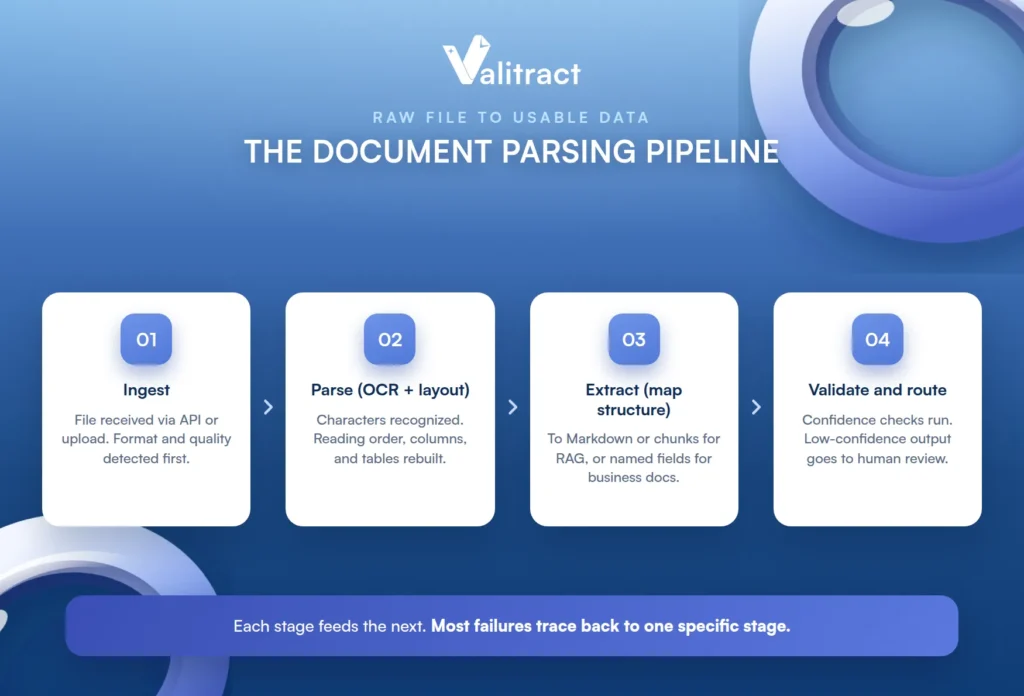
Ingest. The file is received via API or upload, and its format and quality are detected (native-text, scanned, or mixed) before any processing starts.
Parse (OCR and layout). Characters are recognized, and reading order, columns, and table structure are reconstructed.
Extract (structure mapping). The parsed content is mapped either to Markdown and chunks for RAG use cases, or to named fields for structured business-document use cases, depending on the tool and the job.
Validate and route. Confidence scoring and business-rule checks run, and low-confidence output is routed to human review before the data reaches its destination. Skipping this stage is how wrong data reaches production unnoticed.
Common Mistakes When Choosing or Integrating a Document Parsing API
A few recurring errors cause most of the pain. Each is avoidable once you know to look for it.
The first is testing only against clean vendor demo samples instead of your own scanned, skewed, and multi-format production documents. The second is conflating a high page-level OCR score with usable field-level accuracy, which are different numbers. The third is picking a RAG-oriented parser for a structured business-document workflow, or the reverse, because both call themselves a document parsing API.
The fourth is skipping confidence-score review and sending unverified low-confidence extractions straight into production. The fifth is overlooking data-retention and deployment requirements until a compliance review flags them after the tool is already live. Our explainer on IDP vs OCR helps you avoid the RAG-versus-structured mismatch in particular.
Five Industry Use Cases for Document Parsing APIs
The same technology serves very different verticals. Each follows the same shape: an ingestion challenge, an API solution, and an operational impact.
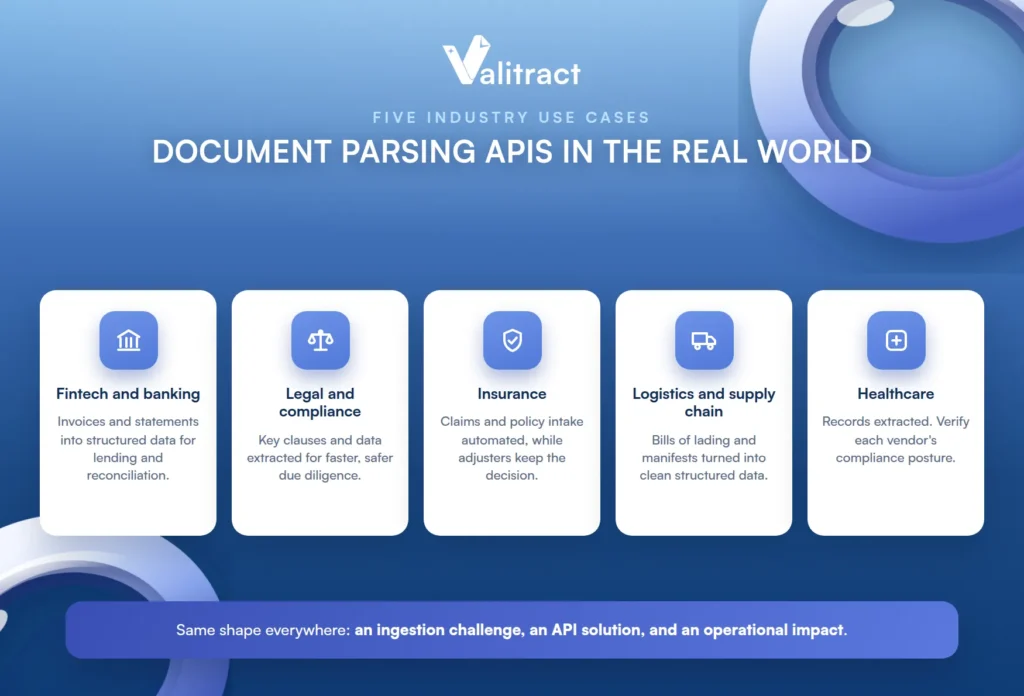
Fintech and banking. Lenders and finance teams drown in invoices and bank statements arriving in dozens of formats. A parsing API extracts transactions and fields into structured data for lending and reconciliation, cutting decision time. Our bank statement extraction software is built for exactly this step.
Legal and compliance. Legal teams review mountains of contracts and filings. A parsing API extracts key clauses and data for due diligence, speeding review and reducing the risk of a missed clause.
Insurance. Claims arrive as dense, varied forms and policy documents. A parsing API automates intake, removing the transcription that slows claims while adjusters keep the decisions.
Logistics and supply chain. Bills of lading and freight manifests pile up in inconsistent layouts. A parsing API turns them into structured data, keeping the supply chain moving without a data-entry bottleneck.
Healthcare. Medical records and claims documents mix printed and handwritten content. A parsing API extracts the structured data, though regulated deployments must be checked against each vendor’s specific compliance posture.
Concluding Thought
The best document parsing API is decided by what happens to the data after parsing, not by which tool has the flashiest benchmark. The right choice follows the downstream system, so the question is always what you are feeding next.

For RAG and LLM ingestion of varied documents, look at LlamaParse, Reducto, Unstructured.io, Docling, or LandingAI ADE. For hyperscaler-native integration, use Google Document AI, AWS Textract, or Azure Document Intelligence. For open-source and self-hosted needs, Docling and Unstructured.io lead. And for structured extraction from repeatable business documents into validated, typed fields, Valitract is built for exactly that job.
If that last one is your need, you can start with Valitract on the free tier and test it on your own documents.
Frequently Asked Questions About Document Parsing APIs
What is a document parsing API?
It is an API that converts unstructured documents like PDFs, scans, and images into machine-readable output such as Markdown or JSON that a downstream system can use. Depending on the tool, it may cover OCR, layout parsing, structured field extraction, or all three.
What is the difference between OCR, a document parsing API, and intelligent document processing (IDP)?
OCR converts pixels to characters. A document parsing API adds layout understanding and, in some tools, structured field extraction on top. IDP is the broader end-to-end category that wraps extraction with classification, validation, and human-review workflows into a complete pipeline.
Which document parsing API is best for RAG or LLM pipelines?
For RAG, you want Markdown or chunked output with clean reading order and faithful tables, which points to LlamaParse, Reducto, Unstructured.io, Docling, or LandingAI ADE. The best fit depends on your document complexity, deployment needs, and whether you require open-source or on-premise options.
Can a document parsing API handle scanned or handwritten documents?
Scanned documents are handled well by AI-powered parsers, though accuracy varies with scan quality. Handwriting is harder and more variable, so test any tool on your own handwritten samples rather than trusting a general accuracy claim.
How much does a document parsing API cost?
Open-source and self-hosted tools are free to run, managed general parsing runs roughly $10 to $30 per 1,000 pages, and structured extraction with validation and human review typically costs more. Premium agentic parsing modes can cost more per page, so model your real monthly volume rather than the pilot price.
Is there a good open-source or self-hosted document parsing option?
Yes. Docling and Unstructured.io are the leading open-source, self-hostable options, which suits data-residency and privacy requirements. They trade some field-level precision on complex layouts for the control of running entirely in your own environment.


