


- Data integration automation is software that connects, extracts, transforms, validates, and loads data across systems on a continuous schedule or event trigger, without a person moving files between tools.
- It replaces hand-coded scripts and manual exports with connectors, transformation rules, and orchestration.
- It is narrower than “automated integration” in the broad iPaaS sense of connecting whole applications and business processes; this article covers the data-pipeline meaning.
Data integration automation is how a business stops moving data by hand and lets it flow between systems on its own. It is the difference between an analyst exporting a CSV every Monday and a pipeline that keeps the warehouse current without anyone touching it.
Done well, it is invisible. Done badly, it is a tangle of brittle scripts that break quietly and get discovered during month-end close. This guide explains how automated integration actually works, the patterns to choose between, where pipelines break in production, and how to scope your first one without inheriting someone else’s mess.
The core idea is simple even when the plumbing is not. Data should move to where it is needed on its own, on a schedule or a trigger, with quality checks along the way and a person only where judgment is genuinely required.
How Automated Data Integration Actually Works
Every automated pipeline runs through the same six-stage lifecycle, and it is worth learning as a debugging map. When a pipeline breaks, it broke at one of these six stages, and knowing which one saves hours.
The stages are sequential, so an error early on propagates. A bad read at the start becomes a bad row in the warehouse at the end, which is why the earliest stages deserve the most attention.
Ingest. The pipeline pulls from source systems through connectors, APIs, database reads, file drops, or monitored inboxes. This is where the data enters, and the variety of source types is larger than most connector libraries admit.
Structure. Whatever arrived is turned into rows and fields. This is trivial for a database read that is already tabular, and it is the hard part for a PDF, scan, or photo that is not.
Transform. Formats are normalized, duplicates are resolved, and fields are mapped to the target schema. This is where raw inputs become consistent with everything else in the destination.
Validate. Quality rules run: row counts, null checks, schema contracts, and freshness thresholds. This is the gate that decides whether data is trustworthy enough to load.
Orchestrate. Jobs are scheduled, dependencies are sequenced, and failures are retried with backoff. This is the conductor that keeps the stages running in the right order.
Load. The finished data is written to the warehouse, lake, ERP, or operational application where it will be used.
The stage most reference architectures skip is Structure, because they quietly assume the source is already tabular. That assumption holds for a database and breaks the moment a vendor emails an invoice, which is where a lot of real pipelines silently fall back on manual work. Our overview of automated data processing covers why this stage matters more than it looks.
Name the Structure stage explicitly and you can see where the manual labor hides. It is almost always sitting on the sources that never became rows and columns on their own.
ETL, ELT, CDC, and Reverse ETL: Which Pattern Fits Which Job
There is no single right way to move data, only a right pattern for a given job. The table below maps the main patterns to the situations they fit.
Most teams do not pick one and stop. A realistic architecture might run CDC from a production database, ELT from SaaS APIs, and a document-extraction step for the invoices that arrive by email, all feeding the same warehouse.
| Pattern | What it does | When to choose it |
|---|---|---|
| ETL | Transforms before loading into the destination | Strict quality gates required before data lands, or limited destination compute |
| ELT | Loads raw, then transforms in the warehouse | Cloud warehouse where compute is cheap and transformation logic keeps changing |
| CDC | Replicates only changed rows in near real time | Low-latency sync with minimal load on the source database |
| Reverse ETL | Pushes warehouse data back into operational tools | Operationalizing scores, segments, or enriched records in a CRM or ERP |
| Streaming | Processes events continuously as they occur | Fraud checks, live inventory, and telemetry, where stale data creates risk |
| Virtualization | Queries sources in place without moving data | Fast federated reads where physical consolidation is not wanted |
| Document extraction | Converts unstructured files into structured records | Sources that arrive as PDFs, scans, or photos and have no connector |
Most pipelines combine several of these rather than picking one; the patterns are complementary, not competing.
The pipeline layer itself is well served by mature tools. Fivetran and Airbyte specialize in connector-based ELT, Boomi and Workato in broader iPaaS integration, Informatica in enterprise-scale data management, and Zapier in no-code app automation. Each is strong at moving structured records between systems that already expose them.
The Sources That Have No Connector
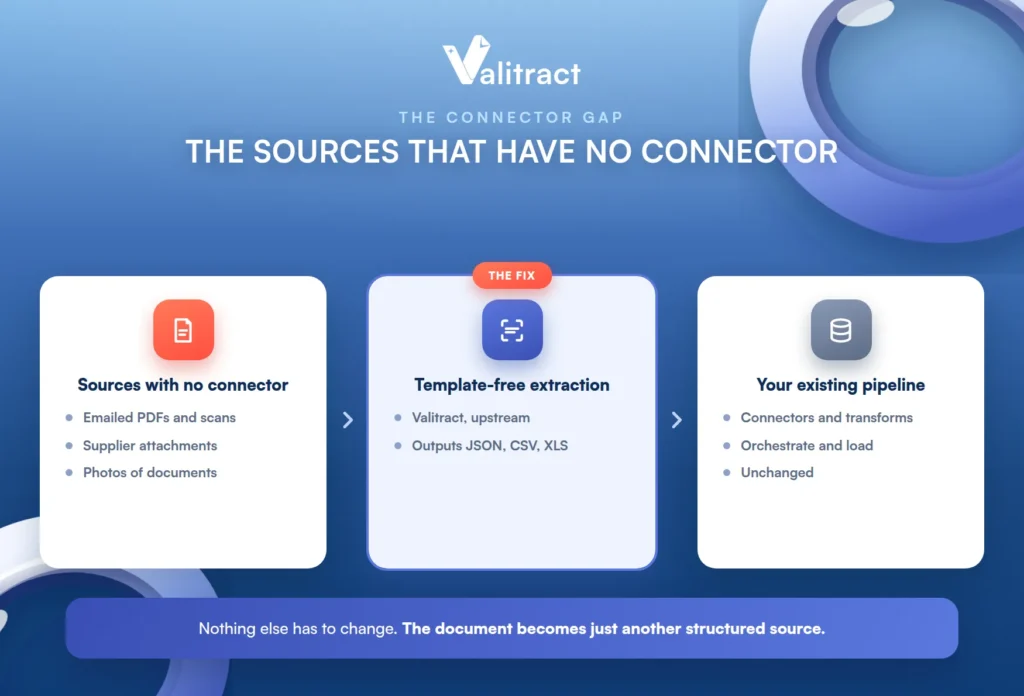
Connector libraries cover databases and SaaS APIs well, but a large share of the data a business actually runs on arrives as emailed PDFs, scanned forms, supplier attachments, and photos. No ELT platform has a connector for “an invoice from a vendor who will not use your portal.”
This is the blind spot in most integration diagrams. The neat boxes and arrows assume every source speaks API, and then reality shows up as an attachment.
Why this gap persists
The pipeline layer is designed to move structured records between systems, so anything that is not already rows and columns falls outside its model. That work falls to whoever is willing to retype it, which is usually a person in finance or operations.
The tools are not defective here; they are simply built for a different input. A connector expects an API or a table, and a scanned delivery note is neither.
What teams actually do instead
In practice, teams bridge the gap with manual keying, spreadsheet staging, or a brittle per-vendor template. The template approach works until a supplier changes their layout, at which point it breaks silently and the manual keying quietly resumes.
The cost of this is easy to underestimate because it is spread out. A few minutes per document across hundreds of documents a week is a full role’s worth of time hiding in plain sight.
None of these scale. They are the hidden manual labor sitting underneath an otherwise automated pipeline.
What closes it
The fix is a template-free extraction step ahead of the pipeline that outputs JSON, CSV, or XLS, so the document becomes just another structured source the existing pipeline can pick up. This is where intelligent document processing and OCR data extraction fit into an integration architecture.
Valitract is one option for this step, with a REST API and a no-code interface, and it reports up to 99.8% field-level accuracy on standard printed documents. It sits upstream of the pipeline as a document intelligence layer, turning unstructured files into structured records; it is not an iPaaS, ELT platform, or orchestration tool, and it does not replace them. The document simply becomes another clean input the pipeline already knows how to handle.
The value of framing it this way is that nothing else has to change. Your existing connectors, transformations, and orchestration keep working, and the document extraction step just hands them one more structured source.
What Breaks in Production, and How to Catch It
Automated pipelines fail in a handful of predictable ways. Each has a symptom to watch for and a guardrail that prevents it.
The pattern across all of them is the same. Failures are cheap to prevent with a guardrail defined up front and expensive to chase once bad data has already spread downstream.
Schema drift. A source changes shape and the pipeline inherits the change. The guardrail is to distinguish breaking changes (a required column removed) from non-breaking ones (a new optional field), using contract tests and versioned schemas that catch drift before it cascades. This is the most common way a pipeline that worked yesterday quietly stops working today.
Non-idempotent retries. A re-run duplicates rows instead of replacing them, so a transient failure becomes double-counted data. The guardrail is idempotent loads, where re-running a job produces the same result rather than stacking another copy.
Bi-directional overwrite loops. Two systems sync both ways with no defined source of truth, and they overwrite each other in a loop. The guardrail is a single declared system of record for each field.
Silent extraction errors. A wrong value passes type checks and reaches the ledger unflagged, which is the most dangerous failure because nothing alerts. The guardrail is automated data validation with low-confidence flagging that routes uncertain values to human review before they land.
Missing freshness SLOs. A pipeline stalls and nobody notices, because nothing defined what “late” means. The guardrail is an explicit freshness threshold that fires an alert when data is older than it should be.
API version changes. A custom-built connector breaks when a vendor ships an update nobody was tracking. The guardrail is monitoring vendor API versioning and preferring maintained connectors over one-off custom code where possible.
How to Scope Your First Automated Pipeline
The mistake most first pipelines make is starting from a vendor’s feature list rather than from the sources. Here is a sequencing that starts from reality instead.
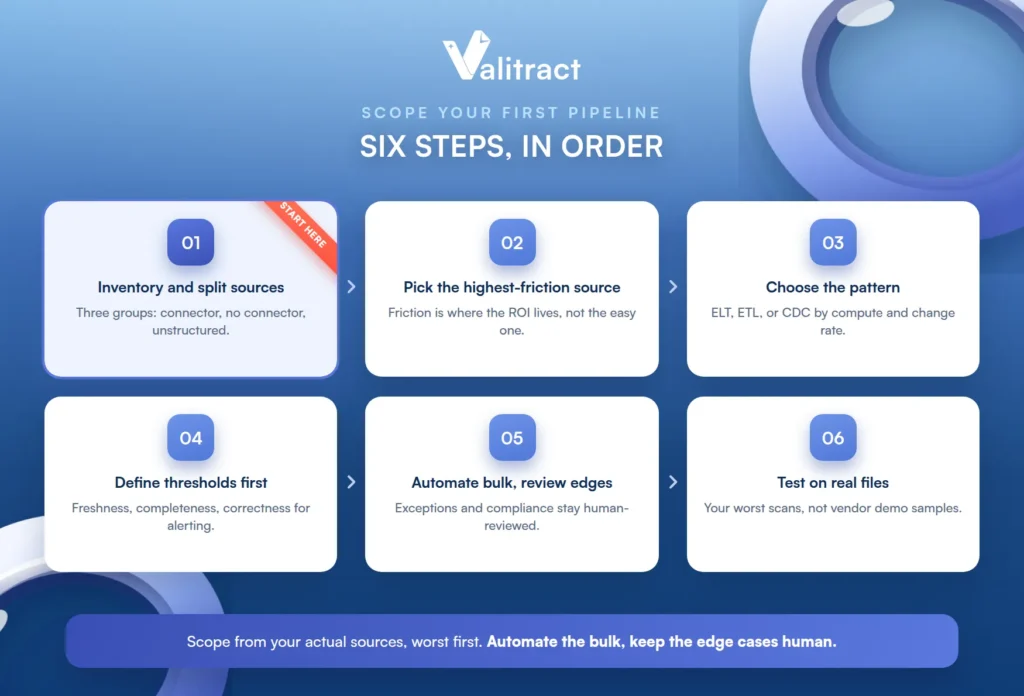
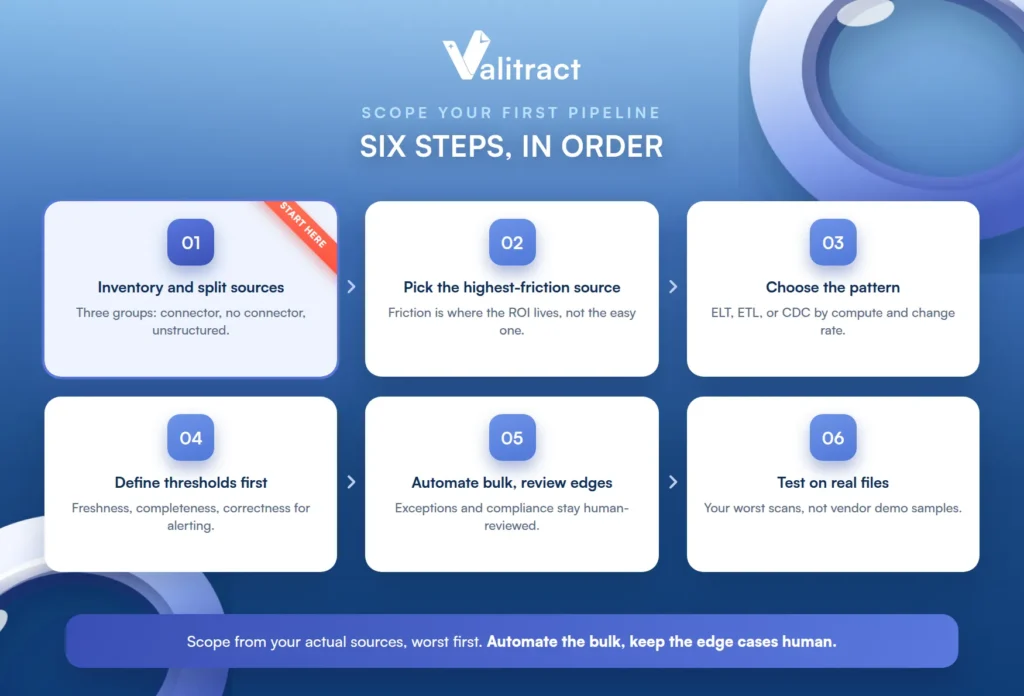
The order matters as much as the steps. Scoping from your actual sources, worst first, is what keeps a first project from ballooning into a stalled everything-at-once rebuild.
- Inventory your sources and split them into three groups: structured with a connector, structured without a connector, and unstructured documents. The three groups need different tooling, and conflating them is why projects stall mid-build. Doing this inventory honestly at the start is the single highest-value hour in the whole project.
- Pick the highest-friction source first, not the easiest one. Friction is where the return on investment lives, so the painful source that eats hours every week is the one worth automating before the tidy database that was never really a problem.
- Decide the pattern from destination compute and how often transformation logic changes. A cheap cloud warehouse with frequently changing logic points to ELT; strict pre-load quality gates point to ETL; low-latency sync points to CDC.
- Define freshness, completeness, and correctness thresholds before go-live, so your alerting has something concrete to fire against. Thresholds set after an incident are thresholds set too late.
- Automate the repeatable majority and keep the edge cases human-reviewed. Exception handling, ambiguous matching, and compliance-sensitive decisions belong with a person, while the predictable bulk runs on its own.
- Test on real production files, not vendor demo samples. For document sources, a free tier is enough to run your own messy files through before committing; Valitract’s is 100 pages a month with no card, which is plenty to see how a tool handles your worst scans rather than a curated sample.
Common Mistakes in Data Integration Automation
A few recurring mistakes cause most of the pain in integration projects. Each is easy to avoid once named.
Most of them come from an optimistic assumption made early. Assuming clean data, universal connectors, or one tool that does everything is what sets up the disappointment later.
- Treating clean demo data as representative of the actual source mix. Real inputs are messier than any demo, and a pipeline tuned to clean data breaks on the real thing.
- Assuming every source has a connector, then discovering mid-project that a third of the inputs are emailed attachments. Inventory the sources honestly before choosing tools, not after.
- Confusing data integration with application integration. One unifies data for analysis, the other keeps two applications in sync, and they need different tools; picking an iPaaS for an analytics pipeline, or the reverse, leads to a poor fit.
- Expecting an extraction layer to reconcile documents against each other or detect tampering. A tool like Valitract structures and validates fields, but it does not perform cross-document reconciliation, fraud or tamper detection, live currency normalization, or payment execution; those are separate layers, and expecting one tool to cover all of them leads to disappointment. Our guides to automated invoice processing and automated bank statement processing show where the extraction layer ends and the next layer begins.
- Ruling out automation entirely because of data-sensitivity constraints, without first checking what the constraint actually is. “No third-party API at all” rules out most hosted tools, Valitract included, but a simple residency requirement often does not, so it is worth knowing which one you are dealing with before deciding.
- Retrofitting governance after the pipelines are live. Lineage, access control, and audit trails are far cheaper to build in from the first source than to bolt on once data is already flowing through untracked.
Frequently Asked Questions About Data Integration Automation
What is data integration automation?
It is software that connects, extracts, transforms, validates, and loads data across systems automatically, on a schedule or an event trigger, without a person moving files between tools. It replaces manual exports and hand-coded scripts with connectors, transformation rules, and orchestration. The goal is data that flows between systems on its own and stays current.
What is the difference between data integration and application integration?
Data integration unifies data from many sources into a destination for analysis and reporting. Application integration keeps two or more applications in sync so an action in one is reflected in another. They solve different problems and generally use different tools, even though the phrase “integration” covers both.
Is ETL obsolete now that ELT exists?
No. ELT suits cloud warehouses where compute is cheap and transformation logic changes often, but ETL is still the right choice when strict quality gates must run before data lands or when destination compute is limited. Many architectures use both, choosing per pipeline rather than standardizing on one.
How do you automate integration for data that arrives as PDFs or scans?
You add a template-free document extraction step ahead of the pipeline that converts the file into structured JSON, CSV, or XLS. Once the document is structured, it becomes just another source the existing pipeline can ingest, transform, and load like any other. This closes the gap that connector libraries leave open.
How does an automated pipeline handle schema changes?
Well-built pipelines use contract tests and versioned schemas to detect drift, distinguishing breaking changes like a removed required column from non-breaking ones like a new optional field. Breaking changes are caught and halted before they cascade downstream, while non-breaking ones are absorbed. Without these guardrails, a schema change silently corrupts everything downstream.
How long does it take to automate a first data integration pipeline?
A single well-scoped source with an existing connector can be live in days, while a source with no connector or heavy transformation needs takes longer. The realistic path is to ship one high-friction source first and expand, rather than attempting every source at once. Scoping tightly is what keeps a first project from stalling.
Can AI fully automate data integration without human review?
Not entirely, and it should not try to. The repeatable majority of a pipeline can run autonomously, but exception handling, ambiguous matching, and compliance-sensitive decisions belong with a human. The right design automates the bulk and routes the genuinely uncertain cases for review.
Conclusion
Data integration automation is the work of getting data to move between systems on its own, and it lives or dies on the details: the right pattern for each job, guardrails against the ways pipelines break, and an honest inventory of sources that includes the ones with no connector. Start with the highest-friction source, define your thresholds before go-live, and keep a human on the edge cases.
For the document-shaped sources that have no connector, Valitract turns PDFs, scans, and photos into structured records your pipeline can pick up like any other source. It closes the one gap the pipeline layer was never built to cover, without asking you to replace any of it. To test it on your own files, start with Valitract.


