



TL;DR
- Receipt data entry automation uses OCR and AI to read receipts and post their data into your systems without manual typing.
- Manual entry is slow and error-prone: the average expense report costs $58 and takes 20 minutes, and one in five contains errors.
- Automation runs a receipt through six stages: OCR, AI structuring, ingestion, validation, categorization, and export.
- The best tools win on real-world accuracy, language and handwriting support, integrations, pricing, and data security.
Receipt data entry automation is how finance teams stop typing receipts by hand. Instead of a person keying merchant, date, and total from a faded slip, software reads the receipt and posts the data for them.
The manual version is expensive. According to the GBTA Foundation, cited by Navan, the average expense report costs $58 to process and takes 20 minutes, and one in five contains errors that cost an extra $52 and 18 minutes each to fix.
At scale, that adds up to hundreds of thousands of dollars a year in avoidable rework. Automation removes most of it.
This guide covers what receipt data entry automation is, why businesses prefer it, how it works under the hood, how to roll it out, the challenges to expect, and how to choose a tool in 2026.
The aim is practical, not theoretical. By the end you should know how to evaluate a tool and plan a rollout.
Receipt Data Entry Automation Explained
You likely know the basics, so this section is brief. It sets the shared definitions the rest of the guide builds on.
What Is Receipt Data Entry Automation
Receipt data entry automation is the use of OCR and AI to read receipts and enter their data into your accounting or expense system automatically, with no manual typing. It turns a photo or scan into structured fields like merchant, date, total, and tax.
The key word is automatic. The data moves from image to system with little or no human typing in between.
The contrast with manual entry is stark. A person keys each field by hand at a rate of roughly one to four percent errors per field, while automation reads and validates in seconds.
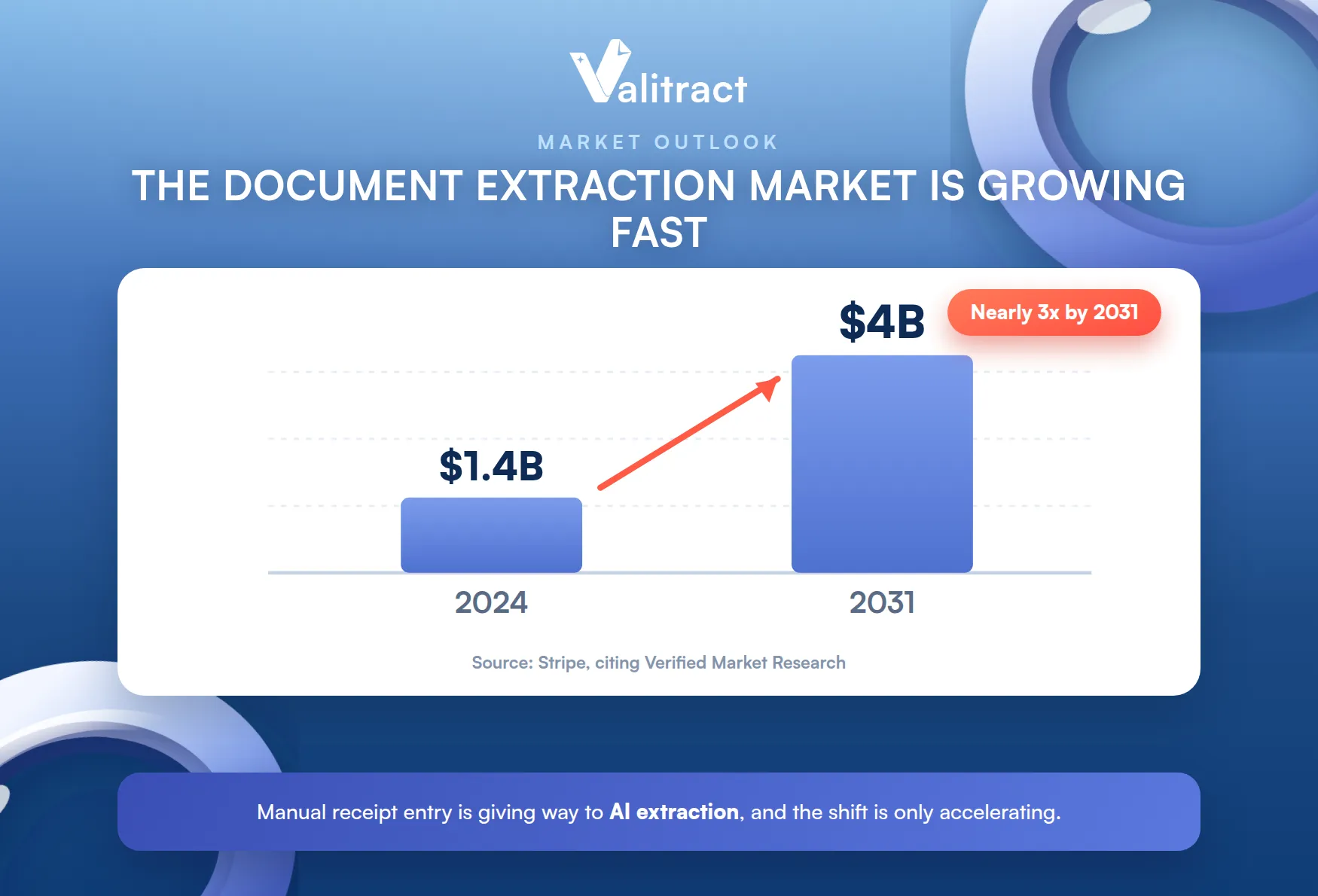
The market reflects the shift. The document data extraction market is growing fast, from around $1.4 billion in 2024 toward an estimated $4 billion by 2031, according to Stripe citing Verified Market Research.
Automation also sits inside a broader practice. For the wider concept, see our explainer on automated data entry, and for a direct contrast, our guide to manual vs. automated data entry.
Why Receipts Are Different From Invoices or Other Documents
Receipts are among the hardest documents to read. They fade, crumple, and smudge, and thermal paper loses its print within months.
They are also wildly non-standard. Every merchant and point-of-sale system lays out a receipt differently, so there is no fixed template to rely on.
That is why receipts demand stronger OCR and AI than clean, structured documents. Reading a folded, faded, angled receipt takes models that read by meaning, not fixed position.
This is the core reason receipt automation is its own category. A tool tuned for tidy invoices often stumbles on a crumpled receipt.
Why Receipt Data Entry Automation Is the Preferred Choice for Businesses
The case for automation is practical, not ideological. It saves time, cuts errors, lowers cost, and scales in a way manual entry cannot.
The Problem With Manual Receipt Entry
Manual entry is slow and error-prone by nature. Someone reads each receipt, types the fields, and fixes mistakes later, which is exactly where the $52-per-error correction cost comes from.
It also does not scale. Twice the receipts means twice the hours, and the error count climbs right along with the volume.
The cost is also easy to miss. Because the labor is already on payroll, the per-receipt expense hides in plain sight.
Benefits of Receipt Data Entry Automation
The gains fall into four areas. Together they change the economics of processing receipts.
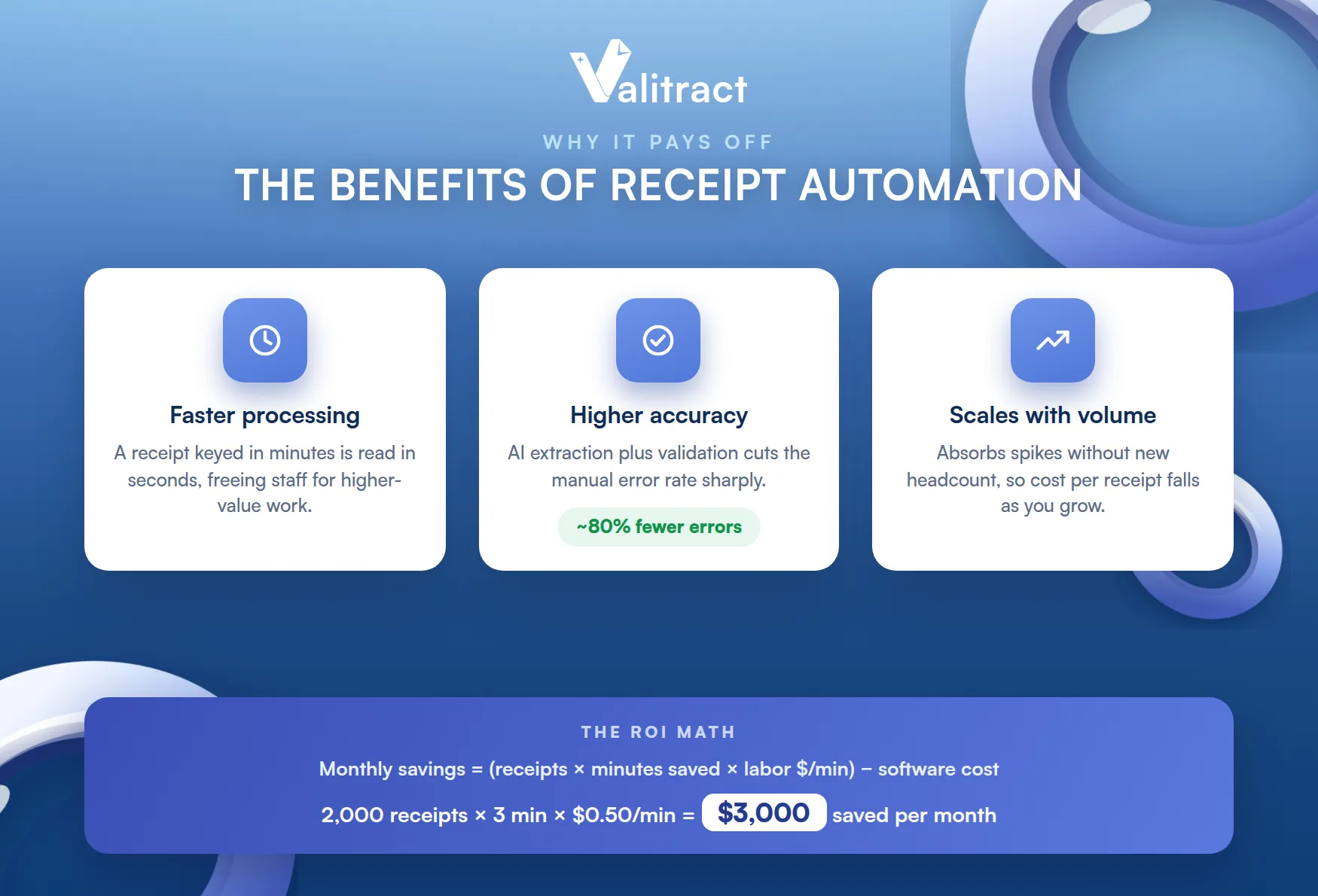
- Faster processing and time savings: a receipt that took minutes to key is read in seconds, freeing staff for higher-value work.
- Higher accuracy, fewer costly errors: AI extraction plus validation cuts the manual error rate sharply, and studies of automation report error reductions around 80%.
- Scales with your volume: the system absorbs a spike in receipts without adding headcount, so cost per receipt falls as you grow.
The fourth benefit is cost, and it is worth doing the math.
Most teams underestimate this number. Once you price the hours honestly, the savings are usually larger than expected.
Cost savings, the ROI formula. A simple estimate makes the case concrete:
Monthly savings = (receipts per month x minutes saved per receipt x labor cost per minute) – software cost
For example, 2,000 receipts a month at 3 minutes saved each and a loaded labor rate of $0.50 per minute yields 2,000 x 3 x $0.50, or $3,000 in monthly labor savings, before subtracting the tool’s cost. Adjust the inputs to your own numbers.
Manual vs Automated: Side by Side
The contrast is clearest in a table.
Table 1. Manual versus automated receipt data entry.
| Dimension | Manual entry | Automated |
| Time per receipt | Minutes | Seconds |
| Error rate | 1 to 4% per field | Sharply lower, with validation |
| Cost | High, labor-driven | Low per document at volume |
| Scalability | Linear with headcount | Absorbs volume without new hires |
| Audit trail | Manual, easy to lose | Logged and timestamped |
| Availability | Working hours | Continuous |
Sources: GBTA Foundation via Navan (expense report cost and error rate); Barchard and Pace (manual entry error rate); automation error-reduction figures from McKinsey and Deloitte reporting. See also our manual vs. automated data entry guide.
For audit purposes, the logged trail matters as much as the speed. Tax authorities, including the IRS, expect businesses to keep records that support their filings, so a timestamped digital record is easier to defend than a shoebox of fading receipts.
Thermal receipts make this worse on paper. Their print fades within months, so the original is often unreadable by the time an audit arrives.
These gains come from how automation actually processes a receipt. Here is what happens under the hood.
How Receipt Data Entry Automation Actually Works
A receipt moves through six stages from capture to your books. Understanding them helps you evaluate any tool.
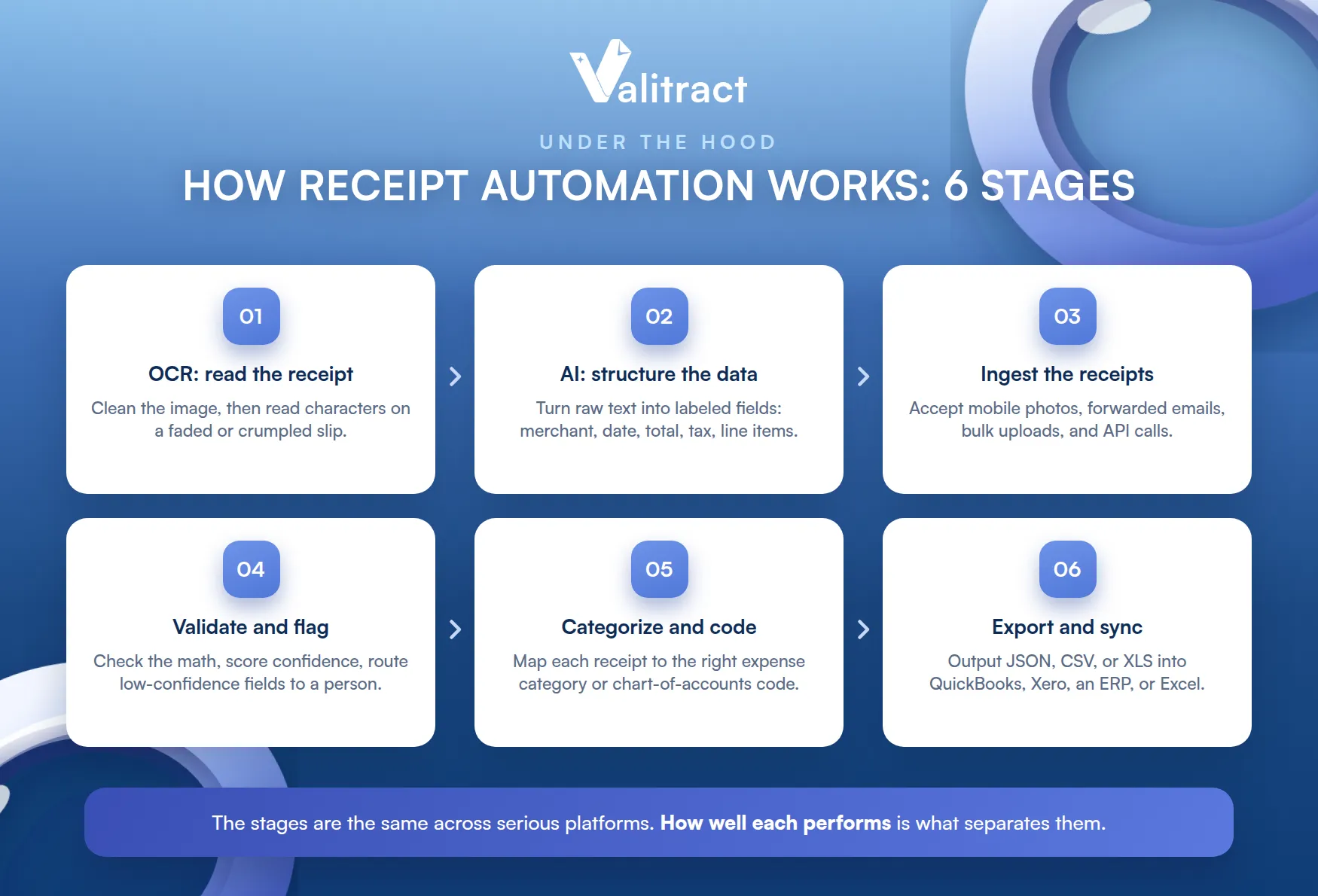
The stages are the same across serious platforms. How well each stage performs is what separates them.
Stage 1: OCR, Reading the Receipt
First the system reads the characters on the receipt. Good OCR cleans the image first, correcting skew, glare, and noise before it reads a faded or crumpled slip.
This stage sets the ceiling for everything after it. The cleaner the read, the more the later stages have to work with.
Image preprocessing is quietly decisive here. Deskewing and denoising a bad photo can be the difference between a clean read and a failed one.
Stage 2: AI, Understanding and Structuring the Data
Next, AI turns raw text into labeled fields. It identifies the merchant, date, total, tax, and payment method, and parses the line items into rows.
This is where meaning replaces position. The model knows which number is the total regardless of where it sits, which is what our receipt OCR software is built to do.
Stage 3: How Receipts Get Into the System
Receipts arrive from many places. A good platform accepts mobile photos, forwarded emails, bulk uploads, and direct API calls.
That flexibility matters for adoption. Employees capture on a phone, while finance bulk-uploads a backlog, all into the same pipeline.
Capture at the point of purchase is best of all. A receipt photographed on the spot is rarely lost or faded later.
Stage 4: Validation and Error Handling
Extraction is not the end. The system checks that the numbers are consistent and assigns a confidence score to each field.
Low-confidence fields route to a person for a quick check, while confident ones flow straight through. That human-in-the-loop step is what makes the output trustworthy.
Stage 5: Categorization and Coding
Clean data still needs a home in your books. AI maps each receipt to the right expense category or chart-of-accounts code, based on the merchant and line items.
Good tools learn your coding over time. The more they see your corrections, the better the auto-coding gets.
This stage saves real accounting effort. Consistent coding is exactly what makes month-end reconciliation faster.
Stage 6: Export and Sync to Your System of Record
Finally, the data leaves as structured output. Valitract exports JSON, CSV, or XLS, and the clean data syncs into QuickBooks, Xero, an ERP, or Excel.
For developers wiring this into an app, the extraction runs through a receipt OCR API. That gives engineering a direct, programmatic path from capture to system of record.
How to Automate Receipt Data Entry: A Step-by-Step Implementation Guide
Rolling out automation is a short project, not a leap. Six steps take you from manual entry to a running pipeline.
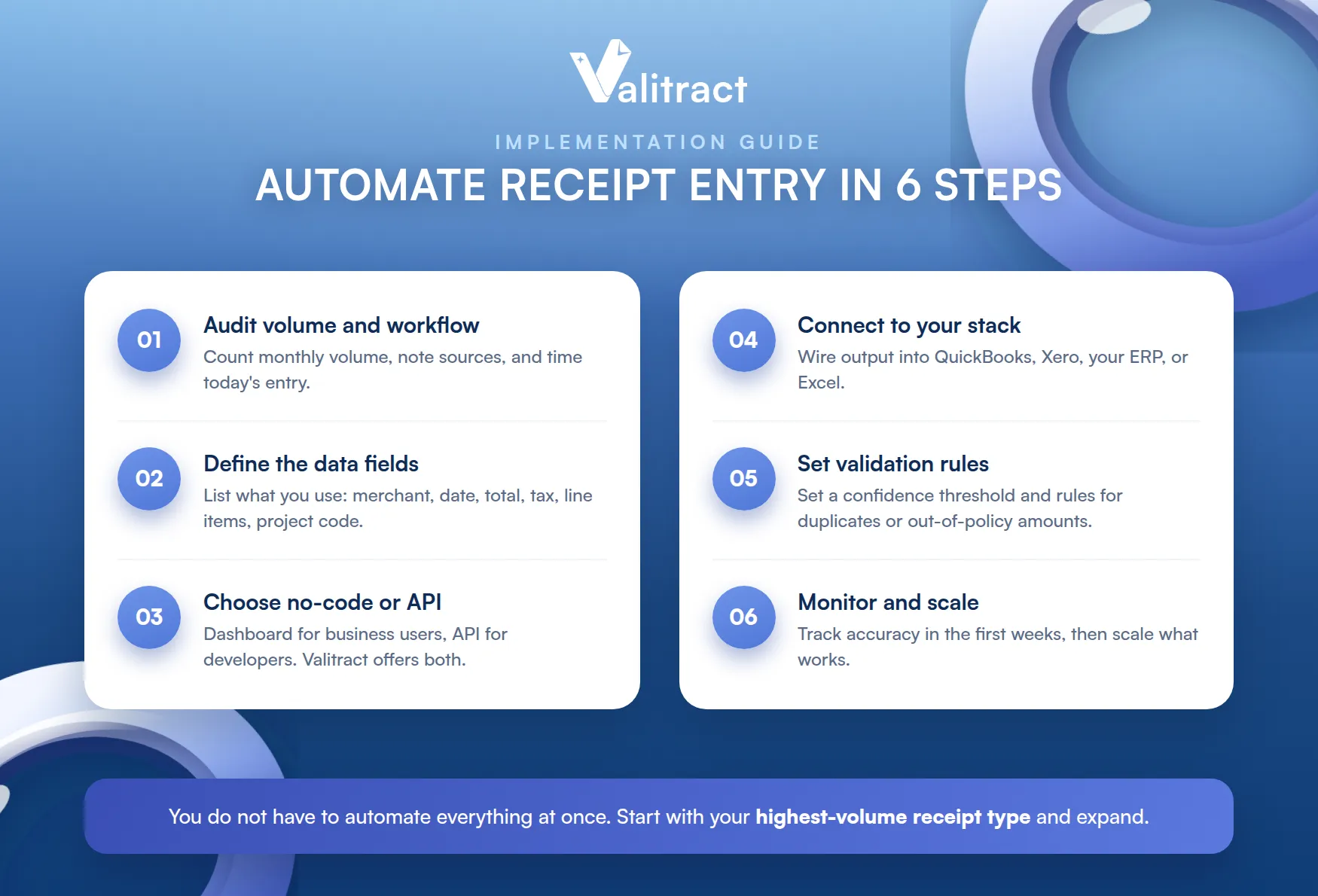
You do not have to automate everything at once. Start with the highest-volume receipt type and expand from there.
Step 1: Audit Your Current Receipt Volume and Workflow
Start by measuring what you have. Count monthly receipt volume, note where receipts come from, and time how long entry takes today.
That baseline sizes the opportunity. It also tells you which model, no-code or API, fits your team.
Involve the people who do the entry today. They know the edge cases a plan on paper will miss.
Step 2: Define What Data Fields You Actually Need
List the fields you truly use downstream. Merchant, date, total, and tax are common, but you may need line items, currency, or a project code.
Valitract supports customizable data fields and labels, so you capture exactly what your workflow needs. Defining this early prevents rework later.
Step 3: Choose Between No-Code Platform or API Integration
There are two paths, and the right one depends on your team. A no-code platform suits finance and operations users who want a dashboard, while an API suits developers embedding extraction into an app.
Valitract offers both. That two-sided design lets business users start immediately and engineering scale it later, without switching vendors.
Step 4: Connect to Your Accounting or ERP Stack
Next, wire the output into your books. Connect the tool to QuickBooks, Xero, your ERP, or Excel so data lands where your team already works.
A native path here avoids a manual export-import loop. That loop quietly reintroduces the very keying you set out to remove.
Step 5: Set Validation Rules and Review Thresholds
Decide what needs a human. Set a confidence threshold below which a field is flagged, and define rules for duplicates or out-of-policy amounts.
Tune the threshold to your risk tolerance. Higher review catches more, while lower review moves faster, and you can adjust as trust grows.
Start cautious, then loosen. A higher review rate early builds confidence before you let more flow through automatically.
Step 6: Monitor Accuracy and Scale
Finally, watch the results. Track accuracy and exception rates in the first weeks, and refine your fields and rules as real receipts flow through.
Once accuracy holds, scale up with confidence. The pipeline that handled a test batch will handle ten times the volume without new headcount.
Common Challenges When Automating Receipt Data Entry (And How to Solve Them)
Automation is not magic, and a few issues come up in every rollout. Knowing them in advance makes them manageable.
None of these is a reason to avoid automating. Each has a practical fix that a good tool already handles.
Blurry, Faded, or Handwritten Receipts
Poor-quality receipts are the classic problem. The fix is an AI model trained on real-world conditions, plus confidence scoring that flags the fields it is unsure about.
Handwriting is the hardest case. Modern models read it far better than legacy OCR, but a review step on low-confidence handwritten fields is still wise.
Handwritten totals deserve extra care. A misread digit there is more costly than one in a description.
Multi-Currency and Multi-Language Receipts
Global teams collect receipts in many currencies and languages. A capable tool reads across languages and detects currency automatically, so a receipt in another language is not a manual exception.
Integrating With Legacy Accounting Systems
Older systems may lack a modern connector. A tool with flexible output, such as CSV or XLS, and an API bridges to legacy software without a custom rebuild.
Keeping Records Audit-Ready
Auditors want a clean, traceable record. Automation helps by storing a timestamped digital copy of each receipt alongside its extracted data, which is far easier to produce than paper months later.
With these challenges in mind, the next question is which tool to choose.
Best Receipt Data Entry Automation Software in 2026
The market has several strong options. The right one depends on your volume, your stack, and your data-security needs.
There is no single best tool for everyone. The best choice is the one that fits your receipts and your systems.
What to Look For in a Receipt Automation Tool
A few criteria separate the serious tools. Weigh them against your own workflow.
- Accuracy on real receipts, including faded, crumpled, and handwritten ones.
- Language and handwriting support, if you process receipts globally.
- Output format and integrations, so data lands in your accounting stack.
- Pricing model that fits your volume, whether per document or tiered.
- Security and data retention, including how long data is stored and whether it trains the vendor’s models.
Quick Comparison: Top Tools at a Glance
The table below is a high-level orientation, not a deep review.
Table 2. Receipt automation tools at a glance.
| Tool | Best known for | Notes |
| Valitract | Template-free AI extraction, no-code plus API | 95+ languages, handwriting support, JSON/CSV/XLS output, security-first retention |
| Veryfi | Receipt and expense OCR with fraud detection | Strong mobile capture and integrations; paid plans reported to start around $500/month |
| Taggun | Real-time receipt OCR API for developers | 85+ languages, reported over 90% accuracy; entry pricing reported from a few dollars a month |
| Docsumo | High-volume IDP across document types | Built for batch processing at scale |
| Nanonets | Flexible IDP with usage-based pricing | SOC 2, GDPR, and HIPAA compliant, with built-in accounting integrations |
Pricing and capability details are reported from vendor and third-party sources as of mid-2026; confirm current details with each vendor. For a detailed side-by-side, see our best receipt OCR software comparison, and for broader needs, our data entry automation software roundup.
Why Businesses Are Choosing AI-Powered OCR Platforms Like Valitract
Valitract fits teams that want accuracy and control together. It reaches up to 99.8% accuracy, offers both a no-code platform and an API, reads 95+ languages, and handles handwritten receipts.
Its security stance is a deciding factor for many. Valitract applies automatic data purging and does not train its models on customer data, which matters when receipts carry sensitive financial detail.
The combination is the draw. One tool serves business users and developers, at high accuracy, with a security posture built for financial data. For plan details, see the Valitract pricing page.
As always, test on your own receipts first. The right tool is the one that performs on your real documents, not a demo file.
Frequently Asked Questions About Receipt Data Entry Automation
Is receipt data entry automation accurate enough for accounting?
Yes, when the tool pairs strong AI extraction with validation. Leading tools reach up to about 99.8% accuracy on clear receipts, and confidence scoring routes uncertain fields to a person, so the data entering your books is checked rather than trusted blindly.
Can automation read handwritten receipts?
It can, though accuracy is lower than for printed text. Modern AI models handle handwriting far better than legacy OCR, and a review step on low-confidence handwritten fields keeps the final data reliable.
How much does receipt automation software cost?
Pricing ranges widely, from a few dollars a month for entry tools to several hundred for enterprise platforms, on per-document or tiered models. Many tools, including Valitract, offer a free tier so you can test before paying.
Does automation work for both individual freelancers and enterprises?
Yes. A freelancer can capture receipts on a phone through a no-code app, while an enterprise runs high volumes through an API into its ERP, using the same underlying extraction.
Is my receipt data secure when using an automation tool?
It can be, depending on the vendor. Look for encryption, clear data-retention policies, and whether the vendor trains its models on your data. Valitract applies automatic data purging and does not train on customer data.
Conclusion
Receipt data entry automation turns a slow, error-prone manual task into a fast, structured pipeline from capture to your books. It reads real-world receipts, validates the data, codes it, and syncs it into your accounting system, cutting both cost and error.
The payoff is concrete: less time lost, fewer costly mistakes, cleaner audit records, and a process that scales with your volume rather than your headcount.
Whether you prefer a no-code dashboard or a developer API, Valitract can automate your receipts at high accuracy with a security-first design. To talk through your use case, reach the team through the Valitract contact page.
Valitract – Next-gen AI-Powered Data Extraction Platform
- Email: contact@valitract.com
- LinkedIn: https://www.linkedin.com/company/valitract-api-platform
- X: https://x.com/valitract


