


The benefits of OCR in finance are measurable operational changes, not adjectives:
- Lower cost per document
- Shorter cycle time
- Fewer transcription errors
- Capacity that grows without new headcount
- A searchable audit trail linked back to the source file
The savings concentrate at one step, because data capture is the biggest slice of document-processing cost and the most automatable. Note that “OCR” here means optical character recognition, not the on-campus recruitment sense used in finance-career threads.
The benefits of OCR in finance are easy to list and hard to pin down, because most vendor pages describe advantages without saying what any of them is worth. This guide does the opposite: it pairs each benefit with a published benchmark range and the condition it actually depends on.
OCR reads a document; it does not understand or verify it. Keeping that distinction in view is what separates a real benefit from an overstated one, and it is the thread running through everything below, from where the savings come from to which claims to read skeptically.
The benefits also concentrate rather than spread evenly. Most of the measurable gain sits at one step, and knowing which one is what lets you size the opportunity honestly instead of hoping the whole process gets faster at once.
What Is OCR in Finance and How Does It Work?
OCR in finance converts the text on invoices, receipts, bank statements, and ID documents into machine-readable data. It reads a document and returns fields; it does not decide whether those fields are correct, approved, or fraudulent. Every finance OCR workflow moves through four stages, and a benefit is created or lost at each one.
The stages are sequential, so quality at the top of the flow bounds everything below it. A field misread at capture cannot be recovered by a smarter validation rule later, which is why the earliest stages carry the most weight.
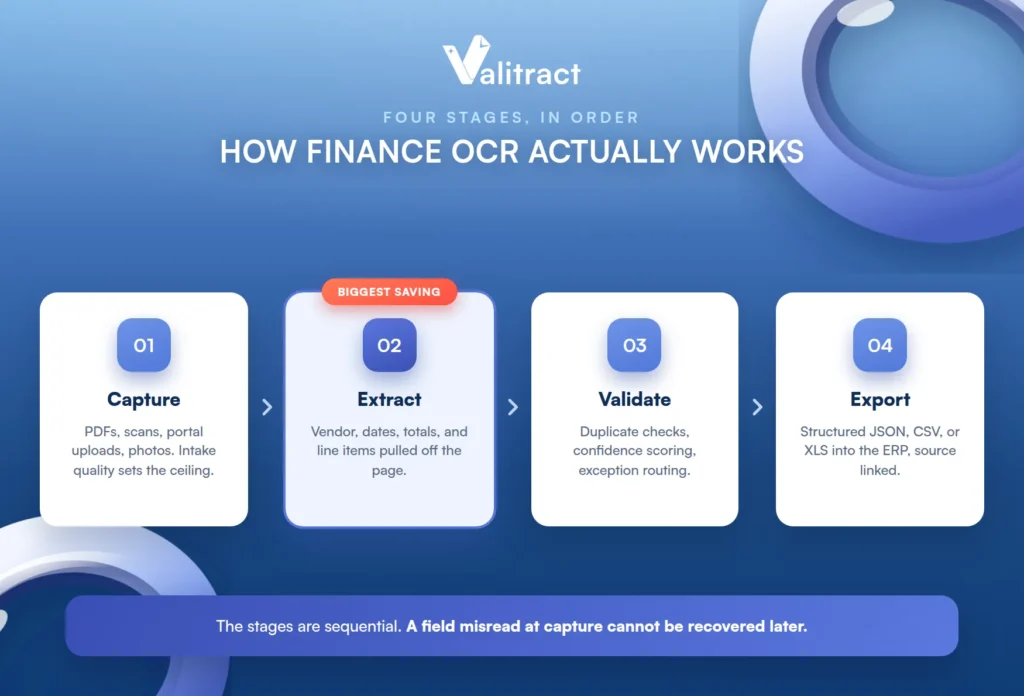
Capture. Documents arrive as emailed PDFs, scanner output, portal uploads, and phone photos. Intake consistency sets the ceiling for everything downstream, because a bad image caps the accuracy of every stage that follows.
Extract. The engine pulls the fields finance actually needs: vendor, invoice number, dates, PO reference, tax, totals, line items, and transaction rows. This is where the largest, most measurable saving is created.
Validate. Duplicate checks, vendor matching, totals that reconcile, confidence scoring, and exception routing run here. Extraction without this layer does not remove errors; it delivers them downstream faster.
Export. The structured result lands in the ERP or accounting platform as JSON, CSV, or XLS, with the source document still linked for audit. The link back to the original is what turns the output into an audit trail rather than just data.
OCR vs. AI-Powered Data Extraction in Finance
The single biggest reason benefit claims are impossible to compare is that “OCR” describes two different technologies. Legacy template-based OCR returns a flat text string and needs a map built per document format, so it breaks the moment a vendor changes its layout.
AI-native extraction, by contrast, returns semantic fields across layouts it has never seen, which is the template-free approach that tools like Valitract use. Most published benefit figures never say which of the two they measured, so a “90% accuracy” claim from a template tool and one from an AI-native tool are not the same number. Our explainer on IDP vs OCR sets out the layer terminology in full.
The 7 Key Benefits of OCR in Finance, With Benchmarks
Here are the seven benefits that actually show up in the numbers, each paired with a published range and the condition it depends on. The ranges vary widely by source and document complexity, so treat them as directional, not as guarantees.
The pattern across the table is worth noticing. The benefits extraction controls directly, such as cost per document and error rate, have the firmest numbers, while the ones that depend on approvals or verification are gated by systems extraction does not touch.
| Benefit | What changes operationally | Benchmark range | What it depends on |
|---|---|---|---|
| Lower cost per document | Transcription labor is removed from intake | Manual invoices commonly $10 to $22; semi-automated $3 to $5; fully automated under $2 | Volume, exception rate, and how much manual review remains |
| Faster cycle time | Intake-to-payment-ready shortens | Manual cycles around 9 to 17 days; best-in-class near 3 days, clean invoices same-day | Approval routing, which extraction does not touch |
| Fewer transcription errors | Values come off the document, not a keyboard | Manual keying errors typically cited at 1 to 4 percent | Input quality and whether a validation layer exists |
| Capacity without headcount | Staff shift from keying every document to reviewing flagged ones | Per-person throughput multiplies once review is exception-only | Confidence scoring reliable enough to trust |
| Early-payment discount capture | Invoices clear in time to earn terms | Most vendor early-pay discounts go uncaptured under manual AP | Whether approvals move as fast as capture now does |
| Searchable audit trail | Extracted values stay linked to the source file | Retrieval shifts from inbox archaeology to a query | Retention settings and how the store is indexed |
| Faster onboarding and credit decisions | KYC and underwriting documents read in seconds | Onboarding steps that took days compress to minutes | Verification checks that sit on top of extraction, not in it |
Sources: Ardent Partners, IOFM, APQC, Levvel Research, and Billentis benchmark research (2024 to 2026). Ranges differ by source, company size, and document complexity; the manual figures blend multiple survey years, so read them as ranges rather than matched comparisons.
The figures vary because the studies measure different things: Ardent Partners puts the average manual invoice cost near $12.88 and best-in-class near $2.78, while IOFM and Lido cite $10 to $22 manual against under $2 automated. On accuracy, AI-assisted field-level extraction is commonly benchmarked at 95% or higher, and Valitract reports up to 99.8% field-level accuracy on standard printed documents. That is a field-level figure specifically, which matters for reading accuracy claims correctly, as the last section explains.

Where OCR Savings in Finance Actually Come From
Extraction eliminates the largest cost line and indirectly shrinks the second largest, but it does nothing for approval routing. That is a workflow problem, not an extraction problem, and saying so plainly is what separates an honest benefits article from vendor copy.
This is also why two teams can buy the same tool and report very different results. The team whose bottleneck was data entry sees a large gain, while the team whose bottleneck was approvals sees little, because their constraint was never the reading step.
Here is how the cost of manually processing a document breaks down by activity, and what extraction actually touches:
- Data capture and entry is the largest share, and the part extraction removes outright.
- Exception handling is the second largest, and it is partially reduced, since many exceptions begin as upstream capture errors that better extraction prevents.
- Approval routing is largely unchanged by extraction, because it is a people-and-policy problem, not a reading one.
- Validation and matching is reduced where duplicate and totals checks are automated.
- Filing and retrieval is reduced by indexing, not by recognition.
This is why a nine-day cycle time barely moves when you add extraction alone: the reading takes one to two seconds, and almost all of the nine days is approvals and missing goods receipts. For the full arithmetic behind these figures, see our breakdown of invoice processing cost.
How the Benefits of OCR in Finance Differ by Role
The same technology delivers a different headline benefit depending on the metric each role is judged on. A generic list serves none of them well, so here is what each role should actually watch.
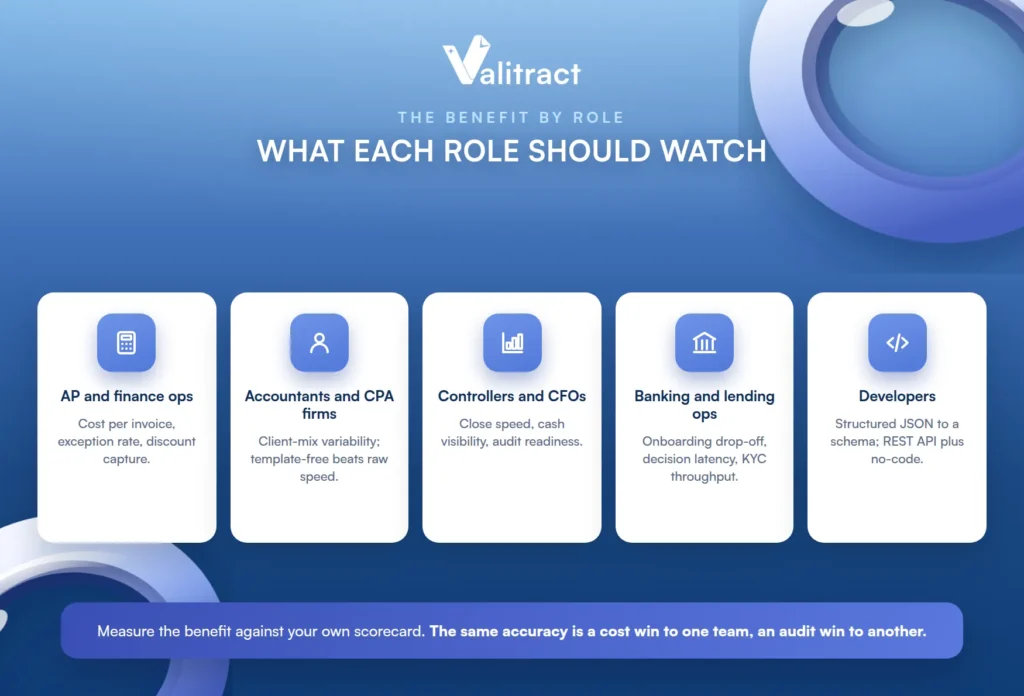
The common thread is that each role should measure the benefit against its own scorecard, not a generic one. The same extraction accuracy reads as a cost win to one team and an audit win to another.
AP and finance ops are measured on cost per invoice, exception rate, and discount capture. Extraction moves the first and third directly and the second only if the validation layer is strong; our guide to accounts payable invoice processing covers the full workflow.
Accountants, bookkeepers, and CPA firms are constrained by client-mix variability, not volume. A tool that works on one client’s formats can fail on the next, so template-free extraction matters more here than raw speed.
Controllers and CFOs care about close speed, cash visibility, and audit readiness rather than per-document cost. For them the searchable audit trail and faster reporting are the benefits that register.
Banking and lending ops are measured on onboarding drop-off, decision latency, and KYC throughput. Reading documents in seconds compresses onboarding, though the verification itself is a separate layer; see identity verification automation.
Developers building the pipeline want structured JSON that maps to a schema without custom parsing per vendor. A REST API and a no-code interface are the two ways teams consume the same extraction layer, one for the pipeline and one for the ops team.
What Determines Whether You Actually Get These Benefits
The benefits are real, but they are conditional, and each condition is a precondition rather than a warning. Miss one and the benchmark numbers stay on the vendor’s page instead of showing up in yours.
None of these are reasons to avoid automation. They are the checklist that decides whether a given operation is ready for it, and each one is knowable before you spend anything.
Input quality. Faxed, photocopied, and phone-photographed documents degrade accuracy well before the engine is at fault. The cleanest way to lose the benefit is to feed the tool your worst images and blame the tool.
Format variability. A mid-sized AP team may receive invoices from hundreds of vendors, and a lender dozens of bank layouts. Template-based tools break here first, which is exactly the case template-free extraction is built for.
Handwritten and mixed content. Annotations, signatures, and hand-completed fields are handled very differently by legacy versus AI-native engines. If your documents carry handwriting, test it specifically; see handwriting recognition software.
Tables and line items. Row and column relationships must survive page breaks, or line-level workflows stay manual no matter how good the header extraction is. Confirm table structure is preserved before you scope the project.
Validation and confidence scoring. Extraction without a validation layer does not remove errors; it delivers them downstream faster. Side-by-side review and low-confidence flagging are what make exception-only review possible.
Integration effort. Mapping extracted fields into an ERP is consistently the most underestimated cost of the project. Check which accounting and automation platforms connect natively before you assume the integration is free.
Volume threshold. Below a few hundred documents a month, the payback period stretches and the business case thins. Automation economics reward volume, so the same tool that transforms a 5,000-invoice operation may not pay for itself at 200.
Four OCR Benefit Claims That Are Routinely Overstated
Reading vendor pages critically saves more money than any single feature. Here are four claims to treat with care, each with what is actually true, and the honest scope of what an extraction layer does.
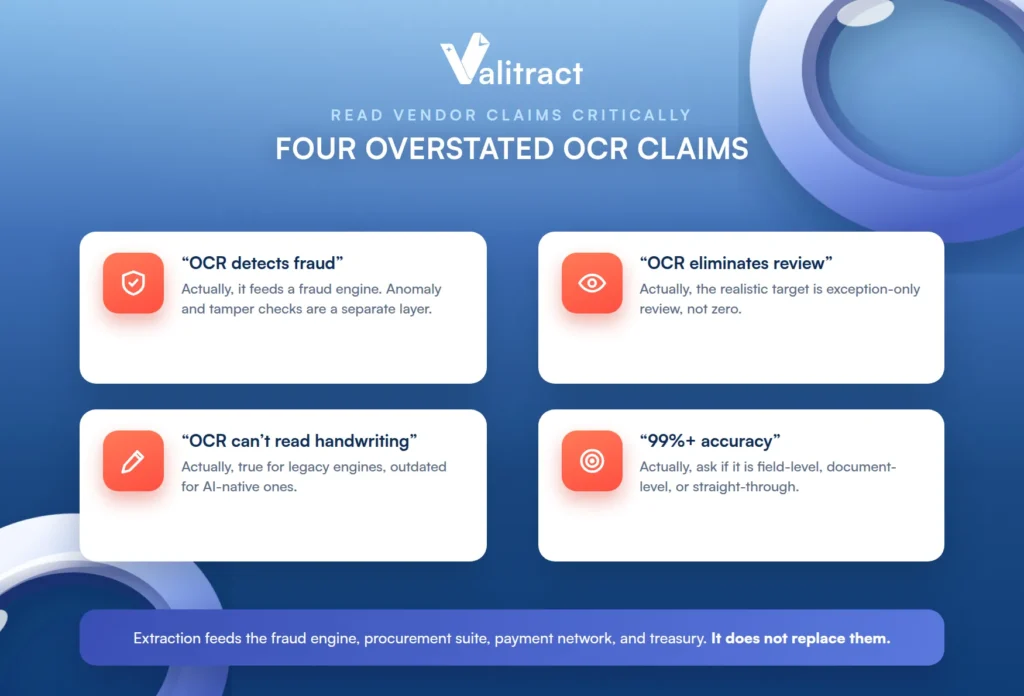
“OCR detects fraud.” Extraction supplies data to a fraud or verification engine; it does not find fraud itself. Anomaly detection, tamper checks, and cross-document reconciliation are a separate layer that document intelligence tools, Valitract included, do not perform.
“OCR eliminates human review.” The realistic target is exception-only review, not zero review. Industry touchless rates average around a third of invoices and reach roughly half in best-in-class teams, which means even the best operations keep a human on the exceptions.
“OCR cannot read handwriting.” This was accurate for legacy engines and is outdated for AI-native ones, yet it is still repeated constantly. Modern engines read many handwritten fields well, though accuracy still varies with legibility.
“99%+ accuracy.” Always ask whether that is field-level, document-level, or a straight-through rate, because they are very different numbers. A high field-level rate on a document with dozens of fields can still mean a meaningful share of documents have at least one field wrong.
To name the adjacent layers plainly: full procure-to-pay workflow belongs to procurement suites, payment execution to AP payment networks, live currency conversion to treasury tooling, and strict data-residency requirements to self-hosted options. Extraction sits underneath all of them and feeds them; it does not replace any of them.
How to Calculate Your Own OCR ROI in Finance
You do not need a vendor’s calculator to size the opportunity. Four inputs get you a defensible estimate.
First, your monthly document volume, counted across every type, not just PO-backed invoices. Second, the fully loaded labor cost of everyone who touches those documents, not just base salary. Third, your exception rate, the share of documents that need intervention beyond standard processing. Fourth, the average days from receipt to payment-ready.
The arithmetic is straightforward: multiply volume by the current per-document cost to get today’s spend, then apply a conservative automation reduction (industry benchmarks cluster around 60 to 80 percent on the capture portion) to estimate the saving, and divide the tool’s cost by the monthly saving to get a payback period. Mid-market projects commonly reach payback in 6 to 14 months.
One caveat decides whether your real numbers match the estimate: run the trial on your own worst documents, the crumpled receipt, the six-generation photocopy, and the unfamiliar bank layout, not on a vendor sample. A free tier makes that test cheap to run before you commit. For the tooling landscape, see our guide to financial data extraction software, and for statements specifically, automated bank statement processing.
Common Mistakes When Adopting OCR in Finance
A handful of mistakes turn a strong business case into a disappointing rollout. Each is avoidable once named.
The first is benchmarking on a clean vendor sample instead of your real document mix. The second is buying extraction to solve what is actually an approval-routing bottleneck, which extraction cannot touch. The third is reading field-level accuracy as if it were document-level accuracy.
The fourth is skipping the validation layer, which converts an accuracy problem into a reconciliation problem downstream. The fifth is leaving ERP mapping and integration effort out of the ROI calculation, since it is the most underestimated cost. The sixth is comparing benefit claims across vendors without checking whether they measured template OCR or AI extraction, which makes the numbers meaningless.
Frequently Asked Questions About OCR in Finance
What are the main benefits of OCR in finance?
Lower cost per document, faster cycle time, fewer transcription errors, capacity that grows without new headcount, better early-payment discount capture, a searchable audit trail, and faster onboarding and credit decisions. The largest and most reliable of these is the cost saving at the data-capture step, because capture is the biggest and most automatable slice of document-processing cost.
How much does OCR actually save per invoice?
Manual invoice processing is commonly benchmarked at $10 to $22, semi-automated workflows at $3 to $5, and fully automated processing at under $2, per IOFM, Ardent Partners, and APQC research. The exact saving depends on your volume, exception rate, and how much manual review remains. Higher volume and a lower exception rate produce a larger saving per document.
Is OCR accurate enough for financial data?
Modern AI-native extraction reaches high field-level accuracy on clean, standard documents, commonly benchmarked at 95% or above, and lower on degraded or handwritten ones. The reliable safeguard is a validation layer with confidence scoring that routes uncertain fields to human review. Accuracy tracks document quality far more than vendor choice.
What is the difference between OCR and IDP in finance?
OCR reads characters and, in template-based form, needs a map per document layout. IDP (intelligent document processing) wraps AI-native extraction, classification, and validation into an end-to-end workflow that handles varied layouts. In finance, the practical difference is whether the tool breaks when a vendor changes its invoice format.
Can OCR detect fraudulent or altered financial documents?
No, not on its own. OCR extracts the data; detecting anomalies, tampering, or duplicates is a separate fraud and verification layer that consumes the extracted data. Extraction is a prerequisite for that analysis, not a substitute for it.
Does OCR work on handwritten financial documents?
AI-native engines read many handwritten fields, such as annotations, signatures, and hand-completed forms, far better than legacy OCR did. Accuracy still varies with legibility, so handwriting-heavy documents should be tested specifically rather than assumed. The old claim that OCR cannot read handwriting is outdated for modern engines.
How long does OCR take to pay for itself?
Mid-market finance automation projects commonly reach payback in 6 to 14 months, after which the savings compound as volume grows. The payback period depends on document volume, current per-document cost, and how much of the process the tool actually automates. Below a few hundred documents a month, the payback period stretches and the case weakens.
Conclusion
The benefits of OCR in finance are real and measurable, but they are not evenly distributed: they concentrate at the data-capture step, where extraction removes the largest cost line, and they thin out toward approval routing, which extraction does not touch. The way to capture them is to read benchmark claims critically, confirm your preconditions, and test on your own worst documents rather than a vendor’s clean sample.
Get the extraction and validation layer right, and the numbers in the table above start showing up in your own operation. Ask it to do the work of the fraud engine, the procurement suite, or the payment network, and it will disappoint, because those are different layers sitting on top of the one that reads the page.


