


Quick answer
- Intelligent character recognition (ICR) is an AI-based extension of OCR that reads handwritten and hand-printed characters from scanned forms and images and converts them into structured, machine-readable data, learning from handwriting variation instead of matching fixed character templates.
- It is not the same as OMR (optical mark recognition), which only detects whether a box or bubble has been marked and does not read characters at all.
What is intelligent character recognition, and will it actually read your documents? Those are two different questions, and most explainers answer only the first. This guide answers both, because the honest version of ICR is that its accuracy depends far more on what you are asking it to read than on which vendor you pick.
ICR turned handwritten forms from something a person had to key by hand into something a model can read, but the results range from near-perfect on a checkbox to barely half the words on free-form cursive. Understanding where on that range your documents fall is the whole game, and it is what this article is built around.
How Intelligent Character Recognition Works
ICR runs a scanned form through five stages, and when a field comes back wrong, the stage that failed is usually identifiable. Reading the pipeline as separate steps is what lets you diagnose a bad result instead of blaming the whole engine.
Image pre-processing deskews, denoises, and drops out form lines and shaded backgrounds so the engine sees the pen strokes rather than the artifacts around them. A crooked scan or a heavy background tint caps accuracy before a single character is read.
Zone and region detection locates which box holds the date of birth and which line holds the address, before any recognition happens. Getting the zones wrong sends the right characters to the wrong field.
Character segmentation and recognition is where neural networks, increasingly vision transformers rather than older convolutional models, classify each character against learned handwriting variation instead of a fixed template. This is the step that separates ICR from classic OCR.
Contextual correction applies format rules to repair predictable misreads, such as a letter O sitting inside a date field that can only contain digits. A field with a known format lets the engine fix its own mistakes.
Structuring and confidence scoring maps the corrected values to named fields, each carrying a confidence value that decides what passes through and what goes to review. What makes the output usable downstream is that it arrives as structured JSON, CSV, or XLS rather than a flat text dump, which is the same pipeline our guide to OCR data extraction describes in full.
ICR vs OCR vs OMR vs HTR vs IDP: The Acronyms Explained
These terms are used interchangeably across the web, and at least one widely cited source still claims ICR cannot read cursive at all, a statement that predates current neural models. Here is what each one actually reads.
| Technology | What it reads | Where it fits |
|---|---|---|
| OCR | Printed and typed text | Invoices, contracts, books, any typed page |
| ICR | Hand-printed characters, field by field | Structured forms with boxes and defined zones |
| OMR | Marks in boxes and bubbles, not characters | Checkboxes, exam sheets, multiple-choice surveys |
| HTR / IWR | Continuous handwritten words and lines | Letters, margin notes, historical archives |
| IDP | All of the above, plus meaning and workflow | End-to-end document automation with validation |
The line to keep in mind is that ICR is one recognition layer inside a larger pipeline, not a product category on its own. You do not buy “an ICR”; you use ICR as one capability inside a document workflow, which our guide to IDP vs OCR unpacks.
Who Uses ICR, and What Changes by Industry
ICR shows up wherever handwritten forms still feed a digital process, and the useful way to see it is by the specific document, not the sector.

Insurance runs handwritten claim forms and first-notice-of-loss packets, where the boxed fields read well and the free-text incident description is the hard part; see automated data entry for insurance claims.
Healthcare processes patient intake and consent forms, where structured fields reach the chart reliably while clinical free-text notes remain the single hardest input in the whole category.
Banking and lending handle cheques, loan applications, and KYC forms, and while paper cheque usage has fallen sharply it still runs into the billions annually, which keeps the volume argument alive.
Government and public sector process census returns, permit applications, and statutory forms that carry fixed processing deadlines and cannot simply be delayed.
Logistics captures handwritten delivery confirmations and proof-of-delivery notes that sit inside otherwise fully digital supply chains.
Identity and onboarding read hand-completed application forms alongside ID documents, where recognition feeds a downstream check; see identity verification automation.
How Accurate Is ICR? The Numbers by Field Type
ICR accuracy is a per-field question, not a per-product one, and any single headline percentage hides the split that actually determines whether a workflow is viable. The same engine can be excellent and useless on the same page.
| What is being read | Realistic accuracy | Why |
|---|---|---|
| Checkboxes and fixed options | Highest of any field type | A small, closed set of possible answers |
| Dates, ZIPs, and ID numbers | High when a format rule exists | Contextual correction catches and repairs errors |
| Hand-printed names in boxes | Good with constrained fields | Character separation is enforced by the form |
| Cursive across a full line | Materially lower | No field boundaries to anchor segmentation |
| Free-form handwritten prose | Lowest, roughly half the words in published benchmarks | No structure, plus abbreviations and shorthand |
Accuracy figures are directional and vary by engine, scan quality, and handwriting; test on your own documents rather than trusting a single benchmark.
Some history explains why vendor claims and practitioner reports diverge so widely. Hand-print recognition was long cited at around 70% character accuracy, with 85% considered good, and modern neural models improve on that substantially, which is why an old source and a new benchmark can both be quoted and disagree. Production reviews back the caution: general-purpose cloud OCR engines perform near-flawlessly on printed text and drop to roughly half that on cursive field notes, which is exactly why “our OCR supports handwriting” and “our OCR reads your handwriting” are different claims.
This is where the honest version of the Valitract figure belongs. Valitract extracts handwritten and cursive text at high accuracy across invoices, forms, and IDs, and reports roughly 99.8% field-level accuracy, but that figure is measured on standard printed documents, not on handwriting. Naming that distinction is the entire point: a print-document accuracy number tells you almost nothing about how a tool will do on a doctor’s cursive note, and any vendor who blurs the two is selling the blur.
The metric that matters operationally is the straight-through processing rate, the share of documents reaching the target system untouched by a human, measured per document type rather than as a single site-wide average. A 90% site-wide number can hide a form type that lands at 40%.
Accuracy and Confidence Are Not the Same Thing
Almost every competing page conflates these two, and the difference decides whether an ICR deployment is safe to run. They are not interchangeable.
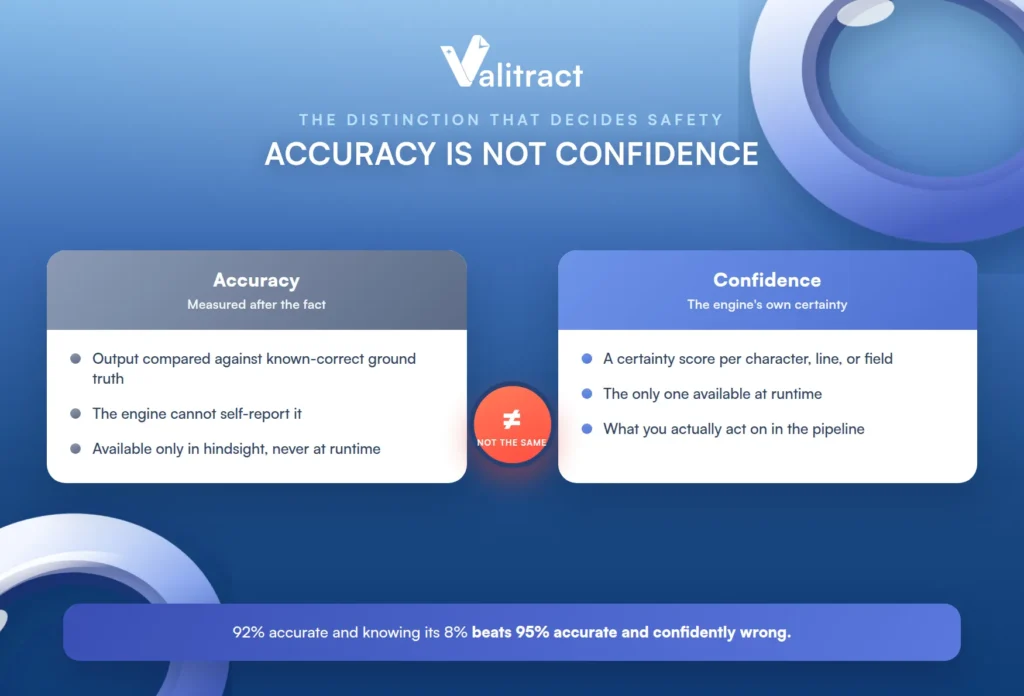
Accuracy is measured after the fact, by comparing output against known-correct ground truth. A recognition engine cannot self-report its own accuracy, because it does not know when it has misread a character; if it knew, it would not have misread it.
Confidence is the engine’s own certainty score, per character, line, or field, and it is the only one of the two available at runtime. When the document is flowing through your pipeline, confidence is all you have to act on, which is why it matters more in practice than a benchmark accuracy figure.
The practical consequence is counterintuitive. A system that is 92% accurate and knows which 8% it is unsure about is operationally better than one that is 95% accurate and confidently wrong, because the first routes its doubtful fields to a person and the second ships errors silently.
That is exactly what confidence-based review is for. Valitract flags low-confidence fields for human review in a side-by-side validation view, so a reviewer verifies a handful of values against the original image rather than re-checking every field, which is the practical shape of human-in-the-loop document processing.
Form Design Is the Accuracy Lever You Actually Control
Almost no competing page mentions this, yet it moves results more than the vendor choice does. If you control the form, this is the cheapest accuracy available, and it costs nothing but attention.
Character boxes beat comb lines, and square boxes beat narrow ones, because rectangular boxes make people compress their writing vertically into something the engine reads worse. The shape of the box shapes the handwriting.
Spacing between fields of at least one and a half box widths stops readers from treating the gap as another character slot, which prevents a whole class of segmentation errors.
Instructions change behavior more than layout does: telling people the form will be read by a computer, and asking for block letters, measurably improves recognition without changing a single field.
Constraining the character set per field, so a field can only contain digits or one of nine plan codes, lets contextual correction do real work instead of guessing. A closed set is easy; an open one is hard.
Paper and scan quality finish the list, since 300 DPI flat scans beat angled phone photos, and thin paper causes bleed-through on double-sided forms that no engine can fully undo.
Where ICR Still Fails
An evaluator who has already run a failed pilot needs the honest list, so here it is, specific rather than reassuring.
- Clinical and professional shorthand that only the writer can decode, because no model can recover meaning the ink never carried.
- Cursive running text with no field boundaries, where there is nothing to anchor character segmentation.
- Crossed-out answers, overwriting, and arrows pointing to the intended box, which confuse both zone detection and recognition.
- Faxes, third-generation photocopies, and ink bleeding through thin paper, where the image quality caps accuracy regardless of engine.
- Ambiguous characters inside identifiers, such as 0 against O or 1 against l, where no format rule exists to arbitrate.
- Signature verification and tamper detection, which are a separate discipline from character recognition entirely.
The honest boundary belongs here, where the section is already about limits. Valitract is a cloud extraction layer with a REST API and a no-code interface, and it does not offer a self-hosted or on-premise deployment, so teams whose data-sensitivity rules exclude any third-party API should look at on-premise SDKs instead. It also does not perform document fraud or tamper detection, which is a dedicated verification layer rather than part of recognition.

How to Test ICR on Your Own Documents
Every ICR demo works on the vendor’s samples, so the only test that counts is 100 to 300 of your own historical documents, deliberately including the bad ones. A pilot on clean forms tells you nothing about the forms that will actually break it.
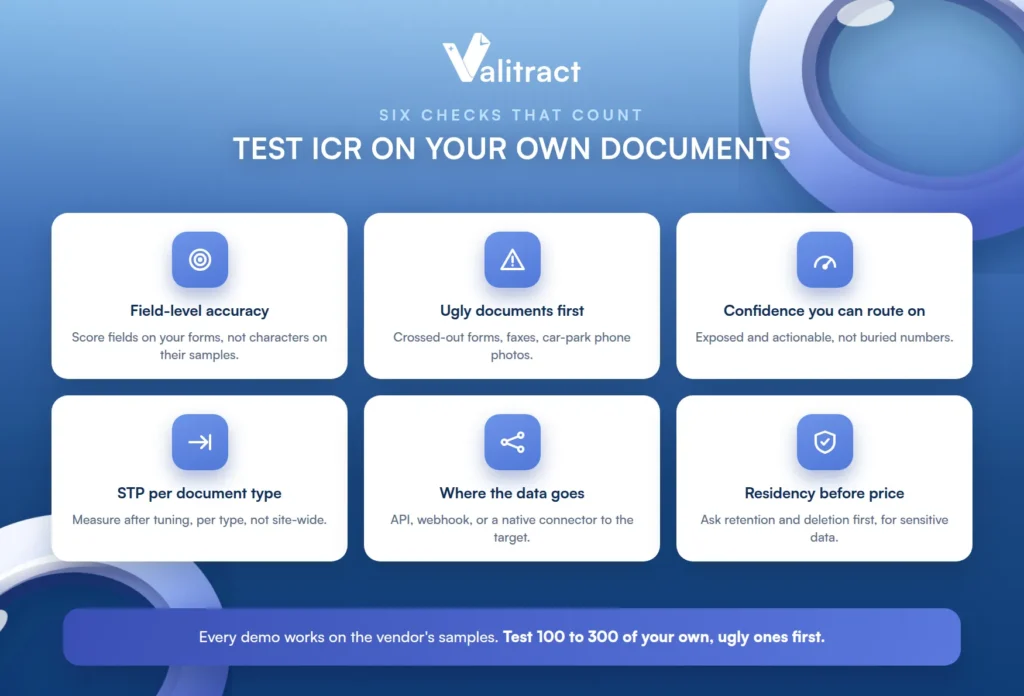
Run field-level accuracy on your own forms, not character accuracy on their samples, because the field is the unit your workflow cares about. And send the ugly documents first, the crossed-out claim forms, the faxes, and the phone photos taken in a car park, since those decide whether the tool survives production.
Check that confidence scores are exposed and actionable rather than buried, because a confidence score you cannot route on is no better than none. Then measure the straight-through processing rate per document type after tuning, not on day one, so the number reflects a settled system.
Confirm where the data goes next, whether through an API, a webhook, or a native connector into the system that actually needs the values, because extraction that does not reach its destination is unfinished. And ask about data residency, retention, and deletion before you ask about price, especially for patient or claimant data.
A free tier is the cheapest way to run this test. Valitract’s processes 100 pages a month with no credit card, which is enough for a representative sample of real forms before committing to anything; our guide to handwriting recognition software covers the fuller tool comparison.
Common Misconceptions About ICR
A few recurring misconceptions cause most of the disappointed pilots, and naming them is half the fix.
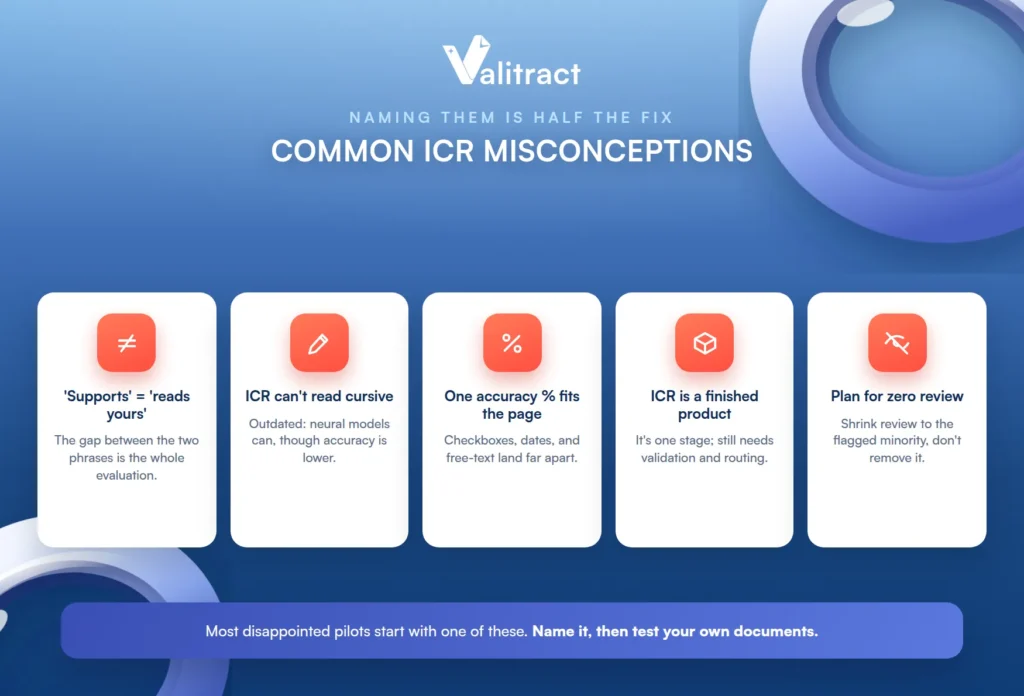
The first is treating “supports handwriting” as equivalent to “reads your handwriting accurately”, when the gap between those two phrases is the entire evaluation. The second is assuming ICR cannot read cursive at all, which reflects template-era systems rather than current neural models, even though cursive accuracy is still meaningfully lower.
The third is expecting a single accuracy percentage to hold across checkboxes, dates, and free-text comments on the same page, when they land in completely different places. The fourth is treating ICR as a finished product rather than one recognition stage inside a pipeline that still needs validation and routing.
The fifth is planning for zero human review, when the realistic goal is shrinking review to the flagged minority of fields rather than eliminating it. A deployment designed around no review is a deployment designed to ship its own errors.
Frequently Asked Questions About ICR
What is intelligent character recognition?
Intelligent character recognition (ICR) is an AI-based form of OCR that reads handwritten and hand-printed characters and converts them into structured data. Unlike template-based OCR, it learns from handwriting variation, which lets it handle writing it has never seen before. It is used mainly on structured forms with defined fields and boxes.
What is the difference between ICR and OCR?
OCR reads printed and typed text, while ICR extends that to handwritten and hand-printed characters using machine learning. OCR matches shapes against known fonts; ICR classifies handwriting against learned variation. In practice, a tool often uses OCR for the typed parts of a form and ICR for the hand-completed fields.
How accurate is intelligent character recognition?
Accuracy depends heavily on what is being read: highest on checkboxes and format-constrained fields like dates and IDs, good on hand-printed names in boxes, and much lower on cursive and free-form prose, where published benchmarks report roughly half the words. There is no single accurate percentage for ICR, only accuracy per field type. Always test on your own documents.
Can ICR read cursive handwriting?
Modern neural ICR can read cursive far better than the template-based systems that gave rise to the old “ICR cannot read cursive” claim, but accuracy on cursive is still materially lower than on hand-printed characters in boxes. Continuous cursive across a line, with no field boundaries, is one of the harder cases. For long cursive passages, HTR (handwritten text recognition) is the more specific technology.
Is ICR the same as handwriting OCR?
They are close enough that the terms are often used interchangeably; “handwriting OCR” is a common informal name for what ICR does. Strictly, ICR emphasizes field-by-field hand-print recognition on structured forms, while continuous handwritten prose is the domain of HTR. The important question is which kind of handwriting you have, not the label.
What is the difference between ICR and OMR?
ICR reads handwritten characters and converts them into text, while OMR (optical mark recognition) only detects whether a box or bubble has been marked. OMR does not read any characters; it registers a position. A single form can use both: OMR for the checkboxes and ICR for the hand-written fields.
Which documents is ICR best suited to?
Structured forms with defined fields and boxes, such as insurance claim forms, patient intake sheets, loan and KYC applications, census returns, and delivery confirmations. It performs best where the form constrains the handwriting into separated fields with known formats. It performs worst on unstructured, free-form handwritten prose.
Do you still need a human to check what ICR extracts?
Yes, but the goal is to shrink review, not eliminate it. A well-configured system flags its low-confidence fields so a reviewer verifies only the uncertain values rather than re-checking every field. Planning for zero human review is unrealistic and unsafe, especially on handwriting-heavy or high-stakes documents.
Can ICR read a doctor’s handwriting?
Sometimes, but clinical handwriting and professional shorthand are among the hardest inputs in the category, and accuracy drops sharply on them. Structured fields on a medical form read far better than free-text clinical notes. For that content, expect meaningful human review rather than full automation.
Conclusion
What is intelligent character recognition, in the end? It is the recognition layer that reads handwriting off a form, and its accuracy is a per-field reality rather than a per-product headline: excellent on a boxed checkbox, much lower on a line of cursive, and lowest on free-form prose. The number that matters is the one you measure on your own documents, per field type, not the one on the vendor’s page.
Design the form where you can, lean on confidence scores rather than trusting a benchmark, and keep a human on the flagged minority. Do that, and ICR turns a stack of handwritten forms into structured data, with a clear-eyed view of exactly which fields it will and will not read.