


- The best intelligent character recognition software reads hand-printed and handwritten characters from scanned forms and converts them into structured, machine-readable fields, an AI-driven extension of OCR, which handles printed type only.
- The split that decides your shortlist is block print versus cursive: neat printing inside boxes is close to solved, narrative cursive is not, and the same platform can score in the nineties on one and the forties on the other.
- The field divides three ways: template-free AI extraction (Valitract, Doxis AI.dp, Nanonets), enterprise capture suites with built-in human review (ABBYY, Hyperscience, Parascript), and hyperscaler OCR APIs where handwriting is one feature (Google Document AI, Amazon Textract, Azure AI Document Intelligence).
- Mind the terminology trap: classic ICR is character-level and was never built for joined cursive, so an “ICR software” search can return the wrong category of tool.
- Test on your own worst pages, not the vendor sample: check multi-page consistency, confidence scores, and whether the tool flags uncertainty instead of guessing.
Choosing the best intelligent character recognition software is less about ranking vendors and more about matching a tool to your handwriting. A platform that automates a boxed intake form end to end can fall apart on a page of cursive notes, so the honest comparison starts by splitting handwriting into the parts that are solved and the parts that still need a human.
This guide does that. It defines the category, ranks ten platforms with real differentiators and honest limitations, and then spends a full section on the block-print-versus-cursive split that decides which tool actually fits.
What Is Intelligent Character Recognition (ICR) Software?
ICR software uses neural networks to recognize hand-printed characters that traditional OCR cannot read, and returns them as structured field data rather than a flat text string. Its working shape has been the same since the technique was patented in 1993: image preparation, recognition with confidence scoring, and output validation.
One quick disambiguation before the comparison: “ICR” also stands for indirect cost rate in grant administration and for various unrelated hardware and lab abbreviations. This article covers character recognition for document processing only.
ICR vs. OCR vs. IWR: Which One Does Your Document Need?
The three technologies read different units, and picking the wrong one is a buying mistake, not trivia.
| Technology | Recognition unit | Text type handled | Where it breaks |
|---|---|---|---|
| OCR | Character (printed) | Printed and typed text | Any handwriting |
| ICR | Character (hand-printed) | Hand-printed letters, best in boxes or combs | Joined cursive, free-form notes |
| IWR | Whole word in context | Unjoined cursive and free-form handwriting | Highly degraded or ambiguous script |
OCR reads printed characters, ICR reads hand-printed characters one at a time and does best when they sit in separated boxes, and IWR (intelligent word recognition) reads whole words in context, which is what cursive and free-form notes require. Our guide to IDP vs OCR covers the wider architecture for readers who want it.
Why “ICR” Is Now a Legacy Label for a Modern Capability
Almost no 2026 vendor sells a standalone “ICR engine.” Handwriting recognition now ships as one capability inside intelligent document processing platforms, and the strongest results come from vision-language models that read the page as a whole rather than classifying one character at a time.
What that means for you is practical: shortlist by what a tool does with your handwriting, not by whether its marketing page uses the letters ICR. Our deeper handwriting recognition software page covers the capability itself rather than the label.
The 10 Best Intelligent Character Recognition Software Platforms in 2026
Here is the field at a glance, followed by individual write-ups. Treat the handwriting-strength column as directional and test it on your own pages.
| Tool | Best for | Handwriting strength | Deployment | Pricing model |
|---|---|---|---|---|
| Valitract | Template-free extraction across mixed printed and handwritten documents | Hand-printed forms, mixed pages, 95+ languages | Cloud API + no-code UI | Free tier, then usage-based |
| ABBYY | Multilingual enterprise digitization | Block print and forms; broad language range | Desktop, server, cloud | License / custom |
| Doxis AI.dp (formerly Klippa) | High-volume European document workflows | Handwriting plus fraud and anonymization layers | Cloud, API, SDK | Subscription / usage |
| Hyperscience | Regulated high-volume back offices | Degraded and messy forms with review routing | Cloud / on-prem | Custom enterprise |
| Parascript FormXtra.AI | Checks, signatures, financial forms | Cursive amounts, signature verification | On-prem / embedded | Custom |
| Google Document AI | GCP-native pipelines | Strongest hyperscaler on cursive, still limited | Cloud API | Per page |
| Amazon Textract | AWS-native structured forms | Handwriting inside defined fields | Cloud API | Per page |
| Azure AI Document Intelligence | Microsoft-stack teams | Neat block print; weak on cursive | Cloud API | Per 1,000 pages |
| Nanonets | Custom models for niche form types | Trainable per document type | Cloud API | Free tier, then tiered |
| Transkribus | Historical and archival manuscripts | Trainable cursive models, single hand | Cloud / research | Credit-based |
1. Valitract
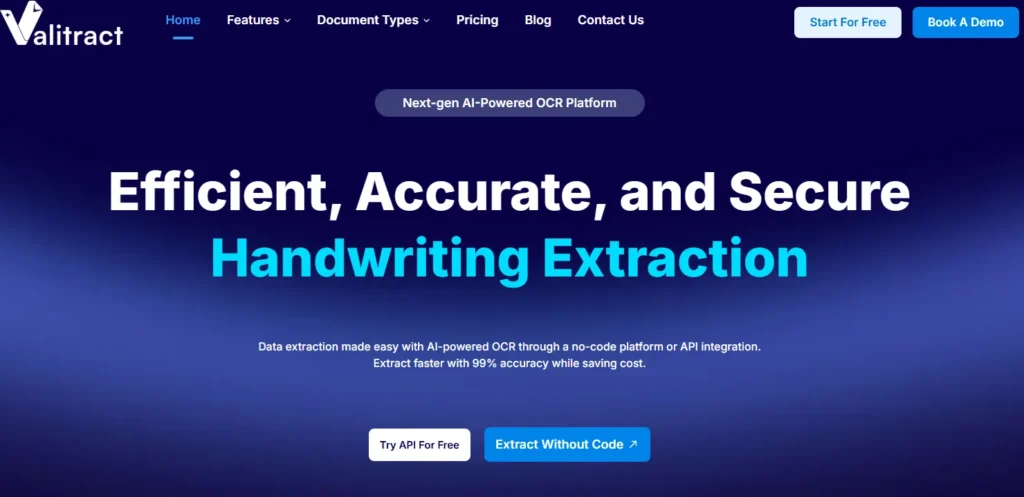
Valitract ranks first for the most common real-world job: extracting structured data from documents that mix printed layout with handwritten fill-ins, without building a template per form.
Key features:
- Template-free extraction across invoices, receipts, bank statements, purchase orders, contracts, ID documents, logistics documents, and medical records
- Hand-printed and cursive fields read without per-form setup
- Structured JSON, CSV, and XLS output
- Table extraction that preserves row and column relationships
- 95+ languages
- A side-by-side validation UI with low-confidence flagging
- Batch processing; a REST API at api.valitract.com alongside a drag-and-drop dashboard
- Integrations with QuickBooks, SAP, Xero, Sage, Zapier, Make.com, and n8n
Pricing: A free tier at 100 pages a month with no credit card, then usage-based.
Pros: Works across a mixed document set without templates, serves both developers and ops teams from one engine, and flags uncertain fields for review rather than guessing.
Cons, stated plainly: No self-hosted or open-source deployment, so teams whose data-sensitivity rules exclude any third-party API should look elsewhere. No signature verification or check-fraud detection. And the roughly 99.8% field-level accuracy figure is measured on standard printed documents, so handwriting, and especially cursive, should be validated on your own pages before committing.
2. ABBYY
ABBYY is the veteran of enterprise document digitization, strongest where language breadth and faithful document reconstruction matter across a large, multilingual operation.
Key features: Broad language coverage, mature block-print and forms recognition, and document reconstruction that preserves layout.
Pricing: License or custom enterprise.
Pros: Language range and reliability few can match.
Cons: A sales-gated price and a workflow that still carries desktop-era assumptions.
3. Doxis AI.dp (formerly Klippa)
Now the IDP engine inside the Doxis platform after SER Group’s acquisition and 2026 rebrand of Klippa’s DocHorizon, this is a strong fit for high-volume European document workflows.
Key features: Handwriting extraction plus fraud-detection and GDPR anonymization layers, with API and SDK access.
Pricing: Subscription or usage-based.
Pros: Fraud and privacy tooling built in.
Cons: More limited support for non-Latin handwritten scripts.
4. Hyperscience
Hyperscience targets regulated, high-volume back offices where messy inputs and audit requirements meet, and its review routing is the differentiator.
Key features: Strong handling of degraded and messy forms, with confidence-scored review queues that route uncertain fields to people.
Pricing: Custom enterprise.
Pros: Excellent for noisy claim and intake packets.
Cons: Cost and a months-long implementation.
5. Parascript FormXtra.AI
Parascript is the specialist for checks, cursive dollar amounts, and signatures, and it is the one category on this list where a general extraction platform is the wrong tool.
Key features: Deep check processing, cursive-amount recognition, and signature verification.
Pricing: Custom.
Pros: Best-in-class at exactly the financial-document tasks others avoid.
Cons: A narrow, embedded focus aimed at financial institutions rather than general document work.
6. Google Document AI
Google Document AI is the natural pick for GCP-native pipelines and handles cursive better than the other hyperscalers, though still with limits.
Key features: The best hyperscaler cursive handling, with strong general document parsing.
Pricing: Per page.
Pros: Low per-page cost and solid handwriting for a general API.
Cons: GCP lock-in and a console-first setup.
7. Amazon Textract
Textract is the serverless, AWS-native choice for structured forms and tables, with cheap per-page pricing.
Key features: Key-value and table extraction, handwriting inside defined fields.
Pricing: Per page.
Pros: Cheap, scalable, and easy inside an AWS stack.
Cons: Weak on narrative handwriting.
8. Azure AI Document Intelligence
Azure’s document service fits Microsoft-stack teams and connects cleanly to Power Automate and Microsoft 365.
Key features: Prebuilt and custom models, neat block-print recognition.
Pricing: Per 1,000 pages.
Pros: Native fit for the Microsoft ecosystem.
Cons: Weaker on cursive, and pricier than Textract for basic extraction.
9. Nanonets
Nanonets suits teams that need a custom model trained per document type rather than an out-of-the-box general extractor.
Key features: Per-document-type custom training and workflow automation.
Pricing: Free tier, then tiered.
Pros: Adaptable to niche form types.
Cons: A setup that reviewers repeatedly describe as slow to get right.
10. Transkribus
Transkribus is built for historical and archival manuscripts, where trainable models for a single hand outperform general tools.
Key features: Trainable cursive models for specific historical hands, aimed at researchers and archives.
Pricing: Credit-based.
Pros: Unmatched on a trained historical hand.
Cons: Poor out-of-the-box accuracy on varied modern business handwriting.
Free and Open-Source ICR Alternatives
For teams that cannot send documents to any third-party API, the honest options are Tesseract, PaddleOCR, and open-weight vision models such as DeepSeek-OCR and the Qwen-VL family.
The real trade-off, from practitioner testing rather than marketing, is that you get no per-page cost and full data control, but materially lower out-of-the-box accuracy on messy handwriting, a repetition-loop and hallucination failure mode on long or table-heavy pages, and an engineering burden that usually exceeds the licence savings.
This is also the honest place to repeat that Valitract does not offer a self-hosted option. If your data genuinely cannot leave your network, a local open-source stack is the right answer, and it is worth the setup cost.
Block Print vs. Cursive: The Accuracy Split That Decides Your Shortlist
Handwriting is not one problem, and a platform’s headline accuracy number usually describes the easy half of it. Published and practitioner tests routinely show the same engine scoring in the nineties on neat block print inside boxes and under fifty on narrative cursive. Sort your own documents into these four buckets before you open a single vendor demo.
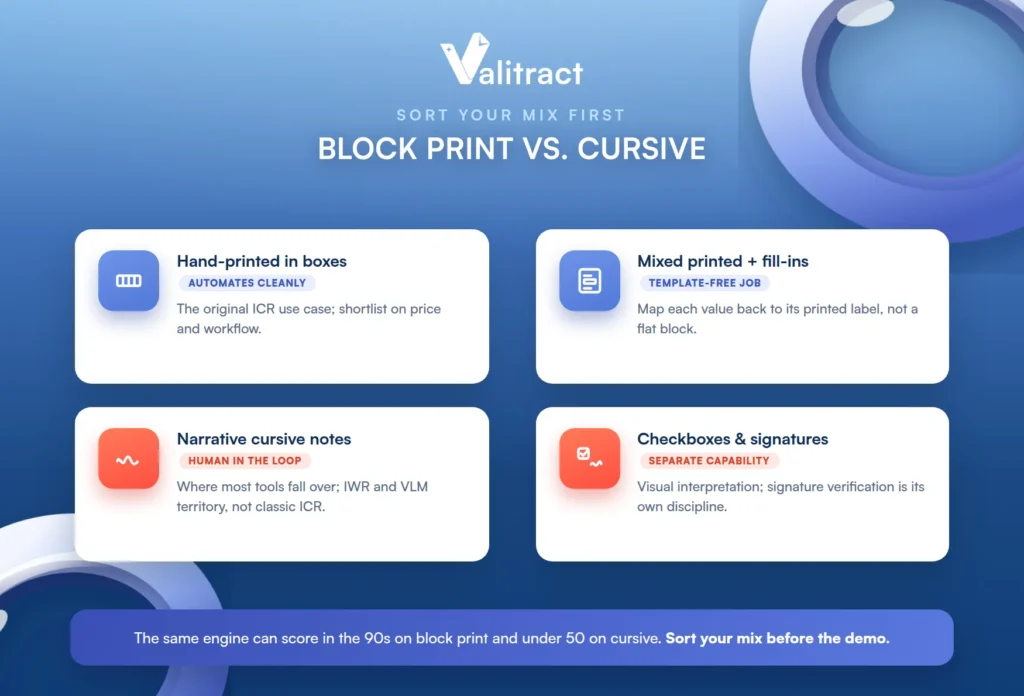
Hand-printed fields in boxes or combs are the original ICR use case and the one that automates cleanly end to end. If this is most of your mix, almost any capable tool will do well and you can shortlist on price and workflow.
Mixed printed forms with handwritten fill-ins are the most common business reality. The deciding capability here is whether the tool maps each handwritten value back to its printed label rather than returning a flat block of text, which is exactly the template-free extraction job.
Narrative cursive comments and notes are where most tools fall over. Expect a human in the loop and budget for it, because full automation on free-flowing cursive is not realistic today. This is the territory of IWR and vision-language models, not classic ICR.
Checkboxes, initials, stamps, and signatures on the same page are visual interpretation rather than character recognition, and some platforms simply do not have that capability. Signature verification in particular is a separate discipline, which is why a check specialist exists as its own category.
Valitract’s side-by-side validation view with low-confidence flagging is designed for exactly the third and fourth cases, where full automation is not realistic and the goal is to shrink review to the uncertain fields rather than eliminate it, the practical shape of human-in-the-loop document processing.
Which ICR Software Should You Choose?
The best intelligent character recognition software is the one that matches your handwriting profile and your deployment constraints, not the one with the longest feature list. A quick recap by need:
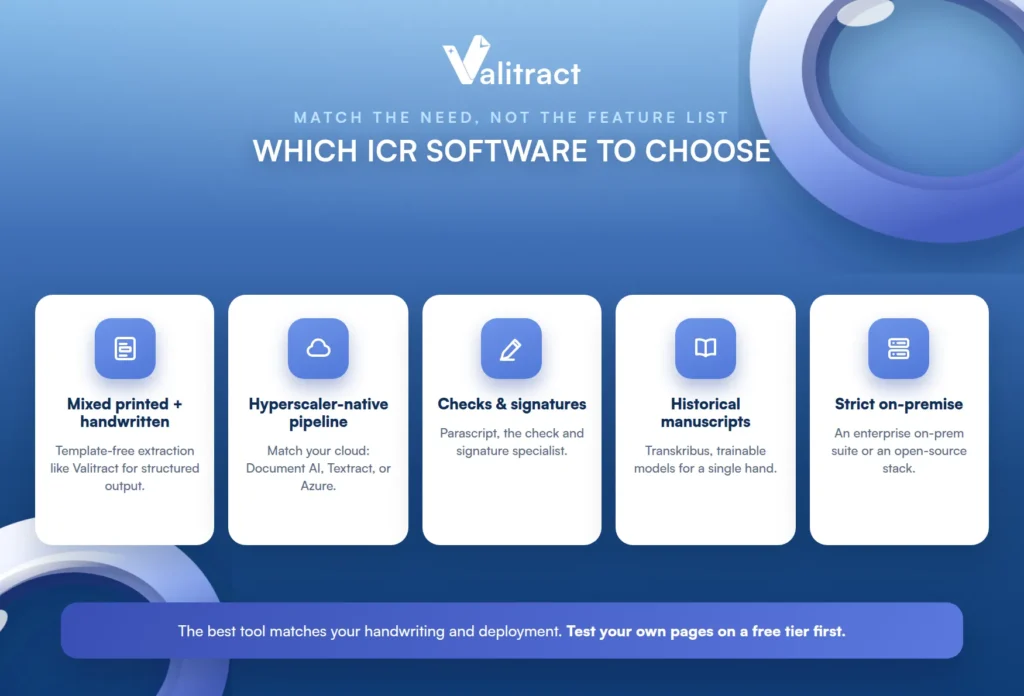
For mixed printed and handwritten documents where you need structured output, a template-free extraction platform like Valitract fits, and it is the natural home for insurance and intake forms, as our guide to automated data entry for insurance claims shows.
For hyperscaler-native pipelines, match the tool to your cloud: Document AI, Textract, or Azure. For checks and signatures, Parascript.
For historical manuscripts, Transkribus. And for strict on-premise requirements, an enterprise suite with an on-prem path or an open-source stack, since a cloud-only API will not clear procurement.
If your documents are mostly forms with handwritten fields, the cheapest way to decide is to run your own pages through a free tier before committing to anything.
How to Evaluate ICR Software Before You Buy
A clean demo page proves nothing. Evaluate against production reality with these eight factors.
First, accuracy on your own worst pages, meaning faded ink, crossed-out corrections, values drifting outside their boxes, photocopy artifacts, and phone photos taken at an angle. Second, multi-page consistency, whether accuracy holds on page 12 of a packet or degrades as context is lost. Third, behavior under uncertainty, whether the tool returns a confidence score and flags the field or fills in a plausible guess.
Fourth, structured output quality, nested JSON with preserved table rows and key-value pairs rather than a text dump your team has to re-parse. Fifth, language and script coverage against the actual population filling in the forms. Sixth, deployment and data residency, cloud, private cloud, or on-premise, and whether any third-party processing is permitted at all.
Seventh, review workflow fit, who corrects flagged fields, in what interface, and whether that needs a developer. Eighth, total cost including correction time, because a cheap per-page rate on a tool that misreads half your cursive costs more than a higher rate that does not.
The practical way to settle it is to run fifty of your genuinely difficult pages through two or three shortlisted tools. Valitract’s free tier covers 100 pages a month with no credit card, which is enough for a real test rather than a demo; for the developer route, see our best OCR API comparison and our overview of OCR data extraction software.

Common Mistakes When Choosing ICR Software
A few recurring mistakes send teams to the wrong tool.
The first is testing on the vendor’s clean sample form instead of the crumpled, faded, corrected pages that make up the real intake queue. The second is reading a single headline accuracy figure without asking which document type and handwriting style it was measured on. The third is buying a per-page rate rather than a total cost, since low-accuracy output shifts the expense from the invoice to the correction queue.
The fourth is assuming an API price is the whole price, when a raw endpoint with no review interface can take months of build time before operations can use it. The fifth is expecting character-level ICR to read joined cursive, which it was never designed to do. The sixth is skipping the data-residency question until procurement raises it, then discovering the shortlisted tool has no on-premise path.
Frequently Asked Questions
What is intelligent character recognition software?
It is software that reads hand-printed and handwritten characters from scanned forms and converts them into structured, machine-readable fields. It is an AI-driven extension of OCR, which reads only printed type. Modern tools ship this as one capability inside a broader document-processing platform rather than as a standalone ICR engine.
What is the difference between ICR and OCR?
OCR reads printed and typed text, while ICR extends recognition to hand-printed and handwritten characters using machine learning. OCR matches shapes against known fonts; ICR classifies handwriting against learned variation. In practice a single tool often uses OCR for typed content and ICR for hand-completed fields on the same page.
Can ICR software read cursive handwriting?
Modern neural systems read cursive far better than the template-based tools that gave rise to the “ICR cannot read cursive” claim, but accuracy on narrative cursive is still much lower than on hand-printed characters in boxes. Continuous cursive is really the domain of IWR and vision-language models. For cursive-heavy documents, expect meaningful human review.
How accurate is ICR on handwritten forms?
It depends entirely on the handwriting: high on hand-printed characters inside defined boxes, and much lower on narrative cursive, where the same engine can drop from the nineties to under fifty. There is no single accuracy figure that holds across a whole form. Always ask which field type and handwriting style a quoted number was measured on.
Is there free or open-source ICR software?
Yes: Tesseract, PaddleOCR, and open-weight vision models like DeepSeek-OCR and the Qwen-VL family. They remove per-page cost and keep data fully in-house, which matters for strict data policies, but they have lower out-of-the-box accuracy on messy handwriting and a real engineering burden. For many teams the setup cost exceeds the licence savings, so weigh it honestly.
Can ChatGPT or another AI model replace ICR software for handwritten forms?
General vision-language models can read handwriting and adapt to layouts, but they can also produce a clean-looking but wrong value rather than failing visibly, which is risky on forms headed to a system of record. Purpose-built tools add confidence scoring, field mapping, review workflows, and validation that a raw model does not. For production handwriting work, those safeguards matter more than the model alone.
Which ICR software is best for high-volume handwritten forms?
For mixed printed-and-handwritten forms needing structured output, a template-free extraction platform such as Valitract fits well; for regulated back offices with heavy review needs, Hyperscience; and for checks and signatures specifically, Parascript. The right answer depends on your handwriting profile and deployment constraints. Test your own high-volume forms on a free tier before committing.
Conclusion
The best intelligent character recognition software is not the one with the longest feature list; it is the one that matches the handwriting you actually process and the way you are allowed to deploy it. Sort your documents into block print, mixed fill-ins, cursive notes, and marks-and-signatures first, and the shortlist narrows itself before you read a single vendor page.
Then test the shortlist on your own worst pages, watch how each tool behaves when it is unsure, and count the correction time, not just the per-page rate. Do that, and you will pick a tool that survives your real intake queue rather than one that only shines on the demo.


