


Quick answer:
- Handwriting recognition technology uses machine learning to convert handwritten characters into machine-readable text.
- It works either from a static image of finished writing (offline recognition, also called HTR) or from live pen strokes on a screen (online recognition).
- It is different from handwriting analysis, which tries to identify the writer or infer personality.
A printed invoice arrives with the total crossed out and a new amount written in pen. A claim form comes back with the accident description squeezed into the margin. Someone on your team types both by hand, because the OCR tool skipped them or guessed wrong.
Handwriting recognition technology promises to fix this, and vendor pages quote accuracy figures near 99%. Real-world results on cursive and multi-page forms often land far lower. The gap is not dishonesty. It comes from measuring very different tasks with the same word.
This guide explains how handwriting recognition works, what accuracy to expect for each type of writing, where it still fails, and how to test it on your own documents.
What handwriting recognition technology actually is
Handwriting recognition technology is software that reads human handwriting and turns it into editable, searchable text. It solves two different problems, depending on when the machine sees the writing. Most confusion about accuracy comes from mixing these two problems up.
Online recognition: reading the pen, not the page
Online recognition captures writing as it happens on a touchscreen or digitiser. The system records stroke order, direction, speed, and pressure. That extra signal makes it the easier problem, and it powers note-taking apps and stylus input.
Offline recognition (HTR): reading a static image
Offline recognition, often called handwritten text recognition (HTR), works only from pixels in a scan or photo. All timing information is gone by the time the image exists. It is harder, and it is what nearly every business workflow needs, because the writing happened on paper first.
The table below compares the two approaches side by side. Use it to confirm which one your documents actually require.
| Aspect | Offline recognition (HTR) | Online recognition |
|---|---|---|
| Input | Scans, photos, faxes, PDFs | Stylus or finger on a digitiser |
| Signal available | Pixel patterns only | Stroke order, direction, speed, pressure |
| Relative difficulty | Harder, less to work with | Easier, richer input |
| Main failure driver | Image quality and layout | Unfamiliar stroke habits |
| Typical use | Forms, records, archives, business documents | Note apps, signature capture, tablets |
Source: Valitract summary of published HTR literature, 2026.
The rest of this article focuses on offline recognition. That is the version finance, operations, and records teams are actually evaluating.
Key takeaway: If your handwriting arrives on paper, you need offline recognition, and you should judge tools on scanned samples only.
HWR, HTR, ICR, and OCR: which term means what
These four terms describe overlapping layers of the same technology, and vendors use them loosely. Knowing the difference prevents mismatched expectations between a product page and your real needs. Each definition below stands on its own.
- OCR (optical character recognition) reads printed characters with fixed shapes. It matches pixel patterns against known typefaces, so it struggles when shapes vary.
- ICR (intelligent character recognition) uses neural models that learn what a character looks like in general. That flexibility is what makes handwriting readable by machines.
- HWR and HTR name the same field. HTR is common in academic and archival work, while HWR appears more on the commercial side.
- AI data extraction sits above recognition. It maps recognised text into named fields, such as “invoice total” or “date of birth,” and then validates it.
The label on a product page does not tell you what the engine can do. A tool marketed as “OCR” may include ICR, and a “handwriting” tool may stop at raw text. For a deeper breakdown, see our guides to OCR vs AI data extraction and IDP vs OCR.
Pro tip: Ask every vendor one question: “Do you return raw text, or named and validated fields?” The answer tells you which layer you are buying.
How handwriting recognition works, step by step
Handwriting recognition works through six stages, from cleaning the image to structuring the output. Treat this list as a diagnostic map. When output is wrong, it tells you which stage to investigate.
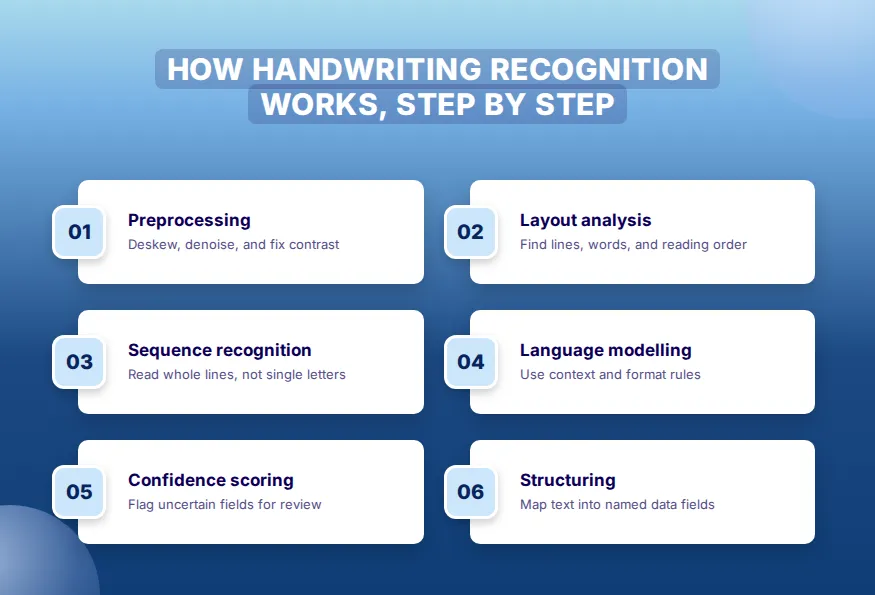
- Preprocess the image. The system straightens tilted scans, removes noise, normalises contrast, and converts the image to black and white. This stage is under-rated, because errors here spread into every stage after it.
- Analyse layout and segment the text. The engine finds where text sits, splits it into lines and words, and sets a reading order. It becomes fragile when writing drifts across ruled lines or into margins.
- Recognise character sequences. A neural model reads a whole line image and predicts likely character sequences. Modern systems no longer classify one letter at a time.
- Apply language modelling. Context resolves shapes that could be several letters. Dictionaries and format rules constrain dates, amounts, and ID numbers to valid patterns.
- Score confidence. Every output carries a certainty value, and a threshold decides what passes automatically and what a person checks. Valitract, for example, flags low-confidence fields and shows them beside the source image, so reviewers only confirm uncertain values. This routing is the core of human-in-the-loop document processing.
- Structure the output. The system maps recognised text into named fields. This step separates a transcript from data your ERP can use, and it is the step most demos skip.
Real example: An AP team sees wrong totals on faxed invoices. Stage 1 is usually the culprit, because fax compression blurs digits before recognition begins.
The architectures behind modern handwriting recognition
Modern handwriting recognition relies on four model families, each built to fix the limits of the one before it. Technical readers can use this section to place each approach. Finance readers can skim it for the main shift: from fixed shapes to learned patterns.
- Template matching is the original OCR method. It assumes each character has one fixed shape, which is exactly what handwriting lacks.
- CNN plus LSTM with CTC combines three parts. A convolutional network extracts visual features, a recurrent layer reads them as a sequence, and connectionist temporal classification aligns image regions to characters without cutting letters apart first. This combination made unconstrained handwriting practical.
- Transformer models use self-attention across the whole text line. Language knowledge lives inside the model instead of being added afterwards.
- Vision-language models are the current frontier for raw transcription. They read a page much like a person, resolving ambiguity from meaning. They are strongest at transcription and least predictable at structured output.
The turning point came around 2009. Recurrent networks by Alex Graves and colleagues won several ICDAR handwriting competitions that year. By 2013, deep convolutional networks had pushed Chinese handwritten character error rates into the low single digits.
Key takeaway: Newer architectures read messier writing, but none of them guarantees correct fields. Structure and validation still sit outside the recognition model.
How accurate is handwriting recognition technology?
There is no single accuracy figure for handwriting recognition technology. Accuracy depends far more on the type of writing than on the vendor. Neat block capitals in boxes and hurried cursive are different problems.
The table below shows realistic ranges by writing type. Use it to set expectations before you look at any vendor demo.
| Writing type | Realistic accuracy | What drives the result |
|---|---|---|
| Printed or typed text | 99%+ | Fixed character shapes, effectively a solved problem |
| Neat hand-printing in form boxes | 90-95% | Boxes force spacing and give clean segmentation targets |
| Everyday mixed handwriting | 80-90% | Variable slant and spacing, needs review on names and numbers |
| Cursive | 60-85% | Connected letters defeat segmentation, widest spread between engines |
| Medical and field shorthand | Unreliable | Domain abbreviations with no dictionary support |
| Non-Latin and mixed scripts | Varies sharply | Depends on language coverage in the model |
Source: Valitract synthesis of published benchmarks and practitioner reports, 2026. Ranges are indicative, not guarantees.
The printed row anchors the gap. Valitract reports roughly 99.8% field-level accuracy on standard printed documents. That is a printed-text figure, not a handwriting figure, and handwritten fields should be expected to score lower.
Why published accuracy numbers disagree so much
Published accuracy numbers disagree because they measure different tasks. A 2026 cursive benchmark reported frontier vision-language models at or near perfect semantic similarity on 100 handwritten paragraphs. A team testing the same model class on multi-page inspection reports measured 65-85%, with major cloud OCR services near 45-50% on cursive narrative sections.
Both results are honest. The first measures transcription of one clean paragraph image. The second measures pulling named fields from a three-page document mixing print and handwriting.
The rule is simple: a transcription benchmark does not predict extraction performance. Always check what task a published number describes.
Character accuracy, word accuracy, and field accuracy are not the same number
Character error rate (CER) counts the share of characters read wrong. Word error rate (WER) counts the share of words with at least one error. Neither tells you whether a form is usable.
A 5% character error rate sounds small. Spread across a ten-field form, it can put an error in half the fields. One wrong digit in a date or amount invalidates the whole record.
Field-level accuracy is the number that decides whether a workflow can run unattended. Pair it with automated data validation rules that check totals, date formats, and ID patterns.
Pro tip: When a vendor quotes accuracy, ask “character, word, or field?” If they cannot answer, treat the number as marketing.
Where handwriting recognition still fails
Handwriting recognition still fails in six predictable situations, each with a clear cause. Match the list below against your own documents. The last item is the one vendor content usually skips.
- Low-resolution or degraded input. Below roughly 300 DPI, faded ink and heavy compression destroy the signal before recognition starts.
- Cursive and touching characters. Segmentation cannot find the boundary between letters that were never separated.
- Writing that ignores the form. Text spills outside fields, wraps into margins, or overlaps printed labels.
- Mixed scripts on one page. An English name beside a non-Latin address needs multi-language support many engines lack.
- Genuinely ambiguous characters. A 1, an l, and an I, or a 0 and an O, cannot be separated without context a short field does not supply.
- Multi-page degradation and confident wrong answers. Practitioners report accuracy dropping several points per page on long documents. The model fills later pages from earlier context and returns a plausible wrong value instead of flagging doubt.
On structured forms, document design often moves accuracy more than engine choice. Character boxes instead of blank lines, strong contrast, and a “please print” instruction all help.
Real example: A clinic that redesigns its intake form with boxed fields for date of birth removes a whole class of date errors, before changing any software.
Who uses handwriting recognition technology, and for what
Most businesses use handwriting recognition technology on documents that are mostly printed. A written amount on a printed invoice, a signature on a delivery note, and a margin note on a claim form are typical. That makes it a template-free extraction problem across the whole page, not a separate handwriting pipeline.
This mixed-document case is where Valitract fits, reading printed and handwritten fields together across 95+ languages. If you have moved from understanding the technology to choosing a tool, compare options in our guide to handwriting recognition software.
The sections below show how each industry uses the technology. Each one has a different tolerance for error.
Banking and lending
Banks process loan applications, account-opening forms, and handwritten cheque amounts. Written adjustments on printed statements also need capture. Amount fields demand validation, because one misread digit changes money movement.
Healthcare
Clinics digitise patient intake forms and consent documents. This is the highest-stakes use case, since a wrong allergy or dosage entry can harm a patient. Confidence routing matters most here.
Insurance
Claims forms and accident reports mix printed structure with handwritten narrative. Structured fields extract well, while free-text descriptions need more review. Learn more about automated data entry for insurance claims.
Logistics
Carriers handle proof-of-delivery confirmations, customs declarations, and handwritten receiving logs. Many arrive as ruled grids, where row and column relationships must survive. Good table extraction keeps quantities attached to the right items.
Government and archives
Agencies digitise registration cards, census sheets, and historical records. The goal is usually searchability, not field-perfect data. A few errors are acceptable if the record can still be found.
Individuals and researchers
Students, writers, and field scientists digitise notebooks, lecture notes, and field notes. This audience has the loosest accuracy needs. Consumer note apps and open models often serve it well.
Key takeaway: Match your accuracy bar to the cost of an error in your industry, not to a vendor’s headline figure.
What handwriting recognition technology cannot do
Handwriting recognition technology reads text, and nothing more. The four limits below are category boundaries, not minor caveats. Each one points to a separate kind of system.
- It does not identify who wrote something. Writer identification, signature verification, and forensic document examination answer a different question and use different systems. For confirming a person’s identity, see identity verification automation.
- It does not detect forged or altered documents. Recognition reads what is on the page and has no view on whether it belongs there. Valitract extracts and validates fields, but it does not perform tamper detection or cross-document reconciliation at the level of dedicated verification platforms.
- It does not always run where your data must stay. Valitract is a hosted API and no-code platform, with no self-hosted or open-source option. Teams whose rules forbid any third-party API need an on-premise engine or an open-weights model.
- It does not remove human review. It moves review from every document to the uncertain ones. That shift is the real operational gain.
Pro tip: List these four needs separately in your requirements document. Buying one tool and expecting all four is the most common scoping error.
How to test handwriting recognition on your own documents
The only reliable way to judge handwriting recognition is to test it on your own documents. Vendor samples are chosen to look good. The six steps below form a test you can run this week.
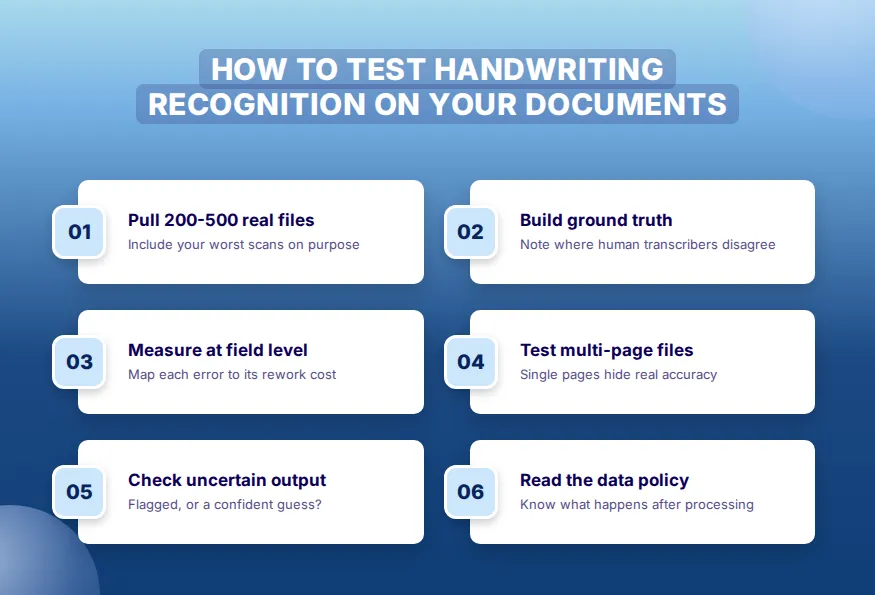
- Pull 200-500 real documents. Include the worst ones on purpose: faded scans, cramped cursive, and odd layouts. A test set of easy files tells you nothing.
- Build ground truth by hand. Have people transcribe the documents and record where two transcribers disagree. If humans cannot agree on a field, no engine will.
- Measure at field level. Score each field as right or wrong, then map each error to its rework cost. One wrong invoice total costs more than a misspelled street name.
- Test multi-page documents. Single pages hide the degradation that appears on long files. That is where published numbers and production numbers split apart.
- Check behaviour under uncertainty. Note whether the system flags doubtful fields or fills them with confident guesses. Silent wrong answers are the most expensive failure.
- Read the data-retention policy first. Confirm what happens to your files after processing before uploading anything sensitive. Check for automatic deletion and whether data trains models.
A test like this does not need a budget. Valitract’s free tier covers 100 pages a month with no credit card, enough to run a real sample of your own documents. Upload a batch of your handwritten forms and check the field-level results yourself.
Common mistakes when evaluating handwriting recognition
Most failed handwriting projects trace back to five evaluation mistakes. Each one is easy to avoid once named. Review this list before signing any contract.
- Judging on clean demo samples. Demo files rarely look like the documents you actually receive.
- Treating a transcription benchmark as an extraction benchmark. The two measure different tasks, so one cannot predict the other.
- Buying the wrong specialisation. A handwriting specialist is overkill when handwriting is 5% of volume, and a generalist struggles with an all-cursive archive.
- Skipping the confidence threshold. Without one, unverified values flow silently into downstream systems.
- Treating accuracy as a substitute for validation. Validation rules catch the errors the model was confident about.
Key takeaway: Good evaluation beats good marketing. A 300-document test tells you more than any published benchmark.
Frequently asked questions
What is handwriting recognition technology?
Handwriting recognition technology is software that converts handwritten characters into machine-readable text using machine learning. It works either from scanned images of finished writing (offline recognition) or from live pen strokes (online recognition). Businesses use it to capture data from forms, notes, and records without manual typing.
What is the difference between OCR, ICR, and handwriting recognition?
OCR reads printed characters by matching them to known typefaces. ICR uses neural models that learn general character shapes, which lets it read handwriting. Handwriting recognition (HWR or HTR) is the broader field that ICR belongs to, and many modern tools combine all three.
Can AI read cursive handwriting?
Yes, modern AI can read cursive, but accuracy varies widely, typically 60-85% on real documents. Clean single paragraphs score much higher in benchmarks than messy multi-page forms. Connected letters remain the hardest case for segmentation, so cursive fields usually need human review.
How accurate is handwriting recognition in 2026?
Handwriting recognition accuracy in 2026 ranges from 90-95% on neat block printing to 60-85% on cursive. Printed text reaches 99% or higher. The right figure for your team depends on your writing types, and field-level accuracy matters more than character-level accuracy.
What is the difference between online and offline handwriting recognition?
Online recognition captures writing live on a touchscreen, recording stroke order, speed, and pressure. Offline recognition works only from a scan or photo, after the writing is finished. Offline is harder and is the type most business document workflows need.
Can handwriting recognition read doctors’ notes?
Handwriting recognition reads doctors’ notes unreliably, mainly because of medical abbreviations and rushed script. General models lack dictionaries for clinical shorthand. Healthcare teams usually combine recognition with confidence flagging and mandatory human review for high-risk fields.
Is handwriting recognition the same as handwriting analysis?
No, handwriting recognition and handwriting analysis are different disciplines. Recognition converts writing into text. Handwriting analysis tries to identify who wrote something or infer traits from the script, and it uses entirely different methods and systems.