


Quick answer: Bank statement categorization is the process of assigning each transaction on a bank statement to a labelled bucket, such as income, rent, payroll, utilities, transfers, fees, or discretionary spend. It turns raw debits and credits into data you can report on, file taxes from, or underwrite against. Extraction gets the rows off the page first, and reconciliation matches them to a ledger afterward.
- Extraction, categorization, and reconciliation are three sequential steps, not synonyms.
- Reliable categorization stacks four layers: clean rows, rules, AI suggestions, and human review.
- The right category set depends on the job: bookkeeping, taxes, lending, or budgeting.
- Six quick checks, such as row counts and closing balance, catch most categorization errors before they reach a report.
A client sends twelve PDF bank statements in April. Each one runs ten pages, the bank has no feed connector, and every transaction still needs a category before the return can be filed. Someone ends up typing rows into a spreadsheet and guessing what “POS 4471 SQ *JMK” was for.
Categorization tools promise to fix this, but most assume clean transaction rows already exist. For PDF and scanned statements, they often do not. Errors at the first step then flow silently into every report built on top.
This guide explains how bank statement categorization works, which transactions break it, and how to check the output. It also shows how to build a category set that fits what your data is actually for.
What is bank statement categorization?
Bank statement categorization assigns every transaction on a statement to a category that describes its purpose. The goal is to turn a list of debits and credits into data a P&L, tax return, or credit decision can use.
A category describes what a transaction was for, not what it was. “ACH DEBIT 4471” is what it was. “Software subscription” is what it was for.
Everything downstream depends on that second layer being right. P&L accuracy, deduction capture, and cash-flow assessment all read the category, not the raw description.
Categorization vs. extraction vs. reconciliation
Competing articles and accounting software often use these three terms interchangeably. They are separate steps that run in order, and each one answers a different question.
The table below shows what each step produces and what it cannot tell you. Use it to spot which step caused a problem in your workflow.
| Step | What it produces | What it cannot tell you |
|---|---|---|
| Extraction (bank statement data extraction) | Structured rows: date, description, amount, balance | What any transaction was for |
| Categorization | A labelled bucket per transaction | Whether the rows themselves are complete or correct |
| Reconciliation (bank statement reconciliation) | Confirmation the rows match your ledger and closing balance | Whether the labels applied are the right ones |
Source: Valitract analysis of bank statement processing workflows, 2026.
Key takeaway: A perfectly categorized statement can still be wrong if rows are missing. Each step needs its own check.
How automated transaction categorization actually works
Automated transaction categorization works as a four-layer stack: clean rows, deterministic rules, AI classification, and human review. Each layer owns a different set of transactions. Problems start when one layer takes over work that belongs to another.
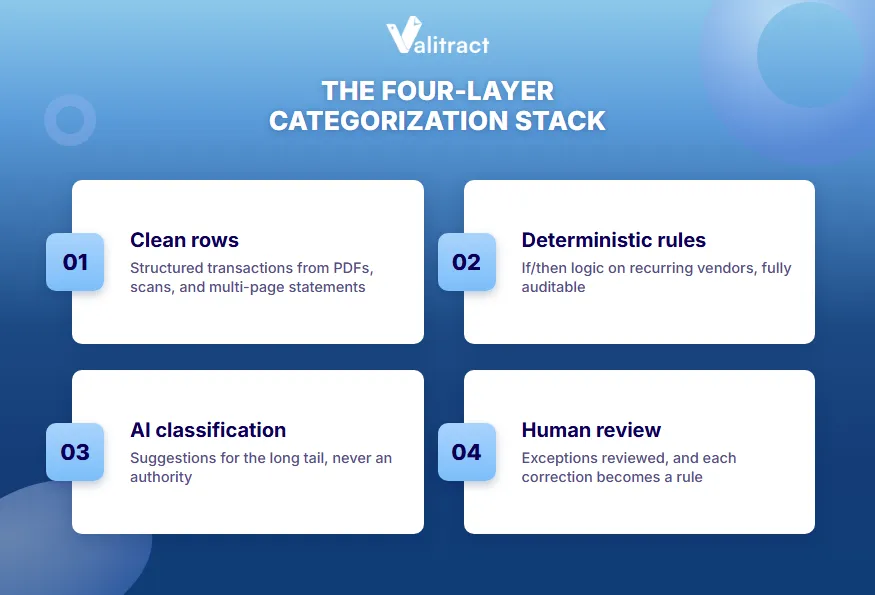
The layers below run in order, from the bottom up. Each one only handles what the layer before it could not.
- Layer 1: Clean rows. Nothing can be categorized until transactions exist as structured data. PDF statements, scans, and multi-page layouts break most workflows here, before categorization is even attempted.
- Layer 2: Deterministic rules. If/then logic runs on merchant strings and recurring vendors. You always know why a label was applied, which matters when the books get reviewed.
- Layer 3: AI/ML classification. A model handles the long tail: unfamiliar vendors, abbreviated narrations, and bank-specific codes. Treat its output as a high-confidence suggestion, not an authority.
- Layer 4: Human review on exceptions. Low-confidence and ambiguous rows go to a person. Each correction feeds back as a new rule, the core idea behind human-in-the-loop review.
The ordering principle matters more than any single layer. Rules should never be overridden by AI, and AI should never silently resolve an ambiguous row. Most categorization failures are layer-ordering failures, not accuracy failures.
Real example: A bookkeeper sets a rule coding “ADOBE” to software. A model later relabels one Adobe charge as marketing because the description mentions “stock.” With rules on top, the rule wins and the label stays consistent.
Pro tip: Set the AI layer to suggest, not post, for its first two months on a new client. Promote a vendor to a rule once its suggested label has been accepted three times in a row.
Your category set depends on what the data is for
The right category set for bank statement categorization depends on who will use the result. A lender, a bookkeeper, and a budgeting app need different labels for the same transaction.
Most guides pick one audience and present its category list as universal. Find your use case below, then design categories around its goal.
Bookkeepers and accounting firms
Categories must map to each client’s chart of accounts, not to a generic list. They must stay consistent month over month and across clients. Most firms handle this inside the rules engines of their bookkeeping automation tools.
Small business owners filing taxes
Categories should map to actual tax schedule lines from the start. A sole proprietor, for example, can mirror the expense lines on Schedule C. That way, deduction capture does not require a year-end rebuild.
Lenders and underwriters
Categories serve income verification and obligation detection. The critical split is sustainable income versus transfers, refunds, and loan proceeds. A budgeting category set does not make that distinction.
Categorization is the layer that feeds income and cash-flow assessment in bank statement analysis. A transfer mislabelled as income can inflate a borrower’s apparent capacity.
Personal finance and budgeting
Categories here are lifestyle-shaped: groceries, dining, subscriptions, and transport. They exist to surface spending patterns, not to satisfy a reviewer or an auditor.
Developers building their own pipeline
Developers need category labels as stable codes, not display names, so a renamed category never breaks downstream logic. Store the raw description, the category code, the method that assigned it, and a confidence score for every row. Those fields make each wrong label traceable to its layer.
The table below compares the four category sets side by side.
| Use case | Categories map to | Critical distinction | Example labels |
|---|---|---|---|
| Bookkeeping | Client chart of accounts | Consistency across months and clients | Office expenses, Professional fees |
| Small business tax | Tax schedule lines | Deductible vs. non-deductible | Advertising, Car and truck expenses |
| Lending | Income and obligation types | Sustainable income vs. transfers and loan proceeds | Salary, Rent paid, Loan repayment |
| Personal budgeting | Lifestyle spending | Needs vs. wants | Groceries, Dining, Subscriptions |
Source: Valitract analysis; example tax labels from IRS Schedule C (Form 1040), 2026.
Pro tip: Never copy a budgeting app’s category list into a business chart of accounts. “Dining” tells a budget something useful, but a tax return needs to know whether the meal was business-related.
Which transactions break automated categorization
Seven transaction types cause most automated categorization errors. Each one fails for a specific reason, and most cannot be fixed by a better model.
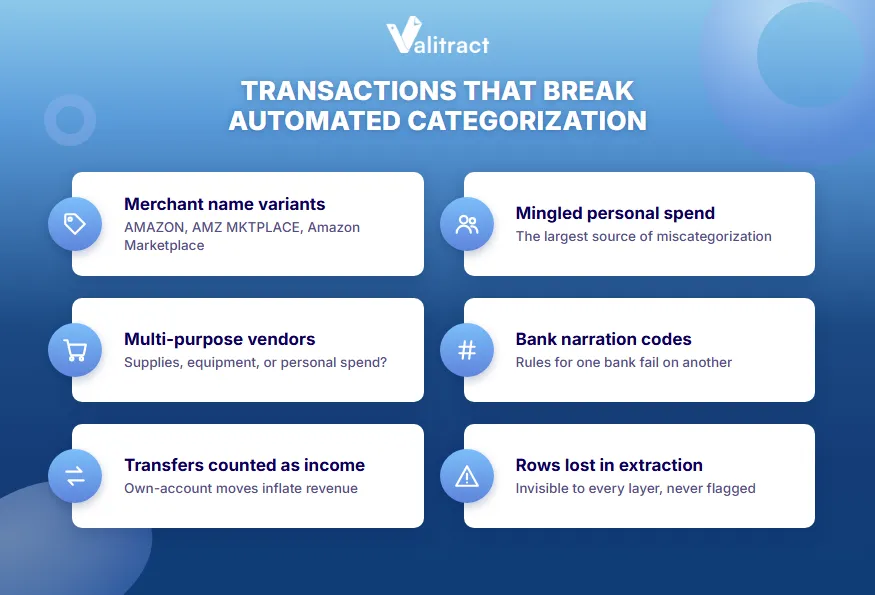
The list below comes from what practitioners report, not from vendor feature lists. Check your own statements for each pattern.
- Merchant name variants. The same vendor appears as AMAZON, Amazon Marketplace, and AMZ MKTPLACE on one statement. Rules written for one spelling miss the others.
- Multi-purpose vendors. Amazon, Walmart, Tesco, and PayPal can each mean office supplies, equipment, software, or personal spend. The description alone cannot resolve it.
- Internal transfers counted as income. Money moved between your own accounts inflates revenue or income if it is not detected as a transfer pair.
- Mingled personal and business spend. Mixed accounts are the single largest source of miscategorization. No engine can fix this downstream.
- Split and part-payment transactions. One payment covering two category types needs a manual split. No automated layer will propose it.
- Bank-specific narration codes. Abbreviations and reference strings differ by institution. Keyword rules built on one bank’s format fail on another’s.
- Rows that never made it off the page. Transactions dropped during extraction on multi-page or scanned statements are invisible to every layer above. Nothing flags their absence.
Each failure has a fix, and it usually sits outside the classifier. The table below pairs each pattern with the layer that should handle it.
| Failure | Layer that fixes it | Typical fix |
|---|---|---|
| Merchant name variants | Rules | Normalize vendor names before writing rules |
| Multi-purpose vendors | Human review | Match the charge to its receipt or invoice |
| Internal transfers | Rules | Pair equal in-and-out movements across own accounts |
| Mingled spend | Account setup | Open separate business accounts |
| Split payments | Human review | Split the row manually, then save a rule if it recurs |
| Bank narration codes | Rules | Keep a per-bank code dictionary |
| Dropped rows | Extraction | Check row count and closing balance every month |
Source: Valitract analysis of bank statement workflows, 2026.
Key takeaway: The last failure is the most dangerous, because it produces no error. A missing row looks exactly like a transaction that never happened.
Getting clean transaction rows before you categorize anything
Categorization accuracy is capped by extraction accuracy. For anyone working from PDF or scanned statements rather than a live bank feed, extraction is where the workflow usually fails.
Bookkeepers describe the same situation again and again. Statements arrive as ten-plus-page PDFs per client per month, and no bank feed exists for the account. Generic chat-based AI tools, handed a raw statement, return inconsistent columns and silently drop rows.
The chat-tool problem is worth a closer look. Run the same 12-page statement twice, and you may get two tables with different column names and different row counts. Without a confidence flag, nothing tells you which rows went missing.
Two tool layers handle this job, and they should stay separate. The first gets clean rows off the page, and the second assigns categories.
The extraction layer
Bank statement OCR alone reads characters, but a statement is a table. Clean categorization needs the table structure intact: each date matched to its description, amount, and running balance.
Valitract handles this step through template-free bank statement data extraction across bank formats. It keeps row and column relationships intact and returns JSON, CSV, or XLS through a no-code UI or REST API. It reports around 99.8% field-level accuracy on standard printed documents, and low-confidence rows are flagged before they reach categorization.
The boundary is simple. Valitract extracts and structures the transactions. It does not assign expense categories or map them to a chart of accounts.
The categorization layer
The labelling layer is a different tool, and the right choice depends on who you are. Firms working in a general ledger usually categorize inside QuickBooks Online or Xero, using their rules engines. PDF-first workflows often use dedicated statement-categorization tools, while lenders use analysis platforms that feed credit decisioning.
Real example: A firm handles 40 clients, each with a 12-page monthly statement and no bank feed. That is 480 pages a month. Extracting them into CSV and importing the rows into the ledger turns hours of typing into a review of flagged rows.
How to build a category taxonomy that survives contact with real data
A category taxonomy survives real data when it starts small, maps to its destination, and decides edge cases in advance. The six steps below build one in that order.
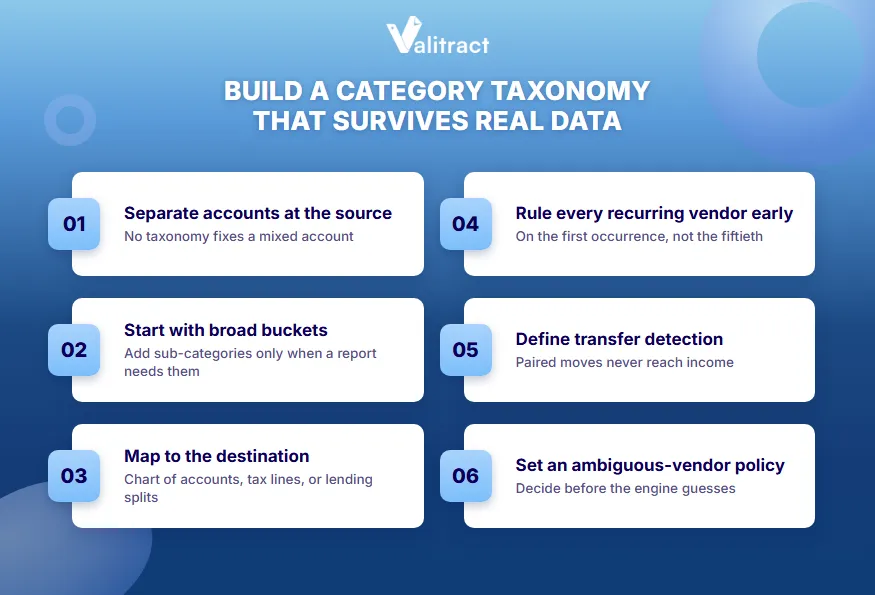
Each step makes the next one cheaper. Follow them before you write your first automation rule.
- Separate personal and business accounts at the source. Do this before designing anything downstream. No taxonomy can fix a mixed account.
- Start with broad buckets. Add sub-categories only when a report you actually run needs them. Over-specified taxonomies create overlap and inconsistent coding.
- Map categories to their destination from day one. Use the chart of accounts for firms, tax schedule lines for sole operators, and income-versus-obligation splits for lending.
- Write a rule on the first occurrence of every recurring vendor. Do it the first time, not the fiftieth. Early rules prevent months of repeat corrections.
- Define a transfer-detection convention. Match paired movements between your own accounts explicitly. They should never reach the income line.
- Document the ambiguous-vendor policy. Decide in advance what happens to an Amazon charge before the engine guesses. For example, route every marketplace charge over $100 to receipt matching.
Real example: A consulting sole proprietor starts with 14 categories matching Schedule C expense lines. After three months, only one sub-category is added: “Software” split out of “Office expenses” for a quarterly cost review. Coding stays consistent because nothing overlaps.
Pro tip: Keep the taxonomy in a shared document with a one-line definition per category. When two reviewers disagree on a label, the definition settles it.
How to tell your categorization is wrong
Six quick checks catch most bank statement categorization errors before they reach a report. Run them every month, before anyone trusts the output.
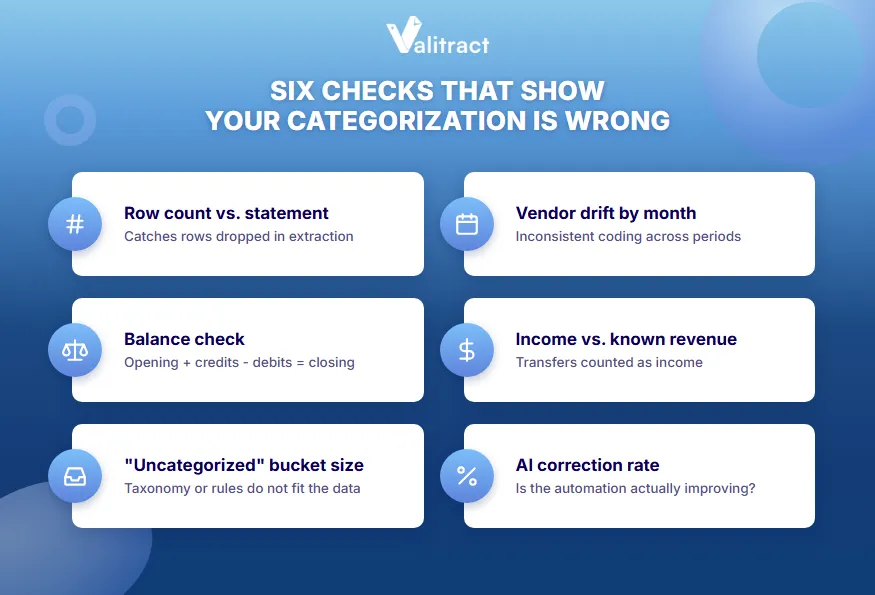
The table below lists each check and the error it catches. The first two test extraction, and the rest test categorization.
| Check | What it catches |
|---|---|
| Row count vs. statement transaction count | Transactions dropped during extraction |
| Opening balance plus credits minus debits vs. stated closing balance | Missing, duplicated, or misread rows |
| Size of the “uncategorized” or “other” bucket | A taxonomy or rule set that does not fit the data |
| Month-over-month category drift for the same vendor | Inconsistent coding across periods or reviewers |
| Income total vs. known revenue | Transfers being counted as income |
| Correction rate on AI-suggested labels | Whether the automation is actually improving |
Source: Valitract analysis of bank statement QA practice, 2026.
The balance check is the fastest and catches the most. If opening balance plus credits minus debits does not equal the closing balance, stop. Do not categorize a set of rows that does not add up.
Real example: A statement opens at $8,240.15 and closes at $5,912.40. The extracted credits total $14,300.00 and debits total $16,318.75, which gives $6,221.40. The $309.00 gap points to a missing debit, found on a page where a table continued across a page break.
The best test runs the whole chain on a real month of your messiest statements, not a clean sample. Valitract’s free tier covers the extraction leg of that test, with 100 pages a month and no credit card.

Common mistakes in bank statement categorization
The most common mistakes come from mixing up pipeline steps and trusting tools with jobs they were not built for. Each one below creates errors that surface weeks later.
Review this list before you set up a new client or a new tool.
- Treating categorization and extraction accuracy as one number. A dropped row and a mislabelled row are different failures with different fixes.
- Expecting a general AI chat tool to categorize a raw PDF. It produces varying columns, inconsistent labels, and silent omissions across runs.
- Letting AI overwrite deterministic rules. Overrides destroy the auditability that made the rules worth writing.
- Reviewing categorization annually instead of monthly. A thirty-second correction turns into a research exercise.
- Assuming categorization replaces reconciliation. Labelled transactions can still be an incomplete or unbalanced set.
- Copying a category list across use cases. A budgeting list does not fit a business chart of accounts, and the reverse is also true.
FAQ
What is bank statement categorization?
Bank statement categorization is the process of assigning each transaction on a bank statement to a labelled bucket, such as income, rent, payroll, utilities, transfers, or fees. It describes what each transaction was for, not just what it was. The result supports bookkeeping, tax filing, budgeting, and lending decisions. It runs after extraction and before reconciliation.
What is the difference between transaction extraction and transaction categorization?
Transaction extraction pulls structured rows off a bank statement: date, description, amount, and balance. Transaction categorization assigns each of those rows a label describing its purpose. Extraction must happen first, because categorization needs clean rows to work on. The two are usually handled by different tools.
How accurate is AI transaction categorization?
AI transaction categorization accuracy depends on the vendor mix and on how much correction history the system has. It performs best on recurring vendors and worst on multi-purpose merchants like Amazon or PayPal, where the description lacks the answer. Accuracy usually improves as corrections become rules. Treat AI labels as suggestions and review low-confidence rows.
Can ChatGPT categorize a bank statement reliably?
General-purpose chat tools like ChatGPT are not reliable for categorizing full bank statements. Given a raw PDF, they can produce inconsistent columns, varying labels between runs, and silently dropped rows. They also lack rules, confidence scores, and an audit trail. A dedicated extraction tool plus a rules-based categorization layer gives consistent results.
What categories should I use for a bank statement?
The right categories depend on what the data is for. Bookkeepers should use the client’s chart of accounts, while small business owners should map to tax schedule lines. Lenders need to separate sustainable income from transfers and loan proceeds. Start with broad buckets and add sub-categories only when a real report needs them.
Is bank statement categorization the same as bank reconciliation?
No, bank statement categorization and bank reconciliation are different steps. Categorization labels what each transaction was for. Reconciliation confirms the transactions match your ledger and the statement’s closing balance. A statement can be fully categorized and still fail reconciliation if rows are missing or duplicated.
How do you categorize transactions from a PDF statement with no bank feed?
To categorize transactions from a PDF statement with no bank feed, first extract the transactions into a structured table. A template-free extraction tool can convert the PDF into CSV or Excel with date, description, amount, and balance columns. Check that the row count and closing balance match the statement. Then import the rows into your accounting software and apply categories there.
Start with rows you can trust
Every category on a report depends on a transaction row that was read correctly. When a PDF statement drops a row or shifts a column, no rules engine can put it back.
Valitract turns PDF and scanned bank statements into structured rows across bank formats, with table structure intact. Output lands as JSON, CSV, or XLS, ready for QuickBooks, Xero, or your own categorization layer. Low-confidence rows are flagged so they get checked before anyone labels them.
99.8% extraction accuracy on standard printed documents. GDPR and HIPAA compliant. Free tier available.
Extract a month of your messiest bank statements free, 100 pages a month