


Finance teams, operations managers, and IT leaders are dealing with the same problem at growing scale: documents arrive in dozens of formats, from dozens of channels, and someone still has to read them, key the data, and route it somewhere useful. Intelligent document processing changes that workflow entirely.
IDP is the category of AI document processing technology that replaces manual document handling with automated extraction, classification, and validation. Where traditional tools require templates or rules configured per vendor or document type, IDP platforms learn from the document itself. The result is faster processing, fewer errors, and AP or operations staff who spend their time on decisions rather than data entry.
This guide explains how intelligent document processing works at the technical level, which industries are capturing the highest returns, and what to look for when evaluating intelligent document processing software for your organization.
TL;DR
Intelligent document processing (IDP) combines OCR, NLP, and machine learning to automatically extract, classify, and validate data from any document format without manual setup or rigid templates. Organizations adopting IDP report 70–80% reductions in document processing time and error rates below 1%. This guide covers how IDP works, where it delivers the highest ROI across industries, how to evaluate platforms, and the technology stack that makes it possible.
What Is Intelligent Document Processing (IDP)?
Definition of intelligent document processing
Intelligent document processing is the use of AI technologies, including OCR, NLP, and machine learning, to automatically ingest, classify, extract, validate, and route data from structured and unstructured documents without manual intervention or pre-configured templates.
OCR vs. IDP: What’s the difference?
Traditional OCR converts image pixels into machine-readable text. That is the entirety of what it does. It reads characters from a fixed position on a page and outputs a string of text. For it to extract meaningful data, someone must first define exactly where each field sits on the document: vendor name at coordinates X,Y, total amount at coordinates A,B. Change the vendor, change the layout, and the template breaks.
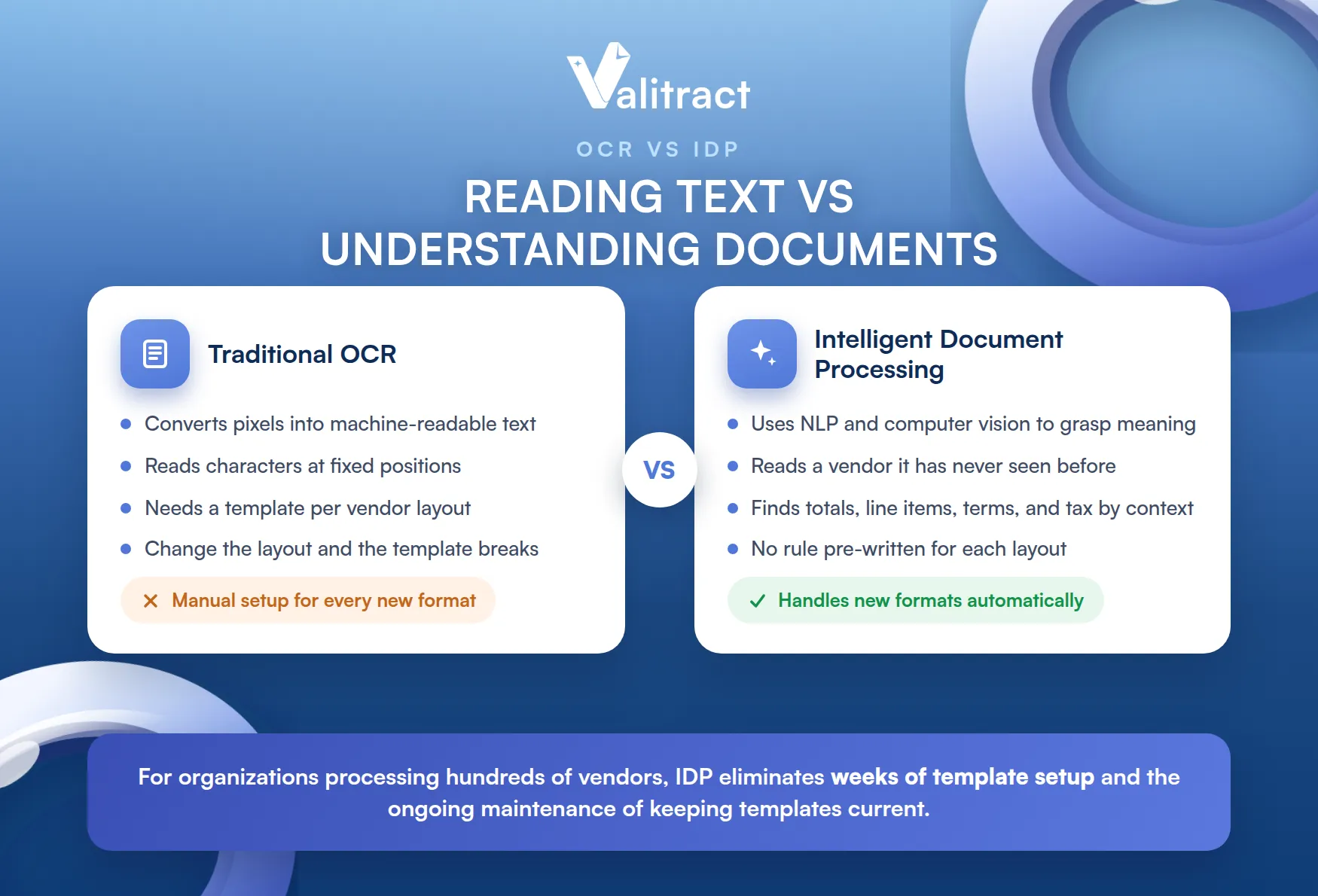
IDP is a different category of technology. It uses NLP and computer vision to understand what a document means, not just what it says. An IDP platform reads an invoice from a vendor it has never seen before and correctly identifies the total amount, line items, payment terms, and tax fields because it understands context, not because a rule was pre-written for that exact layout.
The practical consequence is significant. Template-based OCR requires manual configuration for every new document type or vendor format. IDP handles new formats automatically. For organizations processing hundreds of vendors or document types, this difference eliminates weeks of setup time and the ongoing maintenance burden of keeping templates current.
How Does Intelligent Document Processing Work?
IDP is not a single step. It is a pipeline of connected AI operations, each handling a specific transformation from raw document to structured, usable data.
1. Document ingestion and pre-processing
The platform ingests documents from any channel your organization uses: scanned paper sent via email, mobile photo uploads, EDI transmissions, API feeds from vendor portals, or direct integrations with cloud storage. Documents rarely arrive in perfect condition.
Pre-processing AI handles the preparation work automatically. It corrects skewed scans, rotates misaligned pages, removes noise and artifacts from low-quality images, and sharpens contrast before any extraction begins. This step directly affects downstream accuracy; a poorly pre-processed image produces errors that cascade through every subsequent stage.
2. Classification and layout analysis
Once the document is prepared, the system identifies what type of document it is. Machine learning classifiers analyze layout patterns, semantic markers, and structural cues to distinguish an invoice from a purchase order, a contract from a packing list, or a tax form from a bank statement.
This classification step replaces manual document sorting. In high-volume environments, teams receive mixed document batches containing multiple document types in a single email thread or upload. Automated classification routes each document to the correct extraction model without human triage.
3. AI-driven data extraction
With the document classified, NLP and computer vision models extract the specific data fields your business needs. The extraction engine reads the document contextually, locating vendor names, invoice numbers, line items, dates, and totals based on meaning and position relative to surrounding text rather than fixed coordinates.
This contextual reading is what allows IDP to handle format variations that break template-based systems. An invoice where the total appears at the bottom right, and another where it appears mid-page above a remittance section, are both correctly processed because the model understands what “total amount due” means in context, not just where it typically appears.
4. Validation rules and human-in-the-loop (HITL)
Extracted data passes through automated validation before it moves downstream. Validation rules check for business logic compliance: does the invoice total match the sum of line items, does the vendor ID exist in your ERP, does the payment date fall within acceptable terms.
When a document triggers a low-confidence score or fails a validation rule, the system routes it to a human reviewer rather than passing potentially incorrect data forward. The reviewer corrects the extraction, and the platform records that correction to retrain its models. Each human review makes the system more accurate on similar documents in the future, reducing the volume of exceptions over time.
5. Downstream integration
Validated, structured data exports in machine-readable formats, typically JSON or XML, and pushes directly into your ERP, CRM, accounting platform, or business process automation tool via REST API or pre-built connectors.
The integration step is what makes IDP operationally valuable. Data that previously required manual entry into SAP, NetSuite, QuickBooks, or Salesforce arrives automatically, correctly mapped to the right fields, without human intervention. Approval workflows trigger, payment runs execute, and audit logs update, all without anyone opening a spreadsheet.
Top Intelligent Document Processing Use Cases Across Industries
IDP delivers the highest ROI in operations where document volume is high, formats vary significantly, and the cost of errors is meaningful.
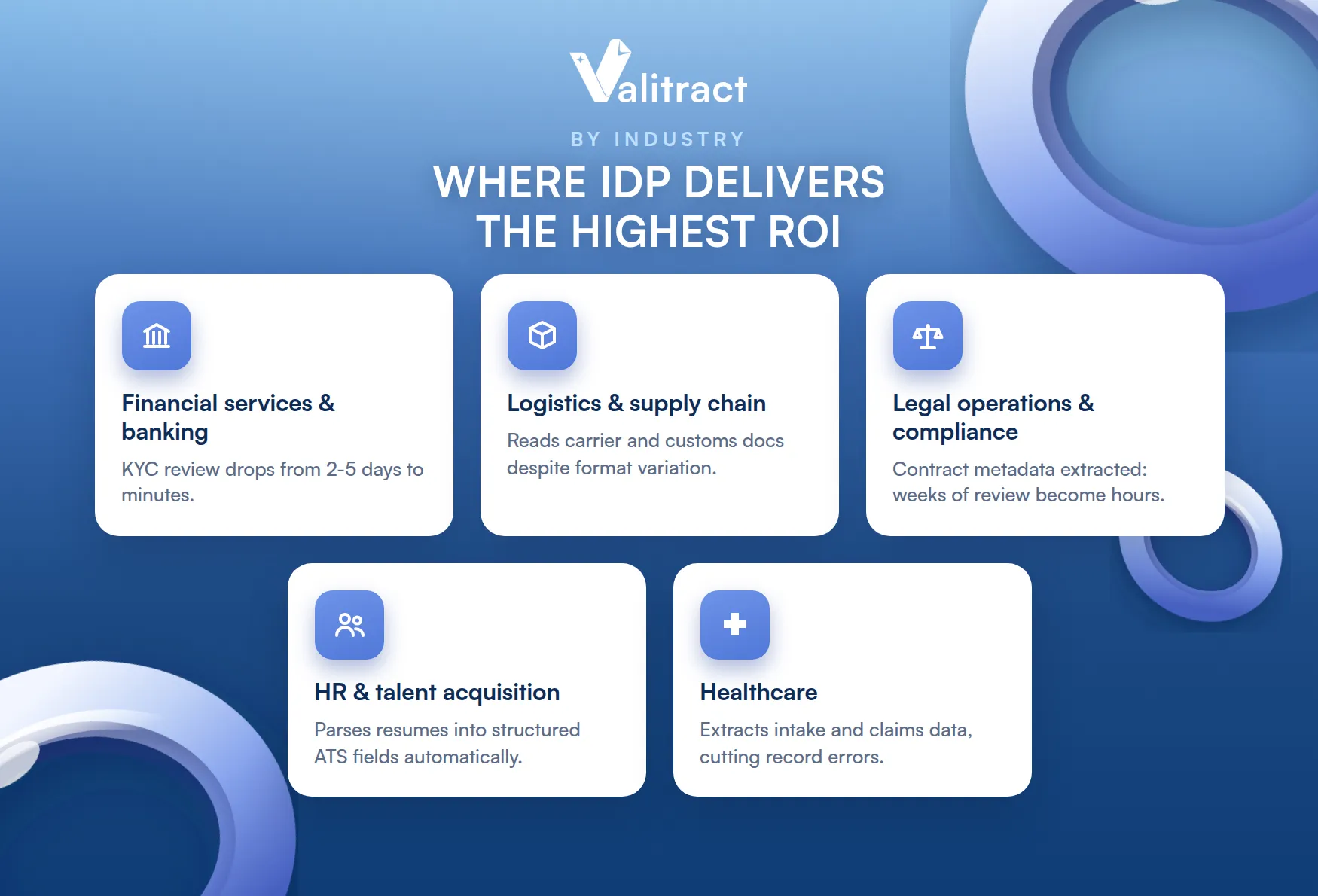
- Financial services and banking: KYC onboarding requires reviewing bank statements, tax returns, income documents, and identity verification materials for every new client. Manual review of a single application can take two to five days. IDP extracts and cross-validates the required data points in minutes, reduces compliance risk from missed fields, and scales to handle application volume spikes without adding headcount.
- Logistics and supply chain: Bills of lading, customs declarations, and packing lists arrive in formats that vary by carrier, country, and shipper. A single shipment may involve a 30-page multi-party document with hundreds of line items. IDP processes these documents accurately regardless of format variation, enabling faster customs clearance and reducing the risk of shipment holds from documentation errors.
- Legal operations and compliance: Corporate legal teams managing contract portfolios of thousands of agreements use IDP to extract key metadata: counterparty names, effective dates, termination clauses, liability caps, and renewal terms. During M&A due diligence or regulatory audits, this turns a weeks-long manual review into a process that completes in hours.
- Human resources and talent acquisition: High-volume recruiting generates large numbers of resumes in inconsistent formats. IDP parses CVs automatically, extracting skills, work history, education, and certifications into structured ATS fields. Recruiters spend time evaluating candidates rather than transcribing resume data.
- Healthcare: Patient intake forms, insurance claims, clinical reports, and referral letters arrive in paper and digital formats across dozens of departments. IDP extracts relevant clinical and administrative data, reduces manual transcription errors in patient records, and accelerates insurance claim processing. In environments where data accuracy directly affects patient outcomes, the error-reduction benefit carries particular weight.
For a broader view of where document workflow software fits within these operational contexts, the linked resource covers the full automation stack.
Key Benefits of Adopting an Intelligent Document Processing Platform
The business case for IDP rests on measurable operational improvements, not theoretical efficiency gains.
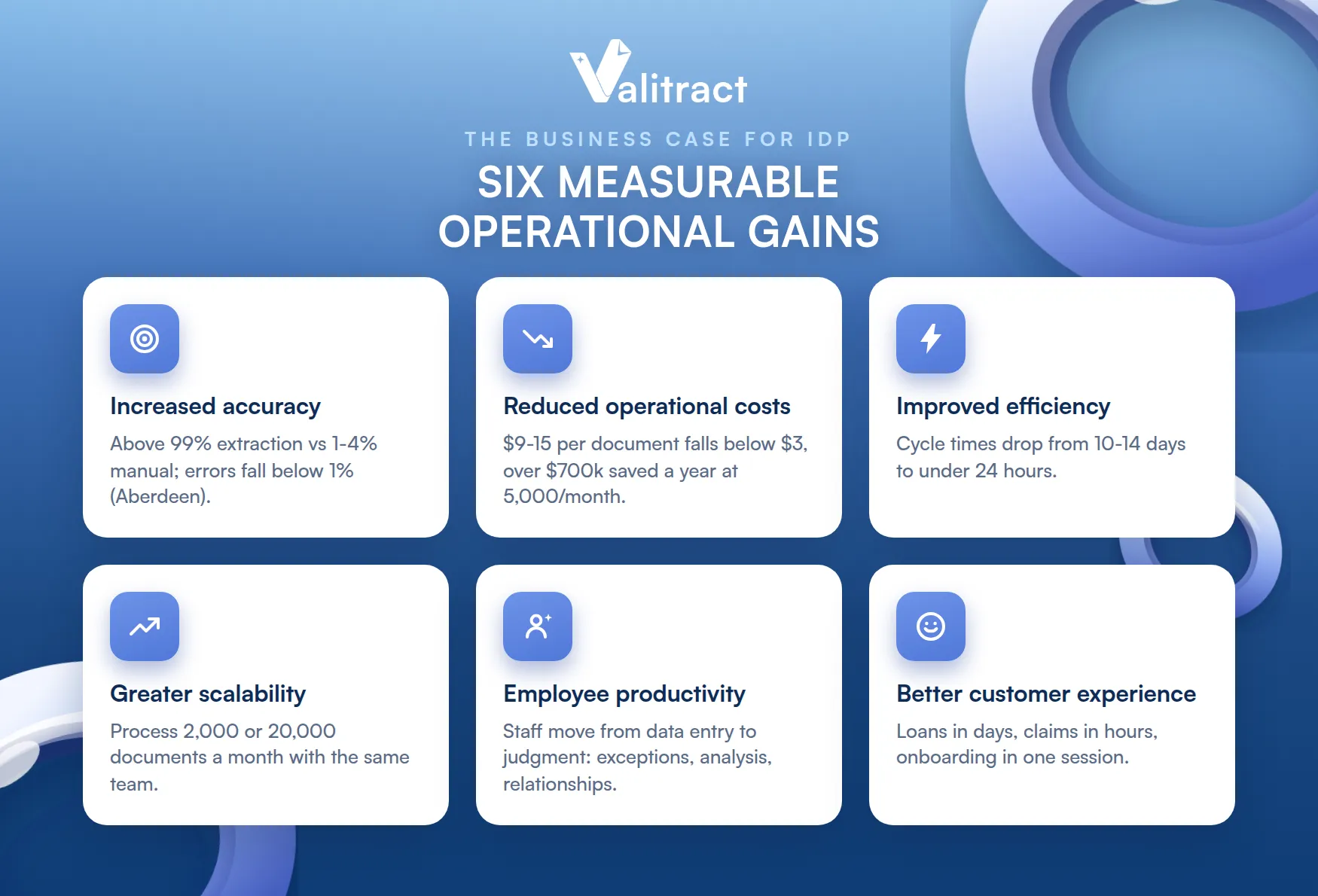
- Increased accuracy: IDP platforms operating on standard printed documents achieve extraction accuracy above 99%. Compared to manual data entry error rates of 1–4%, this reduces exception queues, rework cycles, and the downstream cost of errors propagating through connected systems. Aberdeen Group benchmarks show that organizations using AI document processing reduce error rates to below 1%.
- Reduced operational costs: The fully loaded cost of manual document processing, including labor, error correction, and infrastructure, typically runs $9–$15 per document for invoice-class documents. Automated document processing brings that cost below $3. For a company processing 5,000 documents per month, the annual cost difference exceeds $700,000.
- Improved operational efficiency: Processing cycle times drop from days to hours or minutes. Invoices that took 10–14 days to clear manual approval cycles move through automated workflows in under 24 hours. Loan applications that required two days of document review complete intake in under an hour.
- Greater scalability: Manual document processing scales linearly with headcount. IDP scales with volume. A team processing 2,000 documents per month can handle 20,000 without proportional staff increases. This matters most for organizations with seasonal volume spikes or rapid growth trajectories.
- Increased employee productivity: AP specialists, operations coordinators, and compliance analysts redirected away from data entry spend their time on tasks that require judgment: exception resolution, vendor relationship management, financial analysis, and process improvement. This increases both output quality and job satisfaction.
- Improved customer experience: Faster document processing means faster responses to customers. Loan decisions come back in days instead of weeks. Insurance claims resolve in hours instead of months. Onboarding completes in a single session instead of across multiple follow-up requests for missing documents.
Challenges of Intelligent Document Processing
Deploying IDP effectively requires honest assessment of the implementation challenges.
- Document variability: IDP platforms perform well on standard printed documents. Accuracy drops on heavily damaged scans, unusual handwriting, non-standard fonts, or documents in rare languages. Organizations with a high proportion of handwritten or degraded documents should test platform performance specifically on those document types before committing to a deployment. A platform claiming 99% accuracy overall may perform significantly below that on your specific document mix.
- Model training and maintenance: While modern IDP platforms reduce the need for manual template configuration, some degree of initial training is required to achieve optimal accuracy on your specific document types. Organizations with highly specialized document formats, such as proprietary legal agreements or industry-specific compliance forms, should factor in a training period. Human-in-the-loop feedback accelerates this process, but it requires operational commitment in the first weeks of deployment.
- System integration: IDP delivers its value by pushing data into downstream systems. If your ERP or CRM has a non-standard data model, limited API access, or legacy architecture, integration complexity increases. Before evaluating platforms, document your current system integration requirements: which systems need to receive data, what format they accept, and whether pre-built connectors exist. This prevents late-stage implementation delays.
How to Evaluate the Best Intelligent Document Processing Software
Selecting an IDP platform requires evaluating four criteria that directly predict operational performance.
- Contextual accuracy: Look for platforms that achieve above 95% first-pass accuracy on unstructured data from your specific document types, not just marketing benchmarks on clean sample documents. Higher first-pass accuracy directly reduces human-in-the-loop review volume and the labor cost associated with exception handling.
- Model continuous learning: The platform should improve extraction accuracy over time based on human corrections, without requiring manual code updates or template reconfiguration. Native self-learning capabilities mean your accuracy rate increases as the system processes more of your documents. Platforms that require IT intervention to incorporate corrections will plateau rather than improve.
- Integration architecture: Confirm native REST API availability and pre-built connectors for the specific enterprise systems you use. An IDP platform that cannot connect directly to your ERP requires custom middleware development, which adds cost and delays time-to-value. Priority integrations to confirm: SAP, NetSuite, Salesforce, QuickBooks, Xero, and your business process automation platform.
- Compliance infrastructure: If your organization handles personal data, financial records, or healthcare information, confirm the platform carries SOC 2 Type II, GDPR, and HIPAA certifications at minimum. Verify data retention policies: does the platform store your documents after processing, and for how long? Platforms with automatic data purge after processing carry a lower compliance risk profile.
For a side-by-side comparison of leading platforms across these criteria, the best intelligent document processing software guide evaluates current options with pricing and feature detail.
What Technologies Enable Intelligent Document Processing?
IDP is not a single tool. It is an ecosystem of AI and automation technologies working in sequence. Understanding the stack helps you evaluate platforms more accurately and set realistic expectations for performance on different document types.
1. Natural language processing (NLP): the cognitive engine
NLP is the AI technology that enables machines to interpret meaning from human language within text-heavy, unstructured documents: emails, contracts, legal forms, clinical reports, and financial statements.
Where basic text recognition identifies characters, NLP identifies what those characters mean in context. It recognizes that “Net 30” in a document is a payment term, not a network specification. It understands that “party of the first part” in a legal contract refers to a counterparty, not a gathering. This contextual interpretation is what allows IDP to extract correct data from documents where the same concept appears with different terminology or in a different location depending on the author.
Three underlying components drive NLP in IDP platforms. Machine learning models train on large document datasets to recognize repeating patterns in language and layout. Deep learning and neural networks detect complex contextual relationships that simpler rule-based systems cannot. Computational linguistics frameworks provide the grammar and syntax structures that help the system parse how words relate to each other within a sentence or clause.
2. Optical character recognition (OCR): the digital gateway
OCR converts text from images, scanned paper, and unsearchable PDFs into machine-readable characters. In an IDP pipeline, OCR is almost always the first processing step: it digitizes the raw document so that downstream AI components have text to analyze.
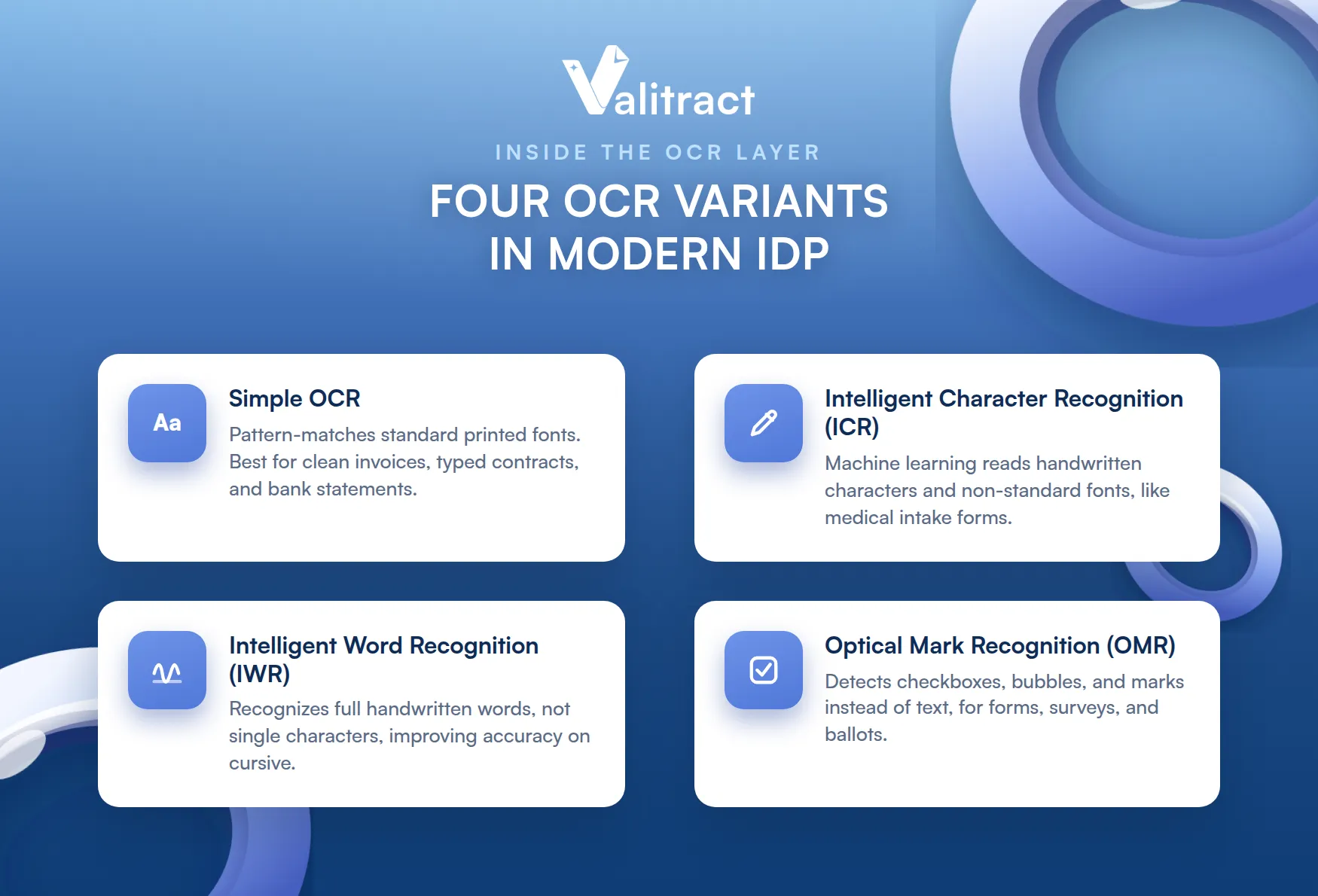
Modern IDP platforms use several OCR variants depending on the document type. Simple OCR applies pattern-matching algorithms to standard printed fonts, well-suited for clean invoices, typed contracts, and bank statements. Intelligent Character Recognition (ICR) uses machine learning to handle handwritten characters and non-standard fonts, common in medical intake forms and handwritten survey responses. Intelligent Word Recognition (IWR) recognizes full handwritten words rather than individual characters, improving accuracy on cursive writing. Optical Mark Recognition (OMR) detects checkboxes, bubbles, and other marks rather than text, used for forms, questionnaires, and ballots.
The choice of OCR variant affects accuracy on different document populations. An IDP platform that uses only simple OCR will struggle with handwritten content. Platforms that layer multiple OCR technologies select the appropriate method based on document characteristics.
3. Robotic process automation (RPA): the workflow executor
RPA uses software robots to execute the repetitive, rule-based tasks that follow data extraction. Where OCR reads the document and NLP understands it, RPA acts on the structured output.
In an IDP pipeline, RPA handles the downstream steps that connect extracted data to business action. Once data is extracted and validated, RPA automatically logs into the target enterprise system, enters the data into the correct fields, triggers approval workflows, sends notifications to relevant stakeholders, and routes exceptions to the review queue. It handles the mechanical steps of moving data from the IDP output into the business process, without human involvement.
The combination of IDP and RPA enables end-to-end document automation: from receiving a document through to the business action that document requires. For organizations evaluating best AI data extraction tools or financial data extraction software, understanding where RPA fits in the broader stack clarifies what the extraction tool is responsible for and what the automation layer handles separately.
Frequently Asked Questions About Intelligent Document Processing
What is intelligent document processing?
Intelligent document processing is the use of AI, including OCR, NLP, and machine learning, to automatically extract, classify, validate, and route data from documents without manual data entry or pre-configured templates. It differs from traditional OCR in that it understands document context rather than just reading characters from fixed positions. IDP platforms handle new document formats automatically without requiring setup for each new vendor or document type.
How does intelligent document processing work?
IDP follows a five-stage pipeline. First, documents are ingested from any channel and pre-processed to correct image quality. Second, machine learning classifiers identify the document type. Third, NLP and computer vision extract the specific data fields required. Fourth, automated validation rules check the extracted data against business logic, and low-confidence documents route to human reviewers. Fifth, validated data exports in structured formats, such as JSON or XML, and integrates directly into downstream enterprise systems via API.
What is the main difference between traditional OCR and intelligent document processing software?
Traditional OCR converts image pixels to text and requires manually configured templates to identify where each data field sits on a document. Change the vendor layout or document format, and the template must be reconfigured. Intelligent document processing software uses NLP and machine learning to understand document context, extracting the correct data fields from any layout without template configuration. IDP handles new document formats automatically, reduces error rates to below 1%, and improves accuracy over time through continuous learning from human corrections.
What is an example of intelligent document processing in practice?
A logistics company receives bills of lading from 200 different carriers, each using a different document format. With traditional OCR, each carrier format requires a separate template, taking days to configure and breaking whenever a carrier updates their layout. With IDP, the platform reads each bill of lading contextually, extracts shipper name, consignee, cargo description, weight, and routing data from any layout automatically, and pushes the structured data into the company’s TMS within minutes of document receipt. No templates, no manual keying, no format-specific configuration.
What are the highest-ROI automated document processing use cases?
The highest-ROI use cases are those combining high document volume with meaningful consequences for errors or delays. Financial services KYC onboarding delivers ROI through faster client activation and reduced compliance risk. AP invoice processing delivers ROI through labor cost reduction and early payment discount capture. Legal contract review delivers ROI through faster M&A due diligence and reduced outside counsel fees. Logistics document processing delivers ROI through faster customs clearance and fewer shipment holds. In each case, the ROI calculation combines labor savings with the business cost of the delays and errors that IDP eliminates.
Concluding Thought
Intelligent document processing is not an incremental improvement to manual document handling. It replaces the underlying process. Organizations still processing documents with template-based OCR or manual data entry are operating with tools that require more configuration, produce more errors, and cost more per document than modern IDP alternatives.
The technology stack is mature, the performance benchmarks are established, and the integration pathways into standard enterprise systems are well-defined. The primary variable for most organizations is not whether IDP will reduce their document processing costs, but how quickly they can move from evaluation to deployment.
Start by measuring your current per-document processing cost, mapping your highest-volume document types, and confirming integration requirements for your target systems. Those three inputs narrow the platform evaluation to a short list quickly.
Valitract’s AI-powered data extraction handles extraction across invoices, contracts, identity documents, logistics paperwork, and more than 95 languages, with no-code setup for teams that want to start without IT involvement and a full REST API for developers building extraction into custom workflows.
Upload your first document and see Valitract extract it in seconds
Valitract – Next-gen AI-Powered Data Extraction Platform
- Email: contact@valitract.com
- LinkedIn: https://www.linkedin.com/company/valitract-api-platform
- X: https://x.com/valitract