


- Bank statement OCR is technology that reads a bank statement PDF, scan, or photo and converts it into structured transaction data (date, description, debit, credit, and running balance) plus account-level fields, in a format like CSV, XLS, or JSON.
- OCR produces the data; bank statement analysis interprets it.
- It also differs from open-banking feeds (Plaid-style API connections), which solve the same job for connected accounts but not for PDFs, historical periods, or banks without API coverage.
Bank statement OCR is what turns a stack of statement PDFs and scans into rows a spreadsheet or ledger can actually use. The promise is simple: upload a statement, get back clean transaction data. The reason it is harder than it sounds is that a bank statement is a table problem wearing a text problem’s clothes.
This guide covers why bank statements break generic OCR, the five stages a good pipeline moves through, exactly what fields get extracted, how template and AI approaches differ, and a one-hour test you can run on your own statements before committing to any tool.
The thread running through all of it is the same: the accuracy that matters is not how many characters the tool reads correctly, but whether the transaction table survived intact. Those are different measurements, and confusing them is the most expensive mistake in this whole category.
Why Bank Statements Break Generic OCR
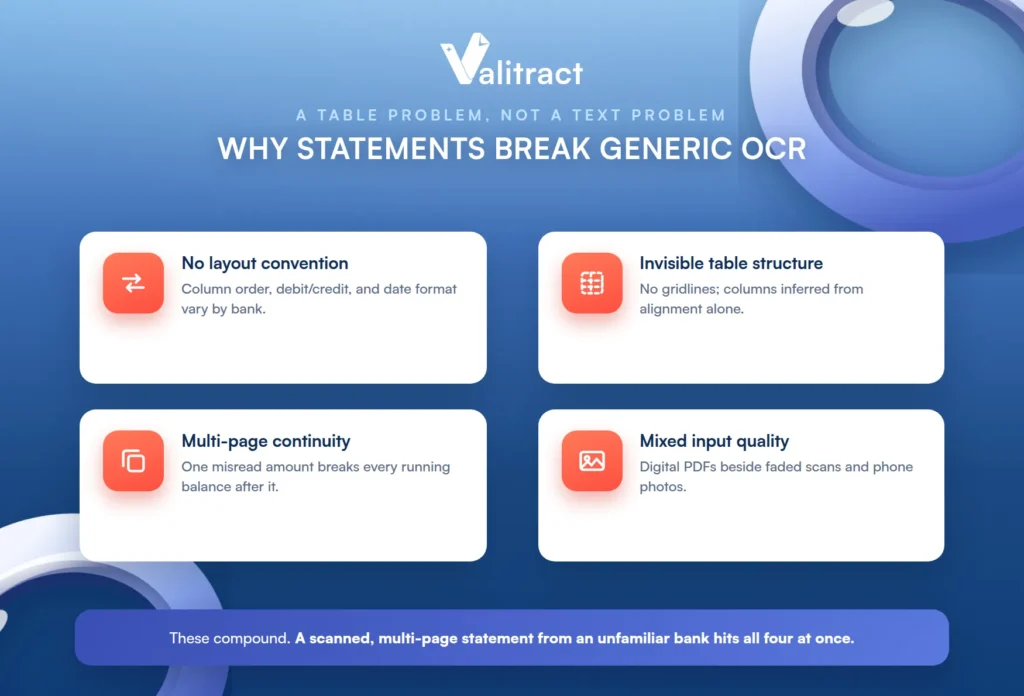
Generic OCR reads the characters correctly and still returns unusable data, because a bank statement is a table problem, not a text problem. Reading the numbers is not the same as knowing which column and row each number belongs to. Four things make statements especially hard, and they tend to arrive together.
The symptom is familiar to anyone who has tried a general-purpose OCR tool on a statement: the text comes back readable and the columns come back scrambled, with debits and credits interleaved or a running balance that no longer reconciles.
No layout convention across banks. Column order, debit and credit structure, and date format vary by institution, and they change between account types and even between years at the same bank. A tool tuned to one layout meets a hundred others in a real portfolio.
Invisible table structure. Many statements have no gridlines at all, so the values are spatially positioned text and the column assignment has to be inferred from alignment. There is no table object to read, only numbers that happen to line up.
Multi-page continuity. Transaction tables restart on every page, headers repeat or vanish, and a single misread amount breaks every running balance after it. A statement that spans pages is where most extraction errors originate.
Mixed input quality in the same batch. Native digital PDFs sit alongside faded scans and phone photos of older statements, each with a different accuracy profile. The batch is only as reliable as its worst image.
These failure modes compound rather than add. A scanned, multi-page statement from an unfamiliar bank hits all four at once, which is exactly the document a clean vendor demo never includes.
How Bank Statement OCR Works, Step by Step
A good pipeline moves through five stages, and knowing them lets you locate where your own output went wrong instead of blaming the whole tool. Each stage can succeed or fail on its own.
The stages are also sequential, so an error early in the pipeline propagates into every stage after it. A skew left uncorrected at pre-processing shows up as a column misalignment three stages later, which is why the earliest stages carry weight out of proportion to their apparent simplicity.
Pre-processing deskews, denoises, and corrects contrast on scans and photos, because a crooked or faded image caps the accuracy of everything after it. This is the cheapest place to fix a problem and the most commonly skipped.
Character recognition turns pixels into text, with a confidence score attached to each element. Those scores are what later let you review only the uncertain values rather than the whole document.
Layout and table reconstruction groups the recognized text by position into rows and columns, and separates the transaction table from headers, footers, and promotional blocks. Valitract’s table extraction preserves row and column relationships across page breaks at this stage, which is what keeps a multi-page statement from fragmenting into unrelated tables; our guide to automated bank statement processing covers the surrounding workflow.
Field mapping and normalization assigns each value to a named field and standardizes dates and amounts into one schema regardless of the source bank. This is what makes statements from ten different banks come out looking the same.
Validation and export runs internal consistency checks and then writes JSON, CSV, or XLS output. Getting a clean, consistent export is the difference between data you can load and data you have to reformat by hand.
What Data Bank Statement OCR Extracts
Statement data splits cleanly into two groups, and that split determines the structure of the output: fields that appear once per document, and fields that repeat on every transaction row. Getting the two groups right is what lets the output nest correctly, with statement-level fields as the header and transaction rows beneath them.
| Field | What it is | Why it matters downstream |
|---|---|---|
| Account holder name | Name on the account | KYC matching, client file association |
| Account number | Full or masked identifier | Routing data to the right ledger or account |
| Bank name / branch | Issuing institution | Format handling, audit trail |
| Statement period | Start and end dates | Confirming coverage and detecting missing months |
| Opening balance | Balance at period start | Anchor for balance continuity checks |
| Closing balance | Balance at period end | Reconciliation checkpoint |
| Currency | Currency of the account | Preventing silent mixing of currencies |
| Total debits / credits | Period summary values | Built-in validation against extracted rows |
| Field | What it is | Why it matters downstream |
|---|---|---|
| Transaction date | Date the transaction occurred | Period allocation, trend analysis |
| Posting date | Date the bank recorded it | Explains timing gaps in reconciliation |
| Description / narrative | Payee or reference text as printed | Matching, categorization, vendor identification |
| Debit amount | Value withdrawn | Expense totals, cash flow |
| Credit amount | Value received | Income verification, deposit patterns |
| Running balance | Balance after the transaction | The single best self-check on extraction accuracy |
| Reference / check number | Transaction identifier where present | Tracing specific items in an audit |
One field deserves special attention: the description or narrative text is the one most often truncated or garbled, and it is also the field that every downstream matching, categorization, and vendor-identification step depends on. Lose it and the numbers survive while their meaning does not. Our guide to bank statement data extraction goes deeper on the field set.
Template OCR vs. Template-Free AI Extraction
The practical difference between the two approaches shows up the moment a bank changes its layout. One breaks; the other adapts. For a single stable format this rarely matters, but across a portfolio of client banks it is the difference between a tool that runs itself and one that needs a maintainer.
| Template / zonal OCR | Template-free AI extraction | |
|---|---|---|
| Setup | One template per bank format | None; upload and extract |
| New bank format | Requires a new template | Handled without configuration |
| Layout change | Breaks silently until noticed | Adapts, with confidence flags on uncertain fields |
| Best fit | Low volume, one or two stable formats | Mixed client portfolios, varied or unknown formats |
| Real cost driver | Ongoing template maintenance | Per-page processing cost |
The hidden cost most buyers miss is maintenance. Template tools look cheaper on paper, right up until you price in the work of building and repairing a template every time a bank tweaks its format, which happens more often than anyone expects across a real portfolio. Valitract is template-free, which trades that maintenance burden for a per-page cost; our comparison of OCR vs AI data extraction lays out the tradeoff in full.
How to Test Bank Statement OCR Accuracy Before You Commit
Published accuracy figures are measured on the vendor’s documents, not yours, so the only number that predicts your outcome is the one you measure on your own statement mix. Here is a four-check protocol you can run in under an hour.
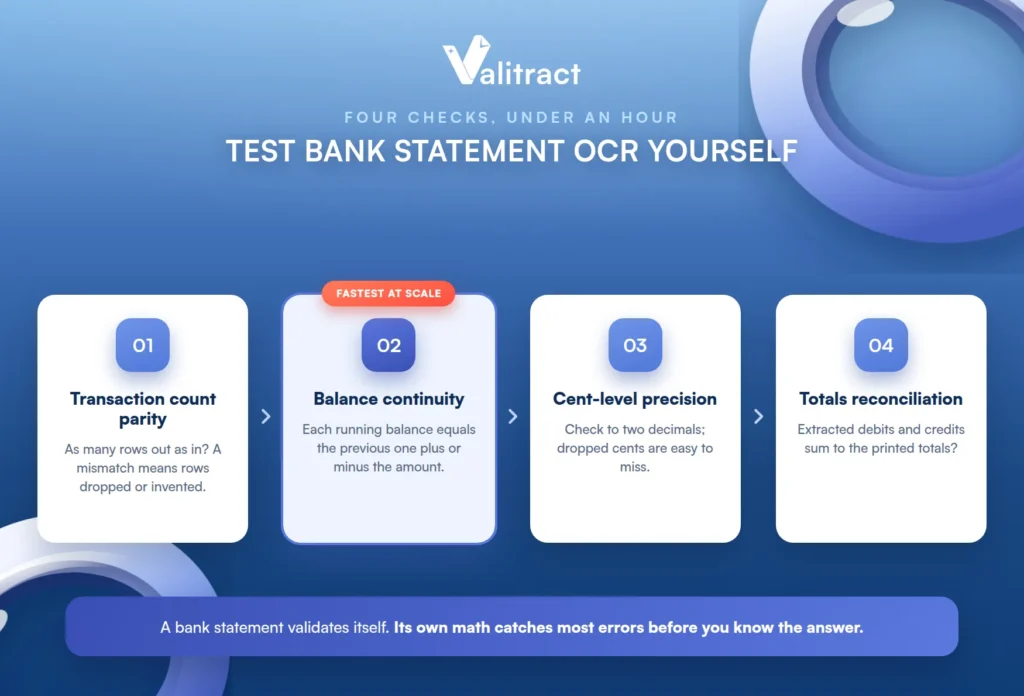
The useful property of these checks is that a bank statement validates itself. Between the running balance and the printed totals, the document carries enough internal math to catch most extraction errors without you knowing the correct answer in advance.
Transaction count parity. Does the output contain exactly as many rows as the source statement? A mismatch tells you rows were dropped or invented before you check a single value.
Balance continuity. Does each running balance equal the previous balance plus or minus the transaction amount, including across page breaks? This is the fastest way to catch errors at scale, because the statement’s own math flags them for you.
Cent-level precision. Check amounts to two decimals, because dropping the cents while getting the dollars right is a common failure that is easy to miss and expensive to inherit.
Totals reconciliation. Do the extracted debits and credits sum to the totals printed on the statement? A failed reconciliation is a certainty-grade error signal, not a guess.
A representative test set is 20 to 30 statements spanning your actual bank mix, including at least one scan, one phone photo, one multi-page business statement, and one older statement with degraded print. Testing on ten copies of your cleanest PDF proves only that the easy case works.
A free tier is the practical way to run this. Valitract’s covers 100 pages a month with no credit card, which is enough for a real multi-type test, and its reported up to 99.8% field-level accuracy applies to standard printed documents specifically, so it is worth verifying against your own scans and photos rather than assuming it transfers. Our overview of bank statement extraction software covers the wider tooling.
What Bank Statement OCR Doesn’t Do
Extraction produces the data, and several jobs readers assume come with it actually happen in a different layer. Naming them plainly is what keeps expectations honest, and it is what separates a tool that oversells from one you can plan around.
Transaction categorization. Categories are not printed on the statement, so assigning them is a classification step that runs after extraction, not part of reading the page.
Fraud and tamper detection. Arithmetic consistency checks catch some edited documents, but metadata forensics and cross-document verification are a dedicated verification tool layer. Valitract does not perform tamper detection or cross-document reconciliation at that level, and teams that need it should reach for that category of tool.
Multi-currency normalization. Currency values are extracted exactly as printed, while live FX conversion and normalization at scale is a separate treasury function that Valitract does not do.
Self-hosted or on-premise processing. Teams whose data policy rules out any third-party API need an on-premise or open-source engine, and Valitract is API and cloud only. This is a common constraint in this audience, so it is worth stating rather than burying.
Deciding anything. Credit decisions and cash flow conclusions come from bank statement analysis, which runs on the extracted data rather than replacing it. Extraction hands analysis a clean table; it does not draw the conclusion.
Who Uses Bank Statement OCR, and What Changes by Role
The same technology serves very different needs depending on who is holding it, and each role should judge output against its own priority.
Accountants and bookkeepers handle many clients across many bank formats on a monthly cadence, so they need clean CSV or XLS that imports into QuickBooks, Xero, or Sage without reformatting. For them the export format and its fit with bank statement reconciliation matter as much as raw accuracy.
Lenders and underwriters pull three to six months per applicant across multiple accounts, and they need deposit and balance accuracy above all, because a single misread amount can change a lending decision.
Developers and fintech teams need a consistent JSON schema across banks, predictable multi-page handling, and batch throughput, so a stable REST endpoint matters far more than a dashboard.
Forensic and compliance reviewers need completeness and traceability back to the source page more than they need speed, because an unverifiable value is worse than a slow one.
Individuals convert one or two accounts to Excel for budgeting, usually without a recurring workflow, so simplicity beats every advanced feature.
Common Mistakes When Setting Up Bank Statement OCR
A handful of setup mistakes cause most of the disappointment, and each is avoidable once named.
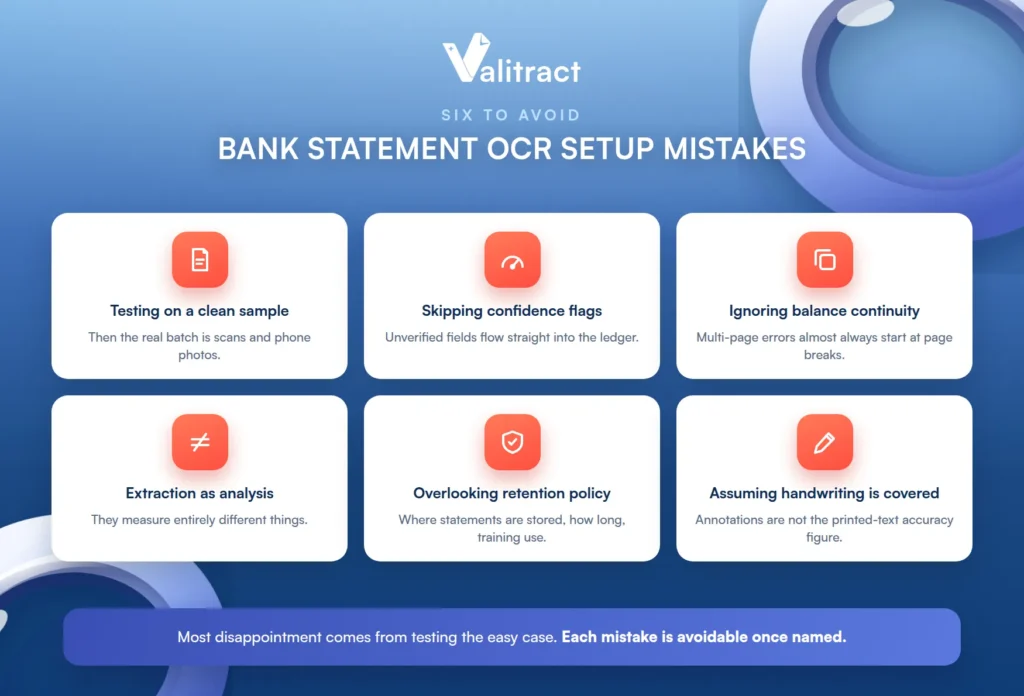
The first is testing only on a clean sample PDF and then discovering the real batch is scans and phone photos. The second is skipping confidence scores and low-confidence flags, so unverified fields flow straight into the ledger; see human-in-the-loop review.
The third is ignoring balance continuity across page breaks, which is where multi-page errors almost always originate. The fourth is treating extraction accuracy and analysis accuracy as one claim, when they measure different things entirely.
The fifth is overlooking the data-retention policy, meaning where statements are stored, for how long, and whether they are used for model training. The sixth is assuming handwritten annotations on a statement are covered by the same accuracy figure as printed text; see handwriting recognition.
Frequently Asked Questions About Bank Statement OCR
What is bank statement OCR?
It is technology that reads a bank statement PDF, scan, or photo and converts it into structured transaction data, including date, description, debit, credit, and running balance, plus account-level fields. The output is a clean CSV, XLS, or JSON that a ledger or spreadsheet can use. It produces the data; interpreting that data is a separate analysis step.
How accurate is bank statement OCR on scanned statements?
Accuracy is high on clean, standard printed statements and lower on faded scans, phone photos, and degraded older documents. The reliable safeguard is confidence scoring plus a balance-continuity check, which catches most errors automatically. Test any tool on your own scans rather than trusting a figure measured on the vendor’s clean samples.
Can bank statement OCR read handwritten entries?
Modern AI-native engines read many handwritten annotations far better than legacy OCR did, but handwriting accuracy is lower and more variable than printed text. A headline accuracy figure for printed statements does not apply to handwritten fields. If your statements carry handwritten notes, test that specifically.
What’s the difference between bank statement OCR and a bank statement converter?
They overlap heavily; “converter” usually describes a consumer-facing tool that turns a PDF into Excel, while “OCR” describes the underlying recognition and extraction technology. A converter is one packaging of bank statement OCR. The important question is not the label but whether it preserves table structure and handles your document mix.
Can ChatGPT or another LLM extract transactions from a bank statement?
LLMs and vision-language models can extract transactions and adapt to varied layouts, but they carry a specific risk: a generative model can produce a clean-looking but wrong value rather than failing visibly. That makes confidence scores, balance-continuity checks, and review more important, not less. For financial data headed to a ledger, verification matters more than the model alone.
Does bank statement OCR work on multi-page and multi-account statements?
Yes, but multi-page tables are where errors concentrate, because headers repeat and a single misread amount breaks every running balance after it. A good tool detects continuation and stitches the pages into one table while keeping the running balance intact. Test a real multi-page statement and check balance continuity across the page breaks.
Is it safe to upload bank statements to an OCR service?
It depends on the provider’s security posture and data-retention policy, so check where statements are stored, for how long, and whether they are used for model training. Teams with strict data policies that rule out any third-party API need an on-premise or open-source engine instead. Read the retention terms before uploading anything sensitive.
Do I still need OCR if my bank connects through an open-banking feed?
Open-banking feeds like Plaid work well for connected, current accounts, but they do not cover PDFs, historical periods before the connection, or banks without API coverage. Bank statement OCR fills exactly those gaps by reading the document itself. Many workflows use both: feeds for live connected accounts and OCR for everything else.
Conclusion
Bank statement OCR is easy to describe and hard to do well, because the challenge is never reading the characters; it is keeping the table intact across banks, pages, and image quality that vary wildly. The tools that succeed treat a statement as a structured table with its own built-in math, not as a page of text to transcribe.
Test on your own worst statements, lean on balance continuity as your fastest accuracy check, and be clear about where extraction ends and analysis, categorization, and verification begin. Get that right, and a folder of mismatched statement PDFs becomes clean, consistent data you can actually reconcile and trust.


